


 Video Converter Ultimate
 Perakam Skrin
 Pembaikan Video
Dalam Ulasan Terperinci Mengenai 5 Apl Penguat Bunyi Boleh Akses Teratas
Semua orang di seluruh alam semesta menggemari muzik sama ada pop, metal, rock, jazz dan sebagainya. Namun, tidak semua pembesar suara memberikan output bunyi yang hebat sehingga membuatkan kita meremang. Selain itu, membeli penguat bunyi (amplifier) boleh menelan kos lebih daripada seratus dolar atau lebih teruk lagi mencecah ribuan. Bukankah itu mahal? Tetapi kita boleh mengelakkan daripada berbelanja banyak jika kita cuba menggunakan penguat bunyi terbaik yang tersedia pada semua platform ini. Jadi, jika anda mahu menggunakan aplikasi penguat bunyi cuba baca senarai di bawah yang akan menelan kos kurang daripada jumlah yang disebut tadi tetapi masih mampu memberikan kesan penguatan bunyi yang hebat.

Bahagian 1. Penguat Bunyi Fenomenal Tersedia pada PC & Mac
Jika anda mahu mendapatkan kesan 8D atau 16D tanpa berbelanja besar untuk peralatan penguat bunyi, cuba gunakan Video Converter Ultimate. Tidak seperti peralatan amplifier biasa, dengan alat ini anda akan berbelanja lebih sedikit dan tidak perlu melakukan pemasangan rumit atau membaca manual tebal untuk tahu cara menggunakannya. Perisian desktop ini juga sangat bagus untuk menambah baik video, audio, GIF dan banyak lagi. Walaupun alat ini berbayar, ia tetap mudah digunakan tanpa komplikasi, serta menyediakan ciri lanjutan yang boleh anda laksanakan dengan mudah pada video dan audio anda. Jadi kini, jika anda mahu tahu cara menggunakan perisian ini, anda mesti ikut langkah-langkah yang disediakan di bawah.
Langkah Menggunakan Pengeuat Volum dalam Video Converter Ultimate:
Langkah 1. Mula-mula sekali, muat turun perisian ke pemacu PC atau Mac anda. Kemudian pasang ke komputer dan lakukan tetapan ringkas secara manual.
Muat Turun PercumaUntuk Windows 7 atau lebih baharuMuat Turun Selamat
Muat Turun PercumaUntuk MacOS 10.7 atau lebih baharuMuat Turun Selamat
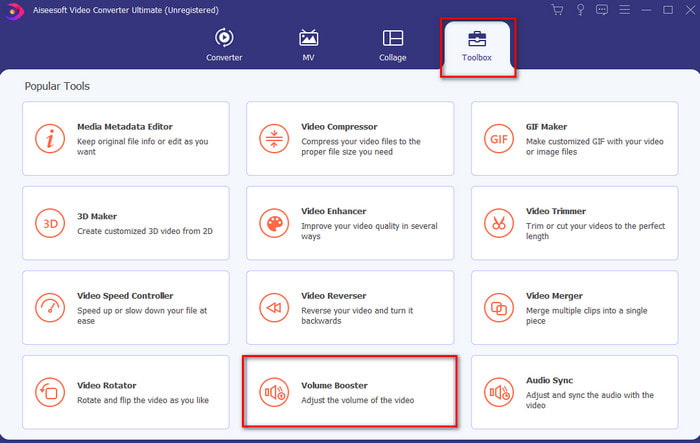
Langkah 2. Di bawah bahagian Toolbox klik Volume Booster.
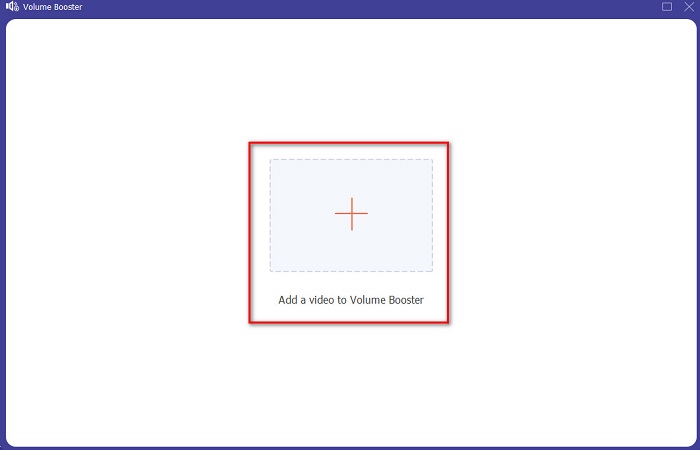
Langkah 3. Klik butang + untuk memilih fail yang anda mahu kuatkan bunyinya. Kemudian tekan Open untuk meneruskan.
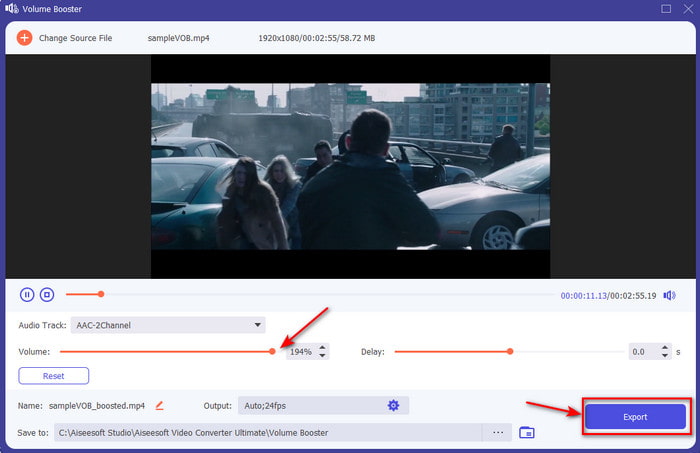
Langkah 4. Pada antara muka, anda kini boleh menyeret peluncur volum untuk menjadikan bunyi lebih kuat dan jelas. Jika pelarasan audio sudah siap, klik Export.
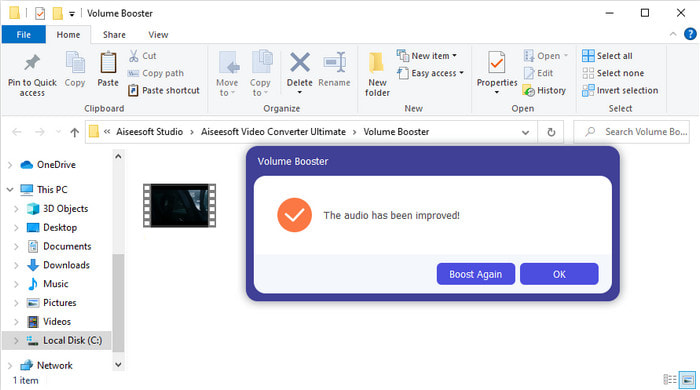
Langkah 5. Tunggu beberapa saat sehingga proses selesai dan apabila sudah siap, pengurus fail akan muncul pada skrin anda dengan fail yang telah anda kuatkan bunyinya, klik fail tersebut untuk mendengarnya.
Kelebihan
- Perisian ini mudah digunakan dan boleh menjadikan bunyi audio anda luar biasa.
- Prestasi perisian amat dihargai oleh pelanggannya.
- Ia tersedia dan sedia untuk dimuat turun pada PC dan Mac.
Keburukan
- Perisian ini tidak menyokong peranti mudah alih.
- Alat ini dibayar tetapi ia tidak begitu mahal berbanding alat desktop yang lain.
Berkaitan:
Cara Meningkatkan Volum Video MP4
Cara Membetulkan Lewat Audio VLC
Bahagian 2. 4 Apl Penguat Bunyi Terbaik Tersedia pada Telefon Mudah Alih iOS dan Android
1. Peningkatan Kelantangan – Penguat Bunyi 4+ (iOS)
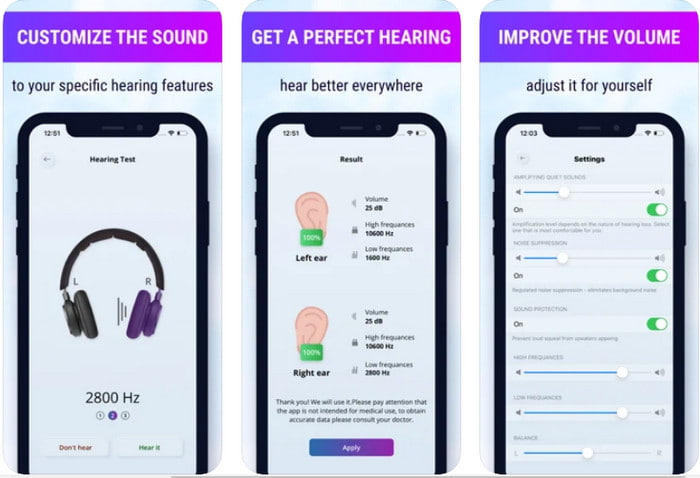
Pengguna iOS boleh memuat turun Volume Boost- Sound Amplifier 4+ secara percuma dengan mudah. Aplikasi ini boleh menguatkan bunyi dengan mudah tanpa sebarang masalah dengan pelarasan automatiknya, tetapi anda juga boleh melakukan pelarasan manual. Selain itu, aplikasi ini sangat baik digunakan sebagai amplifier namun aplikasi ini tidak berfungsi dengan pembesar suara Bluetooth dan fon telinga atau pods. Anda juga akan menghadapi banyak ralat (crash) dan iklan yang tidak dapat dielakkan apabila membukanya. Walaupun aplikasi ini boleh dimuat turun secara percuma, masih terdapat pembelian dalam aplikasi untuk membuang iklan dan menggunakan fungsi lain.
Kelebihan
- Percuma untuk dimuat turun pada mana-mana peranti iOS.
- Kuatkan audio pembesar suara anda dengan mudah sehingga 30db.
- Antara muka dan persediaan yang intuitif.
Keburukan
- Alami banyak ranap sistem, pegun dan pepijat masih ada pada apl ini.
- Iklan banyak yang perlu dielakkan.
2. Penggalak Kelantangan Tambahan - pembesar suara kuat (Android)
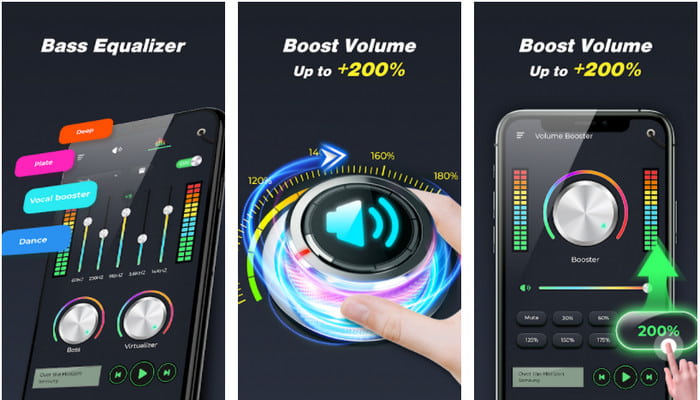
Jika pengguna iOS mempunyai penguat bunyi telefon, pengguna Android juga patut mempunyai sesuatu seperti Extra Volume Booster. Tambahan pula, ramai pengguna sudah berpuas hati dengan prestasi aplikasi ini kerana ia sangat baik dalam menguatkan dan menambah volum. Namun, apabila anda membuka aplikasi ini, semua bunyi yang dijana pada telefon anda seperti nada dering panggilan, penggera, pemberitahuan dan lain-lain akan turut dikuatkan. Ini bermakna tiada tetapan berasingan untuk ciri-ciri tersebut. Walaupun alat ini percuma, ia masih dianggap antara yang terbaik berbanding aplikasi berbayar lain di Android atau malah di iOS. Tetapi jika anda memaksimumkan volum kepada 200% maka jangkakan kerosakan pada pembesar suara terbina dalam atau pembesar suara Bluetooth yang tidak mampu menampung audio volum 200%.
Kelebihan
- Versi ringkas penguat yang boleh anda muat turun pada peranti Android.
- Walaupun antara muka aplikasi tidak banyak, ia bagus.
- Penguatan dan penggalak yang berbeza tersedia dalam aplikasi ini.
Keburukan
- Berharap untuk menemui banyak iklan semasa menggunakan aplikasi.
- Semasa menggunakan alat terdapat kemungkinan bahawa CPU atau telefon akan menjadi panas.
3. Penggalak Pembesar Suara: Penggalak Kelantangan & Penguat Bunyi 3D (Android)
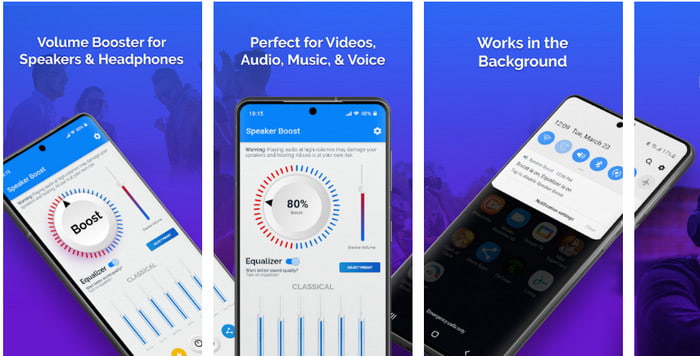
Satu lagi aplikasi Android yang boleh anda gunakan yang menghasilkan penguat bunyi sekeliling (surround) yang hebat ialah Speaker Boost. Sama seperti Extra Volume Booster, aplikasi ini sangat tepat dan jauh lebih mudah digunakan walaupun anda tiada pengalaman. Anda juga boleh memuat turun alat ini secara percuma tetapi ia mempunyai pembelian dalam aplikasi yang mungkin anda inginkan, seperti membuang iklan yang mengganggu dan lain-lain. Walaupun alat ini nampak berbaloi untuk digunakan, pembelian dalam aplikasinya akan menelan kos yang agak tinggi berbanding perisian lain dalam senarai ini. Satu lagi kebimbangan ramai pengguna ialah aplikasi ini berfungsi di sebalik penyekat iklan (ad-blocker) dan ada kemungkinan aplikasi ini merupakan perisian intip (spyware).
Kelebihan
- On-point untuk meningkatkan bunyi dengan mudah tetapi ia berkuasa untuk digunakan.
- Muat turun alat secara percuma tanpa sebarang kerumitan untuk menguatkan bunyi.
- Lakukan penggantian manual pada penyamaan.
Keburukan
- Alat ini tidak lengkap yang pada asasnya bermakna ia berada di bawah percubaan.
- Apabila anda meningkatkan bunyi terdapat beberapa herotan yang anda akan dengar.
4. Boom: Bass Booster & Equalizer 4+ (iOS)
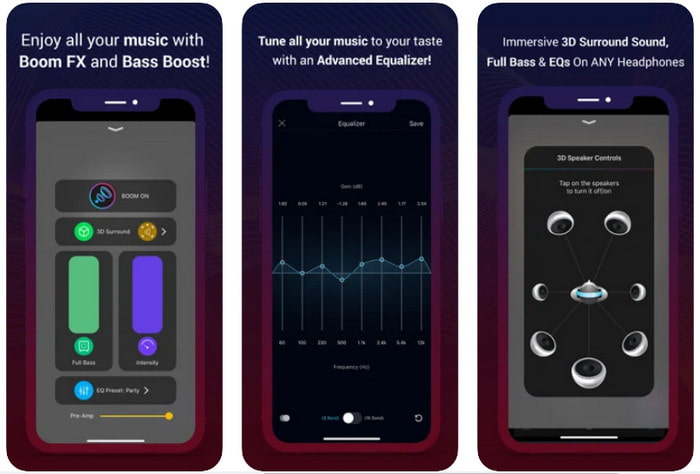
Jika anda mencari aplikasi penguat bunyi yang lebih canggih maka Boom: Bass Booster ialah pilihan yang baik. Namun, aplikasi ini hanya tersedia pada peranti iOS dan anda tidak akan menemuinya pada peranti Android anda. Setakat ini, alat ini sudah menerima banyak pujian daripada pengguna tetapi ada sesetengah format yang tidak disokong untuk dikuatkan. Selain itu, apabila anda menggunakan aplikasi ini, jangkakan beberapa pepijat dan ralat (crash) berlaku semasa menggunakannya. Aplikasi ini juga mengelirukan pengguna baharu. Walaupun prestasi aplikasi ini kelihatan memadai, ia masih perlu diperbaiki untuk menjadikannya lebih baik.
Kelebihan
- Beberapa ciri lanjutan tersedia di sini.
- Penguat mudah alih yang anda boleh gunakan dengan mudah.
- Apl ini menerima 4.1 bintang daripada 5 bintang.
Keburukan
- Bukan pilihan terbaik untuk pemula kerana struktur antara muka yang mengelirukan.
- Kebanyakan format audio tidak disokong untuk dikuatkan dengan apl ini.
- Isu pepijat dan kelewatan masih berlaku dengan apl.
Bahagian 3. Soalan Lazim tentang Penguat Bunyi
Apakah db?
Db bermaksud desibel dan ini ialah unit ukuran untuk menyatakan kenyaringan atau kuasa gelombang bunyi. Selain itu, dengan bantuan desibel kita boleh dengan mudah menentukan bunyi yang kita selamat untuk didengari dalam masa yang lama. Dan kesemua 85 desibel di bawah adalah sangat selamat untuk didengar.
Apakah keburukan bunyi yang kuat?
Ia adalah perkara biasa kepada kita bahawa apabila kita terdedah kepada bunyi yang kuat, pendengaran boleh rosak. Tetapi tahukah anda bahawa ini boleh mengakibatkan loya, sakit kepala, tekanan, keletihan dan banyak lagi. Jadi, jika anda akan menggunakan penguat maka gunakannya dengan betul dan jangan gunakannya secara berlebihan untuk mengelakkan kesan berbahaya yang tidak dapat dielakkan.
Mengapa saya mendengar sedikit keretakan pada pembesar suara saya?
Masalah ini sangat biasa kepada pembesar suara dengan hertz yang sangat terhad boleh mengendalikan. Jadi, jika anda meningkatkan audio pastikan pembesar suara boleh mengendalikannya. Dan jika anda mendengar bunyi retak maka anda mesti merendahkan bunyi dengan segera. Walau bagaimanapun, jika anda mendengar beberapa keretakan walaupun anda merendahkan bunyi maka sudah terlambat.
Kesimpulannya
Semua aplikasi dan perisian yang dibentangkan di sini sangat baik digunakan sebagai amplifier. Walaupun program yang disebutkan di atas mempunyai beberapa perbezaan, fungsi mereka adalah serupa. Namun, jika anda mencari penguat bunyi terbaik untuk PC dan Mac maka Video Converter Ultimate adalah pilihan yang tepat. Ini kerana ia menyediakan ciri lanjutan yang hebat dan mudah digunakan. Jadi, jika anda tertanya-tanya sama ada ini pilihan terbaik, muat turun dahulu ke pemacu komputer anda dan ikut langkah yang disediakan di atas.
Muat Turun PercumaUntuk Windows 7 atau lebih baharuMuat Turun Selamat
Muat Turun PercumaUntuk MacOS 10.7 atau lebih baharuMuat Turun Selamat
-
 [Mudah] Cara Membaiki Penyegerakan Audio dan Video
 Katakan anda'akan menjadualkan strim anda untuk esok, tetapi apabila anda menyemak persediaan anda, audio dan video tidak segerak. Baca artikel ini untuk anda mengetahui lebih lanjut tentang kebimbangan ini.
-
 7 Langkah Mudah untuk Membetulkan Isu Kelewatan Audio OBS [Selesai]
 Adakah anda sukar untuk menonton klip video anda selepas merakam kerana kelewatan audio semasa menggunakan OBS Studio? Baca artikel di bawah untuk mengetahui cara membetulkan audio yang tidak segerak dengan berkesan.
-
 Cara Menambah Audio dan Muzik ke Video secara percuma di Komputer / Telefon Anda
 Artikel ini menunjukkan 4 cara mudah untuk menambahkan audio ke video secara percuma. Tidak kira trek audio mana yang ingin anda tambahkan ke dalam video anda, anda boleh mendapatkan hasil yang memuaskan di sini.
