


 Video Converter Ultimate
 Perakam Skrin
 Pembaikan Video
Cara Mempercepatkan Video TikTok di Tiktok atau Menggunakan Perisian Alternatif Lain
Salah satu aplikasi hiburan video yang paling pesat berkembang yang boleh anda gunakan pada telefon mudah alih ialah TikTok. Walaupun TikTok dikeluarkan pada tahun 2016, ia serta‑merta menjadi sangat popular dalam beberapa bulan selepas tarikh pelancarannya. Selain itu, salah satu suntingan popular yang sering dilakukan di sini ialah memecut video untuk mencipta kesan visual. Jadi, jika anda salah seorang yang ingin tahu cara melakukannya, anda berada di tempat yang betul. Kita akan membincangkan pelbagai alat yang akan membantu anda mempelajari cara memecut video di TikTok.

Bahagian 1. Cara Mempercepatkan Video di TikTok
Seperti yang dinyatakan tadi, TikTok telah menjadi salah satu platform klip video pendek yang terkenal, jadi menyunting video di sini boleh dilakukan dengan mudah. Ambil perhatian bahawa anda boleh memecut video semasa merakam dan bukannya selepas video siap. Selain itu, jika anda cuba memecut video di TikTok anda perlu menganggar jumlah kelajuan tanpa mengetahui sama ada itulah kelajuan yang anda mahu capai. Namun, jika anda tidak mahu memuat turun alat pihak ketiga untuk memecut video, maka TikTok sudah memadai. Jadi sekarang, ikut langkah di bawah untuk memecut video di TikTok.
Langkah‑langkah Cara Merakam Video Pecut di TikTok:
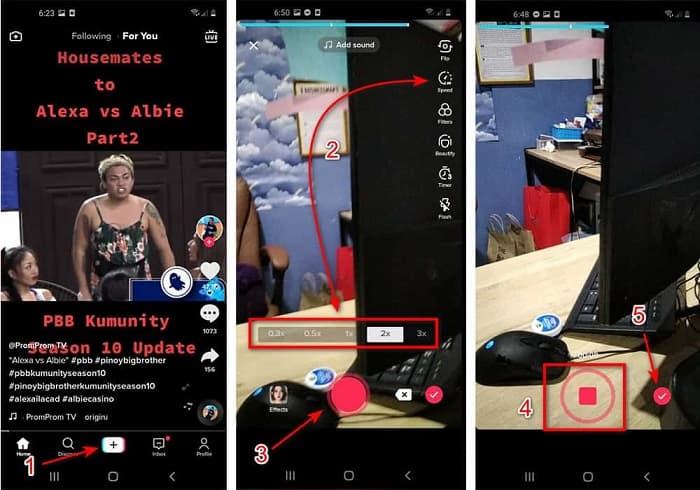
Langkah 1. Mula‑mula muat turun TikTok pada telefon mudah alih anda dan lancarkan aplikasi selepas proses muat turun selesai.
Langkah 2. Tekan tanda + untuk mula merakam. Kemudian klik tambah bunyi untuk memasukkan muzik latar dan penapis jika anda mahu. Sekarang, untuk memecut video, klik Speed dan pilih opsyen di bawahnya. Untuk mula merakam, klik butang bulat dan klik sekali lagi jika anda mahu berhenti.
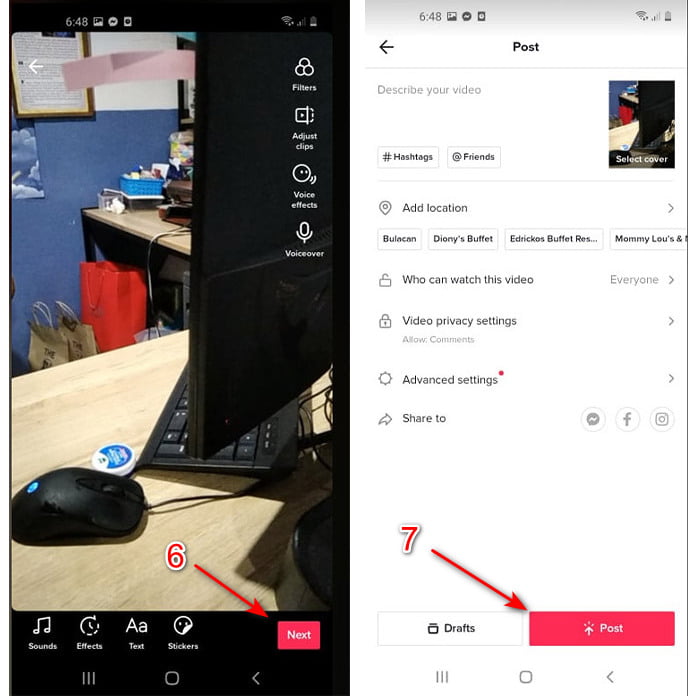
Langkah 3. Untuk menyemak video, tekan butang check dan klik Next. Kemudian klik Post untuk memuat naiknya ke TikTok.
Bahagian 2. Cara Mempercepatkan Mana-mana Video TikTok pada Video Converter Ultimate
Tidak seperti fungsi penyuntingan terbina dalam yang disediakan TikTok kepada anda, Video Converter Ultimate membolehkan anda memecut secara manual tetapi dengan cara yang lebih mudah. Selain itu, semasa anda memecut video akan ada pratonton untuk menentukan sama ada kelajuan video menepati citarasa anda. Tambahan pula, perisian hebat ini sudah membolehkan penggunanya merasai ciri penyuntingan tahap profesional yang canggih tetapi dengan langkah yang dipermudahkan. Disebabkan ciri lanjutan yang disediakan alat ini, anda perlu membayar beberapa dolar. Namun tidak perlu risau kerana harganya tidak mencecah ribuan atau ratusan. Jika anda ingin tahu apakah kelebihan atau ciri utama yang akan anda peroleh jika mempunyai alat ini, lihat senarai di bawah.
Ciri‑ciri Utama Terbaik yang Akan Anda Temui dalam Video Converter Ultimate:
◆ Ini ialah perisian bebas platform yang bermaksud anda boleh memuat turunnya pada PC, Mac atau Linux anda.
◆ Semua pengeditan lanjutan, penukar, pembuat GIF dan banyak lagi tersedia dalam alat ini.
◆ Kebolehgunaan alat ini sangat berguna kepada sesiapa sahaja, walaupun untuk profesional atau baru dalam penyuntingan.
◆ Ia membolehkan pengguna meluahkan sisi kreatif mereka melalui pelbagai ciri penyuntingan yang tersedia di sini.
◆ Walaupun alat ini dibayar, ia adalah lebih murah dan sangat berpatutan kepada sesiapa sahaja yang ingin mencubanya.
Jadi sekarang, jika anda ingin tahu cara memecut video TikTok dengan editor alternatif yang hebat ini, maka baca dan ikut arahan di bawah untuk mencapai kejayaan 100%.
Langkah‑langkah Cara Memecut Video TikTok dengan Video Converter Ultimate:
Langkah 1. Untuk menggunakan perisian ini, anda mesti memuat turunnya terlebih dahulu pada PC atau Mac anda. Kemudian pasang, lakukan tetapan manual ringkas dan klik finish untuk meneruskan.
Muat Turun PercumaUntuk Windows 7 atau lebih baharuMuat Turun Selamat
Muat Turun PercumaUntuk MacOS 10.7 atau lebih baharuMuat Turun Selamat
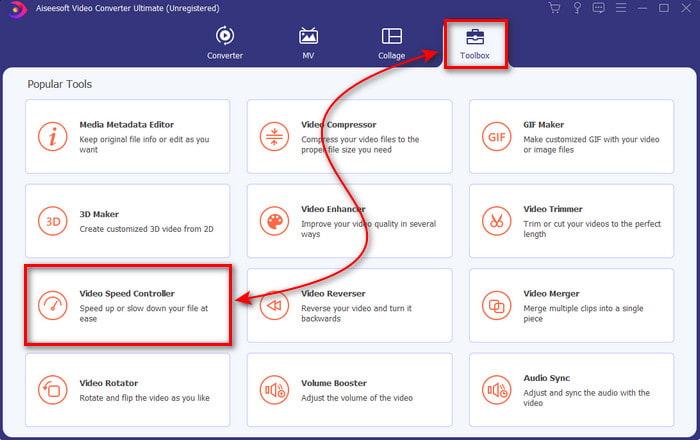
Langkah 2. Tekan Toolbox dan pilih Video Speed Controller di bawahnya.
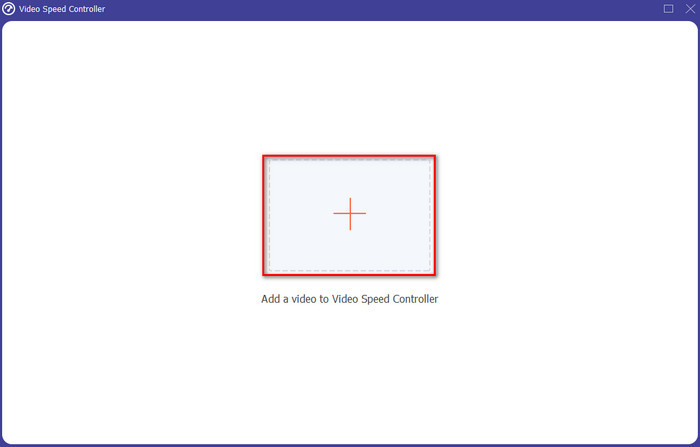
Langkah 3. Untuk menambah fail yang anda mahu pecut, klik butang +. Kemudian pilih fail dalam folder yang akan dipaparkan seterusnya dan klik Open untuk meneruskan.
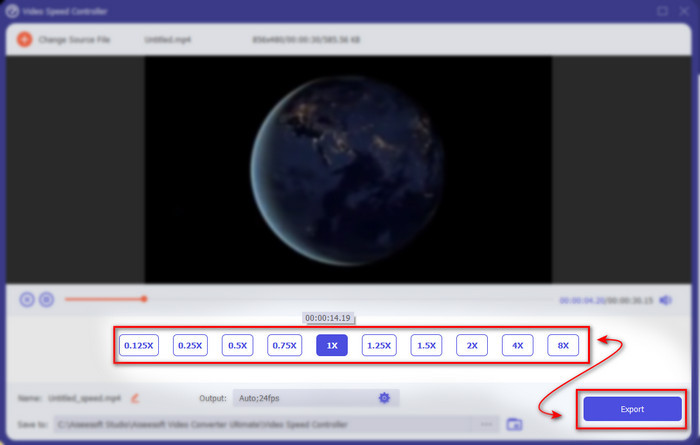
Langkah 4. Jadi, untuk melaraskan kelajuan video, pilih pilihan speed di bahagian bawah. Dan untuk memuat turun fail, klik Export untuk memulakan proses muat turun.
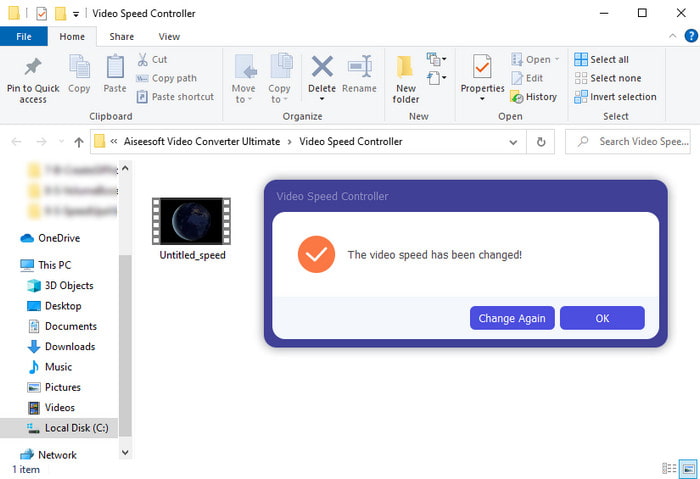
Langkah 5. Tidak perlu menunggu sehingga seminit kerana fail akan siap selepas beberapa saat. Jadi, jika satu folder muncul pada skrin anda, itu bermakna fail telah dieksport. Klik fail tersebut untuk menonton video yang telah anda pecut.
Berkaitan:
Bahagian 3. Soalan Lazim tentang Mempercepatkan Video di Tiktok
Bagaimana untuk mempercepatkan video TikTok yang bukan milik anda?
Jika anda mahu memecut video yang bukan milik anda, maka anda perlu memuat turun video TikTok itu terlebih dahulu. Klik butang + dan Upload kemudian pilih video dalam galeri. Pilih pilihan kelajuan dan klik Next untuk memuat naiknya. Atau gunakan Video Converter Ultimate untuk memecutnya dengan mengikuti langkah‑langkah yang disediakan di atas.
Bolehkah saya merakam video 3 minit di Tiktok?
Benar-benar Ya, anda boleh jika ia dirakam secara berasingan namun anda tidak boleh merakam video 3 minit terus. Kerana panjang rakaman dengan sokongan aplikasi ini ialah 15 hingga 60 saat penuh. Jadi, jika panjang video yang anda ingin rakam melebihi satu minit maka lebih baik untuk merakamnya secara berasingan. Walau bagaimanapun, jika anda adalah salah seorang pengguna yang telah dipilih oleh Tiktok untuk mencuba rakaman selama 3 minit maka anda bertuah kerana ini hanya diuji untuk sekumpulan kecil orang.
Bolehkah saya menambah MP3 pada video saya di Tiktok?
Apabila TikTok pertama kali dikeluarkan, pengguna dibenarkan menambah muzik pada video mereka tetapi kini mereka telah mengalih keluar ciri ini. Kerana isu hak cipta yang telah difailkan kepada TikTok. Jadi, untuk mengelakkan isu, mereka mengalih keluarnya dan menambah sampel muzik yang tersedia atau anda boleh menggunakan aplikasi lain untuk melakukannya untuk anda.
Adakah Tiktok mempunyai sekatan umur?
Mengikut terma dan syarat TikTok, 13 tahun ke atas mestilah umur pengguna yang akan menggunakan aplikasi ini. Selain itu, Tiktok tidak mempunyai pengesahan umur semasa anda mendaftar, jadi jangkakan kira-kira 16+ kandungan akan muncul pada suapan anda.
Kesimpulannya
Dan kini setelah anda tahu cara memecut video di TikTok, inilah masanya untuk anda menikmatinya. Seterusnya, pilih penyelesaian yang anda rasa paling sesuai. Jika anda rasa fungsi pecut terbina dalam yang disediakan TikTok sudah memadai, maka gunakannya. Tetapi jika anda mahu mengalami proses pecut yang lebih baik dengan pratonton, gunakan Video Converter Ultimate. Tidak kira pilihan mana yang anda pilih, anda sepatutnya mendapat hasil yang hebat kerana fungsi dan prestasi keseluruhan kedua‑duanya.
-
 7 Langkah Mudah untuk Membetulkan Isu Kelewatan Audio OBS [Selesai]
 Adakah anda sukar untuk menonton klip video anda selepas merakam kerana kelewatan audio semasa menggunakan OBS Studio? Baca artikel di bawah untuk mengetahui cara membetulkan audio yang tidak segerak dengan berkesan.
-
 Cara Cemerlang Mungkin | Cara Membetulkan Kelewatan Audio VLC [2021]
 Adakah anda mengalami kesukaran menonton filem kegemaran anda pada pemain media VLC anda kerana ketidaktentuan audio? Teruskan membaca artikel ini untuk mengetahui semua cara yang mungkin untuk membetulkan kelewatan audio VLC.
-
 Cara Terbaik untuk Meningkatkan Kelantangan MP4 Dalam Talian dan Luar Talian
 Adakah anda sukar untuk mendengar bunyi klip video anda? Baca artikel di bawah untuk mengetahui cara Meningkatkan volum mp4 dengan cara yang berbeza.
