


 Video Converter Ultimate
 Perakam Skrin
 Pembaikan Video
Kenali Lebih Lanjut Mengenai 5 Editor Video Terbaik untuk PC dan Bandingkan
Ramai orang pada masa kini gemar merakam video untuk menyimpan detik-detik bermakna dan kebanyakannya menggunakannya untuk menjana wang. Seperti para vlogger dan influencer, mereka sentiasa merakam video tentang apa yang mereka lakukan untuk peminat mereka. Selain itu, untuk meraih lebih banyak populariti berbanding influencer atau vlogger lain. Jadi, jika anda seorang vlogger atau influencer yang bercita-cita tinggi dan suka merakam video diri sendiri, anda mesti mempertimbangkan untuk mempunyai penyunting video Windows 10 yang terbaik untuk menambah baik dan menghasilkan video yang mengagumkan, memperoleh lebih banyak tanda suka, tontonan, pelanggan, dan juga keuntungan dalam jangka panjang. Sebelum kita bermula, kami ingin mengucapkan tahniah kerana anda sudah mengambil langkah pertama untuk menjadi vlogger atau influencer yang berjaya. Namun, memilih alat yang betul untuk digunakan ialah salah satu bahagian paling penting yang akan anda hadapi. Jadi kini, kami telah mengumpulkan pelbagai penyunting video yang berkesan untuk anda pilih di bawah.

Bahagian 1. Top 5 Windows Video Editor Dalam Talian dan Luar Talian
Teratas 1. Video Converter Ultimate
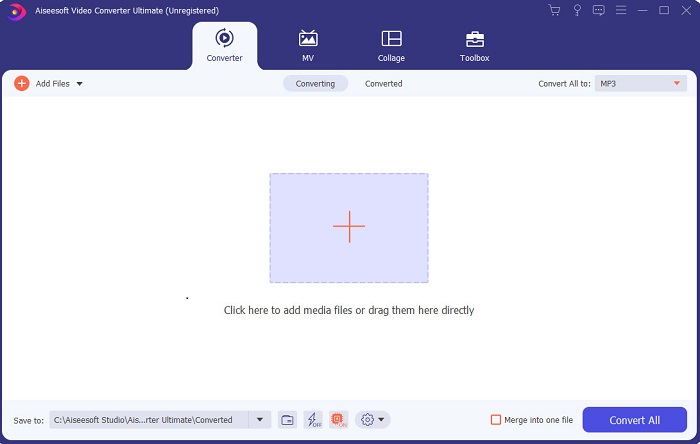
Jika anda mahu mempunyai kelebihan dan mendapatkan video terbaik seperti idola anda, maka gunakan FVC Video Converter Ultimate. Penukar dan penyunting video Windows ini telah membantu ramai pelanggannya menjadi popular di seluruh dunia dan mungkin anda yang seterusnya. Kebanyakan influencer, vlogger dan penyunting video terkenal menggunakan ini sebagai penyunting, penambah baik, pemacu prestasi dan banyak lagi. Jadi, jika anda mahu mempunyai hasil yang profesional seperti idola anda dan menjana wang sebenar daripadanya, anda mesti memuat turun perisian ini dengan segera untuk menjadi sensasi baharu di internet dan juga versi terbaik diri anda. Kami juga menyediakan kelebihan dan kekurangannya supaya anda lebih memahami alat ini.
Muat Turun PercumaUntuk Windows 7 atau lebih baharuMuat Turun Selamat
Muat Turun PercumaUntuk MacOS 10.7 atau lebih baharuMuat Turun Selamat
Kelebihan
- Untuk pemula, alat ini adalah pilihan yang tepat untuk mereka. Kerana ia menyediakan arahan mudah untuk anda ikuti dan lebih mudah difahami. Pada asasnya, ia adalah on-point.
- Untuk profesional, tidak seperti yang lain editor video untuk PC alat ini mempunyai banyak ciri futuristik. Sebagai contoh, jika anda ingin meningkatkan kualiti audio anda dan meningkatkan video maka anda boleh menggunakan alat ini. Selain itu, jika audio anda tidak disegerakkan dengan video, ia mempunyai ciri penyegerakan audio untuk membetulkannya.
- Secara keseluruhannya, ini ialah penukar dan editor fenomenal yang boleh anda harapkan. Terutama jika anda ingin membuat kemasukan yang mengejutkan ke dunia vlogger dan influencer.
- Perisian editor boleh dimuat turun dan tiada alat editor yang mempunyai ciri yang sama seperti ini.
Keburukan
- Alat ini bukan percuma tetapi harganya rendah. Dalam erti kata lain, ia adalah murah dan menghasilkan output berkualiti tinggi.
Top 2. Windows Movie Maker
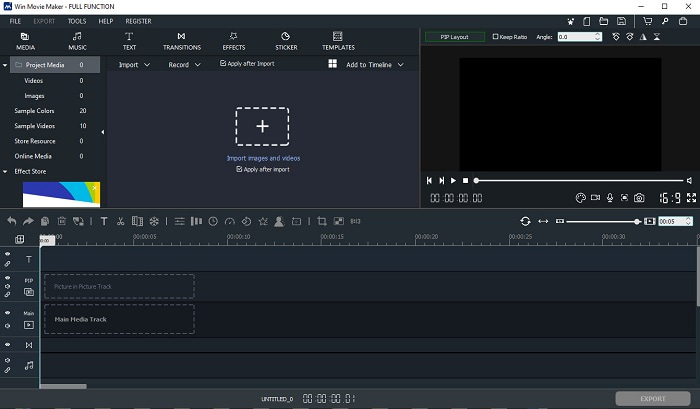
Penyunting video untuk Windows 7, 8, 10 dan XP ini adalah antara yang terbaik untuk menghasilkan dan menyunting video. Windows Movie Maker telah dimuat turun oleh ramai pengguna untuk menyunting video mereka sendiri. Ia menyediakan ciri penyuntingan yang agak rumit. Namun, alat ini terlalu mengelirukan bagi mereka yang baru dalam bidang penghasilan dan penyuntingan video. Tetapi jika anda seorang yang sudah mahir atau ada pengalaman menyunting, anda patut cuba gunakan alat ini. Alat ini mempunyai versi premium dan ia sangat mirip dengan versi percumanya, cuma hasil akhirnya tidak mempunyai tera air apabila anda mengeksport.
Kelebihan
- Untuk pemula, alat ini tidak sesuai tetapi ia bagus untuk melakukan penyuntingan yang rumit.
- Untuk profesional, ciri yang dibentangkan di sini boleh dilakukan jika anda mempunyai pengalaman.
- Ia menyediakan peralihan, kesan, dan pelekat dll.
Keburukan
- Alat ini agak mengganggu kerana fungsi alat yang boleh anda lakukan di sini. Juga, ia sangat menggembirakan dan ia tidak mempunyai arahan tentang cara mengendalikannya.
- Jika anda menggunakan versi percuma alat ini, harapkan mempunyai tera air pada video itu sendiri selepas mengeksportnya.
3 Teratas. OpenShot
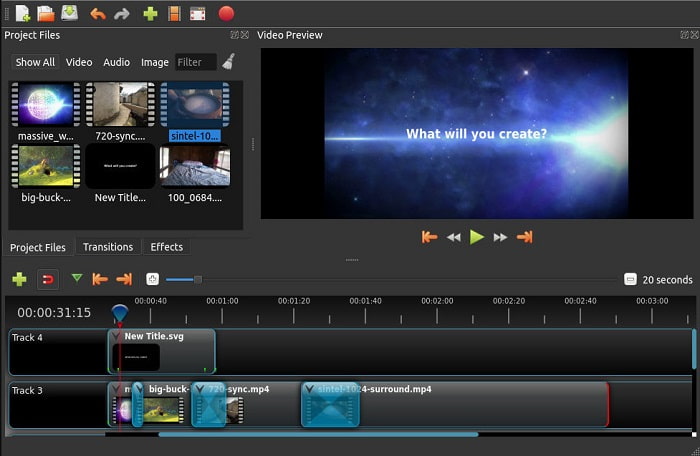
Satu lagi perisian penyuntingan video percuma tanpa tera air ialah Openshot. Ia menyediakan fungsi yang lebih mudah difahami berbanding Windows Movie Maker. Selain itu, selepas anda memasang alat ini akan ada panduan ringkas tentang fungsi-fungsinya. Walaupun diterangkan, hanya ciri-ciri asas sahaja yang dijelaskan. Namun, alat ini hanya menyediakan fungsi penyuntingan asas, yang bermakna anda tidak dapat menjadi terlalu kreatif. Selain itu, jika anda memasang alat ini, rupanya agak membosankan kerana warna antara muka yang monokrom.
Kelebihan
- Untuk pemula, ini adalah versi Windows Movie Maker yang lebih mudah. Anda boleh menambah kesan, peralihan dan banyak lagi.
- Bagi profesional, tidak mengapa untuk mereka menggunakannya tetapi ia bukanlah yang terbaik.
- Perisian ini tidak mengapa jika ia datang dengan penyuntingan yang mudah.
Keburukan
- Tidak boleh menukar antara muka yang membosankan dan ia kurang interaktif.
- Beberapa pepijat utama dan kecil masih ada di sini walaupun selepas kemas kini.
4 Teratas. Lightworks
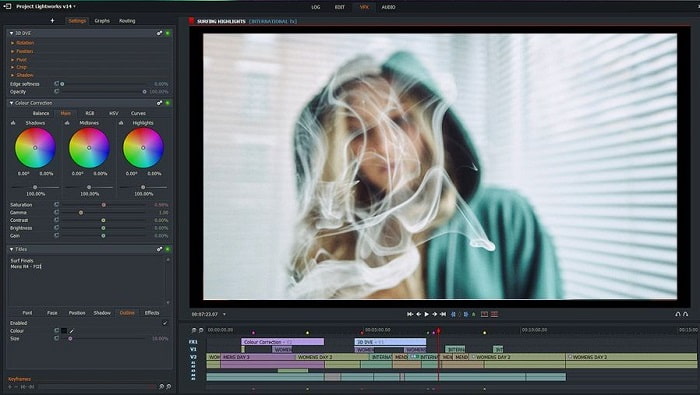
Lightworks ialah penyunting video percuma untuk Windows tetapi ia juga mempunyai versi premium. Namun, apabila kami cuba dan memuat turun alat ini, ia memaklumkan bahawa fail .exe berpotensi membahayakan komputer kami. Jadi, kami tidak memuat turunnya dan sebaliknya membuat kajian mendalam tentang alat ini. Jika anda memasang alat ini ke dalam pemacu anda, anda perlu mendaftar terlebih dahulu sebelum boleh menggunakannya. Ciri-ciri penyuntingan yang disediakan agak banyak dan boleh mengelirukan jika anda seorang pemula, malah bagi pengguna mahir sekalipun ia masih agak sukar. Tetapi tidak perlu risau kerana anda boleh mempelajarinya dengan mencuba sendiri.
Kelebihan
- Untuk pemula, alat ini terlalu rumit dan ia boleh menjadi terlalu banyak untuk dikendalikan. Lebih-lebih lagi jika anda ingin mencuba dan hanya melakukan penyuntingan yang mudah.
- Untuk profesional, anda boleh menggunakan ciri penyuntingan masa nyata yang disediakan oleh alat ini. Walaupun beberapa ciri adalah baharu dan kebanyakannya perlu dibayar.
- Prestasi keseluruhan alat ini diklasifikasikan sebagai kelas-A dalam menyunting dan membuat video.
Keburukan
- Jika anda ingin mempunyai output 1080px anda mesti membeli alat tersebut. Dan sebelum anda boleh menggunakannya, anda perlu mendaftar.
- Perisian ini mempunyai fail .exe yang berbahaya jadi muat turunnya atas risiko anda sendiri.
Top 5. ClipChamp
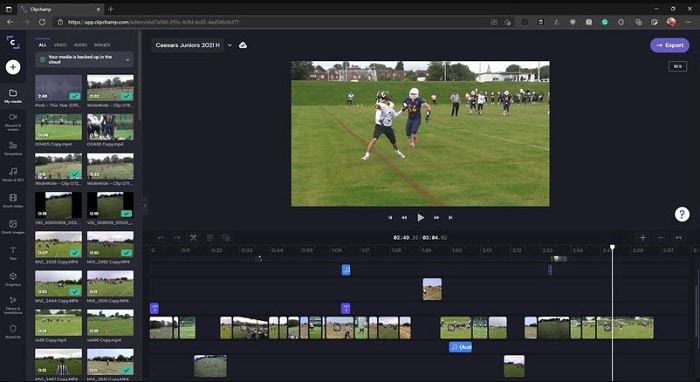
Alat dalam talian ini mempunyai lebih banyak fungsi jika anda menaik taraf pelan anda. Ia juga antara alat yang mudah diakses untuk anda menyunting video tanpa perlu memuat turun perisian tertentu. Clipchamp ialah alat yang hebat untuk digunakan tetapi anda perlu mendaftar sebelum boleh mengaksesnya. Penyunting video Windows 10 dalam talian ini mempunyai ciri yang serupa dengan Lightworks tetapi berasaskan web. Walau bagaimanapun, jika anda mengimport fail video ke sini untuk disunting, anda perlu menjangkakan proses import yang agak perlahan. Namun kelebihannya ialah anda tidak perlu memuat turun perisian untuk menggunakannya.
Kelebihan
- Untuk pemula, alat ini mesti dicuba tetapi proses menyunting dan memasukkan video di sini agak perlahan.
- Untuk profesional, tidak mengapa untuk menggunakan dan mengedit video ringkas dengan sumber yang terhad.
- Secara keseluruhan, alat ini lebih mudah difahami daripada Windows Movie Maker.
Keburukan
- Bergantung kepada Internet yang bermaksud jika anda mempunyai internet yang perlahan maka mengharapkan proses yang tidak stabil.
- Perlukan borang pendaftaran sebelum anda boleh menggunakan alat web.
Bahagian 2. Carta Perbandingan untuk 5 Editor Video untuk Windows
| Ciri-ciri | Video Converter Ultimate | Pembuat Filem Windows | OpenShot | Kerja-kerja ringan | ClipChamp |
| Penyuntingan Video seperti pemangkasan, pemotongan, penggabungan dan sebagainya. |  | | | | |
| Penambah Video | |  | | | |
| Tera air | | | | | |
| Program Disokong | Alat berasaskan desktop | Alat berasaskan desktop | Alat berasaskan desktop | Alat berasaskan web | Alat berasaskan web |
| Julat harga | Selama 1 bulan: $25.00 Selama setahun: $31.20 | $39.95 Bayaran sekali | Percuma tetapi anda boleh menderma | QScan Pro QScan Pro – Pengaktifan Langganan Bulanan $59.99 | Pencipta- $9/bulanan Perniagaan- $19/ bulanan |
| Untuk Lesen Sepanjang Hayat: $55.20 | QScan Maks QScan Max – Pengaktifan Langganan Bulanan $119.99 | Platinum Perniagaan – $39/ bulanan |
Bahagian 3. Soalan Lazim tentang Editor Video Windows
Apakah Editor Video Mac terbaik yang boleh saya gunakan?
Walaupun alat yang dibentangkan di sini semuanya adalah penyunting untuk Windows kecuali Video Converter Ultimate. Jadi, untuk mengetahui apakah penyunting video lain untuk Mac, anda mesti klik pautan ini dan pilih daripada senarai.
Mengapa video saya tidak boleh dimainkan pada Android?
Terdapat banyak sebab mengapa video tidak dapat dimainkan pada Android anda. Jadi, untuk mengetahui apakah puncanya, anda perlu mengetahuinya dengan segera dan membaiki masalah itu dengan membaca Cara Membaiki Video yang Tidak Boleh Dimainkan pada Telefon Android.
Bagaimana untuk memampatkan video panjang saya dan berkongsinya di YouTube?
Buat masa ini anda boleh memuat naik saiz fail maksimum 256, jadi cara terbaik untuk mengatasinya ialah dengan memampatkannya. Jika anda mahu berkongsi video anda di YouTube, jom pelajari cara mengurangkan saiz fail dan memuat naiknya ke YouTube.
Kesimpulannya
Sebelum anda menjadi salah seorang vlogger atau influencer yang anda selalu kagumi, anda perlu mempunyai kemampuan untuk menyunting sendiri. Hari ini, inilah peluang anda untuk menggunakan penyunting hebat yang menawarkan ciri dan kualiti penyuntingan bak di Hollywood. Dengan cara itu, anda akan mengagumkan penonton, pengikut malah diri anda sendiri. Jadi, bersinarlah seumpama berlian dan biarkan sinar cahaya membuka jalan kejayaan dengan bantuan FVC Video Converter Ultimate.
-
 Editor MP4 Terbaik untuk Windows dan Mac pada tahun 2025
 Sama ada anda menggunakan komputer anda untuk menyunting video MP4 atau hanya bekerja pada telefon anda, anda akan dapat menemui beberapa pilihan hebat di sini, termasuk editor MP4 terbaik untuk Windows dan Mac.
-
 Cara Menambah Audio dan Muzik ke Video secara percuma di Komputer / Telefon Anda
 Artikel ini menunjukkan 4 cara mudah untuk menambahkan audio ke video secara percuma. Tidak kira trek audio mana yang ingin anda tambahkan ke dalam video anda, anda boleh mendapatkan hasil yang memuaskan di sini.
-
 Cara Memotong dan Menggabungkan Lagu Dalam Talian - 4 Cara Terbaik yang Anda Perlu Tahu
 Apabila anda ingin memotong dan menggabungkan lagu secara dalam talian untuk membuat muzik, anda dapat mengetahui lebih lanjut mengenai 4 alat dalam talian terbaik untuk memotong lagu dan menggabungkan fail dari artikel tersebut.
