


 Video Converter Ultimate
 Screen Recorder
 Reparație video
Aflați mai multe despre cel mai bun editor video 5 pentru computer și comparați
Mulți oameni în zilele noastre adoră să filmeze pentru a păstra momentele memorabile, iar cei mai mulți folosesc asta pentru a face bani. De exemplu, vloggerii și influencerii își filmează mereu ceea ce fac pentru fanii lor, dar și pentru a deveni mai cunoscuți decât alți influenceri sau vloggeri. Așadar, dacă ești un vlogger sau influencer la început de drum și îți place să te filmezi, trebuie neapărat să iei în considerare folosirea celui mai bun editor video pentru Windows 10, ca să-ți îmbunătățești și să-ți creezi un videoclip impresionant, să obții mai multe aprecieri, vizualizări, abonați și, pe termen lung, și profit. Înainte de toate, vrem să te felicităm, pentru că deja ai făcut primul pas spre a deveni un vlogger sau influencer de succes. Însă alegerea instrumentului potrivit pe care îl vei folosi este una dintre cele mai cruciale etape cu care te vei confrunta. De aceea, am adunat mai jos diferiți editori video, la fel de eficienți ca întotdeauna, dintre care poți alege.

Partea 1. Top 5 editoare video Windows online și offline
Top 1. Video Converter Ultimate
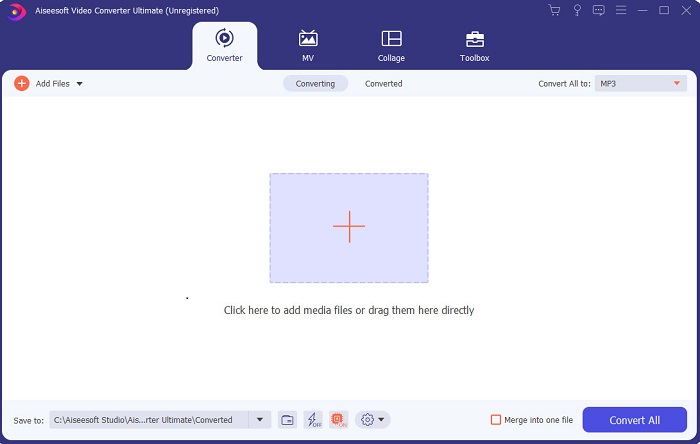
Dacă vrei să ai un avantaj și să obții videoclipuri la fel de bune ca ale idolilor tăi, folosește FVC Video Converter Ultimate. Acest convertor și editor video pentru Windows a ajutat deja mulți dintre clienții săi să devină cunoscuți în întreaga lume, iar poate tu vei fi următorul. Cei mai cunoscuți influenceri, vloggeri și editori video îl folosesc ca editor, instrument de îmbunătățire, booster și nu numai. Așadar, dacă dorești un rezultat profesionist, ca al idolilor tăi, și să câștigi bani reali din asta, trebuie să descarci imediat acest software ca să devii noua senzație a internetului și, totodată, cea mai bună versiune a ta. De asemenea, ți-am pregătit avantaje și dezavantaje, ca să înțelegi mai bine acest instrument.
Descărcare gratuită pentru Windows 7 sau o versiune ulterioară Descărcare securizată
Descărcare gratuită pentru MacOS 10.7 sau o versiune ulterioară Descărcare securizată
Pro
- Pentru începători, acest instrument este alegerea potrivită pentru ei. Deoarece oferă instrucțiuni simple de urmat și mai ușor de înțeles. Practic, este la punct.
- Pentru profesioniști, spre deosebire de oricare altul editor video pentru PC acest instrument are o mulțime de caracteristici futuriste. De exemplu, dacă doriți să vă îmbunătățiți calitatea audio și să îmbunătățiți videoclipul, puteți utiliza acest instrument. De asemenea, dacă sunetul nu este sincronizat cu video, are o funcție de sincronizare audio pentru a o remedia.
- În general, acesta este convertorul și editorul fenomenal pe care vă puteți baza. Mai ales dacă vrei să faci o intrare surprinzătoare în lumea vloggerilor și influencerilor.
- Software-ul de editare poate fi descărcat și nu există instrumente de editare care să aibă aceleași caracteristici ca aceasta.
Contra
- Acest instrument nu este gratuit, dar are un preț scăzut. Cu alte cuvinte, este ieftin și produce rezultate de înaltă calitate.
Top 2. Windows Movie Maker
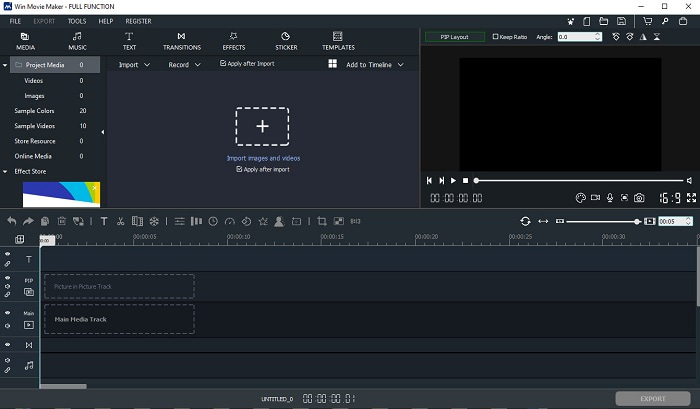
Acest editor video pentru Windows 7, 8, 10 și XP este unul dintre cele mai bune pentru creare și editare. Windows Movie Maker a fost deja descărcat de mulți utilizatori pentru a-și edita propriile videoclipuri, deoarece oferă funcții de editare complexe. Totuși, pentru cei care sunt la început în realizarea și editarea de videoclipuri, instrumentul poate fi copleșitor. Dacă însă ești profesionist sau ai deja experiență în editare, atunci ar trebui să încerci acest program. Are și o versiune premium, foarte asemănătoare cu cea gratuită, dar la export rezultatul nu mai are filigran (watermark).
Pro
- Pentru începători, acest instrument nu este ideal, dar este grozav să faci editări complicate.
- Pentru profesioniști, caracteristicile care sunt prezentate aici sunt realizabile dacă aveți experiență.
- Oferă tranziție, efecte și autocolante etc.
Contra
- Instrumentul este puțin deranjant din cauza funcțiilor instrumentului pe care le puteți face aici. De asemenea, este copleșitor și nu are instrucțiuni despre cum să-l folosească.
- Dacă utilizați versiunea gratuită a acestui instrument, așteptați-vă să aveți un filigran la videoclipul în sine după exportul acestuia.
Top 3. OpenShot
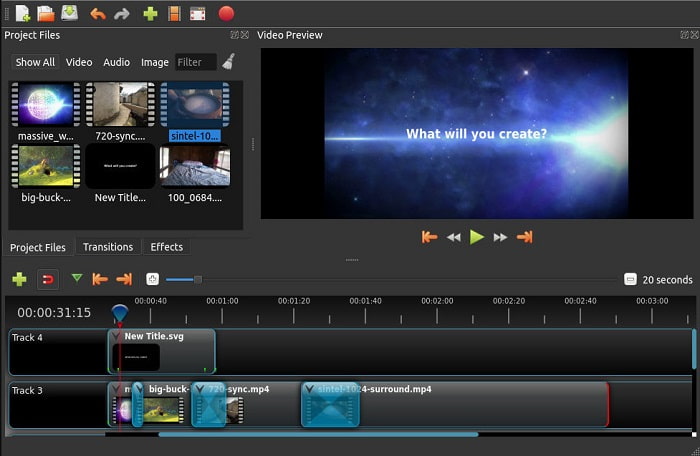
Un alt program gratuit de editare video fără filigran este Openshot. Acesta oferă funcții mai ușor de înțeles decât Windows Movie Maker. Mai mult, după ce instalezi programul, vei avea parte de un scurt tur al funcțiilor. Totuși, sunt explicate doar funcțiile de bază. Iar acest program oferă doar opțiuni de editare de bază, ceea ce înseamnă că nu îți permite să fii foarte creativ. În plus, după instalare, interfața poate părea cam plictisitoare, din cauza schemei monocrome de culori.
Pro
- Pentru începători, aceasta este o versiune mai simplă a Windows Movie Maker. Puteți adăuga efecte, tranziții și multe altele.
- Pentru profesioniști, este în regulă să-l folosească, dar nu este cel mai bun.
- Software-ul este în regulă dacă vine cu o editare simplă.
Contra
- Nu se poate schimba interfața plictisitoare a acestuia și este mai puțin interactiv.
- Unele erori majore și minore sunt încă prezente aici chiar și după actualizare.
Top 4. Lucrări de lumină
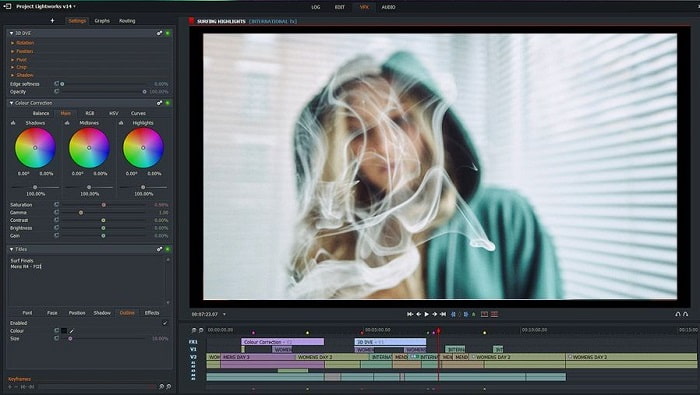
Lightworks este un editor video gratuit pentru Windows, dar are și o versiune premium. Când am încercat să descărcăm programul, a apărut un mesaj că fișierul .exe ar putea dăuna computerului, așa că nu l-am instalat și am făcut cercetări amănunțite despre el. Dacă îl instalezi pe unitatea ta, va trebui mai întâi să te înregistrezi ca să îl poți folosi. Funcțiile de editare pe care le oferă sunt foarte numeroase, iar pentru începători poate fi prea mult de gestionat, însă chiar și pentru profesioniști este puțin dificil. Totuși, nu trebuie să îți faci griji, pentru că poți învăța să îl folosești exersând.
Pro
- Pentru începători, instrumentul este prea complicat și poate fi prea greu de manevrat. Mai ales dacă vrei să încerci și să faci o editare simplă.
- Pentru profesioniști, puteți utiliza funcțiile de editare în timp real oferite de acest instrument. Deși unele dintre caracteristici sunt noi și majoritatea sunt plătibile.
- Performanța generală a instrumentului este clasificată ca clasa A în editarea și realizarea videoclipurilor.
Contra
- Dacă doriți să aveți o ieșire de 1080px, trebuie să cumpărați instrumentul. Și chiar înainte de a-l putea folosi, va trebui să vă înregistrați.
- Software-ul are un fișier .exe dăunător, așa că descărcați-l pe propriul risc.
Top 5. ClipChamp
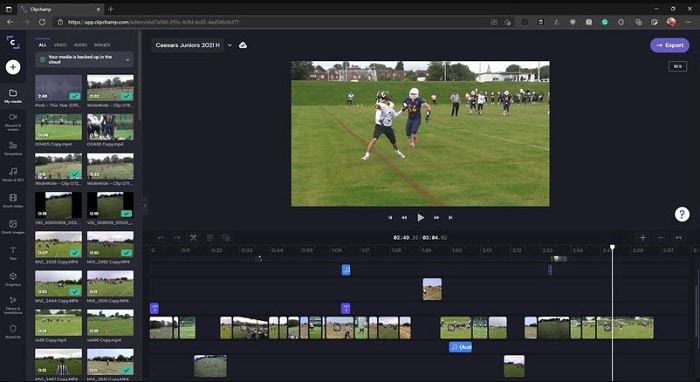
Acest instrument online oferă funcții suplimentare dacă îți actualizezi abonamentul. De asemenea, este unul dintre cele mai ușor de accesat instrumente pe care le poți folosi pentru a edita videoclipuri fără să descarci un software dedicat. Clipchamp este un instrument excelent, dar va trebui să te înregistrezi înainte de a avea acces la el. Acest editor video online pentru Windows 10 are funcții similare cu Lightworks, însă totul se desfășoară online. Totuși, dacă imporți fișiere video pentru editare, trebuie să te aștepți la un proces de import mai lent. Avantajul este că nu trebuie să descarci programul ca să funcționeze.
Pro
- Pentru începători, acest instrument este obligatoriu de încercat, dar procesul de editare și inserare video aici este puțin mai lent.
- Pentru profesioniști, este bine să folosești și să editezi videoclipuri simple cu resurse limitate.
- În general, instrumentul este mai ușor de înțeles decât Windows Movie Maker.
Contra
- Dependent de internet, ceea ce înseamnă că dacă aveți un internet lent, vă așteptați la un proces instabil.
- Aveți nevoie de un formular de înregistrare înainte de a putea folosi instrumentul web.
Partea 2. Diagramă de comparație pentru cele 5 editoare video pentru Windows
| Caracteristici | Video Converter Ultimate | Windows Movie Maker | OpenShot | Lucrări de lumină | ClipChamp |
| Editare video, cum ar fi tăierea, tăierea, îmbinarea și așa mai departe. |  | | | | |
| Amplificator video | |  | | | |
| Filigran | | | | | |
| Program suportat | Instrument bazat pe desktop | Instrument bazat pe desktop | Instrument bazat pe desktop | Instrument bazat pe web | Instrument bazat pe web |
| Gama de prețuri | Pentru 1 lună: $25.00 Pentru un an: $31.20 | $39.95 Plată unică | Gratuit, dar poți dona | QScan Pro QScan Pro – Activări lunare de abonament $59.99 | Creator- $9/lunar Afaceri- $19/ lunar |
| Pentru licență pe viață: $55.20 | QScan Max QScan Max – Activări lunare abonamentului $119.99 | Business Platinum – $39/ lunar |
Partea 3. Întrebări frecvente despre Windows Video Editor
Care este cel mai bun editor video Mac pe care îl pot folosi?
Deși instrumentele prezentate aici sunt toate editoare pentru Windows, cu excepția Video Converter Ultimate, dacă vrei să afli ce alte editoare video pentru Mac există, trebuie doar să dai clic pe acest link și să alegi din listă.
De ce nu pot fi redate videoclipurile mele pe Android?
Există o mulțime de motive pentru care videoclipurile nu pot fi redate pe telefonul tău Android. Ca să afli care sunt aceste motive și să rezolvi rapid problema, citește articolul Cum să repari videoclipurile care nu rulează pe telefoanele Android.
Cum să comprim videoclipurile mele lungi și să le distribui pe YouTube?
Deocamdată poți încărca fișiere de maximum 256 (unități de) dimensiune, așa că cea mai bună soluție este să le comprimi. Dacă vrei să îți distribui videoclipurile pe YouTube, atunci hai să învățăm cum să reduci dimensiunea fișierului și să postezi pe YouTube.
Concluzie
Înainte să devii unul dintre vloggerii sau influencerii la care te uiți mereu cu admirație, trebuie să ai abilitatea de a-ți face singur editarea. Chiar acum ai ocazia să folosești editorul fenomenal care oferă funcții și calitate de nivel Hollywood. În felul acesta îți vei impresiona spectatorii, urmăritorii și chiar pe tine însuți. Așa că strălucește ca un diamant și lasă raza de lumină să-ți deschidă drumul spre succes, cu ajutorul FVC Video Converter Ultimate.
-
 Cel mai bun editor MP4 pentru Windows și Mac în 2025
 Indiferent dacă folosești computerul pentru editarea video MP4 sau doar lucrezi la telefon, vei putea găsi câteva opțiuni grozave aici, inclusiv cel mai bun editor MP4 pentru Windows și Mac.
-
 Cum să adăugați audio și muzică la video gratuit pe computer / telefon
 Acest articol prezintă 4 moduri simple de a adăuga audio la video gratuit. Indiferent ce pistă audio doriți să adăugați în videoclip, puteți obține rezultate satisfăcătoare aici.
-
 Cum să tăiați și să îmbinați melodiile online - cele mai bune 4 moduri pe care ar trebui să le cunoașteți
 Când doriți să tăiați și să îmbinați melodiile online pentru a crea o piesă muzicală, puteți afla mai multe despre cele mai bune 4 instrumente online pentru a tăia melodiile și a combina fișiere din articol.
