


 Video Converter Ultimate
 Screen Recorder
 Reparație video
Aflați cum să convertiți AMV în MOV fără a degrada calitatea
AMV este un format video proprietar folosit pentru redarea fișierelor video pe playere media S1 MP3 și MP4. Această extensie de fișier .amv are rezoluție mică și este comprimată pentru a putea fi stocată pe acest player media portabil. Deși formatul încă există, este greu de găsit un player media compatibil pentru telefon, deoarece acest format este vechi. În loc să cauți un player media compatibil, de ce să nu convertești fișierele AMV într-un format nou, care se bucură de mult suport, cum ar fi MOV? Așadar, dacă vrei să știi cea mai bună metodă de a converti AMV în MOV, să începem analiza.

Partea 1. Scurtă introducere despre AMV și MOV
Ideea Action Media Video sau AMV este de a înlocui MP4 ca format universal deoarece acest format este mai bun și mult mai comprimat. De asemenea, acest format este versiunea mai bună a formatului AVI. Dar formatul a fost ignorat în această nouă eră, deoarece nu primește nicio actualizare pentru a îmbunătăți calitatea rezoluției. Și acum, dacă stocați acest format pe dispozitivele noastre mobile și îl redați așteptați să nu îl puteți reda deoarece formatul nu este acceptat. Deci, dacă doriți să redați un videoclip în acest format, trebuie să descărcați un player media terță parte pentru AMV. În timp ce MOV, acest format câștigă mult suport, deoarece este formatul de fișier nativ pe care îl dezvoltă QuickTime.
Partea 2. Convertiți AMV în MOV cu Ultimate Desktop Software
FVC Video Converter Ultimate
Convertește AMV în MOV cu ajutorul acestui convertor video profesional, care produce un rezultat fenomenal, de neegalat, FVC Video Converter Ultimate. Acest convertor este disponibil pe PC și Mac, iar ambele versiuni au aceleași funcții avansate pe care le oferă acest instrument. În plus, conversia rapidă și accelerarea hardware disponibile pe PC sunt prezente și pe Mac. Mulți utilizatori au ales deja acest software ca primă opțiune pentru a-și rezolva problemele de conversie. Mai mult, înainte de a putea utiliza acest instrument, va trebui să îl achiziționezi de la FVC. Deși este contra cost, nu va trebui să cheltuiești sute de dolari, iar prețul își va merita banii. Fără alte introduceri, să testăm acest instrument pentru a vedea dacă putem obține conversia „ultimate”, așa cum promite numele.
Pași pentru a converti AMV în MOV cu FVC Video Converter Ultimate:
Pasul 1. Descarcă FVC Video Converter Ultimate pe desktop făcând clic pe butonul de mai jos; după descărcare, instalează software-ul.
Descărcare gratuită pentru Windows 7 sau o versiune ulterioară Descărcare securizată
Descărcare gratuită pentru MacOS 10.7 sau o versiune ulterioară Descărcare securizată
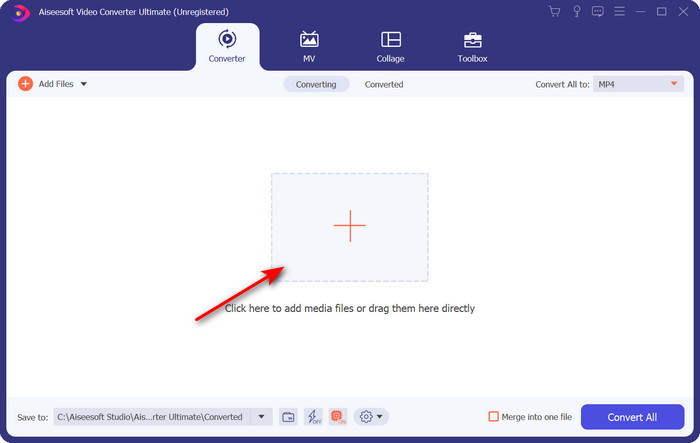
Pasul 2. Deschide software-ul pentru a-l folosi, iar pentru a încărca fișierul .amv, fă clic pe semnul +. Caută fișierul în folder și apasă Open pentru a-l insera.
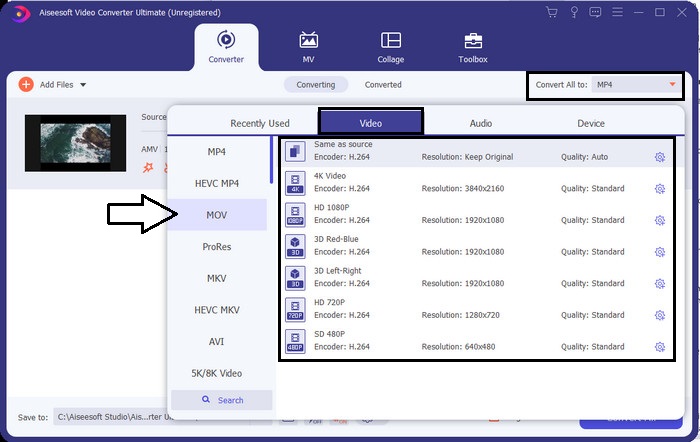
Pasul 3. Pentru a schimba formatul în MOV, fă clic pe Convert All to: și alege MOV sau orice alt format îți dorești.
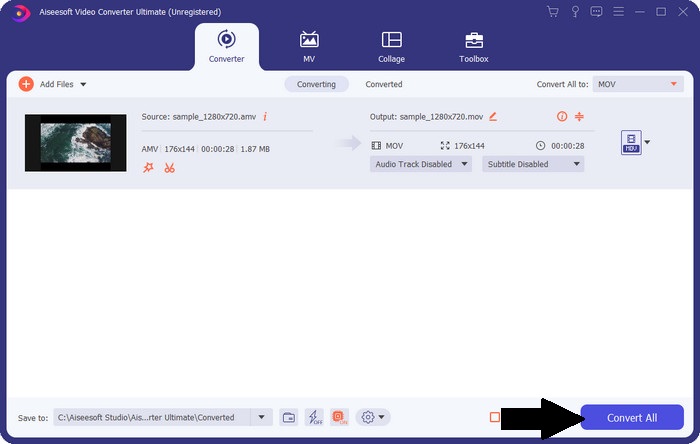
Pasul 4. Pentru a transforma fișierul AMV în MOV, fă clic pe Convert All pentru a începe procesul de conversie.
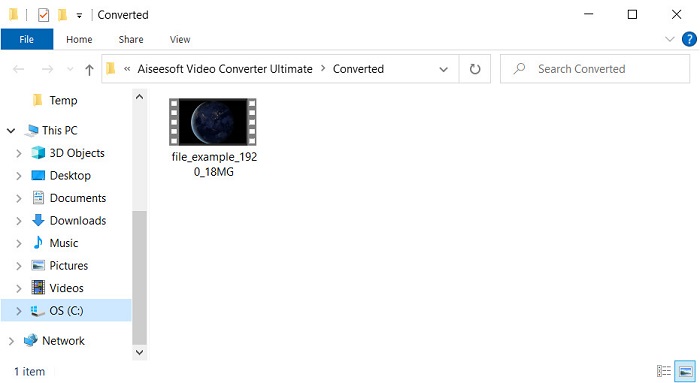
Pasul 5. Conversia fișierului va dura doar câteva secunde. Apoi așteaptă să se deschidă folderul cu fișierul .mov creat; fă clic pe fișier pentru a-l viziona în playerul tău media implicit.
Partea 3. Convertiți AMV în MOV cu cele 2 servicii Online Converter disponibile
1. ConvertFiles
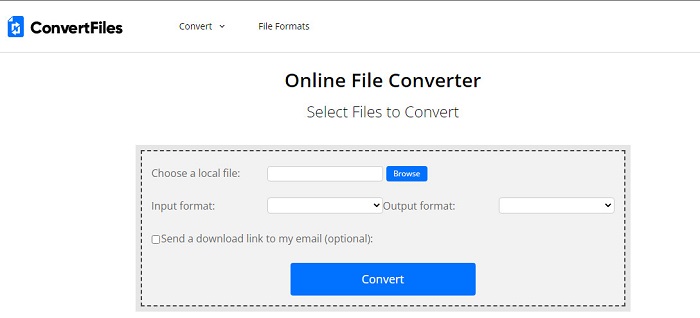
Unul dintre cele mai bune convertoare online la care poți avea acces în browserul tău preferat este ConvertFiles. Acest instrument online îți poate converti fișierul într-un alt format fără nicio dificultate. De asemenea, acest instrument acceptă un set restrâns de formate din care poți alege. Totuși, descărcarea fișierului convertit durează destul de mult, deoarece nu oferă o conversie rapidă. Un alt aspect negativ sunt reclamele; există foarte multe pe interfață. În ciuda problemelor legate de descărcare și de reclame, acest instrument funcționează bine ca unealtă online gratuită.
Pași pentru a converti AMV în MOV cu ConvertFiles:
Pasul 1. Deschide browserul tău preferat și caută ConvertFiles.
Pasul 2. După ce site-ul este deschis, fă clic pe Browse pentru a localiza fișierul în folder; la Output Format, găsește MOV și apasă Convert.
Pasul 3. După ce conversia s-a încheiat, fă clic pe linkul evidențiat cu albastru pentru a descărca fișierul pe computer.
2. MConverter
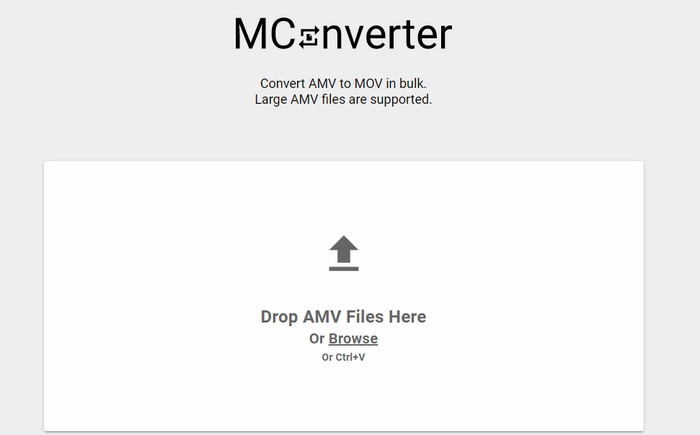
Nu vrei reclame pe interfață pentru a converti liniștit AMV în MOV? Atunci încearcă să folosești MConverter, disponibil în browserul tău. De asemenea, acest instrument acceptă conversia în lot, pentru a face procesul de conversie la fel de eficient ca în FVC Video Converter Ultimate. Totuși, dezavantajul acestui instrument online este că nu poți depăși dimensiunea fișierului de 200 MB. Așadar, dacă vrei să convertești un videoclip lung, iar dimensiunea depășește limita acceptată, acesta nu este instrumentul pe care ar trebui să îl folosești. Dar dacă vrei o experiență de conversie mai bună decât pe ConvertFile, urmează pașii de mai jos.
Pași pentru a converti AMV în MOV cu MConverter:
Pasul 1. Caută MConverter în motorul tău de căutare și deschide-l.
Pasul 2. Fă clic pe butonul Upload pentru a insera fișierul, așteaptă puțin ca unealta web să se încarce, caută MOV și fă clic pe el. Conversia fișierului va începe după ce selectezi formatul MOV.
Pasul 3. Apasă Download All pentru a salva fișierul.
Partea 4. Întrebări frecvente despre AMV și MOV
Îmi pot transforma MP4-ul în AMV?
Poți transforma MP4 în AMV pentru a transfera fișierul mai rapid online. Mai ales dacă videoclipul are o durată de o oră, îți recomandăm să convertești fișierele .mp4 în .amv, deoarece sunt mult mai mici ca dimensiune, dacă comparăm cele două formate.
VLC acceptă AMV?
Din fericire, poți folosi VLC Media Player pentru a reda fișierele .amv în acest player media, chiar dacă este învechit. Dar știai că există playere media care depășesc performanța acestuia? Așadar, dacă vrei să afli care sunt aceste playere media, trebuie să dai clic pe acest link pentru a descoperi 5 alternative de player media pentru VLC.
Cum îmi transform AMV în AVI?
AMV este o versiune îmbunătățită a AVI; totuși, dacă vorbim de calitate, AVI oferă o performanță fenomenală comparativ cu acest format vechi. De asemenea, AVI este foarte compatibil cu toate platformele. Așadar, dacă vrei să îți urmărești fișierele AMV într-o versiune mai bună și pe toate platformele, trebuie să înveți cum să convertești AMV în AVI.
Concluzie
Discuția trebuie să se încheie aici; chiar dacă dorim să stocăm un fișier AMV pe disc, problema de compatibilitate este unul dintre motivele pentru care trebuie să-l convertim. La urma urmei, se spune că AMV este popular înainte din cauza modului în care acest container comprimă fișierul. Cu toate acestea, astăzi trebuie să vă gândiți să îl convertiți într-un nou format pentru a-l folosi în continuare. Mai mult, soluțiile oferite aici se convertesc în mod eficient. Totuși, FVC Video Converter Ultimate funcționează fenomenal în comparație cu celelalte două instrumente. Deci, dacă doriți să experimentați cel mai bun instrument, atunci este o necesitate să descărcați acesta pe computer și să copiați pașii furnizați mai sus.
-
 Cele mai bune 4 metode pentru a converti cu ușurință MOV în MP3 pe Windows și Mac
 Când doriți să extrageți fișierele audio MP3 din fișiere MOV, puteți afla mai multe despre cele mai eficiente 4 convertoare MOV în MP3 pentru a obține fișierele dorite din articol.
-
 MKV în MOV - Cum se convertește MKV în MOV
 Cum convertesc MKV în MOV pe Mac? Poate iMovie să citească MKV? Ce înseamnă formatul MOV? Această postare spune 2 moduri simple de a vă ajuta să convertiți MKV în MOV cu convertoare video gratuite online și profesionale.
-
 FLV în MOV - Cum să convertiți FLV în MOV pe Mac / PC / Online gratuit
 Cum se convertește FLV în MOV? Cum convertesc FLV în MOV pe Mac? Există vreo modalitate gratuită de a converti YouTube FLV în MOV online? Această postare împarte 3 convertoare FLV în MOV pentru a schimba fișierele FLV în MOV.
