


 Video Converter Ultimate
 Screen Recorder
 Reparație video
Proces de conversie offline și online: cel mai bun mod de a converti OGV în FLV
Când folosiți videoclipuri OGV, acest format de compresie video cu pierderi vă poate enerva, deoarece se estompează după ajustări. Totuși, lucrurile se îmbunătățesc dacă convertiți mai întâi OGV în format FLV înainte de a le distribui online; singura provocare va fi să găsiți un program de conversie video ușor de utilizat, dar puternic. Din fericire, avem cel mai bun atât pentru utilizare offline, cât și online, care vă permite să convertiți OGV în FLV cu ușurință. Pur și simplu urmați pașii prezentați în acest articol, pentru confortul dumneavoastră.

Partea 1. Cum să convertiți cu ușurință OGV în FLV [Offline]
Sincer vorbind, există o mulțime de convertoare video disponibile online, dar doar câteva dintre ele pot gestiona o conversie OGV. Deoarece acest format nu este comun pentru majoritatea consumatorilor de conținut video, dezvoltatorii de convertoare nu se grăbesc să-l includă în lista lor de formate acceptate. Din acest motiv, aici intervine în ajutor Video Converter Ultimate. Acesta acceptă complet fișierele OGV ca intrare și vă permite să convertiți rapid fișierele video OGV în formate FLV. Merită menționat și faptul că vă poate transforma videoclipurile OGV și le poate edita cu instrumente practice. Tot ce aveți nevoie se află în Video Converter Ultimate. Prin urmare, vă oferim cei mai simpli pași de urmat:
Pasul 1: Înainte de a putea utiliza software-ul, trebuie mai întâi să îl instalați pe desktop. Puteți face acest lucru făcând clic pe unul dintre butoanele de Descărcare gratuită de mai jos, în funcție de sistemul de operare pe care îl folosiți. Așteptați să se termine descărcarea fișierului .exe sau .dmg, iar când este gata, deschideți-l pentru a începe procesul de instalare. În final, puteți lansa software-ul imediat după finalizare făcând clic pe Start Now.
Descărcare gratuită pentru Windows 7 sau o versiune ulterioară Descărcare securizată
Descărcare gratuită pentru MacOS 10.7 sau o versiune ulterioară Descărcare securizată
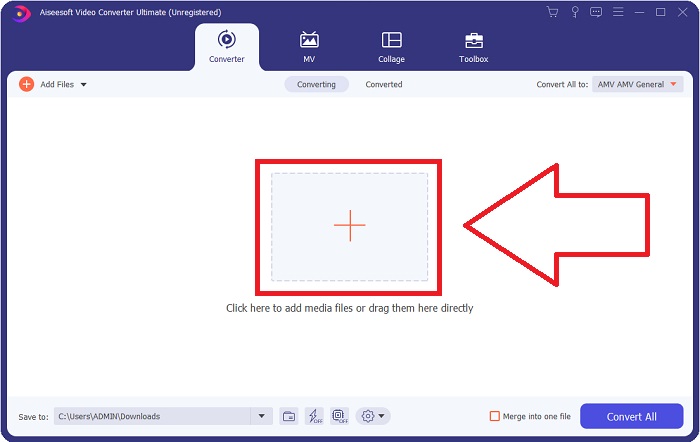
Pasul 2: După ce apare fereastra pop-up, veți vedea o interfață cu un buton + în mijloc. Pentru a importa fișierul video pe care doriți să îl convertiți, faceți clic pe el sau trageți și plasați fișierul direct în program.
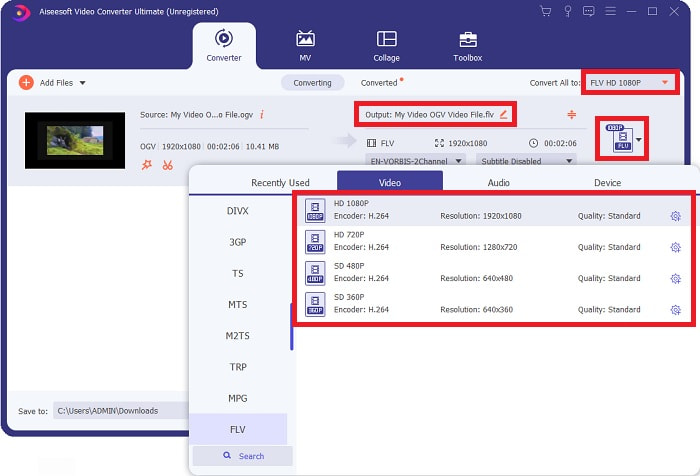
Pasul 3: În partea dreaptă vi se afișează formatul curent al fișierului video. Faceți clic pe acesta și vi se vor afișa toate formatele pe care le puteți alege. În acest caz, derulați și selectați FLV sau pur și simplu căutați-l în bara de căutare de mai jos. Acum, în partea dreaptă a filei, puteți de asemenea alege ce calitate video doriți pentru fișierul convertit.
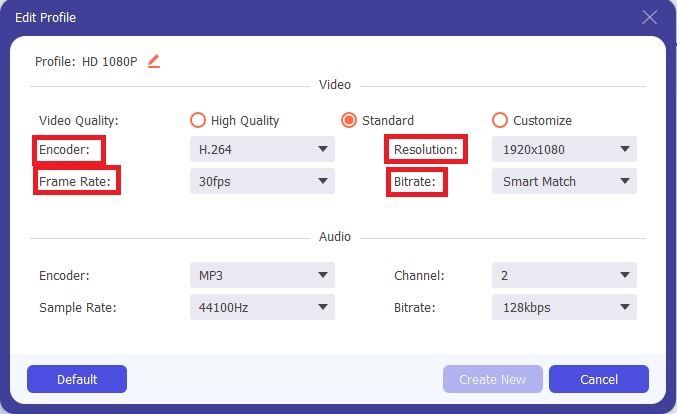
Pasul 4: Dacă sunteți în căutarea mai multor opțiuni, le puteți găsi făcând clic pe pictograma rotiță de lângă calitatea video selectată. Astfel, puteți edita în continuare rezoluția video și alte opțiuni, cum ar fi rata de cadre, rata de eșantionare, bitrate-ul și encoderul. Odată mulțumit, dați clic pe butonul Create New din colțul din dreapta jos pentru a salva modificările.
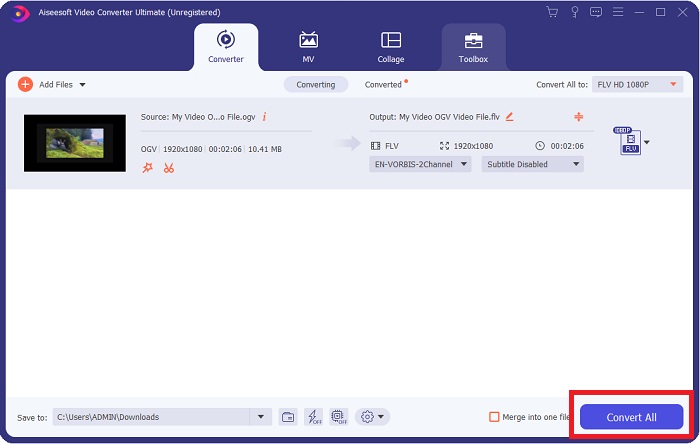
Pasul 5: Când ați terminat cu toate ajustările, puteți începe conversia propriu-zisă făcând clic pe butonul Convert All din colțul din dreapta jos și așteptați să se termine.
Partea 2. O altă metodă disponibilă pentru a converti OGV în FLV [Online]
Dacă nu aveți timp și trebuie să vă convertiți fișierul OGV în FLV cât mai repede posibil, nu trebuie să vă faceți griji, pentru că avem în continuare o soluție pentru dumneavoastră. Puteți folosi varianta online a acestui software, care vă oferă același nivel de confort, urmând un proces de conversie lin. FVC Free Video Converter Online este un instrument web care poate transforma cu ușurință fișierele OGV în FLV și oferă în continuare aceleași opțiuni de rezoluție și calitate audio. Pentru a-l folosi, urmați pașii de mai jos:
Pasul 1: Faceți clic pe acest link, iar acesta vă va redirecționa către convertorul online propriu-zis. În mijlocul paginii se află un buton pe care scrie Add Files to Convert. Trebuie să dați clic pe el pentru a descărca launcher-ul de care aveți nevoie pentru a importa fișierul video pe care doriți să îl convertiți.
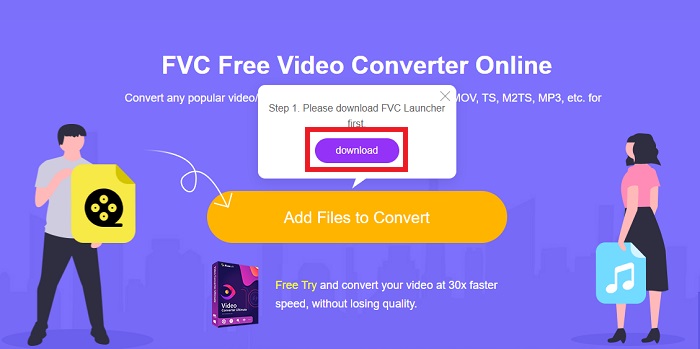
Pasul 2: După ce ați terminat, puteți încărca acum fișierul făcând din nou clic pe același buton. Dacă încărcarea a reușit, va apărea o interfață. De acolo, puteți selecta acum FLV dintre celelalte formate oferite în partea de jos a ferestrei.
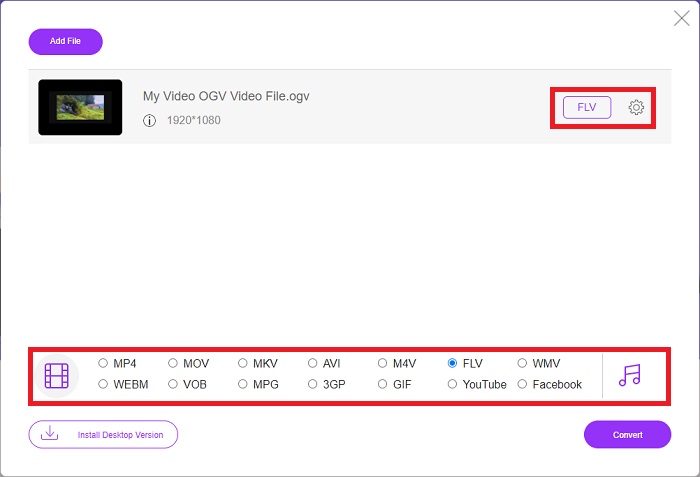
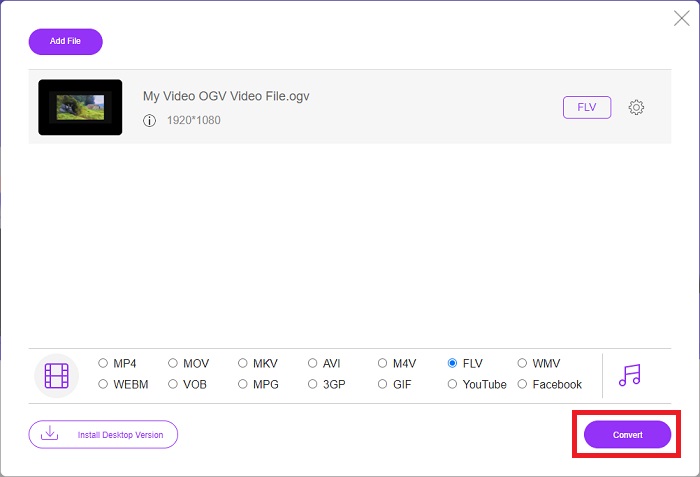
Pasul 3: În mod similar, puteți găsi o pictogramă în formă de rotiță în extremitatea din dreapta, unde puteți edita în continuare videoclipul. Făcând clic pe ea, veți găsi setările video și audio pentru a modifica encoderii, rezoluția, rata de cadre și altele. Faceți clic pe OK, apoi pe butonul Convert din colțul din dreapta jos pentru a începe procesul de conversie.
Partea 3. Cunoștințe extinse despre OGV și FLV
Dacă doriți să aflați mai multe despre cele două fișiere comparate, aici vă oferim toate informațiile necesare pe care ați dori să le citiți:
Metoda de codificare video Ogg Vorbis se poate conecta cel mai adesea cu fișiere care au extensia de fișier .ogv. Ogg Vorbis este un format de compresie audio open source, nebrevetat. Formatul container pentru fișiere audio, video și informații este cunoscut sub numele de Ogg, în timp ce tehnologia de compresie audio Vorbis este numită după. Formatul de fișier OGV este un container pentru fișiere video. Fluxurile video legate de unul sau mai multe codecuri video, cum ar fi Theora și DivX, pot fi găsite în fișierele OGV. Utilizatorii pot reda materialul înregistrat în interiorul fișierului de conținut pe mai multe dispozitive media folosind aceste fișiere.
Pe de altă parte, un fișier video stocat în formatul de container Adobe Flash Video (FLV) este un fișier FLV. Adobe Flash Player îl folosește în principal pentru a oferi conținut video online, cum ar fi filme și episoade TV. De asemenea, este esențial să rețineți că este un format deschis acceptat de o varietate de aplicații non-Adobe/Macromedia. Pentru o comparație mai precisă a celor două, am făcut un tabel doar pentru tine.
| Ogg Vorbis (OGV) | Adobe Flash Video (FLV) | |
| Extensie de fișier | .ogv | .flv |
| Dezvoltator | Fundația Xiph.Org | Adobe Systems Incorporated |
| Programe de sprijin | MPlayer Classic, VLC Media Player, Jriver Media Center, MPUI | RealPlayer, Apple QuickTime Player, Mplayer, VLC Media Player |
| Avantaje | OGG are avantajul de a fi fără brevet, recunoscut în general și acceptat nativ de majoritatea browserelor. Drept urmare, dacă doriți să încărcați un film pe site-ul dvs. web, acest format este o opțiune bună. | Frumusețea Flash este că poate ajuta site-urile web care doresc să încorporeze mișcare și conținut interactiv. Procedura este simplă și, în cele din urmă, poate avea un impact semnificativ. Toată lumea a folosit, de asemenea, Flash pentru jocuri rudimentare în plină experiență. |
| Dezavantaje | În ciuda utilizării pe scară largă, formatul video OGG are câteva dezavantaje. Safari și Internet Explorer, de exemplu, îl acceptă doar parțial; astfel, este posibil ca utilizatorii să nu vizioneze corect videoclipul dvs. în aceste browsere. | Dezavantajul, desigur, este că formatul FLV a devenit mai nepopular în ultimii ani. Crearea conținutului FLV poate dura mult timp și poate fi costisitoare. Un alt dezavantaj este că materialele Flash nu pot fi redate pe dispozitivele iOS, limitându-i sever capacitatea de a atrage noi adepți. |
Partea 4. Întrebări frecvente despre conversia OGV și FLV
OGG și OGV sunt la fel?
Este un subset adecvat al tipului media video Ogg video/Ogg cu extensia de fișier. ogv. Alte aplicații Ogg utilizează extensia de fișier. ogv cu tipul media aplicație/ogg de atunci. ogx este un superset de video/ogg.
Calitatea FLV este mai bună decât MP4?
Se spune că MP4 conține o codare digitală de înaltă calitate pentru video și audio. Opinia publicului despre FLV este mai puțin clară, deși avantajele și dezavantajele FLV se concentrează rareori pe calitatea formatului de fișier. Cu grade mai ridicate de compresie, MP4 are o pierdere mai mică de calitate. Aici puteți consulta metodele de a converti fișiere FLV în MP4.
Este FLV fără pierderi sau cu pierderi ca OGV?
Formatul de fișier FLV pentru Flash Video acceptă două versiuni ale codecului de partajare a ecranului (Screen video), care este o metodă de codificare screencast. Aceste formate se bazează pe plăci bitmap și sunt cu pierderi atunci când adâncimea de culoare este redusă și comprimată folosind Zlib.
Concluzie
Indiferent de cât timp aveți pentru a vă converti fișierele video, atât software-ul, cât și omologul său instrument online vă vor oferi cel mai convenabil. Deci, pe scurt, Video Convert Ultimate și Free Video Converter sunt cele la care trebuie să fie primul lucru la care te gândești când vine vorba de conversia video pentru a economisi timp navigând pe internet și găsind cel mai bun. Aici, vă oferim tot ce este mai bun.
-
 Cele mai bune modalități de a converti VOB în FLV [gratuit și online inclus]
 Doriți să convertiți un fișier VOB într-un fișier FLV? Puteți finaliza cu ușurință sarcina fie cu desktop, fie cu convertoare online. Citiți acest ghid și aflați cum să transformați VOB în FLV ușor și rapid.
-
 Top 4 aplicații gratuite pentru convertizor RMVB în FLV pe desktop sau online
 Acest articol vă va spune cel mai bun software de conversie RMVB în FLV și aplicații web care pot converti fișierele RMVB (RealMedia Variable Bitrate) în video FLV.
-
 Cum se poate comprima un fișier OGV fără a pierde calitatea
 Nu puteți trimite fișiere OGV mari altora? Ei bine, acest articol vă va prezenta 2 moduri simple de a vă ajuta să comprimați fișierele OGV cu ușurință.
