


 Video Converter Ultimate
 Screen Recorder
 Reparație video
Cum să convertiți AMV în FLV în moduri de încredere și de încredere
For those unfamiliar, AMV stands for Anime Music Video. The .amv file extension uses compressed video files. Portable media players manufactured in China are the most likely to use AMV files. Low-resolution video files fit the media player's screen on which the video file can view when playing. However, Adobe Systems makes the FLV (Flash Video File) file format and includes a short header, interleaved audio, video, metadata packets, and audio and video data stored in SWF files. Video streams can be embedded using Flash Video in Adobe applications and the Flash plug-ins. Now that you learn a bit of introduction with these two formats prepare yourself to dig in the converters. It would help if you considered converting AMV to FLV.

Partea 1. Cel mai excelent convertor de folosit la conversia AMV în FLV
Video Converter Ultimate is a professional program that can handle your video conversion. It supports effortless, lossless FLV to MOV conversion on both Windows and Mac computers, and it is available for free. In addition, the tool can convert between over 100 different formats, including high-definition files. A complete video editor is also an offer that allows you to crop, trim, cut, add watermarks, and use special effects. In addition to video conversion, Video Converter Ultimate supports video download, video transfer, and other functions. To learn how to use this software, you'll need to familiarize yourself with the instructions given to you in this section.
Step 1: To gain access to the software, you need to download it first to your computer. And by doing this, just click the Free Download button located at the bottom part of this step. As you can see, you have two choices when downloading the software, either Windows or Mac. Install the software to your computer after downloading, then launch the software.
Descărcare gratuită pentru Windows 7 sau o versiune ulterioară Descărcare securizată
Descărcare gratuită pentru MacOS 10.7 sau o versiune ulterioară Descărcare securizată
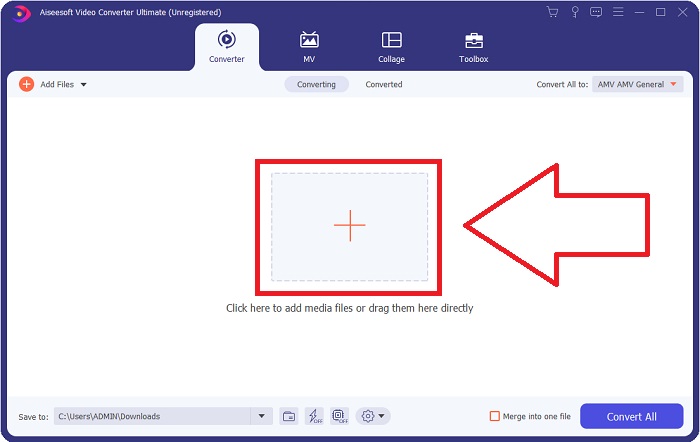
Step 2: You will see a window pop up after you start the software. The Converter interface is displayed on your screen as you also see the uploading area. Click the + button, or drag any video files from your desktop to proceed.
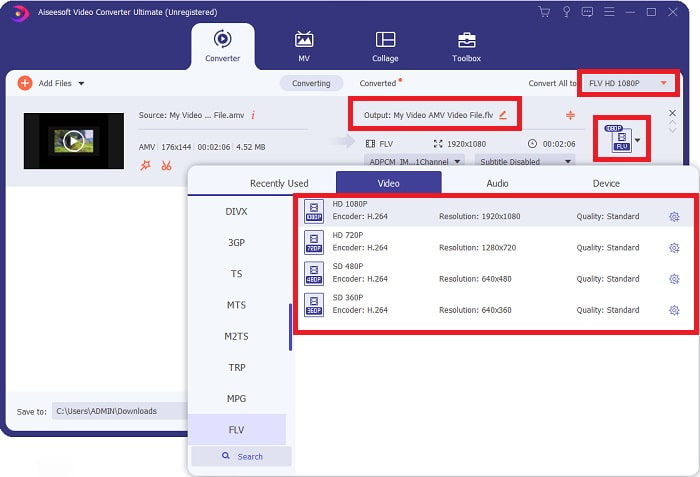
Step 3: To convert the AMV video format to FLV, you need to navigate the selected format after uploading a file in the software and choose the FLV format. You also have the power to choose any video quality afterward.
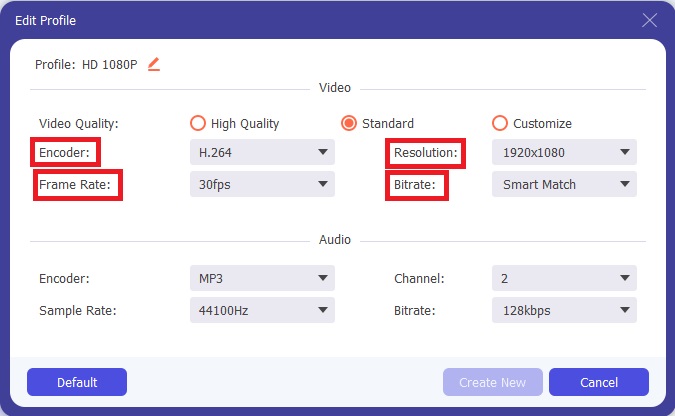
Step 4: If you need to customize or create a new video quality you prefer, you can click the gear icon next to the selection of video qualities.
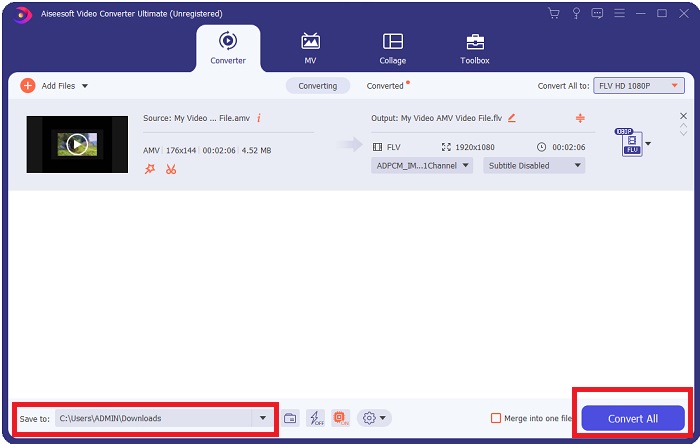
Step 5: You’re almost there! Now that you have fixed all the specifications and adjustments you prefer, you can choose the location of your converted file by clicking the folder icon next to the Save to field at the lower bottom corner of the window. Now, you can convert your video file by clicking the Convert All button.
Partea 2. Instrument online de utilizat pentru a converti AMV în FLV
It's easy to use online converters because they don't require any software downloaded or installed. Free Video Converter Online is an excellent example of a program that can convert AMV to FLV quickly and easily. You can convert a wide range of audio and video formats using this program, and it's entirely free to use. You can upload two files to the program for conversion, and once the process is complete, the converted file will be save to your hard drive automatically. Let me introduce to you all the procedures you need to know in using this great online tool.
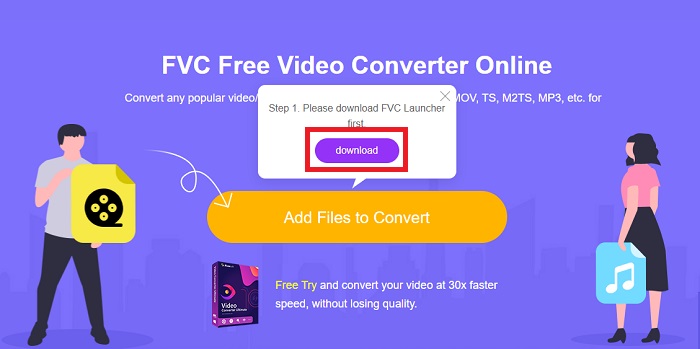
Step 1: Click this link to access the main webpage of the online tool. After you proceed, start converting a file by clicking the Add Files to Convert. The download button will appear at the top corner of your screen afterward. After the launcher finishes installing, you can begin to upload a file from your computer to this tool.
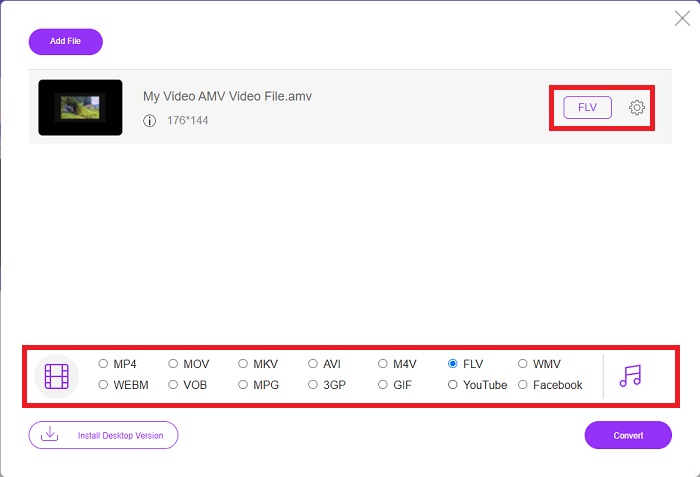
Step 2: Now that your imported file is ready, click the FLV video format located below. As the software can do, you can also adjust all the specifications of your output video by clicking the gear icon.
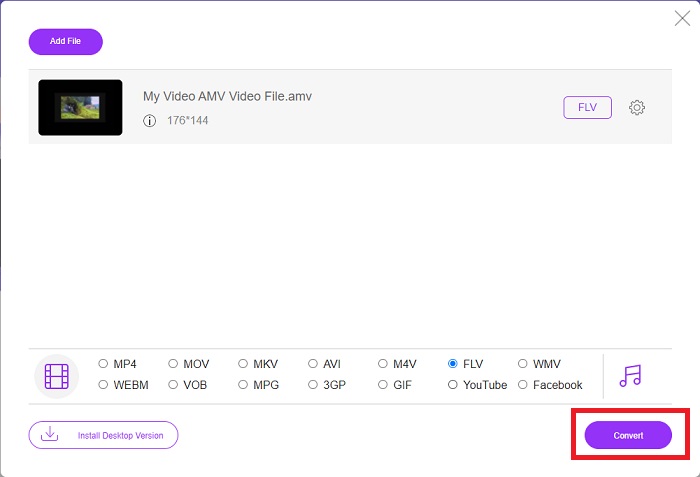
Step 3: In the end, click the Convert button to change your AMV files to FLV format.
Articole similare:
Partea 3. Cunoștințe extinse despre AMV și FLV
AMV optimizează playerele media versatile cu procesoare lente și ecrane mici, cum ar fi playerul MP3 S1. Codecul video este Motion JPEG cu tabele de cuantizare fixe. Codecul audio este IMA ADPCM, în care primii 8 octeți ai fiecărui cadru sunt sursa (16 biți), indexul (16 biți) și cantitatea de mostre criptate pe 16 biți (32 biți). Decodificarea pentru aceste codecuri simplificate este neglijabilă. Compresia video este scăzută (4 pixeli/octet față de peste 10 pixeli/octet pentru MPEG-2), dar dimensiunile fișierelor sunt mici datorită rezoluției reduse (96x96 mai mare sau egală cu 208x176) și fps (10, 12, sau 16 cadre/s). Un videoclip de 30 de minute comprimat la 128x96 pixeli și 12 cadre/s va avea 80 MB.
Cu toate acestea, un fișier video cu extensia.flv pe care îl puteți utiliza extensia de fișier FLV dacă doriți să transmiteți în flux video sau audio din Adobe Flash Player sau Adobe Air pe internet. Pentru o lungă perioadă de timp, Flash Video a fost formatul video implicit pentru aproape toate videoclipurile online, inclusiv cele de pe site-uri precum YouTube, Hulu și nenumărate altele. Din acest motiv, serviciile de streaming și dezvoltatorii de software nu mai folosesc formatul Flash proprietar al Adobe. Cu toată această comparație menționată, iată un mic ajutor pentru tine, acest articol ți-a oferit o diagramă de comparație:
| Extensie de fișier | AMV | FLV |
| Nume de fișier | Videoclip muzical anime | Fișier video Flash |
| Dezvoltat de | Jim Kaposztas | Adobe System Incorporated |
| Pro | ◆ AMV este unul dintre cele mai populare videoclipuri muzicale anime create de fani până în prezent. ◆ Dimensiunea fișierului este mică. | Adobe Flash pentru pagini web dinamice și interactive poate fi un mare avantaj. Chiar dacă acesta este un proces simplu, rezultatele ar putea fi substanțiale. Flash a fost cândva o alegere populară și pentru jocurile video simple. |
| Contra | ◆ Incompatibil cu majoritatea playerelor și dispozitivelor media; de calitate inferioară. | Scăderea popularității FLV a fost un dezavantaj. Crearea de conținut FLV poate fi consumatoare de timp și costisitoare. Lipsa suportului pentru Flash pe dispozitivele iOS îi limitează sever capacitatea de a atrage noi utilizatori. |
| Programe care acceptă fișierul | ◆ VLC Media Player ◆ iOrgsoft AMV Converter | ◆ RealPlayer ◆ Apple QuickTime Player ◆ VLC Media Player ◆ MPlayer |
Partea 4. Întrebări frecvente despre conversia AMV în FLV
Care este scopul unui AMV?
Sincronizarea și unitatea într-un AMV pot realiza diverse stiluri de editare video. Este posibil să obțineți o editare brută cu simple „efecte” de mărire și micșorare și tranziții simple de tranziție. Printre numeroasele exemple se numără următoarele.
Cum se fac AMV-urile?
Pentru ca un AMV să aibă succes, trebuie să folosească o melodie care este strâns legată de subiect și o descrie aproape perfect. Oricine citește asta poate răspunde spunând: „Uau, este uimitor! Acest cântec este al lui, tema ei. Din această cauză, ai ales o piesă bună.
Este FLV de calitate mai bună?
Formatul FLV și MP4 sunt capabile să stocheze codare digitală video și audio de înaltă calitate. Calitatea fișierelor FLV este o chestiune de dezbatere, dar beneficiile și dezavantajele FLV pot discuta formatul fișierului. Rate de compresie mai mari în MP4 au ca rezultat o pierdere mai mică a calității.
Concluzie
În concluzie, veți ști importanța alegerii celui mai bun convertor în conversia AMV în FLV. Alții vor produce videoclipuri de calitate scăzută și nesincronizate după ce videoclipul a trecut prin conversie. Dar cele două convertoare pe care le recomandă acest articol sunt convertorul de top pe care nu trebuie să vă faceți griji cu privire la calitatea pe care o va oferi.
-
 Cea mai bună metodă de utilizat în conversia AMV în AVI [Aprobat]
 Vă este greu să convertiți fișierul video în format AMV în AVI? Iată câteva sfaturi oferite pe care le puteți găsi doar în acest articol.
-
 Cele mai noi 3 convertoare AMV disponibile pentru a converti AMV în format MOV [2022]
 Nu știți cum să vă convertiți fișierele AMV în format MOV? Apoi, acest articol vorbește despre cele 3 convertoare AMV în MOV pe care le puteți folosi online sau offline.
-
 4 metode verificate pentru a converti TS în FLV pe desktop / online
 Nu puteți deschide TS în mod implicit pe computer sau pe mobil. Singura modalitate de a viziona fișierele video este de a converti TS în FLV sau alte formate cu ghidul nostru concret.
