


 Video Converter Ultimate
 Screen Recorder
 Reparație video
Cum să convertiți 3GP în WMV într-un mod profesional [Online și Offline]
3GP este un format mobil popular care transferă date prin telefoane mobile fără să consume prea multă lățime de bandă și economisind totodată spațiu. De asemenea, acest format este standardizat pentru înregistrarea video pe telefoane mobile de a treia generație, însă stați liniștit, puteți reda videoclipul și pe telefoane de a doua și a patra generație. Deși este excelent pe telefoane, este limitat doar la smartphone‑uri. Așadar, nu este o surpriză dacă fișierul .3gp nu arată grozav pe desktop. Cu toate acestea, puteți învăța să convertiți 3GP într‑un format care are o compatibilitate mult mai largă pe desktop, cum ar fi WMV. Doriți să aflați cum să convertiți 3GP în WMV într‑un mod profesionist? În acest caz, haideți să aruncăm o privire și să nu mai pierdem timpul.

Partea 1. Ce este 3GP
Este un format bazat pe ISO care stochează fluxuri media precum H.263 sau H.264 pentru video și AMR sau AAC pentru audio, perfect pentru compresie cu pierderi. Mai mult, acest format de a 3-a generație este prietenos cu stocarea pentru stocarea datelor pe unități portabile de pe telefoanele noastre, chiar și pe IOS. Chiar dacă 3GP este încă disponibil, rata de eficacitate a acestui format a început să scadă și, din acest motiv, 3GPP s-a alăturat scenei și a devenit o versiune mai bună a acestuia.
Partea 2. Ce este WMV
Este un format multimedia proprietar dezvoltat de Windows pentru streaming video online. Spre deosebire de orice alt format, cum ar fi 3GP, WMV folosește un codificator multiplu pentru a face fișierul și mai comprimat. Datorită capacității de a utiliza multe codificatoare, este mai accesibil să partajați eficient videoclipurile în acest format. Cu toate acestea, există un dezavantaj de a folosi o mulțime de codificatoare, în special la editare și redare, deoarece nu toate playerele și editorii media acceptă o gamă largă de codec. Deși formatul folosește un compresor, calitatea suportului nu va fi modificată sau redusă.
Partea 3. Mod profesional de a converti 3GP în WMV cu Video Converter Ultimate
Vreți să obțineți un convertor profesional 3GP în WMV, disponibil gratuit pentru descărcare pe platforma dvs.? FVC Video Converter Ultimate oferă un proces de conversie la nivel de expert, fără prea mult efort. Acest convertor vă duce la un alt nivel de conversie, pe care niciun alt convertor online sau offline nu vi‑l poate oferi. Mai mult, acest instrument „ultimate” suportă peste 200 de formate media din care puteți alege, spre deosebire de alte unelte.
Atâta timp cât aveți acest convertor, așteptați întotdeauna o ieșire profesională pe formatul dvs. media convertit. Doriți să utilizați convertorul profesional pentru a vă converti fișierele 3GP? Dacă acesta este cazul, puteți urma pașii de mai jos pentru a converti cu succes cu instrumentul suprem.
Pași pentru a converti un fișier 3GP în WMV cu FVC Video Converter Ultimate
Pasul 1. Mai jos sunt prezentate butoanele de descărcare; alegeți, după caz, platforma pe care o folosiți. De exemplu, faceți clic pe butonul de descărcare pentru Windows dacă sunteți utilizator de Windows. Dacă sunteți utilizator de Mac, faceți clic pe celălalt. După procesul de descărcare, instalați convertorul și apoi rulați‑l făcând clic pe Start Now. Mai important, după lansare, trebuie să vă familiarizați cu interfața înainte de a trece la următorii pași.
Descărcare gratuită pentru Windows 7 sau o versiune ulterioară Descărcare securizată
Descărcare gratuită pentru MacOS 10.7 sau o versiune ulterioară Descărcare securizată
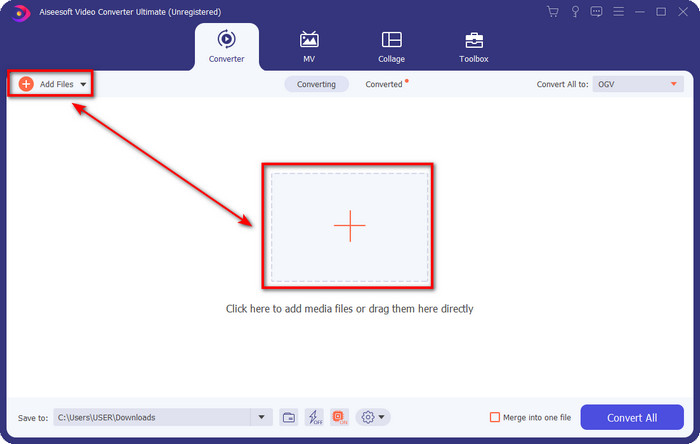
Pasul 2. Veți vedea Add Files în partea stângă sus a interfeței; faceți clic acolo și vi se va deschide un folder. Căutați fișierul .3gp pe unitatea computerului, apoi încărcați‑l apăsând Open.
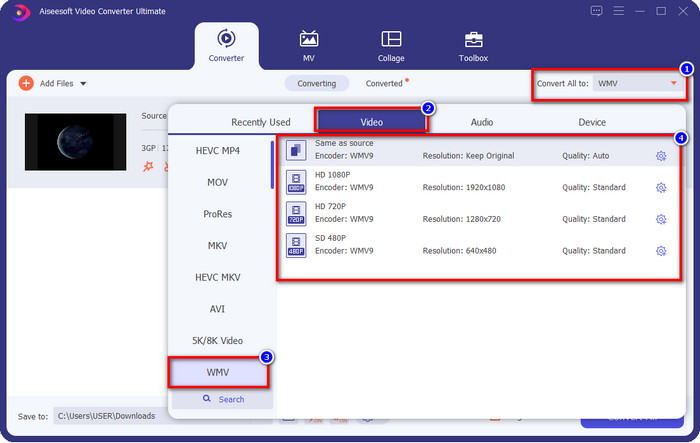
Pasul 3. Faceți clic pe Convert All to pentru a alege formatul WMV dorit sau WMV ca format final de ieșire.
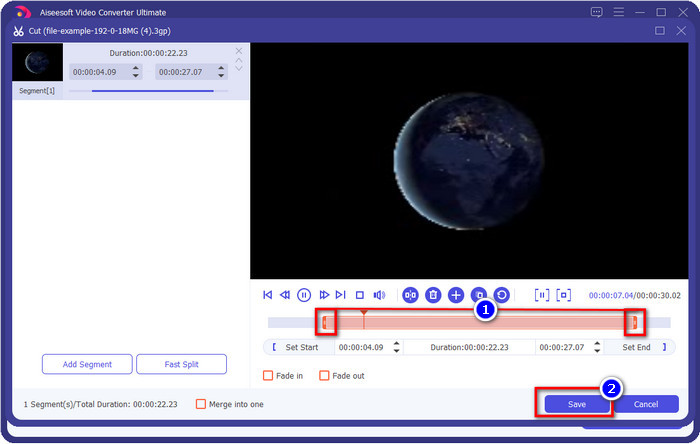
Opțional. Înainte să convertim fișierul 3GP în WMV, să discutăm pe scurt despre celelalte funcții pe care le oferă acest instrument. Trebuie să tăiați videoclipul? Nicio problemă. Apăsați butonul scissor, glisați slide bar pe ambele părți, dacă doriți, și apăsați Save pentru a aplica tăieturile făcute.
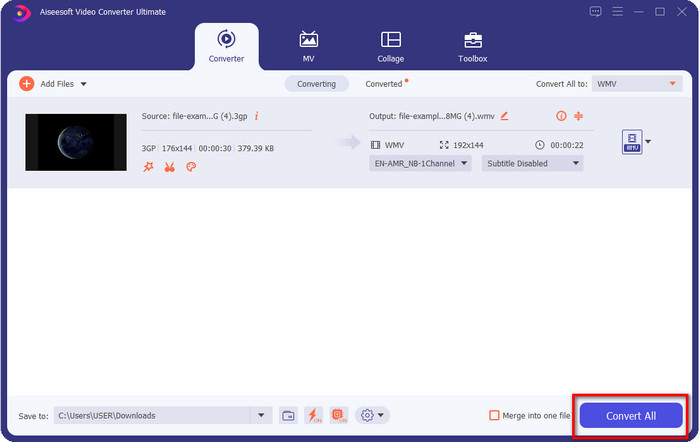
Pasul 4. Porniți procesul de conversie făcând clic pe butonul Convert All. Conversia se va încheia într‑un timp scurt și, voila, fișierul WMV va fi salvat pe unitatea computerului.
Partea 4. Mod online de a converti MXF în WMV cu Free Video Converter Online
Un alt produs FVC, dar de data aceasta o soluție online, este FVC Free Video Converter Online. Acest convertor online profesional oferă o interfață curată și ordonată comparativ cu alte convertoare web. În plus, nu trebuie să descărcați convertorul pe dispozitiv înainte de a‑l folosi; în schimb, deschideți browserul și accesați convertorul. Deși convertorul web este foarte bun, sunt multe funcții avansate pe care acest instrument nu le poate oferi. Totuși, aceasta este alegerea potrivită dacă doriți să convertiți 3GP în WMV online; urmați pașii de mai jos pentru a utiliza acest instrument.
Pași pentru a converti 3GP în WMV online, gratuit, cu FVC Free Video Converter Online
Pasul 1. Faceți clic pe acest link pentru a deschide convertorul online.
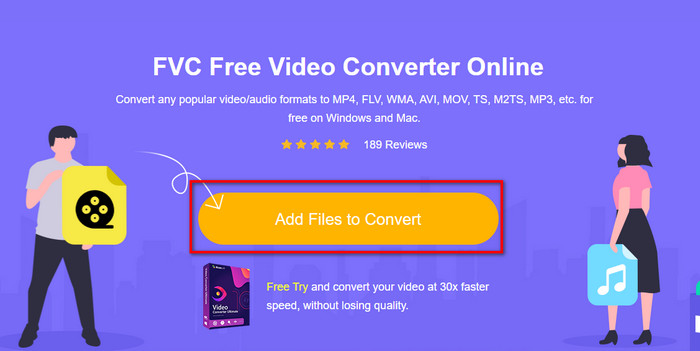
Pasul 2. După ce ați dat clic, apăsați Add Files to Convert pentru a lansa convertorul. Dacă este prima dată când folosiți acest convertor, trebuie să instalați programul de lansare făcând clic pe Add Files to Convert, însă acesta nu este la fel de mare ca instrumentul „ultimate”. Căutați fișierul 3gp pe care doriți să‑l convertiți și apăsați Open.
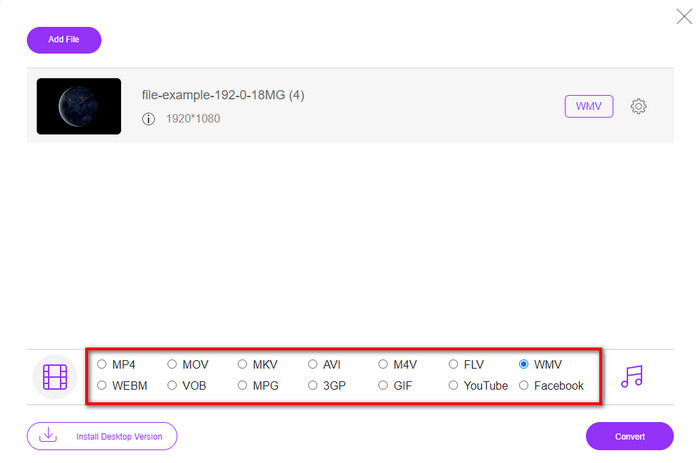
Pasul 3. După încărcarea fișierului 3GP, este momentul să alegeți unul dintre formatele prezentate mai jos sau să faceți clic pe WMV.
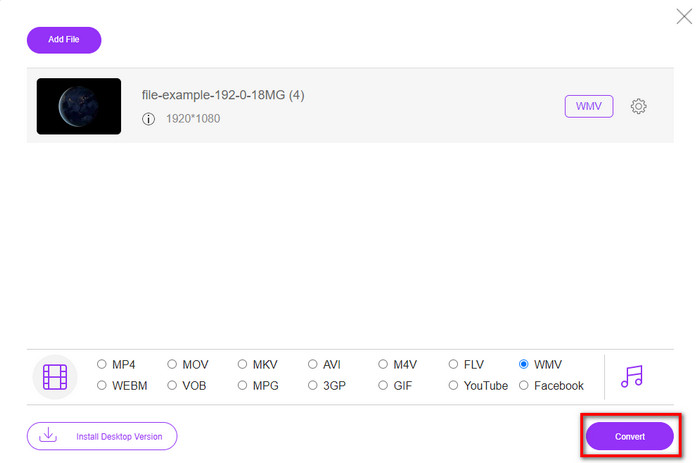
Pasul 4. Ați ales deja un format? Dacă da, faceți clic pe Convert pentru a începe procesul de conversie a fișierului.
Partea 5. Întrebări frecvente despre conversia 3GP în WMV
Este o idee grozavă să utilizați un convertor online 3GP în WMV?
Dacă nu doriți să descărcați un convertor pe dispozitivul dvs., este ideal să utilizați un convertor online. Dar nu uitați, nu toți convertoarele online sau offline sunt sigure de utilizat. De cele mai multe ori, au viruși dacă îi instalezi sau nu faci sarcina eficient. Dar dacă doriți să vă asigurați cu privire la conversie, vă recomandăm să utilizați produsele de conversie FVC, deoarece acesta nu conține malware 101% și vă garantează succesul procesului de conversie.
Este posibil să îmbinați mai multe videoclipuri 3GP?
Da, cu ajutorul uneltelor de îmbinare FVC puteți combina mai multe videoclipuri în format 3GP. Așadar, dacă acum doriți să știți cum să îmbinați mai multe videoclipuri 3GP, trebuie să citiți acest articol pentru a afla cum se face acest lucru.
Videoclipurile 3GP au calitate bună?
3GP are o calitate bună, dar nu poate stoca calitate de înaltă definiție, așa că așteptați-vă ca calitatea video a unui 3GP să fie scăzută.
Concluzie
În concluzie, convertoarele enumerate în acest articol au fost selectate cu grijă, urmând un anumit standard de calitate profesională a rezultatului. În plus, am folosit și noi aceste instrumente pentru a putea prezenta și enunța doar fapte referitoare la caracteristicile lor. Mai mult, dacă nu doriți să descărcați un convertor pe desktop pentru a economisi spațiu și totuși să obțineți un rezultat profesionist, vă recomandăm cu căldură să folosiți FVC Free Video Converter Online. Însă, dacă doriți să transcodați fișierele 3GP într‑un mod mult mai profesionist, vă sugerăm cu tărie să utilizați FVC Video Converter Ultimate. Încă nu sunteți mulțumit de descrierea pe care am oferit‑o? În acest caz, trebuie să îl încercați chiar dvs. pentru a experimenta conversia la nivel de expert pe care o oferă acest instrument și pentru a învăța cum să convertiți 3GP în WMV.
-
 Top 4 cele mai eficiente moduri de a converti 3GP în format AVI [2025]
 Îmi pot converti fișierele 3GP în AVI? Ei bine, îl puteți converti cu ușurință dacă încercați aceste instrumente disponibile, deoarece am adunat toate soluțiile posibile pentru problema dvs. de conversie 3GP în AVI.
-
 Cel mai bun convertor 3GP în FLV de folosit la conversia 3GP în FLV [2025]
 Ați încercat vreodată să convertiți 3GP în FLV, dar nu știți ce fel de convertor veți folosi? Citiți acest articol pentru a afla toate detaliile despre conversia 3GP în FLV.
-
 2 Cele mai bune moduri posibile de a converti 3GP neacceptat în DivX [2025]
 Mulți utilizatori întreabă cum să convertești 3GP în DivX. Așa că acum, vă oferim un articol pentru asta pentru a vă ajuta să vă convertiți fără probleme fișierul .3gp.
