


 Video Converter Ultimate
 Screen Recorder
 Reparație video
[Recenzie completă] Cele mai recente 5 dispozitive de tăiere MP3 disponibile pe Windows/Mac/Online
Deseori dorim să tăiem porțiuni din audio‑ul pe care îl ascultăm și să le setăm ca ton de apel, evidențiind partea esențială sau eliminând detaliile sonore inutile. Deși există mai multe tăietoare pe care le poți folosi pe toate platformele, unele totuși nu sunt de încredere. Așadar, astăzi îți vom prezenta tăietoarele pe care le‑am găsit pe piață și în care poți avea încredere, pentru că le‑am testat noi înșine ca să ne asigurăm că sunt lipsite de malware și fiabile. Înainte de a le selecta, am urmat un standard foarte ridicat pentru publicul care are nevoie de un cutter de încredere. Pentru ca navigarea ta pe internet să fie cât mai eficientă, mai jos îți prezentăm cele cinci tăietoare MP3 pe care le‑am găsit pregătite să facă față sarcinii de a tăia orice format audio.

Partea 1. 2 Software de tăiat MP3 offline Windows și Mac
1. Video Converter Ultimate – Cel mai bun cutter MP3 [Recomandat]
Cel mai bun tăietor audio MP3 din această listă este Video Converter Ultimate, care le permite utilizatorilor să taie orice fișier audio fără efort. Cu ajutorul acestui instrument „ultimate”, poți decupa sunetul pentru a elimina porțiunile nedorite, poți chiar îmbina mai multe fișiere audio tăiate într‑un singur fișier și poți amplifica sunetul dacă ți se pare că este prea încet. În plus, acest software oferă un proces ultra‑rapid, având totodată grijă de calitatea originală a sunetului.
Spre deosebire de orice dispozitiv de tăiere, acest instrument acceptă un spectru larg de formate, nu numai MP3, ci și FLAC, M4R, M4A, OGG, MKA, WAV, WMA și multe altele și, într-adevăr, fișierul dvs. audio este acceptat aici pentru a fi tăiat. Poate că nu știți cum să tăiați fișierul audio și să-l utilizați pentru nevoile dvs. chiar acum. Astăzi este ziua ta norocoasă pentru că te vom învăța cum să folosești gratuit cutterul MP3 și generatorul de tonuri de apel, urmând tutorialul de mai jos.
Pasul 1. Descarcă tăietorul audio pe desktop făcând clic pe butonul de descărcare de mai jos. Alege dacă folosești Windows sau Mac, instalează rapid software‑ul și lansează‑l. Ține minte că trebuie să te familiarizezi cu interfața instrumentului pentru ca următorii pași să fie ușor de urmat.
Descărcare gratuită pentru Windows 7 sau o versiune ulterioară Descărcare securizată
Descărcare gratuită pentru MacOS 10.7 sau o versiune ulterioară Descărcare securizată
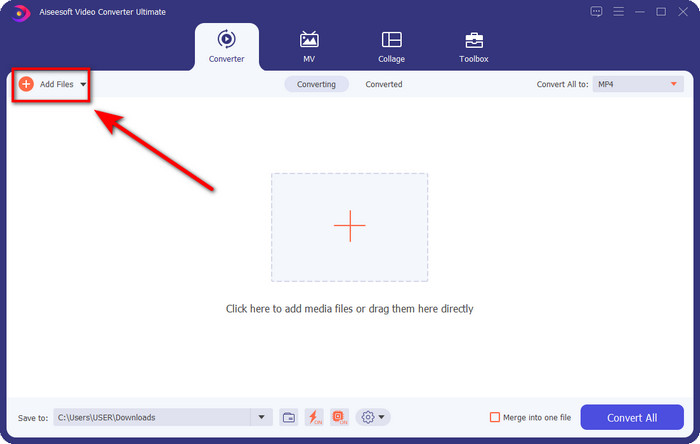
Pasul 2. Trage fișierul audio pe care vrei să îl tai în interfață sau poți face clic pe Add Files și să localizezi fișierul audio în folderul de pe computer care va apărea. Apasă pe Open pentru a trece la pasul următor.
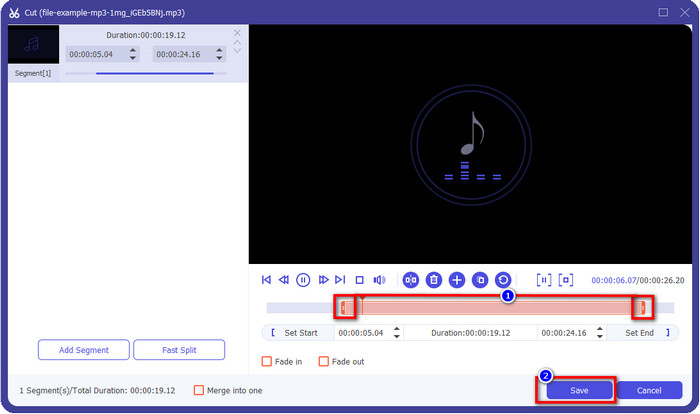
Pasul 3. După inserarea fișierului audio, este momentul să faci clic pe butonul în formă de foarfecă. Trage marcatorii de play in și play out până la lungimea dorită a audio‑ului. Reține că porțiunea evidențiată dintre „play in” și „play out” este singura care va fi păstrată. Apoi apasă pe Save pentru a tăia fișierul audio.
Opțional. Ai nevoie să amplifici sunetul? Dacă da, fă clic pe butonul în formă de baghetă magică, ajustează slider‑ul de volum trăgându‑l în sus și apasă pe OK pentru a salva.
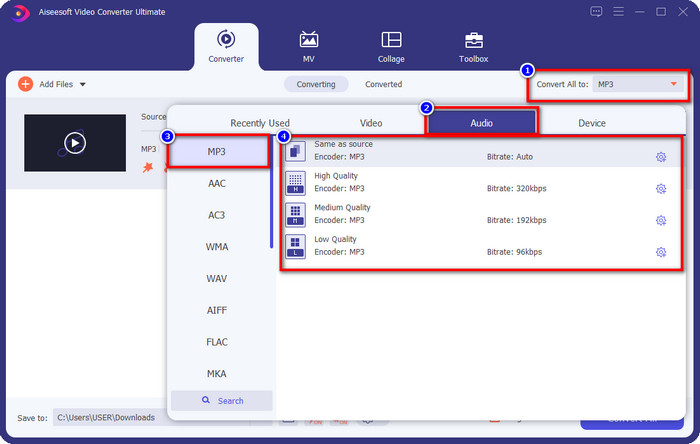
Pasul 4. Mergi la Convert All to, Audio și setează formatul la MP3. Deși nu faci o conversie propriu‑zisă, asigură‑te că denumirea de sub „Convert All to” este MP3 și nu alt format, pentru a evita schimbarea fișierului în alt tip de format.
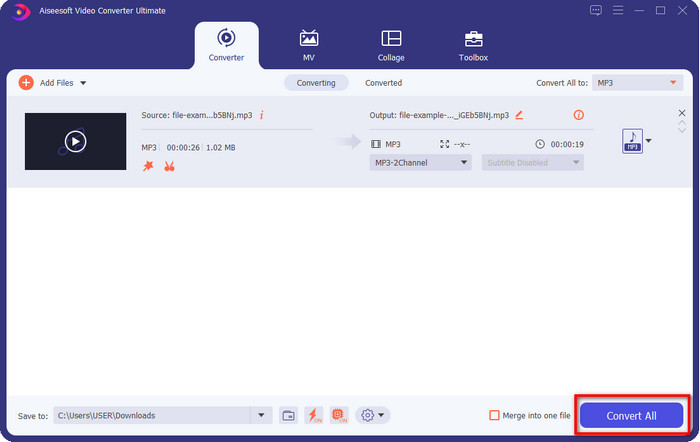
Pasul 5. Făcând clic pe Convert All, va începe salvarea fișierului audio tăiat. Acum ai fișierul audio tăiat cu cel mai bun tăietor MP3 gratuit, atât de simplu.
Pro
- Îți poate tăia sunetul cât mai repede posibil și îl poate procesa în mai puțin de o secundă.
- Sunt disponibile funcții avansate pentru a spori puterea volumului.
- Acceptă toate sistemele de operare, cum ar fi Windows sau Mac.
- Îmbinarea mai multor fișiere audio este posibilă cu fuziunea audio a acestui instrument.
Contra
- Este necesară achiziționarea instrumentului.
2. Tupeul
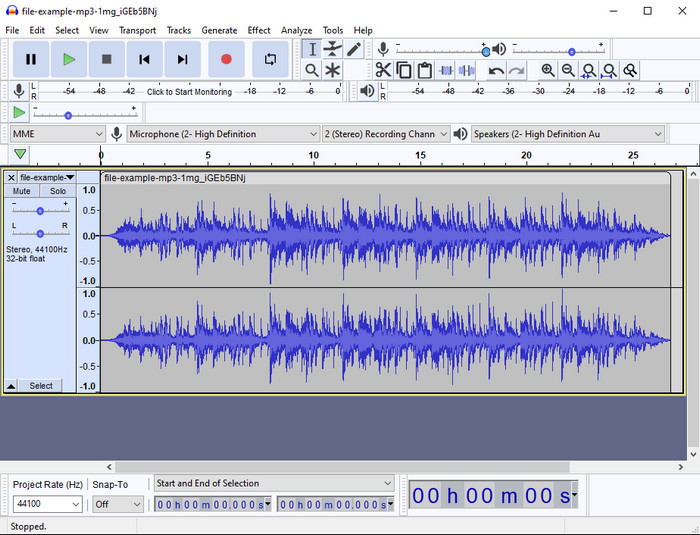
Audacity a oferit, de‑a lungul anilor, funcții de editare la nivel profesionist pentru fișierele tale audio. Această aplicație este gratuită și le permite utilizatorilor să facă mixaje pe mai multe piste. Este cunoscută și folosită de podcasteri pentru a edita și înregistra podcasturi cu ușurință. Totuși, unele dintre funcțiile ei sunt greu de înțeles, mai ales dacă nu ești obișnuit cu software specializat de acest tip.
Deși poți învăța în continuare cum să-l folosești, va dura timp să folosești întregul potențial al acestui trimmer audio MP3, iar pentru tăierea sunetului, este corect să spunem că se taie instantaneu și fără efort dacă ai nevoie de el.
Pro
- Descărcare gratuită în toate programele precum Windows și Mac.
- Sunt disponibile editoare audio avansate și profesionale pentru a vă face sunetul grozav.
- Este cel mai bine pentru înregistrarea podcasturi și multe altele.
Contra
- Mulți concurenți oferă o interfață de utilizator ușor de utilizat.
- Nu este cea mai bună alegere pentru începători pentru un rezultat imediat al tăierii și al altor scopuri de editare.
- Unele rapoarte arată că datele dvs. sunt colectate dacă utilizați acest instrument, dar încă nu există dovezi solide.
Partea 2. 3 Dispozitive de tăiere MP3 online accesibile pe web
1. mp3cut.net
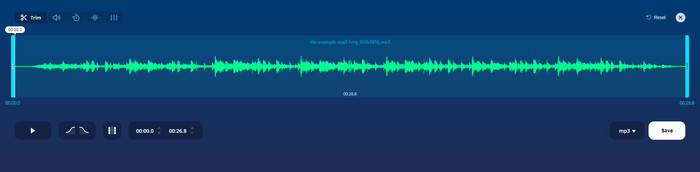
Puteți folosi mp3cut.net dacă aveți nevoie de un dispozitiv de tăiat MP3 online pentru acest lucru. După ce ați încărcat fișierul în acest cutter online, acum puteți elimina sunetul pe care doriți să îl desenați pe fișierul dvs. audio. Mai mult, instrumentul are și câteva funcții minore de editare pentru a schimba viteza și înălțimea sunetului, dacă este necesar.
Deși are acest tip de abilitate, instrumentul se blochează de cele mai multe ori și nu poate reda audio pentru a asculta dacă îl tăiați corect. Așadar, pentru a-l folosi din nou, va trebui să reîmprospătați browserul și să repetați ajustarea pe care ați făcut-o din nou.
Pro
- Ușor de utilizat și accesibil prin internet.
- La punct, funcții care vă ajută să reduceți sunetul.
- Sunt disponibile funcții de editare de bază.
Contra
- Are reclame pe interfața web.
- Uneori se blochează și trebuie reîncărcat din nou pentru a-l folosi.
2. audiotrimmer.com
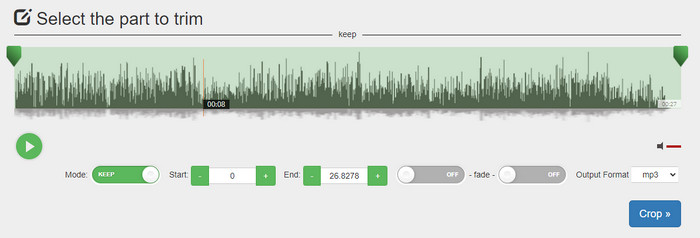
Un alt tăietor MP3 online gratuit este audiotrimmer.com. Acest instrument oferă funcții de tăiere ușor de înțeles și foarte directe; toate funcțiile acestui instrument sunt la obiect. Cu el, poți alege dacă vrei să păstrezi o porțiune de audio sau să o elimini. De asemenea, are efect de fade‑in și fade‑out, la fel ca alte trimmere menționate aici. Totuși, când am încercat să folosim efectul de fade‑in și fade‑out, nu a funcționat; nu s‑a adăugat niciun efect la fișierul nostru audio. Dar, dacă vrei doar să faci o tăiere simplă, acesta este un instrument web care merită încercat.
Pro
- Acces gratuit și disponibil în toate browserele.
- Ușor de utilizat pentru a tăia sunetul.
- Are efecte de fade-in și out.
Contra
- Fade-in și out nu funcționează bine.
- Există multe reclame deranjante dacă le accesați. Deci, aveți grijă să nu faceți clic pe ele.
3. Clideo

Unul dintre cele mai bune tăietoare și unificatoare MP3 online pe care le poți folosi este Clideo. Majoritatea utilizatorilor se bucură de acest instrument și îl preferă datorită capabilităților sale de editare. În plus, poți adăuga și efect de fade‑in și fade‑out fișierului tău audio, dacă este nevoie. Însă, după export și la ascultare, nu am găsit niciun fade‑in sau fade‑out adăugat la fișierul nostru audio. Ne‑am confruntat cu o mică problemă la acest instrument: încărcarea și descărcarea fișierului. Spre deosebire de primul instrument menționat, încărcarea audio‑ului în cutterul Clideo durează, iar uneori nu am reușit deloc să încărcăm fișierul audio din motive necunoscute.
Deși întâmpinăm unele probleme, este încă cel mai bun cutter online și este, de asemenea, sigur de utilizat.
Pro
- Cel mai bun tăietor online online.
- Interfață de utilizator profesională.
- Ușor de folosit.
Contra
- Procesul de încărcare și descărcare vă va lua prea mult timp.
- Fade in and out functioneaza, dar nu bine.
Partea 3. Întrebări frecvente despre MP3 Cutters
Care este cel mai bun trimmer MP3 pe Mac?
FVC Video Converter Ultimate este disponibil și pe Mac. Așadar, dacă ai nevoie să tai fișiere audio pe Mac, cel mai bine este să descarci acest instrument „ultimate” pentru a‑ți gestiona corect fișierele audio. Instrumentul „ultimate” nu este doar excelent pentru tăierea audio‑ului, ci îți permite și să îmbunătățești sunetul prin amplificare. Mai mult, dacă ai nevoie să convertești, să îmbini, să sincronizezi audio etc., instrumentul „ultimate” te scoate din încurcătură. Dacă vrei să afli mai multe despre acest instrument, ar fi bine să citești detaliile prezentate mai sus.
Tăierea sunetului îi reduce dimensiunea?
Dimensiunea fișierului audio se reduce după ce îl tăiați. Pe măsură ce am comparat fișierul audio original cu fișierul tăiat, am observat unele modificări ale altitudinii. Deci, înseamnă că, cu cât fișierul audio este mai scurt, cu atât dimensiunea acestuia este mai mică, dar dacă fișierul audio este foarte lung, atunci așteptați-vă ca și dimensiunea să fie semnificativă.
Pot folosi Audacity pentru a îmbina mai multe audio?
Da, poți, Audacity acceptă îmbinarea mai multor piste audio într‑un singur fișier. Totuși, este dificil, mai ales dacă nu ai un tutorial relevant de urmat. Așadar, dacă ai nevoie să îmbini fișiere audio în Audacity, poți face clic pe acest link și să înveți cum se face.
Concluzie
Tăietoarele MP3 prezentate aici au trecut deja de standardele pe care le‑am stabilit pentru a‑ți oferi doar cele mai bune trimmere. Acest articol arată cât de important este să alegi tăietorul potrivit și adecvat nevoilor tale. Deși trimmerele de aici au aceeași funcție de bază, FVC Video Converter Ultimate oferă o tăiere audio mult mai eficientă. Conform cercetării noastre, acest instrument „ultimate” depășește toate standardele pe care le‑am stabilit. Așadar, dacă vrei să ai la îndemână un tăietor de top, acesta este cea mai bună alegere dintre toate opțiunile disponibile pe piață. Prea bun ca să fie adevărat? Ei bine, mai bine descarcă instrumentul și testează‑l chiar tu.
-
 Cum să tăiați și să îmbinați melodiile online - cele mai bune 4 moduri pe care ar trebui să le cunoașteți
 Când doriți să tăiați și să îmbinați melodiile online pentru a crea o piesă muzicală, puteți afla mai multe despre cele mai bune 4 instrumente online pentru a tăia melodiile și a combina fișiere din articol.
-
 Descoperiți cel mai bun aparat de tuns MP4 cu procedură și informații
 Vrei să înveți cum să tai videoclipuri precum vloggerii pe care îi urmărești? Apoi continuați să citiți această postare pentru a afla ce trimmere MP4 puteți folosi.
-
 Descărcare MP3 Player – 10 cele mai bune playere de muzică MP3 gratuite din 2025
 Care este cel mai bun player de muzică MP3? Cum pun muzică pe un player MP3? Cum se descarcă playerul de muzică MP3? Această postare vă oferă o recenzie detaliată a celor mai bune 10 playere MP3 gratuite pentru Windows PC și Mac.
