


 Video Converter Ultimate
 Screen Recorder
 Reparație video
Aflați care sunt cei 7 editori populari de etichete muzicale disponibile la Reach
Un player media are un editor de metadate integrat pentru a edita sau adăuga taguri muzicale completând numele artistului, titlul și genul. Totuși, majoritatea dintre ele limitează ceea ce pot oferi pentru a‑i ajuta pe utilizatori să adauge tagurile sau metadatele. Nu este frustrant? Din fericire, cel mai bun mod de a gestiona editarea metadatelor este să folosești un editor de metadate pe telefon. Dar întrebarea este: ce aplicație ar trebui să folosești? Care aplicație este potrivită pentru nevoile tale în ceea ce privește editarea metadatelor? Dacă îți pui aceeași întrebare, nu este nevoie să îți faci griji. Pentru că astăzi analizăm cele șase cele mai bune aplicații pe care le poți folosi pentru a le edita pe dispozitivele tale, așa că citește cu atenție pentru a afla mai multe aplicații de editare a metadatelor muzicale pe care le poți descărca și folosi.

Partea 1. Ultimate Music Tag Editor Disponibil pentru utilizare pe Windows și Mac
Dacă ai un Windows sau un Mac pentru a edita metadate, atunci ce instrument ar trebui să folosești? Îți sugerăm să te bazezi pe FVC Video Converter Ultimate. Spre deosebire de editorii de taguri, acest instrument îți oferă toate funcțiile de care ai nevoie pentru a avea sau a adăuga metadate în doar câteva clicuri. Imaginează‑ți așa: toate aplicațiile pe care ți le pot oferi alții sunt incluse în acest instrument, mai puțin tagurile automate. Mai important, poți edita, elimina și actualiza toate tagurile din fișierul audio urmând pașii de mai jos. Așadar, pentru a edita taguri muzicale pe Windows 10/11 sau Mac, ghidul de mai jos te va ajuta să faci acest lucru.
Pasul 1. Pentru a descărca editorul de metadate pe Windows sau Mac, apasă butonul corespunzător de mai jos. După ce descărcarea s‑a încheiat, dă clic pe fișier pentru a instala aplicația, urmează pașii de instalare, apoi deschide instrumentul.
Descărcare gratuită pentru Windows 7 sau o versiune ulterioară Descărcare securizată
Descărcare gratuită pentru MacOS 10.7 sau o versiune ulterioară Descărcare securizată
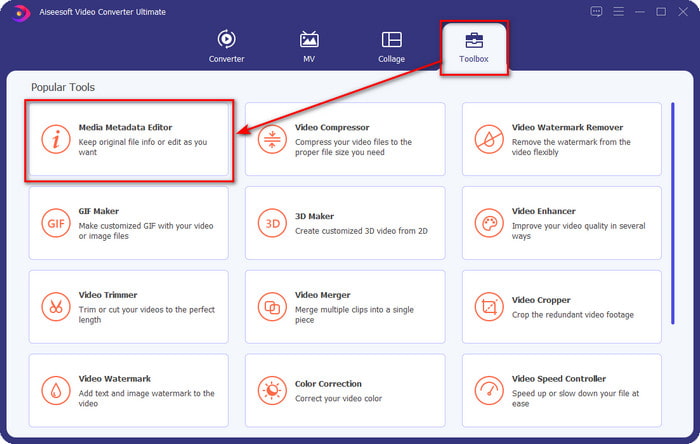
Pasul 2. Apasă pe secțiunea Toolbox, găsește și dă clic pe Media Metadata Editor din lista care va apărea.
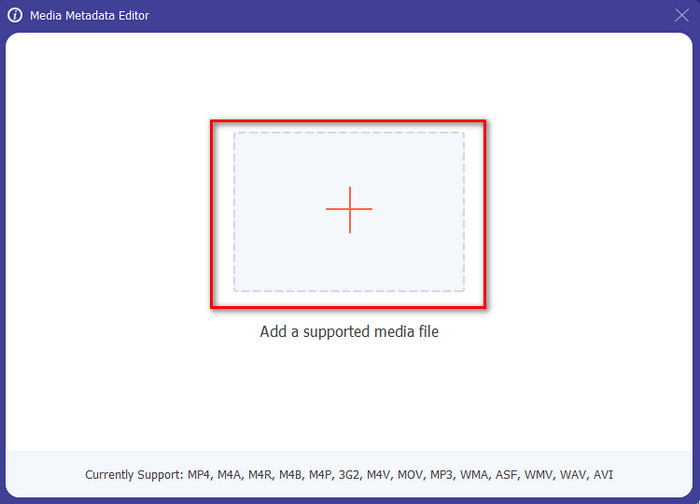
Pasul 3. Apăsând pictograma +, folderul va apărea pe ecran; găsește fișierul audio pe care vrei să îl editezi și apasă Open pentru a trece la pasul următor.
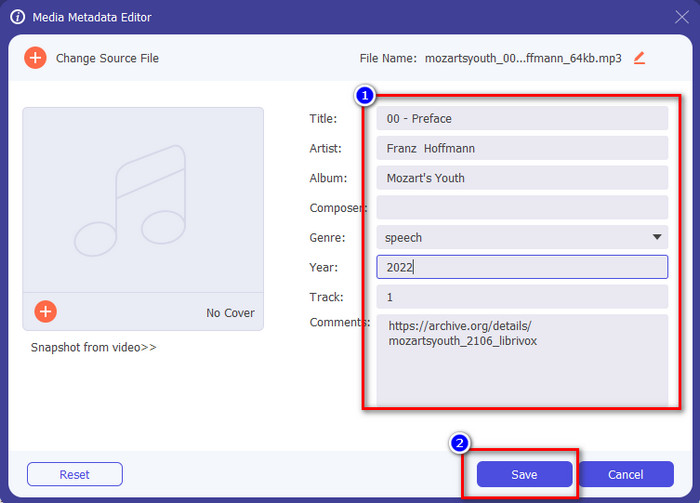
Pasul 4. Actualizează tagul fișierului audio tastându‑l în caseta de text. După aceea, trebuie să faci clic pe Save, iar toate tagurile pe care le‑ai modificat vor fi actualizate. Chiar dacă transferi fișierul pe telefonul mobil, tagurile rămân intacte în fișierul audio.
Articole similare:
Cel mai bun vizualizator de metadate
Partea 2. 6 a celor mai bune aplicații pentru editorul de etichete muzicale pe dispozitive Android și iOS
Editor automat de etichete
Dispozitive compatibile: Android
Stele în Play Store: 4,4 stele
Recenzii sau evaluări: 81.332 de persoane
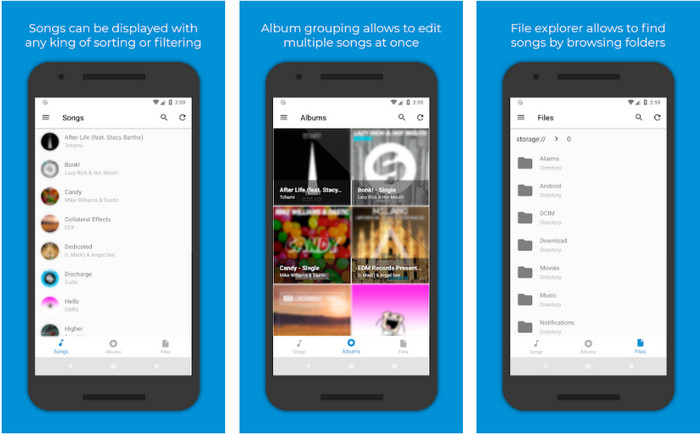
Poți accesa Automatic Tag Editor, cel mai bun editor de metadate muzicale, dacă ești utilizator de Android. Această aplicație este perfectă pentru editarea tagurilor fișierelor audio în mai puțin de un minut. Un alt lucru bun la această aplicație este că are un editor de metadate automat pentru completarea sau actualizarea datelor din fișiere, mai ales dacă ai cumpărat copia digitală. Suportă mai multe taguri pe care le poate completa, precum titlu, gen, an și multe altele, pentru a te ajuta să recunoști fișierul și mai bine. În actualizarea recentă, mulți utilizatori au constatat că apar unele erori și bug‑uri în timp ce folosesc aplicația pe Android. De asemenea, acceptă formatele audio obișnuite pe care le poți încărca, cum ar fi MP3, M4A, OGG, FLAC, WMA și WAV.
Editor de etichete de muzică Star
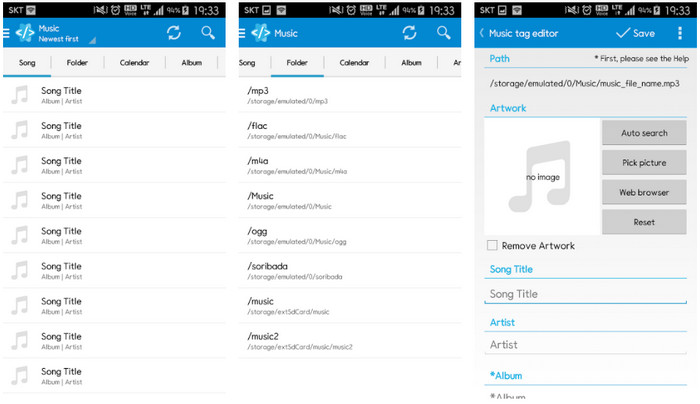
Dispozitive compatibile: Android
Stele în Play Store: 4,0 stele
Recenzii sau evaluări: 293.598 de persoane
Star Music Tag Editor este un alt editor de taguri muzicale pe care îl poți descărca din Play Store. Această aplicație este excelentă deoarece oferă o interfață simplă, ușor de înțeles, mai bună decât ceea ce oferă alte aplicații. La fel ca primul instrument, acceptă și căutarea automată, care completează eficient tagurile muzicale. Deși aplicația este ușor de utilizat și are multe de oferit, în unele cazuri nu este la fel de eficientă cum spun alții. Când am încercat să edităm metadatele în această aplicație, au fost momente în care modificările nu s‑au salvat. De asemenea, atunci când încerci să salvezi metadatele, pe ecran apare un mesaj pop‑up care spune „invalid audio frame exception” pentru noua melodie din cauza fișierului corupt. Totuși, unii utilizatori nu au astfel de probleme folosind aplicația, așa că, dacă vrei să o încerci, o poți descărca din Play Store.
Music Tag Editor - Mp3 Tagger | Editor muzical gratuit
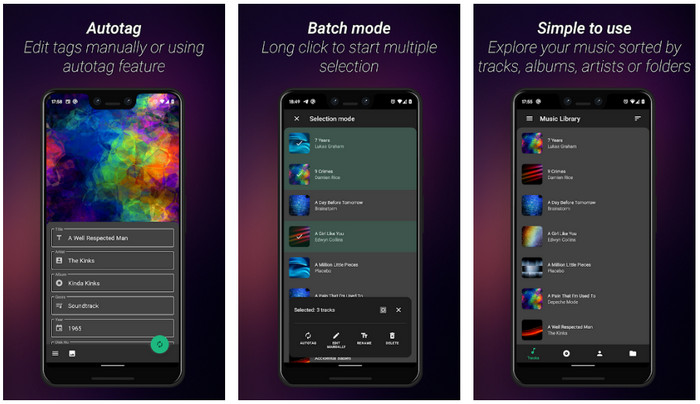
Dispozitive compatibile: Android
Stele în Play Store: 3,8 stele
Recenzii sau evaluări: 11.378 de persoane
Dacă ai probleme cu tagurile greșite, folosește Music Tag Editor - Mp3 Tagger | Free Music Editor pentru a repara rapid metadatele muzicale. Acest instrument poate completa celelalte date dacă introduci mai întâi numele melodiei și al artistului pentru a căuta corect tagurile potrivite. Cu această aplicație, poți adăuga cu ușurință taguri la mai multe fișiere audio simultan. Totuși, căutarea automată a tagurilor durează mult pentru a strânge informațiile și, uneori, include taguri fără legătură. De asemenea, când vrei să adaugi o imagine la piesa audio, aceasta nu se atașează piesei pe care ai editat‑o.
Ever Tag: Music Tag Editor 4+
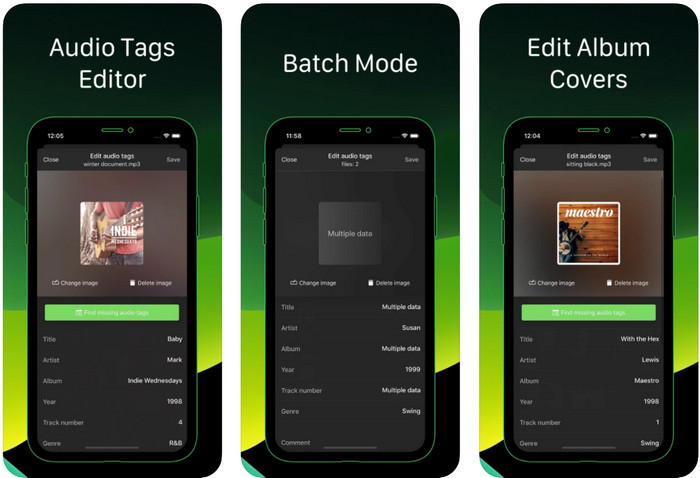
Dispozitive compatibile: iOS
Stele în Play Store: 4,7 stele
Recenzii sau evaluări: 1,1k de persoane
Învață cum să editezi taguri muzicale pe iPhone cu ajutorul Ever Tag: Music Tag Editor 4+. Această aplicație de pe iOS suportă mai multe formate audio, astfel încât încărcarea metadatelor este mai ușoară ca niciodată; la fel și editarea datelor. Mai mult, această aplicație îți oferă diferite seturi de taguri de metadate pe care le poți adăuga fișierului audio completându‑le individual, de la titlu până la evaluări. Dezavantajul utilizării aplicației este că nu poate completa automat tagurile prin căutare automată, așa cum pot face alte instrumente pe Android. Chiar dacă aplicația spune că oferă procesare în lot pentru editarea metadatelor, în realitate nu poți face acest lucru. Dar dacă vrei să încerci și să folosești această aplicație, descarc‑o acum din App Store.
Generator de etichete muzicale
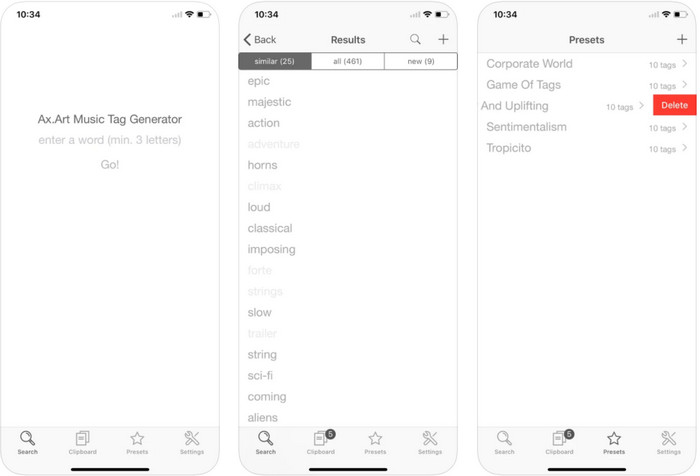
Dispozitive compatibile: iOS
Stele în Play Store: 4,5 stele
Recenzii sau evaluări: 55 de persoane
Deși popularitatea Music Tag Generator nu este la fel de mare ca a altor editori, cu el poți totuși vedea și edita ce înseamnă un tag într‑o melodie. Acest instrument este mica ta aplicație utilitară pentru a găsi și aranja piesele muzicale după taguri. Pe lângă aranjarea tagurilor, poți folosi aplicația și pentru a schimba metadatele în funcție de nevoile tale și pentru a le organiza. Deși aplicația te poate ajuta să editezi, tot nu este la fel de bună ca alți editori menționați în acest articol. Are o interfață simplă, dar funcțiile sale nu sunt atât de cuprinzătoare pe cât te‑ai aștepta.
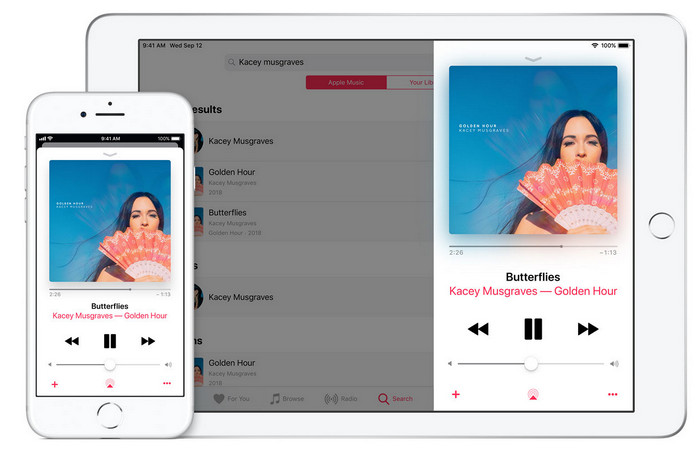
iTunes
Dispozitive compatibile: iOS
Stele în Play Store: 4,9 stele
Recenzii sau evaluări: 1,4k de persoane
Această aplicație are o bibliotecă de muzică încorporată pe care o puteți cumpăra, descărca și utiliza. iTunes nu este aplicația ta obișnuită de editare a metadatelor pe care o poți folosi pe iOS, deoarece această aplicație este cunoscută pentru stocarea muzicii precum ceea ce poate oferi Spotify. Deși muzica pe care o puteți găsi în această aplicație are metadate și etichete, puteți modifica sau actualiza etichetele în funcție de dorința dvs. Cu toate acestea, nu puteți edita sau actualiza cu ușurință etichetele cu această aplicație, deoarece există o cerință de care veți avea nevoie înainte de a învăța cum să etichetați muzica în iTunes.
Cele mai multe dintre aplicațiile menționate aici au o etichetă automată, care vă poate ajuta să adăugați automat etichete sau metadate la fișierul audio pe care îl aveți. Cu toate acestea, această caracteristică are defecte, spre deosebire de adăugarea manuală a etichetelor care nu au legătură în fișierul dvs. Dacă doriți să evitați aceste greșeli, să trecem la cel mai bun editor de etichete muzicale de pe computer citind partea 2.
Partea 3. Întrebări frecvente despre Music Tag Editor
Ce este eticheta ID3?
Puteți vedea aceste etichete ID3 adesea pe muzică, deoarece dețin date despre fișierul media, în special audio. Adăugând etichete ID3 la fișierul dvs. audio, puteți aranja fișierul în funcție de playerul media pe care îl utilizați.
Înregistrarea audio pe telefoane are etichete?
Da, are etichete și metadate. Cu toate acestea, etichetele nu sunt cuprinzătoare ca și celelalte fișiere media.
De ce fișierul meu audio devine corupt după adăugarea metadatelor?
Motivul pentru care sunetul este corupt nu se referă la metadatele pe care le adăugați sau le eliminați, ci este vorba despre instrumentul pe care l-ați folosit pentru a edita etichetele fișierului dvs. Deci, dacă doriți să evitați această circumstanță, trebuie să alegeți instrumentul perfect care vă va ajuta să adăugați sau să eliminați metadate cu ușurință. Și amintiți-vă, dacă procesul începe, asigurați-vă că nu veți anula procesul de editare a metadatelor,
Concluzie
Acum trebuie să alegi ce aplicație poți folosi pentru a edita metadatele muzicale; asigură‑te că selectezi aplicația disponibilă pentru platforma ta, ca să o poți descărca ușor din Play Store sau App Store. Dar dacă simți că ai nevoie de un instrument care oferă cele mai bune performanțe, atunci trebuie să folosești instrumentul suprem pentru desktop. FVC Video Converter Ultimate oferă cel mai bun mod de a adăuga cu ușurință taguri la muzica ta. Însă, înainte de a putea folosi acest instrument, trebuie mai întâi să îl descarci și să urmezi instrucțiunile prezentate în partea a 2‑a. Pentru a afla mai multe, citește cu atenție.
-
 Cele mai simple 5 moduri de a elimina metadatele din orice fișier media
 Cum să eliminați metadatele? Este greu să o faci? Trebuie să cumpăr sau să folosesc un instrument gratuit pentru a elimina etichetele? Toate aceste întrebări au răspunsuri în acest articol.
-
 Top 5 extractoare de metadate disponibile online și offline [2022]
 Puteți găsi mai multe extractoare de metadate pe piață, dar astăzi alegem doar cele cinci extractoare de etichete cele mai alese în funcție de public.
-
 Top 5 editori de metadate video pentru 2022 [Recenzie imparțială]
 Doriți să vedeți metadatele video? Dacă da, citiți detaliile de mai jos pentru a înțelege pe deplin subiectul și pentru a afla care instrument vi se potrivește cel mai bine.
