


 Video Converter Ultimate
 Screen Recorder
 Reparație video
 Descărcare sigură
Cum să unpixelați rapid o imagine cu 3 cele mai bune soluții de utilizat
Dezpixelarea imaginii este soluția de care ai nevoie pentru a oferi un „makeover” unei imagini care a ajuns să fie pixelată sau dacă imaginea ta este bitmap, cu mici pătrățele vizibile. Mulți utilizatori cred că este complicat să modifici, ajustezi, schimbi și îmbunătățești imaginea; în mod sincer, așa era, dar asta ținea de trecut. Cu tehnologia avansată la care avem acces, această sarcină a devenit ușor de rezolvat atunci când folosești instrumentul potrivit.
Nu aveți instrumentul potrivit pentru a elimina pixelarea de pe fotografia dvs.? Din fericire, acest articol vă va aduce cele mai bune trei software-uri pe care le-am găsit, care vă pot ajuta să editați pixelarea fotografiei și un tutorial despre fiecare pentru a rezolva problema.

Partea 1. Cum să eliminați pixelul unei imagini online cu cel mai bun editor de fotografii [Recomandat]
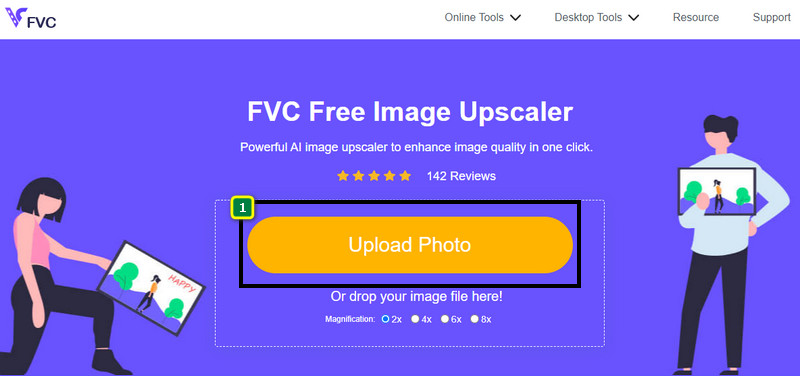
FVC Free Image Upscaler este un instrument online complet automatizat pe care îl poți folosi pentru a dezpixeliza imagini online, gratuit. Îl poți deschide în orice browser web la care ai acces – nu este nevoie să descarci niciun launcher pentru a-l porni, astfel că poți folosi acest instrument imediat ce îl accesezi. Chiar dacă acest software este disponibil pe web, puterea și performanța lui în dezpixelizarea imaginilor sunt la același nivel cu cele ale celor mai profesionale editoare de imagini pe care le poți folosi, fie online, fie offline. Poate crezi că vei avea dificultăți în utilizarea acestui instrument, dar nu va fi cazul. Încă nu ești convins? Atunci poți citi sau urma tutorialul de mai jos pentru a primi un ghid pas cu pas despre cum să folosești ușor acest instrument.
Pasul 1. Poți accesa acest instrument web în orice browser ai pe dispozitiv, căutându-i numele sau făcând clic pe acest link pentru a deschide site-ul principal.
Pasul 2. Odată ajuns în instrumentul web, apasă pe Add Image pentru a încărca imaginea pixelată. Un folder de fișiere va apărea pe ecran; poți începe să cauți imaginea salvată în unitatea ta locală, apoi apasă Open pentru a o încărca.
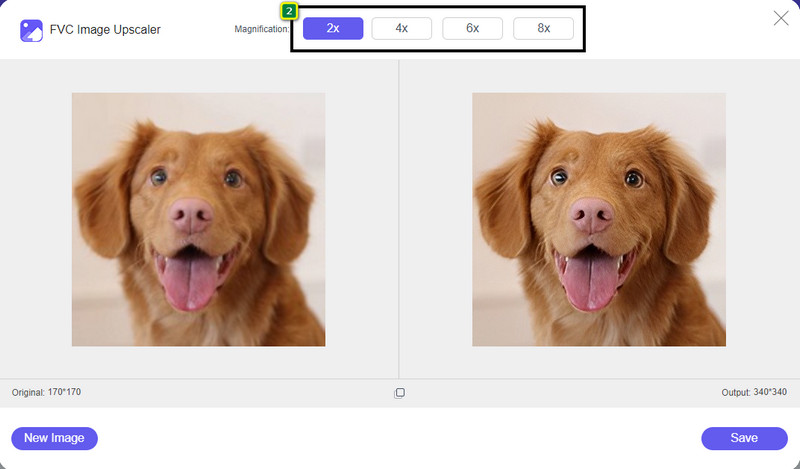
Pasul 3. Apoi, alege opțiunea de mărire pe care vrei să o aplici imaginii pentru a netezi aspectul, astfel încât să nu mai pară bitmap, cu acele pătrățele mici vizibile.
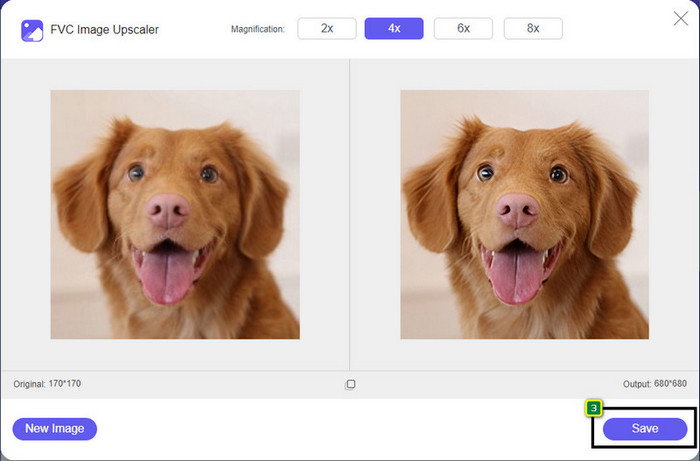
Pasul 4. Atât de simplu: fă clic pe Save pentru a descărca în unitatea locală versiunea dezpixelată.
Partea 2. Cum să eliminați pixelul unei imagini offline folosind 2 moduri pe Windows și Mac [Ușor]
Pixbim - Unpixelați fotografii pe Windows
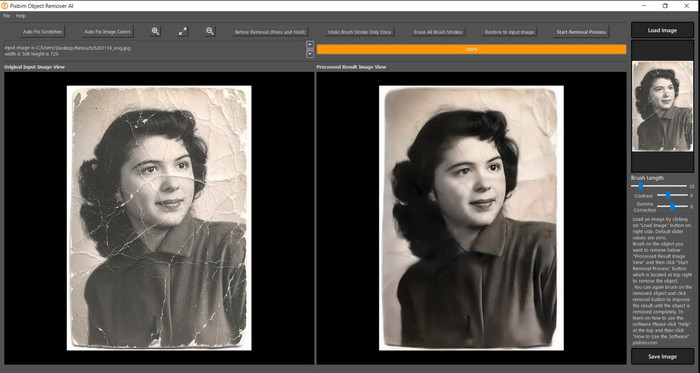
Pixbim este unul dintre cele mai puternice programe de dezpixelizare a imaginilor, bazat pe inteligență artificială, pe care îl poți descărca pe Windows pentru a remedia această problemă. Acest editor merită menționat în acest articol deoarece rezolvă imaginile pixelate rapid și eficient. Cu ajutorul lui, AI îți ajustează parametrii, astfel încât să nu ai complicații la utilizarea software-ului. Din cauza funcțiilor și caracteristicilor sale, trebuie să cumperi o cheie de licență pentru a continua să îl folosești după perioada de probă gratuită. Poate fi costisitor pentru mulți dintre cei care îl doresc pe PC-urile lor.
Pasul 1. După ce ai descărcat software-ul, trebuie să îl lansezi pentru a putea trece la pasul următor.
Pasul 2. Apasă pe Load Image pentru a adăuga aici imaginea pixelată pe care vrei să o îmbunătățești.
Pasul 3. După aceea, ajustează parametrii trăgând de sliders în funcție de valorile pe care vrei să le obții.
Pasul 4. După ce ai terminat de ajustat imaginea, salvează acum rezultatul pentru a-l exporta.
Editor foto Movavi [Windows și Mac]
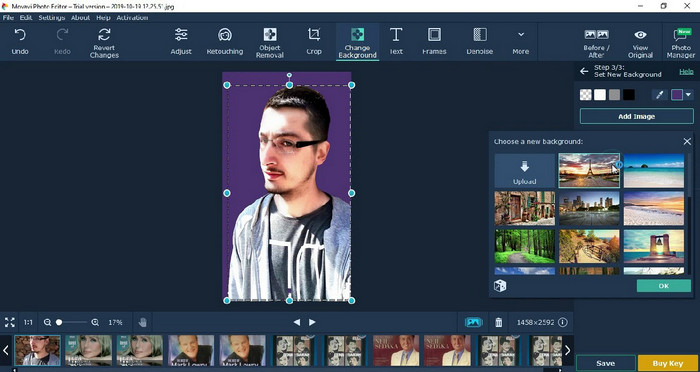
Mulți utilizatori au încercat deja să folosească Movavi Photo Editor datorită versatilității sale în editarea imaginilor. La fel ca Pixbim, poate reface pixelii pierduți ai imaginii cu ajutorul rețelelor neuronale din AI-ul său. Având acest editor la îndemână, poți realiza editări de bază și avansate ale aspectului, precum decupare, rotire, adăugare de filtre, repararea pixelilor și multe altele. Totuși, nu poți avea acces la toate aceste funcții dacă nu cumperi versiunea premium pe desktop.
Are un preț aproape similar cu Pixbim, care este destul de scump pentru mulți. Dar dacă aveți un buget pentru achiziționarea unui editor, acesta ar putea fi cel de care aveți nevoie. Aflați cum să unpixelați imagini cu această aplicație urmând pașii.
Pasul 1. Descarcă aplicația pe Windows sau Mac OS.
Pasul 2. Lansează software-ul, apoi încarcă aici fotografia pe care vrei să o dezpixelizezi.
Pasul 3. Acum că ai încărcat imaginea, fă clic pe Magic Enhance pentru ca imaginea să fie modificată automat de AI.
Pasul 4. Exportă imaginea și bucură-te de rezultat.
Partea 3. Întrebări frecvente despre cum să upixelate o imagine
De ce există un filigran pe imaginea nepixelată exportată?
Când utilizați o versiune de încercare gratuită a aplicației, există șansa ca aceasta să lase un filigran atunci când este exportată. Deci, dacă doriți să exportați o imagine fără filigran, puteți achiziționa licența aplicației sau puteți utiliza FVC Free Image Upscaler, deoarece nu va lăsa un filigran pe imaginea exportată.
Care este diferența dintre neclar și pixelat?
Multe articole au dovedit că încețoșarea și pixelat nu sunt aceleași din cauza unor factori. Imaginile neclare sunt motivul pentru care captați o mișcare de mare viteză sau faceți o fotografie cu o cameră tremurată. În timp ce este pixelat, când măriți un instantaneu, acesta va începe o pixelare și veți vedea un bitmap cu un pătrat mic.
Care este factorul care face ca imaginea să fie pixelată?
Unele motive transformă imaginile în pixeli; o cauză comună este atunci când măriți o imagine raster. Formatele raster, cum ar fi PNG, JPG, GIF și altele, sunt compuse din pătrate mici care construiesc aspectul obiectului stocat în aceste containere. De obicei, atunci când măriți imaginea, veți vedea că există pătrate, cunoscute sub numele de pixeli, care conțin date de culoare care devin prezentate vizual. Poate fi o problemă pentru mulți editori, mai ales când are loc pixelarea.
Cum pot remedia zgomotul imaginii?
Este o altă problemă frecventă pe care o poți întâlni la fotografia realizată, iar soluția de care ai nevoie s-ar putea găsi în acest articol. Fă clic pe acest link pentru a citi ușor, a rezolva și a învăța cum să elimini zgomotul din imagine.
Concluzie
Atât de simplu: acum poți dezpixeliza cu ușurință o imagine cu ajutorul celui mai bun editor foto pe care îl poți descărca sau folosi pe web. Problema este rezolvată! Așadar, dacă te confrunți vreodată cu o problemă de pixelare, te poți baza pe acest articol pentru a te ajuta. Cel mai bun instrument de care ai putea avea nevoie este aici și gata să te sprijine, cum este și FVC Free Image Upscaler. Cel mai bine este să ajustezi imaginea prin repararea pixelării din aspect, astfel încât aceasta să nu mai fie vizibilă pentru toți. Spune adio pixelării atunci când folosești acest editor de imagini online.
-
 7 Image Upscaler pe care le puteți folosi pentru a îmbunătăți și a îmbunătăți fiecare imagine [2022]
 Ai nevoie de upscaler de imagine? Din fericire, acest articol acoperă cel mai bun software pe care îl puteți accesa și descărca de pe desktop.
-
 5 îmbunătățitori de rezoluție a imaginii pe care trebuie să-i folosiți acest 2022 [Ultimele alegeri]
 Nu știți ce îmbunătățitor de rezoluție a imaginii ar trebui să utilizați? Citiți acest articol în timp ce trecem în revistă cinci instrumente pentru a utiliza și a îmbunătăți rezoluția imaginilor.
-
 4 aplicații pentru a crește rezoluția imaginii pe dispozitivele dvs. mobile [Cea mai bună alegere]
 Veți avea nevoie de aplicații pentru a vă crește rezoluția foto dacă doriți să obțineți 1080p, 4k sau așa ceva. Cu lista de mai jos o poți face cu ușurință!
