


 Video Converter Ultimate
 Screen Recorder
 Reparație video
 Descărcare sigură
Sfaturi și trucuri pentru a elimina eficient filigranul Powtoon de pe videoclipuri
Ai creat vreodată animația perfectă, iar când ai exportat‑o, Powtoon a adăugat un filigran? Situații ca aceasta apar cel mai des dacă folosești versiunea gratuită a aplicației. Ți‑a stricat filigranul videoclipul? Nu te mai îngrijora! Poți învăța cum să elimini filigranul Powtoon folosind diferitele metode pe care le‑am inclus aici.

Partea 1. Cum să eliminați filigranul Powtoon fără abonament [alegerea editorului]
FVC Video Converter Ultimate este mai mult decât o soluție completă pe care o poți descărca pe Windows sau Mac pentru a elimina filigranul Powtoon. Chiar dacă nu ai experiență în eliminarea filigranului de pe videoclipurile pe care le creezi, tot vei reuși să faci acest lucru aici. Convenabil și rapid – asta vrea FVC să experimentezi când folosești acest software, și a reușit foarte bine. Așadar, dacă vrei să vezi cum se elimină filigranul, poți urma pașii pe care i‑am adăugat mai jos.
Pași pentru a elimina filigranul Powtoon folosind FVC Video Converter Ultimate:
Pasul 1. Poți avea cel mai impresionant software de editare video pe Windows și Mac făcând clic pe butonul de descărcare de mai jos. După aceea, instalează programul, fă configurarea rapidă și pornește software‑ul.
Descărcare gratuită pentru Windows 7 sau o versiune ulterioară Descărcare securizată
Descărcare gratuită pentru MacOS 10.7 sau o versiune ulterioară Descărcare securizată
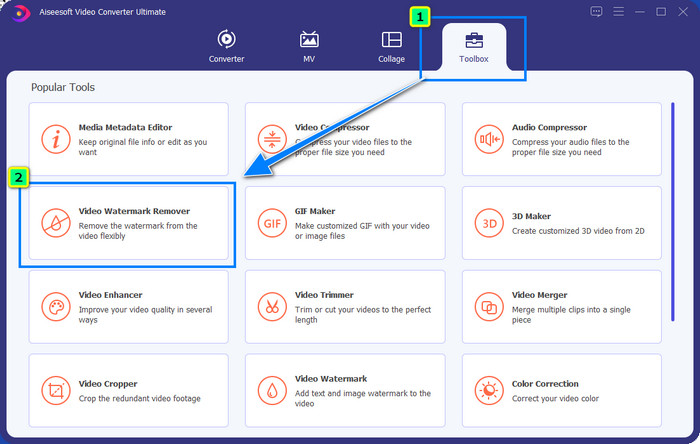
Pasul 2. În Toolbox, fă clic pe Video Watermark Remover pentru a elimina filigranul pe care Powtoon îl adaugă videoclipului tău editat.
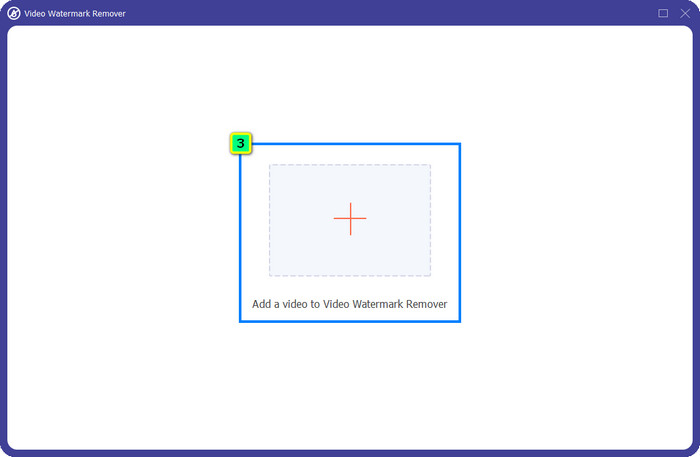
Pasul 3. Apoi apasă pictograma + pentru a încărca videoclipul pe care vrei să‑l editezi, selectează fișierul video din folderul care apare și apasă Open.
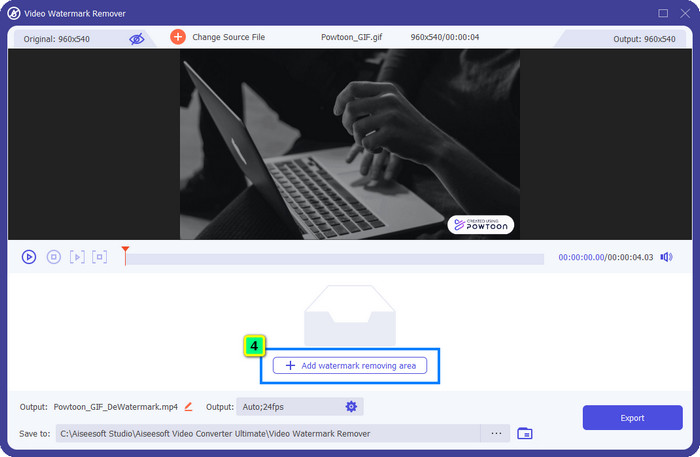
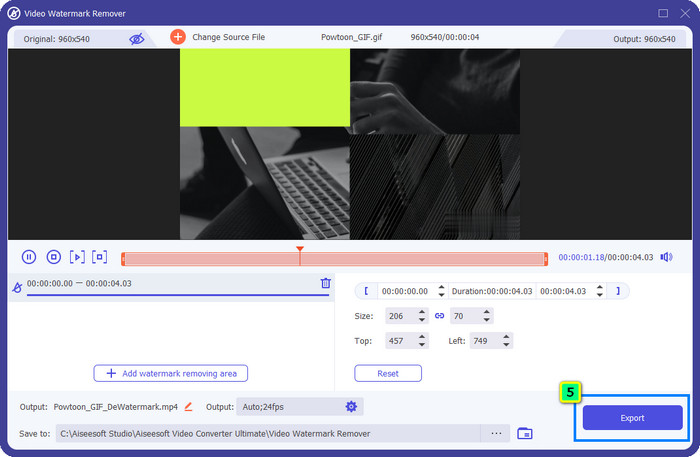
Pasul 4. Apasă Add Watermark Removing Area și poziționează caseta de selecție peste filigran; o poți ajusta după nevoie.
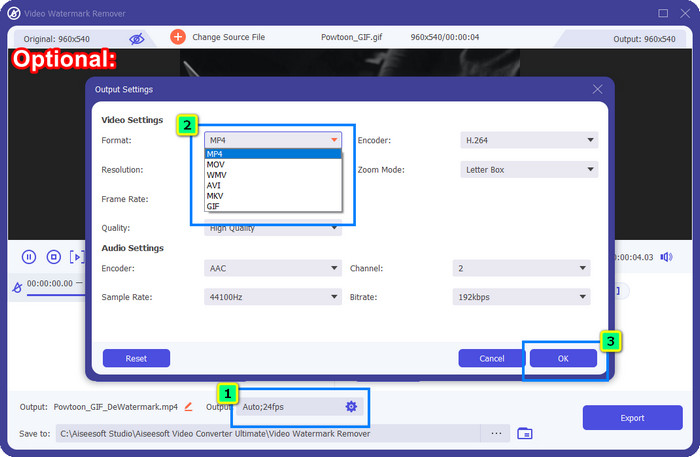
Opțional: Vrei să salvezi rezultatul final într‑un nou format? Fă clic pe Output la Format și alege noul format video dorit. Poți ajusta și alte setări video și audio, apoi fă clic pe OK pentru a salva modificările.
Pasul 5. Apasă butonul Export pentru a descărca videoclipul de pe care ai eliminat filigranul.
Partea 2. Cum să eliminați filigranul Powtoon cu abonament [pe bază de plan]
Powtoon are filigran? Da, adaugă un filigran atunci când utilizați versiunea gratuită. Dar dacă achiziționați Pro sau Pro+, puteți exporta rezultatul final fără filigran. Deci, dacă doriți să știți cum să cumpărați software-ul pentru a vă bucura de videoclipul pe care l-ați editat fără filigran, urmați pașii de mai jos.
Pași despre cum să achiziționați planul Powtoon Pro și Pro+:
Pasul 1. Deschide site‑ul oficial Powtoon și fă clic pe Pricing pentru a vedea prețurile versiunii pro.
Pasul 2. Alege planul pe care îl preferi, Pro sau Pro+, și fă clic pe Get Plan.
Pasul 3. Completează detaliile de facturare necesare, mergi la Metoda de plată și fă clic pe Make Secure Payment.
Partea 3. Cum să eliminați Powtoon Watermark Online gratuit [Serviciul web]
1. Media.io - Watermark Remover
Media.io - Watermark Remover poate elimina gratuit filigranul Powtoon. Este disponibil în orice browser web, ceea ce înseamnă că nu trebuie să descarci această aplicație pentru a o folosi. Deși eliminarea filigranului este gratuită, tot vei avea nevoie de o conexiune la internet stabilă pentru a o folosi. Procesul de încărcare și descărcare durează mai mult comparativ cu primul program de eliminare a filigranului pe care l‑am prezentat aici. Cu toate acestea, acest software este o alegere excelentă pentru tine, iar dacă vrei să afli cum să‑l folosești, urmează pașii de mai jos.
Pași pentru a elimina filigranul Powtoon folosind Media.io:
Pasul 1. Deschide pagina web și fă clic pe Choose File pentru a adăuga videoclipul de pe care vrei să elimini filigranul. Așteaptă procesul de încărcare, deoarece poate dura destul de mult, în funcție de conexiunea la internet.
Pasul 2. Apasă Add Area și poziționează zona de eliminare a filigranului acolo unde se află filigranul.
Pasul 3. Apasă Export pentru a salva videoclipul Powtoon editat pe unitatea ta locală – atât de simplu.
2. Kapwing
Kapwing este un alt instrument web specializat care poate elimina filigranul din videoclipul tău prin decupare. De asemenea, oferă funcții suplimentare de editare pe care le poți folosi pentru a crea un videoclip deosebit, aproape la fel ca în Powtoon. Spre deosebire de alte soluții pentru filigrane pe care le‑am adăugat, acest software modifică dimensiunea videoclipului, deoarece decupezi zona cu filigranul. Dacă nu te deranjează să reduci dimensiunea videoclipului, urmează pașii de mai jos pentru a scăpa de filigranul Powtoon.
Pași pentru a decupa filigranul Powtoon folosind Kapwing:
Pasul 1. Folosind browserul tău, caută programul și deschide‑l.
Pasul 2. Fă clic pe Add Media pentru a importa videoclipul pe care vrei să‑l decupezi aici.
Pasul 3. După ce ai plasat materialul video, fă clic pe Crop pentru a ajusta raportul conform dimensiunii dorite.
Pasul 4. Dacă vrei să salvezi rezultatul final, fă clic pe Done Cropping.
Partea 4. Întrebări frecvente despre cum să eliminați filigranul Powtoon
Care este cea mai bună platformă pentru a crește rezoluția video pe Powtoon?
Există milioane de moduri de a crește rezoluția video a proiectului tău Powtoon. Totuși, unele nu funcționează așa cum te‑ai aștepta. Așadar, în loc să îți încerci norocul, vom face noi partea dificilă pentru tine, iar tu trebuie doar să petreci câteva minute citind acest articol. Alege care dintre cele 8 convertoare de rezoluție video îți satisface cel mai bine nevoile.
Cum să adăugați un filigran la un videoclip?
Cel mai bun mod de a adăuga un filigran pe un videoclip este cu ajutorul unui software, fie că este vorba de text, logo, ștampilă, dată și oră sau altceva. Dacă ai timp liber, poți încerca să citești și să înțelegi cum să adaugi filigrane pe diferite platforme cu ușurință.
De ce este Powtoon scump?
Powtoon s-a scumpit din cauza editării animației pe care o oferă, pe care nu o puteți avea în mare parte într-un alt editor video, fie online, fie offline. Este, de asemenea, în mișcare, așa că nu ar fi nevoie să instalați un lansator pentru a începe să îl utilizați. Cu toate acestea, prețul acestuia nu este accesibil pentru mulți. În loc să utilizați versiunea gratuită Powtoon și să aveți un filigran, încercați să utilizați cea mai bună alternativă de editor video, FVC Video Converter Ultimate. Oferă o multitudine de caracteristici și funcții pe care cu siguranță vă puteți bucura de utilizare.
Concluzie
Poți salva videoclipuri din Powtoon fără filigran, însă trebuie să cumperi un abonament ca să poți salva videoclipul editat fără niciun filigran atașat. Nu îți surâde ideea de a cumpăra un plan? Atunci încearcă să folosești programele online de eliminare a filigranului pe care le‑am prezentat. Conexiunea la internet este lentă? Atunci îți recomandăm să folosești FVC Video Converter Ultimate pentru a elimina rapid și profesional filigranul de pe videoclip. Comparativ cu milioane de programe, FVC Video Editor oferă cea mai eficientă soluție pentru a elimina orice element din videoclipul tău. De asemenea, îl poți ajusta folosind funcțiile și instrumentele pe care acest software le pune la dispoziție.
-
 Eliminați cu ușurință filigranul din PDF cu pași simpli
 Eliminați filigranul din PDF urmând acești pași simpli. Aflați cum să eliminați cu ușurință filigranele din fișierul PDF folosind aceste instrumente uimitoare.
-
 Modalități ușoare de a elimina filigranul din imaginile de absolvire
 Doriți să aflați cele mai bune modalități de a elimina filigranele din imaginile de absolvire? Citind acest articol, veți putea ști cum să eliminați cu ușurință filigranele de pe fotografiile de absolvire.
-
 Cum să eliminați filigranul din videoclip utilizând Final Cut Pro [Ghid complet]
 Ai o problemă cu filigranul de pe videoclipuri? Nu am spus mai mult, pentru că am oferit un tutorial despre cum să eliminați filigranul din videoclip folosind Final Cut Pro.
