


 Video Converter Ultimate
 Screen Recorder
 Reparație video
 Descărcare sigură
Modalități minunate de a converti GIF în DivX în câteva minute
Nowadays, different file formats are used on the internet. One of the popular file formats for web graphics that we have now is the GIF, which is usually entertaining to view. However, there are some instances where a GIF file format is not supported on other devices. Sometimes, you need a file format supported by many devices like DivX. In that case, if you want to dig deeper into this post, you must read this article to get a piece of information about how to convert GIF to DivX instantly.

Partea 1: Introducere în GIF și DivX
Graphics Interchange Format, or GIF, is a popular format for web graphics. It can be animated, often used primarily to display basic animation on your websites. GIFs also include transparent pixels, letting them blend with other colors. In addition, if you observe some pictures moving repeatedly, then there is a possibility that the image is a GIF format. DivX file is another file format recognized by other electronic consumer devices, video playback software, and DVD Players. This file is also known as the DivX-Encoded Movie File, which is classified as a video file. Other devices also support it. Therefore, read the other essential points below if you want to convert GIF to Divx.
Partea 2: Program pentru a converti GIF și DivX fără a pierde calitatea
Suppose you are looking for a good and fantastic converter that can convert GIF to DivX without losing the quality. In that case, the best application you can use is Video Converter Ultimate. This reliable application can support different file formats, such as MKV, MOC, GIF, MTS, M2TS, MPEG, FLV, XVID, MTS, DivX, AVI, and more. In addition, aside from converting, this application has many different features and tools you can use, like a video speed controller, video watermark remover, video enhancer, GIF maker, collage maker, video reverser, video trimmer, audio compressor, video compressor, and more. Moreover, this application is free and accessible on both Windows and Mac. Lastly, Video Converter Ultimate is easy to utilize and has a simple interface, which is suitable for new users.
Funcții cheie
Aplicația nu este numai excelentă la conversia fișierelor, dar are și multe caracteristici de care vă puteți bucura.
◆ Oferă multe opțiuni pentru îmbunătățirea videoclipurilor/audioului.
◆ Personalizați-vă videoclipul.
◆ Vă permite să editați rata de biți a videoclipului.
◆ Vă permite să editați rezoluția și rata de cadre a videoclipului dvs.
Pro
- Potrivit pentru începători.
- Are un proces de salvare rapid.
- Conversia este stabilă și sigură.
- Nu s-a aplicat filigran.
- Disponibil atât pe Windows, cât și pe Mac.
- Usor de utilizat.
Contra
- Achiziționați software-ul pentru funcții mai avansate.
Dacă doriți să convertiți fișierul GIF în DivX folosind Mac sau Windows, urmați acești pași simpli și simpli de mai jos.
Step 1: Download the Video Converter Ultimate on your Mac or Windows. After the process, launch the application.
Descărcare gratuită pentru Windows 7 sau o versiune ulterioară Descărcare securizată
Descărcare gratuită pentru MacOS 10.7 sau o versiune ulterioară Descărcare securizată
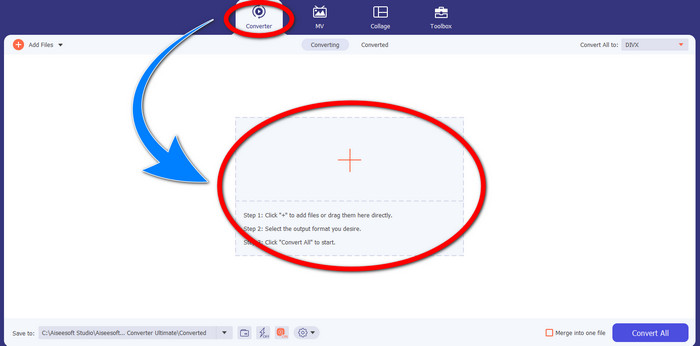
Step 2: After you open the Video Converter Ultimate, click the Converter > Plus sign button to attach the GIF file you want to convert.
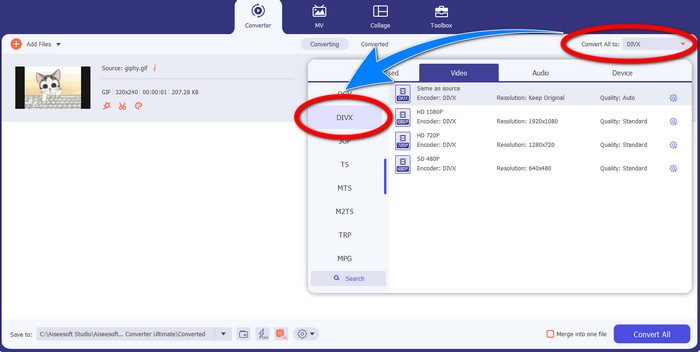
Step 3: When you have already added the GIF, click the Convert All to button, then choose the DivX file with your selected quality, such as 480p, 720p, and 1080p.
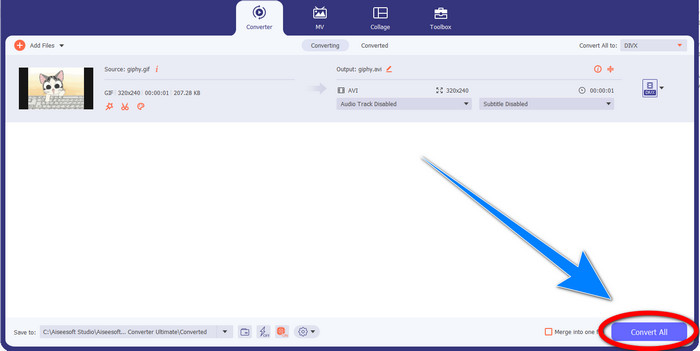
Step 4: After changing the file format from GIF to DivX, click the Convert All button to save your final output.
Partea 3: Convertor online pentru a schimba GIF în DivX
Convertio is an online tool you can use to convert GIFs to DivX file format. This software is capable of converting a specific file format to different formats. Moreover, it has many features, especially converting, like an audio converter, image converter, font converter, ebook converter, presentation converter, and more. In addition to that, you can utilize this software for free, and you can also purchase a subscription for more benefits. Also, you don’t need to worry about your files because it is safe and secured. The file you are converting will be automatically deleted after 24 hours. However, the free version is only limited. You can only have a few features that you can use and a limited file size that you can save. If you are interested in knowing about converting GIF to DivX, follow the given steps below.
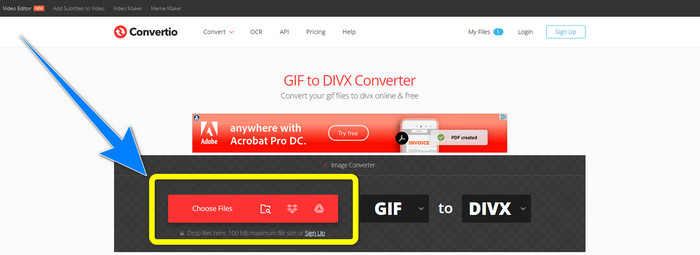
Step 1: Proceed to the website of Convertio. Then, click the Choose Files button to attach the GIF file you want to convert.
Step 2: After attaching your GIF file, you can change the format to DivX by choosing the format options.
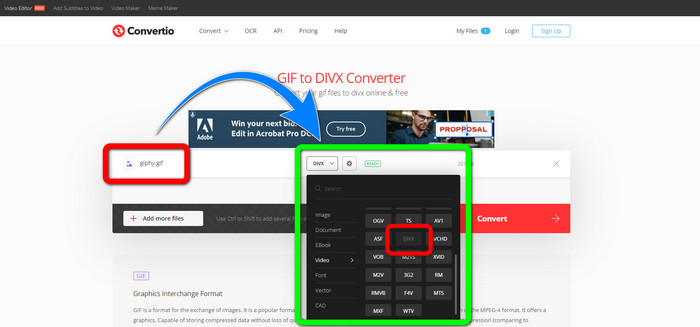
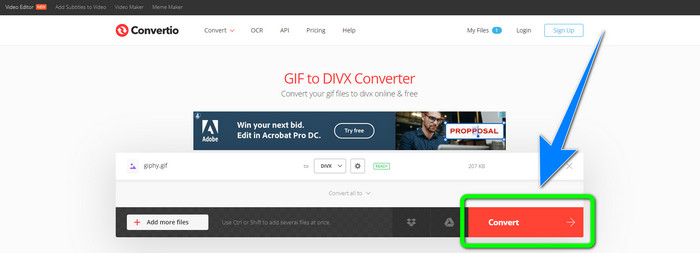
Step 3: When you are done choosing DivX on the format options, click the Convert button to convert the GIF to DivX. Then, you can already save your final output on your device.
Legat de:
[Offline/Online] Most Used AVI to DivX Converters You Should Know
How to Convert MKV to DivX Online and Offline for Free
Partea 4: Întrebări frecvente despre conversia GIF în DivX
De ce ar trebui să convertesc un anumit fișier în alte formate de fișiere?
Unul dintre motivele pentru care trebuie să convertiți un anumit fișier într-un alt format de fișier este că există fișiere care nu sunt acceptate de dispozitiv, care vor deveni incompatibile și nepotrivite. În acest fel, o aplicație cu convertor este esențială pentru a schimba formatul fișierului specific pentru a-l potrivi pe dispozitivul pe care îl utilizați.
Îmi pot converti sunetul folosind aplicația Convertio?
Da, desigur. De asemenea, Convertio nu este de încredere numai în conversia formatelor de fișiere de imagine și video. Această aplicație poate fi considerată și un convertor audio.
Care este cel mai bun și mai de încredere convertor video pe care îl pot folosi pentru Mac-ul meu?
If you are looking for a great and remarkable application with a file converter, then you must use Video Converter Ultimate. It is suitable for editing and converting your video file using your Mac.
Există o aplicație grozavă cu un convertor video pe care să o pot folosi pentru telefonul meu?
Da este! Software-ul cu convertor video nu este accesibil doar pentru computere, ci există și aplicații pe care le puteți găsi în magazinul de jocuri sau browsere pentru a converti fișiere folosind telefonul dvs., cum ar fi Android.
Există un convertor video pentru iOS-ul meu?
Categoric da. Există un convertor video pe care îl puteți folosi pentru iOS. Lucrul bun de făcut este să te uiți la magazinul tău de aplicații. Căutați convertorul video, căutați aplicațiile care apar pe rezultate și încercați-le.
Concluzie
As written in the information above, you can conclude that converting a file into a different file format is important. Some formats are incompatible or unsuitable for your devices, so you must convert them to another file format. Also, this article provided two excellent and effective ways to convert GIF to DivX on Windows, Mac, and online. If you desire to convert more files, then the best software you can use is the Video Converter Ultimate. You can utilize this application quickly and convert files faster than other applications.
-
 Cum să convertiți M4V în DivX gratuit pe Mac [Cele mai bune instrumente]
 Căutați modalități de a converti M4V în DivX gratuit? Am enumerat cele mai bune convertoare pentru a vă converti fișierul M4V în DivX pe Mac.
-
 Convertoare WMV în DivX gratuite Alegerea de top a utilizatorului
 Iată cele mai bune convertoare gratuite WMV în DivX pe care utilizatorii le folosesc în cea mai mare parte. Acest articol vă oferă cele mai bune modalități de a vă converti fișierul WMV în DivX.
-
 Top 5 cele mai bune convertoare gratuite de MPEG în DivX pentru Windows și Mac
 Convertiți cu ușurință fișierul MPEG într-un fișier DivX folosind cele mai bune convertoare MPEG în DivX. Citiți acest articol pentru a afla mai multe detalii despre ele.
