


 Video Converter Ultimate
 Screen Recorder
 Reparație video
 Descărcare sigură
Convertiți DIVX în 3GP cu cele mai eficiente proceduri
Nu poți reda fișierul tău video DIVX pe dispozitiv pentru că nu este acceptat? Majoritatea oamenilor au aceeași problemă. Dar ești norocos, deoarece vom discuta cea mai eficientă și mai ușoară metodă de a converti DIVX în 3GP. Nu rata această șansă și află mai multe despre conversia diferitelor fișiere folosind diverse aplicații de încredere și testate pe care ți le vom prezenta.

Partea 1: Cel mai bun software pentru a converti DIVX în 3GP
Vrei să convertești DIVX în 3GP pe dispozitivele tale, cum ar fi calculatoarele cu Windows și Mac? Atunci problema ta este deja rezolvată. Pentru a-ți converti fișierul DIVX, poți folosi Video Converter Ultimate. După cum sugerează și numele, este o aplicație completă cu ajutorul căreia poți converti peste 1000 de formate de fișiere video, inclusiv DIVX, 3GP, MP4, MOV, MTS, WEBM și multe altele. De asemenea, poți converti două sau mai multe fișiere simultan, deoarece acest instrument oferă conversie în lot. În plus, Video Converter Ultimate are un proces de conversie rapid, ceea ce este excelent dacă intenționezi să convertești numeroase formate de fișiere.
În plus, puteți utiliza în continuare această aplicație offline dacă sunteți interesat să editați fișierul DIVX înainte de a-l converti. Presupunând că doriți să corectați culoarea videoclipului, puteți trece la panoul Caseta de instrumente și puteți selecta instrumentul de corecție a culorii pentru a ajusta luminozitatea, contrastul și saturația videoclipului. Mai mult, să presupunem că doriți să sincronizați sunetul în fișierul video DIVX înainte de a-l converti. În acest caz, puteți face acest lucru deoarece oferă o funcție de sincronizare audio, astfel încât sincronizarea audio cu video este ușoară pentru dvs.
Funcții:
◆ Convertiți formate de fișiere video, inclusiv MP4, M4V, FLV, AVI etc.
◆ Poate crea videoclipuri muzicale cu diverse teme.
◆ Caseta de instrumente conține un amplificator video, un dispozitiv de îndepărtare a filigranelor, un compresor și multe altele.
◆ Capabil să realizeze un colaj.
Pro
- Acceptă diverse formate de fișiere, cum ar fi MP4, AVI, FLV, MOV, MTS, DIVX, 3GP etc.
- Are o interfață de utilizator prietenoasă, potrivită pentru începători.
- Are un proces de conversie de 30 de ori mai rapid
- Accesibil atât pe Windows, cât și pe Mac.
- Poate converti mai multe videoclipuri dintr-o singură mișcare.
Contra
- Cumpărați Video Converter Ultimate pentru a vă bucura de mai multe funcții unice.
Pentru a converti cu ușurință DIVX în 3GP, trebuie să urmați aceste ghiduri simple de mai jos.
Pasul 1: Mai întâi, trebuie doar să descarci Video Converter Ultimate pe dispozitivele tale, cum ar fi calculatoarele cu Windows sau Mac. Apoi, parcurge procesul de instalare și deschide aplicația.
Descărcare gratuită pentru Windows 7 sau o versiune ulterioară Descărcare securizată
Descărcare gratuită pentru MacOS 10.7 sau o versiune ulterioară Descărcare securizată
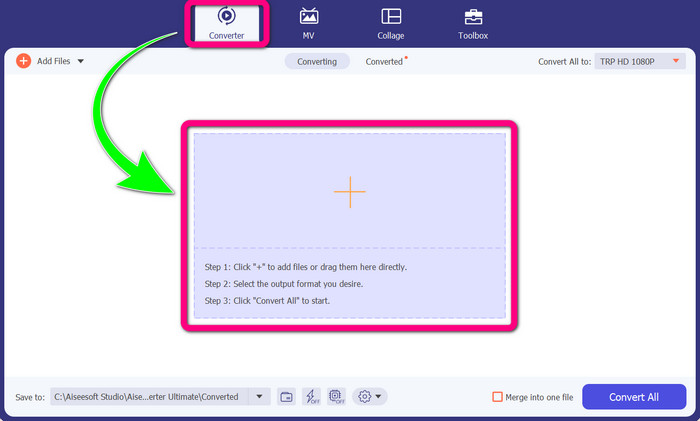
Pasul 2: După ce ai deschis Video Converter Ultimate pe dispozitiv, selectează panoul Converter. Apoi, dă clic pe pictograma + pentru a adăuga fișierul tău video DIVX.
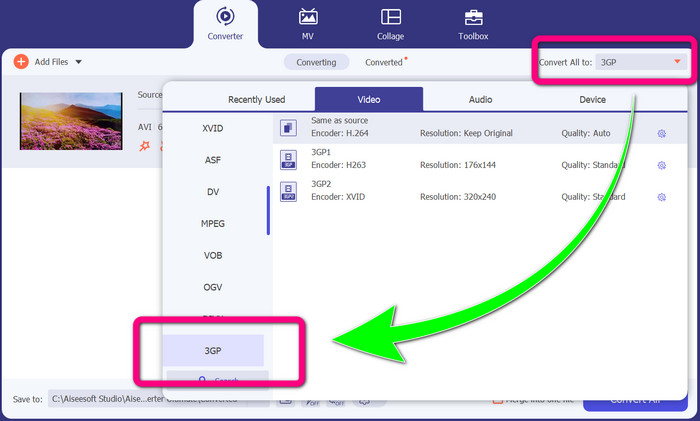
Pasul 3: După ce ai adăugat fișierul video, dă clic pe opțiunea Convert all to, caută formatul de fișier 3GP și selectează-l.
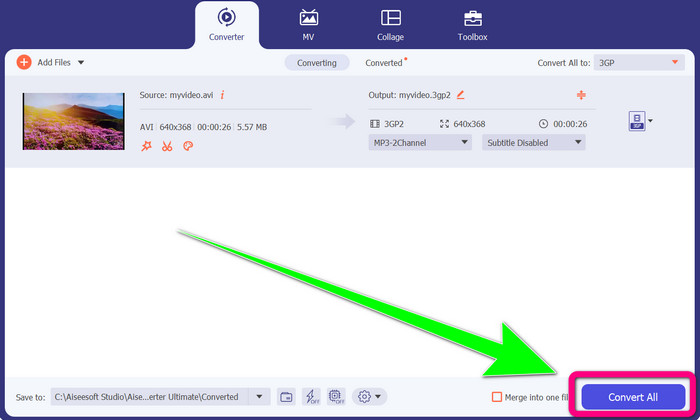
Pasul 4: După ce ai terminat de selectat formatul de fișier 3GP, dă clic pe butonul Convert All. Așteaptă finalizarea procesului de conversie și salvează fișierul video final pe dispozitiv.
Partea 2: Convertoare online excelente pentru a converti DIVX în 3GP
Folosind FVC Free Video Converter Online
Unul dintre cele mai bune instrumente online pentru a converti DIVX în 3GP este FVC Free Video Converter Online. Acest instrument te poate ajuta să convertești diferite formate de fișiere în doar câteva clicuri. Suportă aproape toate formatele video și audio populare către MP4, MOV, MKV, FLV, VOB, MP3, AAC și altele. FVC Free Video Converter Online este simplu și ușor de utilizat. Chiar și începătorii pot folosi această aplicație. De asemenea, indiferent dacă ești utilizator de Windows sau de Mac, te poți baza pe acest instrument, deoarece este disponibil atât pe Windows, cât și pe Mac. Urmează metodele de mai jos pentru a converti DIVX în 3GP.
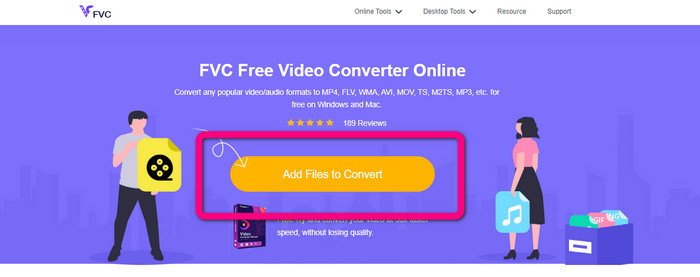
Pasul 1: Accesează FVC Free Video Converter Online. Apoi, selectează butonul Add Files to Convert pentru a importa fișierul DIVX pe care vrei să îl convertești.
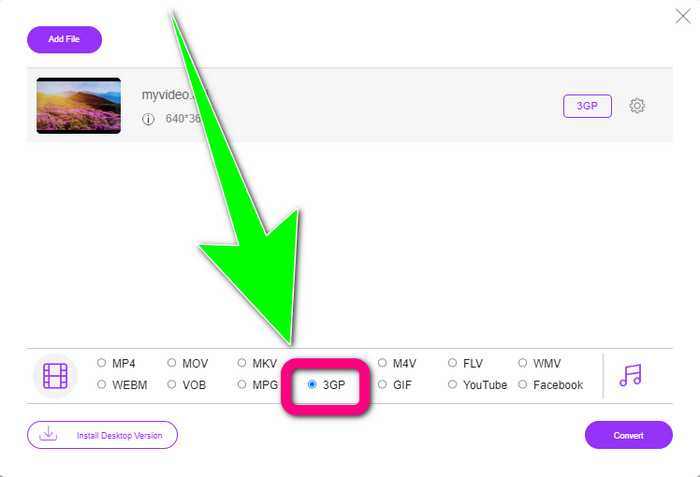
Pasul 2: După ce ai adăugat fișierul DIVX, dă clic pe formatul de fișier 3GP din opțiunile de format de mai jos.
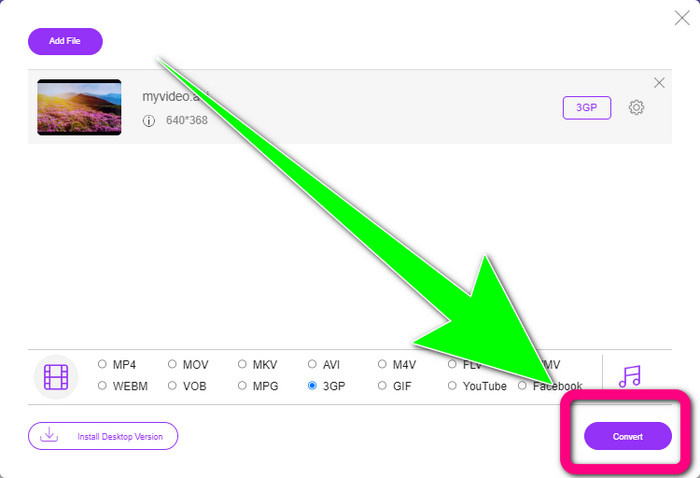
Pasul 3: Continuă dând clic pe butonul Convert. Așteaptă procesul de conversie și salvează videoclipul convertit.
Folosind Convertio
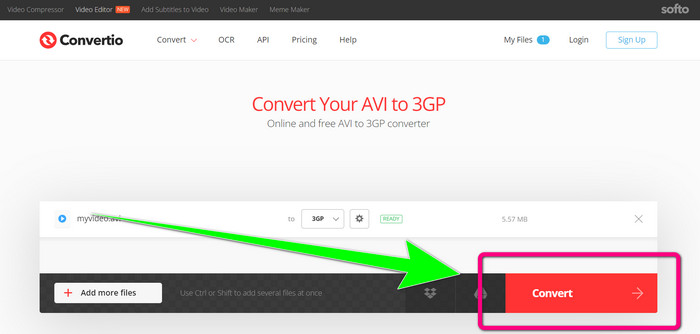
Dacă vrei să convertești DIVX în 3GP online, Convertio este unul dintre instrumentele pe care le poți folosi. Suportă multe formate, precum 3GP, DIVX, XVID, AVID, MP4, M4V, ASF, HEVC și altele. Pe lângă conversia fișierelor video, poți converti imagini, audio, documente, arhive și alte tipuri de fișiere. Convertio este, de asemenea, un instrument simplu, deoarece poți realiza conversia în câțiva pași, astfel încât nu trebuie să îți faci griji când convertești fișierul DIVX într-un fișier 3GP. Totuși, la fel ca și alte instrumente online, nu poți folosi acest software dacă nu ai acces la internet. De asemenea, există situații în care acest instrument online nu funcționează la capacitate maximă. Versiunea gratuită Convertio are o limitare: poți converti doar fișiere cu o dimensiune maximă de 100 MB. Trebuie să achiziționezi software-ul pentru a mări dimensiunea maximă a fișierului și pentru a beneficia de performanțe superioare. Urmează pașii de mai jos pentru a converti fișierul DIVX în format de fișier 3GP.
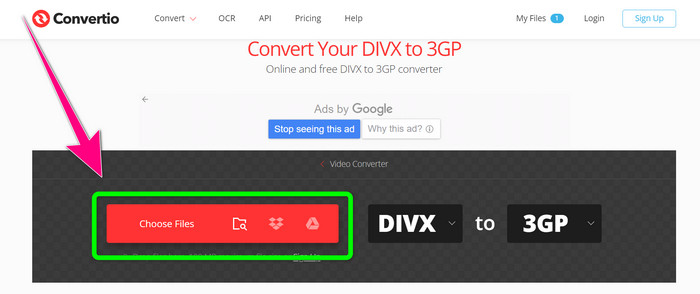
Pasul 1: Mergi pe site-ul Convertio. Dă clic pe butonul Choose Files și adaugă videoclipul tău în format DIVX.
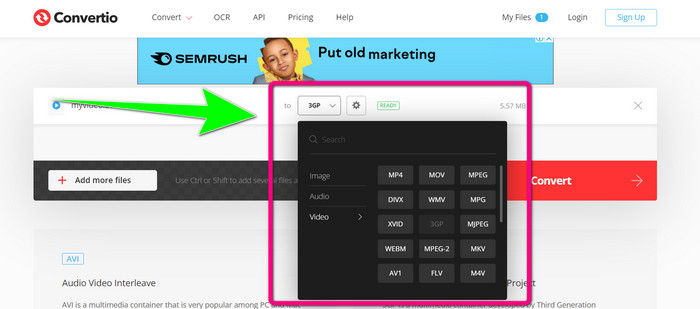
Pasul 2: După ce ai adăugat videoclipul, mergi la opțiunile de format și selectează formatul de fișier 3GP.
Pasul 3: După ce ai selectat formatul de fișier 3GP, dă clic pe butonul Convert, așteaptă procesul de conversie și salvează fișierul video 3GP.
Partea 3: Prezentare generală a formatelor de fișiere DIVX și 3GP
DIVX
DIVX este un software de comprimare video capabil să comprime fișierele video până la o doisprezecime din dimensiunea originală, cu o pierdere minimă de calitate. Acest format video este des întâlnit la marile companii de film, precum Disney, DreamWorks SKG, Universal și Paramount.
3GP
3GP este un container multimedia. A fost dezvoltat în 1998 de Third Generation Partnership Project pentru telefoanele bazate pe GSM (Global System for Mobile Communications). Containerul 3GP necesită puțin spațiu de stocare, consum redus de date și lățime de bandă mică, ceea ce îl face ideal pentru telefoanele mobile.
Citește mai departe
Convertește ușor MTV în MKV folosind acești convertoare performante
Cum să convertești TRP în MKV fără pierderi de calitate
Partea 4: Întrebări frecvente despre conversia DIVX în 3GP
Ce este un convertor DIVX?
Este un instrument excelent, capabil să convertească diferite tipuri de fișiere în numeroase alte formate. Acestea includ AVI, MP4, MPEG, MOV, FLV și multe altele. După ce ai terminat conversia, poți reda videoclipul în orice alt player media care acceptă formatul respectiv. FVC Free Video Converter Online este unul dintre cele mai bune convertoare pe care le poți folosi.
Formatul de fișier DIVX este același cu AVI?
Formatul de fișier DIVX se bazează pe containerul AVI, dar poate conține caracteristici excelente, cum ar fi capitole și subtitrări. În plus, atât formatele de fișiere AVI, cât și DIVX pot fi redate pe dispozitive certificate DIVX.
Pot converti fișierul DIVX în 3GP fără a pierde calitatea?
Da, bineînțeles că poți. Folosind Video Converter Ultimate, poți converti fișierul DIVX în 3GP fără să îți faci griji că se va schimba calitatea. Acest convertor excelent poate converti diferite fișiere fără a pierde din calitatea videoclipului tău.
Concluzie
După cum poți vedea, există diverse metode eficiente de a converti DIVX în 3GP folosind instrumente offline și online. Însă, uneori, anumite instrumente online sunt incomode, mai ales dacă ai o conexiune slabă la internet, astfel că poți folosi o aplicație descărcabilă. Dacă ești în căutarea unui instrument offline remarcabil, poți încerca Video Converter Ultimate.
-
 4 dintre cele mai bune convertoare MKV la 3GP pentru Windows și Mac
 Dacă sunteți în căutarea convertoarelor MKV în 3GP care sunt ușor de utilizat, aveți noroc! Am găsit cele mai bune și gratuite convertoare MKV în 3GP pe care trebuie să le încercați.
-
 5 cele mai bune convertoare MOV în 3GP pe care nu trebuie să le ratați
 Dacă sunteți în căutarea celor mai bune convertoare MOV în 3GP online și offline, atunci sunteți pe drumul cel bun. Citiți acest articol pentru a vă converti MOV într-un fișier 3GP.
-
 3 moduri de a converti MPG în 3GP pe Windows și Mac [gratuit]
 Dacă căutați modalități de a converti MPG în 3GP, citiți acest articol pentru a afla cele mai bune modalități de a converti MPG în 3GP pe Windows și Mac.
