


 Video Converter Ultimate
 Screen Recorder
 Reparație video
 Descărcare sigură
M4A vs. MP3 Revizuire aprofundată și comparare a două formate audio
Din cauza proliferării muzicii digitale, selectarea unui format audio adecvat este acum mai crucială ca niciodată. În timp ce M4A și MP3 sunt utilizate pe scară largă, există distincții importante între cele două. În timp ce MP3 este standardul de facto pentru fișierele muzicale, M4A este frecvent utilizat pentru o calitate audio superioară.
În comparația M4A vs. MP3, vom examina aspectele mai fine dintre formatele de fișiere M4A și MP3, astfel încât să poți lua o decizie în cunoștință de cauză. De asemenea, vom prezenta o analiză cuprinzătoare a diferențelor și asemănărilor dintre cele două tipuri de fișiere în ceea ce privește calitatea sunetului, compatibilitatea, dimensiunea fișierului și altele. Dacă ești un iubitor de muzică sau un muzician profesionist, merită să citești în continuare pentru a afla care format este ideal pentru tine.

Partea 1. M4A vs. MP3
Iată un tabel simplu care compară aceste formate în diferite aspecte importante pentru o decizie informată. Consultați tabelul de mai jos.
| M4A | MP3 | |
| Calitatea sunetului | Înalt | Bun |
| Mărime fișier | Mare | Mic |
| Compatibilitate | Limitat | Compatibil pe scară largă |
| Metadate | Sprijinit | Limitat |
| Protecție DRM | da | Nu |
| Utilizări populare | Muzică, cărți audio, podcasturi | Muzică, podcasturi, tonuri de apel |
Partea 2. Introducere M4A și MP3
Ajunge cu bătălia MP3 vs. M4A. Să ne oprim puțin și să aflăm mai multe despre aceste formate printr-o scurtă introducere a fiecăruia dintre ele.
Introducere în M4A
Formatul audio digital proprietar al Apple este MPEG-4 Audio (sau M4A pe scurt). Este un format audio grozav pentru muzică, cărți audio și podcasturi, deoarece poate găzdui multe rate de biți și rate de eșantionare. Fișierele M4A pot fi deschise în iTunes, QuickTime și alte playere media, ceea ce le face ideale pentru dispozitivele Apple.
Introducere în MP3
MP3, care înseamnă „MPEG-1 Audio Layer 3”, este un format audio digital care a devenit standardul audio comprimat datorită adoptării pe scară largă și a compresiei cu rată de biți scăzută. Fișierele MP3 sunt excelente pentru muzică, podcasturi și tonuri de apel datorită dimensiunii lor compacte în comparație cu alte formate audio. Acestea pot fi redate pe multe dispozitive diferite și descărcate rapid și ușor de pe internet. Fișierele MP3, pe de altă parte, au adesea o calitate audio mai slabă decât formatele alternative precum M4A.
Partea 3. Este M4A mai bun decât MP3?
M4A și MP3 au puncte forte și puncte slabe diferite. M4A este cunoscut pentru calitatea superioară a sunetului și este preferat de pasionații de muzică și de profesioniști. MP3, pe de altă parte, are o dimensiune mai mică a fișierului și este compatibil pe scară largă cu diverse dispozitive și playere media.
Alegerea între M4A și MP3 depinde de ceea ce este mai important pentru tine: calitate înaltă a sunetului sau dimensiune mai mică a fișierului și compatibilitate.
Partea 4. Diferența dintre MP3 și M4A
Formatele populare de muzică digitală MP3 și M4A au caracteristici distincte. Mai jos este o explicație detaliată a distincțiilor dintre MP3 și M4A:
Calitatea sunetului: M4A este cunoscut pentru calitatea superioară a sunetului în comparație cu MP3. M4A utilizează un algoritm de compresie mai bun și acceptă o gamă mai largă de bitrate-uri și frecvențe de eșantionare. M4A acceptă, de asemenea, compresia fără pierderi, care păstrează calitatea audio originală, în timp ce MP3 folosește compresie cu pierderi, ceea ce reduce dimensiunea fișierului, dar și calitatea sunetului.
Dimensiunea fișierului: Fișierele MP3 sunt mai mici ca dimensiune în comparație cu fișierele M4A. Acest lucru se datorează faptului că MP3 folosește un algoritm de compresie mai eficient, care reduce dimensiunea fișierului fără a afecta semnificativ calitatea audio. M4A, pe de altă parte, utilizează un algoritm de compresie mai puțin eficient, care duce la fișiere de dimensiuni mai mari, dar cu o calitate audio mai bună.
Compatibilitate: MP3 este recunoscut pe scară largă ca standard în industrie pentru audio digital și este compatibil cu o gamă vastă de dispozitive și playere media, inclusiv telefoane inteligente, tablete și computere. M4A, pe de altă parte, este mai puțin răspândit ca compatibilitate și este folosit în principal pe dispozitivele și software-ul Apple, cum ar fi iTunes și QuickTime.
Metadate: M4A acceptă o gamă mai largă de metadate în comparație cu MP3. Asta înseamnă că fișierele M4A pot stoca mai multe informații despre audio, cum ar fi coperta albumului, versurile și informațiile despre melodie.
Protecție DRM: M4A acceptă protecția Digital Rights Management (DRM), care le permite deținătorilor de drepturi de autor să controleze utilizarea și distribuirea fișierelor lor audio. MP3, pe de altă parte, nu acceptă protecție DRM.
Partea 5. Cum să convertiți M4A în MP3 sau MP3 în M4A
Mai mult decât compararea și revizuirea acestor două formate audio, este, de asemenea, important să învățați cum să convertiți din M4A în MP3 sau invers. Iată câteva dintre programele pe care le puteți utiliza:
Indiferent dacă ești online sau offline, Video Converter Ultimate este un instrument excelent pe care îl poți folosi pentru a converti între M4A și MP3. Acest utilitar vine cu o mulțime de funcții de care poți profita. Instrumentul oferă posibilitatea de a converti mai multe fișiere în loturi, ceea ce înseamnă că poți transforma o colecție de fișiere muzicale. Interesant este faptul că îți oferă acces la setările de ieșire ale fișierelor audio. Află cum funcționează acest instrument urmărind pașii de mai jos.
Pasul 1. Inițiază descărcarea făcând clic pe unul dintre butoanele Descărcare gratuită, apoi urmează instrucțiunile de pe ecran. Următorul pas este să lansezi aplicația și să te familiarizezi cu interfața sa simplă.
Descărcare gratuităPentru Windows 7 sau versiuni mai recenteDescărcare sigură
Descărcare gratuităPentru MacOS 10.7 sau versiuni ulterioareDescărcare sigură
Pasul 2. Fă clic pe butonul adaugă de pe ecranul principal, apoi găsește fișierul audio pe care dorești să îl convertești. O previzualizare a fișierului încărcat va fi afișată în interfață la scurt timp după încărcare. Poți converti simultan mai multe fișiere M4A în MP3 încărcând un folder.
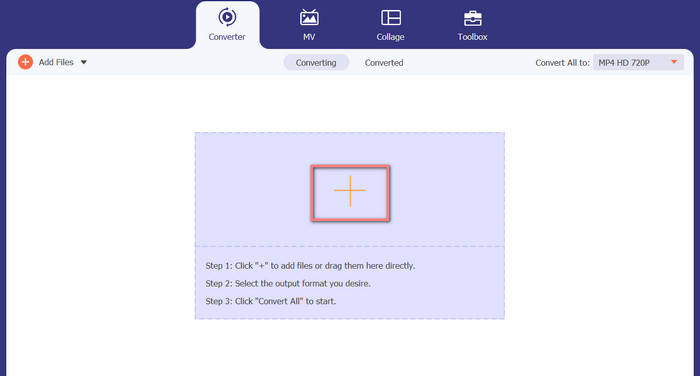
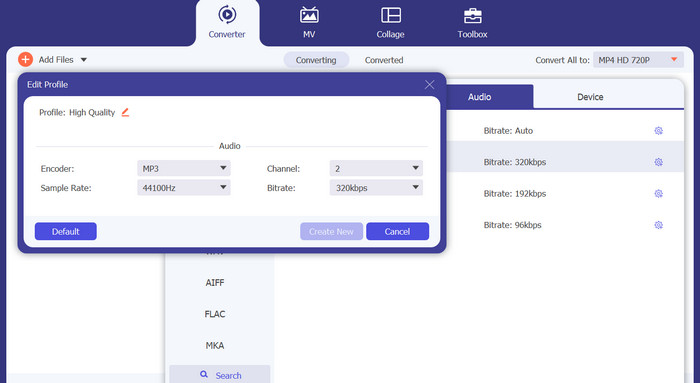
Pasul 3. Pentru a schimba formatul de ieșire al instrumentului, mergi la fila Audio din meniul Profil (aflat în colțul din dreapta sus al instrumentului). Poți transforma un fișier M4A într-un fișier MP3 și invers.
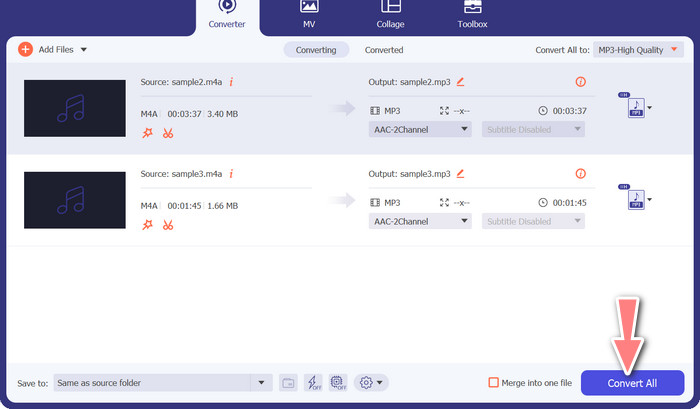
Pasul 4. Selectează locația dorită în partea de jos a ecranului. Pentru a începe conversia, selectează Convertiți tot.
Convertor video gratuit online (online)
Nu mai este loc pentru a instala încă un program? Vestea bună este că folosirea unui convertor bazat pe web poate elimina complet nevoia de a descărca software. Instrumentul online Free Video Converter Online permite conversia direct în browser. De asemenea, acceptă o gamă largă de tipuri de fișiere audio și video. În plus, acest instrument web acceptă conversii în lot. De asemenea, utilizatorul poate modifica setările fișierului audio final. Vezi cum să convertești MP3 în M4A online.
Pasul 1. Mai întâi, deschide browserul web preferat și accesează site-ul Free Video Converter Online.
Pasul 2. Fă clic pe opțiunea Add Files to Convert, apoi mergi la fișierul M4A pe care vrei să îl convertești și selectează-l.
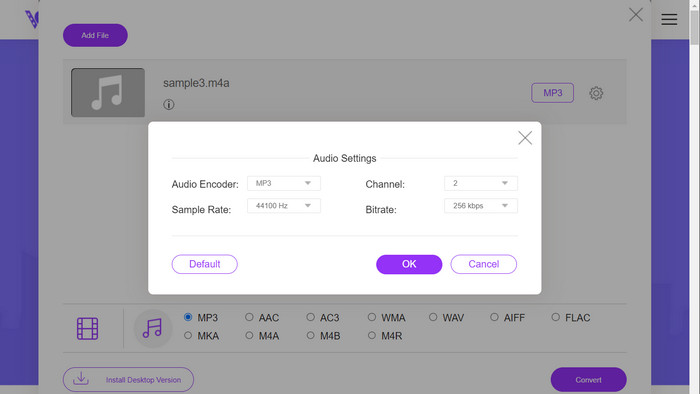
Pasul 3. Selectează MP3 ca tip de fișier de ieșire din meniul de format Audio. Este, de asemenea, posibil să ajustezi bitrate-ul sau calitatea de ieșire a fișierului MP3.
Pasul 4. Pentru a porni procesul de conversie, fă clic pe butonul Convert. Acesta este procedeul pentru a transforma M4A în MP3 pe web.
Lecturi suplimentare:
Ghid pentru conversia M4A în WAV [PC și Mac]
Cele mai bune instrumente pe care le poți folosi pentru a converti în lot fișiere MP3 în M4R
Partea 6. Întrebări frecvente despre M4A și MP3
Ce este MP3 vs. M4A din punct de vedere al metadatelor?
M4A acceptă o gamă mai largă de metadate decât MP3, ceea ce înseamnă că fișierele M4A pot stoca mai multe informații despre sunet.
Pot edita fișiere MP3 sau M4A?
Puteți edita fișiere MP3 și M4A utilizând diverse programe de editare audio.
Care este mai bun pentru podcasturi, MP3 sau M4A?
MP3 este mai bun pentru podcasturi datorită dimensiunii mai mici a fișierului și compatibilității mai largi.
Concluzie
Înțelegerea comparației MP3 vs. M4A te poate ajuta să alegi cel mai bun format audio digital. Fie că redai muzică în streaming sau o produci, alegerea formatului potrivit este esențială pentru a asigura cea mai bună calitate audio posibilă și compatibilitate.
-
 MP3 VS MP4: Care este diferența dintre MP3 și MP4
 MP3 sau MP4, care este mai bine? Care este diferența dintre MP3 și MP4? Acest articol va compara MP3 cu MP4 din toate aspectele pe care le puteți imagina.
-
 M4A Player - Top 5 jucători M4A pentru Android și computer
 Cum să redați fișiere M4A pe telefonul Android? Ce jucător poate juca M4A? Această postare împărtășește cele mai bune 5 playere M4A gratuite pentru Android, Mac și PC.
-
 Cele mai bune 4 metode de a repara și edita metadatele MP3 pe Windows și Mac
 Vrei să afli secretele editarii metadatelor MP3 cu ușurință? Acest blog vă va învăța diferite tehnici cu diferitele instrumente pe care le accesați cu ușurință.
