


 Video Converter Ultimate
 Screen Recorder
 Reparație video
 Descărcare sigură
3 moduri gratuite de a converti FLV în MPG
MPG, standardizat de Moving Picture Experts Group, este un format video obișnuit care conține formate video MPEG-1 sau MPEG-2 și formate audio. Poate fi redat pe toate platformele de computer, inclusiv Windows și macOS. Știi cum să convertești FLV în MPG?

Pe piață există multe convertoare video care te pot ajuta să convertești FLV în MPG cu ușurință. Acest articol îți va prezenta 3 dintre cele mai bune, pentru a-ți transforma fișierele FLV în MPG gratuit.
Partea 1. Cum se poate converti gratuit FLV în MPG
Un convertor gratuit va fi întotdeauna prima ta opțiune atunci când vrei să convertești FLV în MPEG. În prima parte îți prezentăm un Free FLV Converter ușor de folosit pentru a realiza conversia video din FLV în MPG. Acceptă foarte bine toate formatele video și audio utilizate frecvent, inclusiv FLV, MPG, MKV, MP4, MOV, WMV, WAV, AAC, MP3, M4A, FLAC și altele. Îți permite să convertești FLV în MPG fără pierderi de calitate.

- Convertiți orice FLV în MPG, MP4, MOV, AVI, MKV, MP3, AAC și multe altele.
- Oferiți diverse teme pentru a edita și personaliza fișierul FLV.
- CPU-uri multi-core avansate și accelerații GPU pentru a converti FLV în MPG în viteză mare.
- Suport pentru iPhone 12/11 / XS / XR / X / 8/7, iPad Pro, Samsung Galaxy S21, HUAWEI, SONY, LG etc.
- Convertiți unul sau mai multe fișiere FLV fără pierderi de calitate a imaginii sau a sunetului.
Descărcare gratuităPentru Windows 7 sau versiuni ulterioareDescărcare sigură
Descărcare gratuităPentru MacOS 10.7 sau versiuni ulterioareDescărcare sigură
Pasul 1. Acest convertor FLV îți permite să convertești FLV în MPG atât pe PC cu Windows 10/8/7, cât și pe Mac. Poți alege versiunea potrivită în funcție de sistemul tău și apoi să o instalezi gratuit pe computer.
Pasul 2. Deschide acest convertor FLV în MPG și apoi fă clic pe Add Files pentru a încărca fișierul(ele) FLV.

Pasul 3. Alege MPEG ca format țintă din lista derulantă Output format. Poți da clic pe pictograma Settings de lângă formatul de ieșire pentru a personaliza mai multe setări de profil. În acest pas, poți de asemenea să selectezi un folder de ieșire potrivit pentru fișierul MPG convertit.
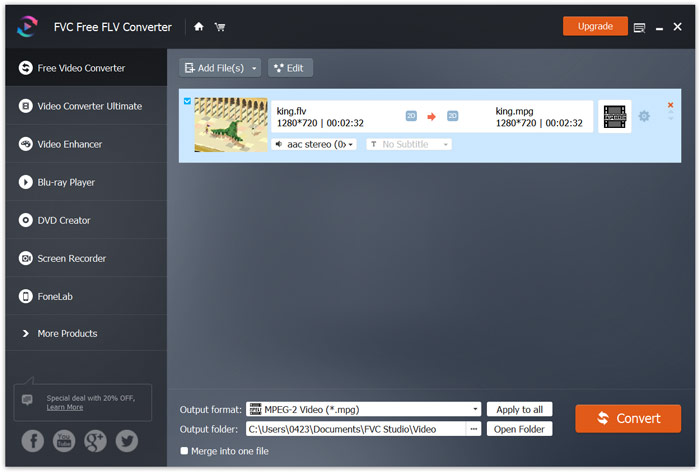
Pasul 4. După cum am menționat mai sus, acest convertor gratuit FLV în MPG este dotat cu o listă de funcții de editare. Așadar, înainte de conversie, le poți folosi pentru a-ți edita videoclipul. După aceea, poți face clic pe butonul Convert pentru a începe conversia gratuită FLV în MPG.
Partea 2. Cum să schimbați FLV în MPG Online
Când cauți pe Google cum să convertești FLV în MPG, poți vedea multe convertoare online în primele 20 de rezultate. Aici îți recomandăm cu tărie popularul Free Online Video Converter. Este compatibil cu multe formate video și audio populare. Nu necesită înregistrare și nu are limită de dimensiune a fișierului. Poți intra direct pe acest site de conversie online FLV în MPG și să începi conversia.
Pasul 1. Deschide browserul, cum ar fi IE, Chrome, Firefox sau Safari, și mergi la această pagină de Online FLV to MPG converter.
Descărcați versiunea pentru desktop pentru a converti fișiere în lot.
Pasul 2. Fă clic pe Add Files to Convert și apoi pe butonul Download pentru a instala rapid un launcher pentru conversia FLV în MPEG. Când launcher-ul este pregătit, poți răsfoi și încărca fișierul FLV prin fereastra pop-up.

Pasul 3. Acum vei fi direcționat către fereastra convertorului. Unele formate video populare precum MP4, MPG, MOV, AVI, FLV, MKV, WMV și altele sunt listate acolo. Setează MPG ca format țintă.
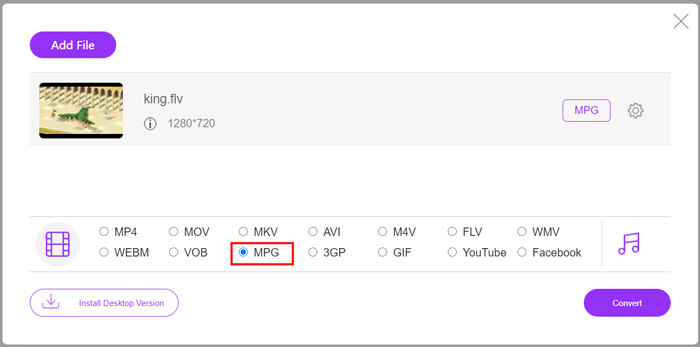
Pasul 4. Pentru mai multe setări video și audio, poți face clic pe pictograma Settings de lângă formatul de ieșire. Apoi fă clic pe butonul Convert pentru a începe conversia video din FLV în MPG.
Partea 3. Cum se poate converti gratuit FLV în MPG cu Aconvert
Aconvert este un alt convertor online popular pentru fișiere video, audio, documente, imagini și PDF. Ca un convertor de fișiere complet, îți permite să îți transformi fișierele FLV în MPG online, gratuit. Ghidul de mai jos îți va arăta cum să îl folosești.
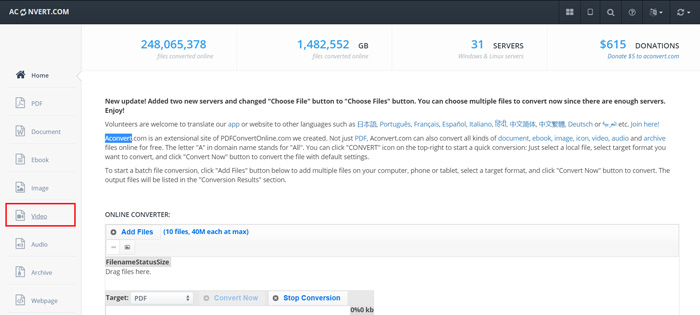
Pasul 1. Caută și accesează site-ul oficial Aconvert. Când ajungi acolo, fă clic pe Video în panoul din stânga. Apoi vei fi dus la pagina Convert video online.
Pasul 2. Fă clic pe butonul Select File pentru a răsfoi și încărca fișierul FLV. Apoi alege MPG ca format de ieșire. Pentru mai multe opțiuni, poți face clic pe Options și să selectezi Change size, bitrate sau frame rate.
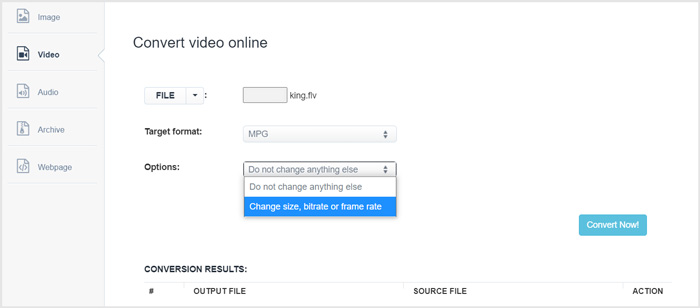
Pasul 3. Fă clic pe butonul Convert Now pentru a începe conversia online FLV în MPG. Acest convertor online FLV în MPG va începe încărcarea și conversia fișierului tău. În comparație cu convertorul video online de mai sus, va dura mai mult timp pentru a finaliza întregul proces, ai răbdare.
FLV vs. MPG
Adobe Flash Player a folosit FLV pentru a furniza conținut video, cum ar fi filme și emisiuni TV. În prezent, Adobe nu mai dezvoltă playerul și recomandă utilizatorilor să-l dezinstaleze din motive de securitate. Cu toate acestea, puteți utiliza în continuare formatul FLV pe multe programe non-Adobe/Macromedia.
Realizat de Moving Picture Experts Group (MPEG), MPG este un format video digital comun pentru stocarea informațiilor video, audio și metadate. Este destul de util atunci când creați filme pentru partajare pe Internet. Acele fișiere în MPG conțin de obicei compresie video/audio MPEG-1 sau MPEG-2.
Partea 4. Întrebări frecvente despre convertirea FLV în MPG
Întrebarea 1. Care sunt dezavantajele FLV?
În primul rând, creează conținut flash necesită mult timp și costă. Fișierele FLV nu pot fi recunoscute de păianjenii motoarelor de căutare. Deci, acestea nu vor fi adăugate la optimizarea unui site. În acest caz, aveți nevoie de timpi de așteptare mai lungi pentru a accesa o pagină web cu flash.
Întrebarea 2. Pot reda fișiere FLV în Windows Media Player?
Da. Windows Media Player poate deschide fișiere FLV. Dar trebuie să descărcați și să instalați codecul CCCP sau alte codecuri necesare pentru a reda fișiere FLV.
Întrebarea 3. Care este cel mai bun player FLV?
VLC Media Player poate fi cel mai bun player pentru a reda fișiere FLV atât pe un PC cu Windows, cât și pe Mac. Desigur, există multe alte playere video disponibile pe internet care te pot ajuta să vizualizezi fișiere FLV. Găsești mai multe playere FLV aici.
Concluzie
În acest articol am vorbit în principal despre cum să convertești FLV în MPG. 3 convertoare video gratuite sunt recomandate pentru a-ți converti fișierele FLV. Dacă ai o metodă mai bună de conversie FLV, te rugăm să o împărtășești în comentarii cu ceilalți cititori.
-
 MP4 în MPEG: Top 4 moduri de a converti MP4 în MPEG (gratuit)
 Această postare este ghidul pas cu pas pentru a converti MP4 în MPEG. Puteți utiliza primele 4 convertoare video gratuite pentru a schimba MP4 în MPEG-1 sau MPEG-2 după cum doriți.
-
 Cum să comprimați fișierele MPEG-4 online - fără descărcare, fără filigran
 Nu aveți suficient spațiu de stocare pentru a vă păstra toate fișierele MPEG-4? Iată câteva soluții care vă pot ajuta să vă micșorați fișierele video.
-
 Top 4 moduri gratuite de a converti videoclipurile FLV în MP4 pe desktop și online
 Acest ghid împărtășește patru metode gratuite pentru a vă converti fișierele video FLV în format MP4 pe Windows 10/8/7 / XP și Mac OS X, astfel încât să vă puteți bucura de videoclipurile de pe orice dispozitiv.

