


 Video Converter Ultimate
 Screen Recorder
 Reparație video
 Descărcare sigură
Cum se îmbină videoclipurile 3GP de pe telefonul mobil într-un singur fișier
Când înregistrați mai multe videoclipuri în timpul călătoriei cu smartphone-ul dvs., vă recomandăm să îmbinați fișiere 3GP într-un singur videoclip. Care sunt cele mai bune metode pentru a combina videoclipurile? Indiferent dacă vă alăturați pur și simplu videoclipurilor 3GP sau faceți filme cu fișierele smartphone-ului, puteți afla mai multe despre cele mai frecvent utilizate 2 metode din articol.

Partea 1: Cum să îmbinați 3GP online gratuit
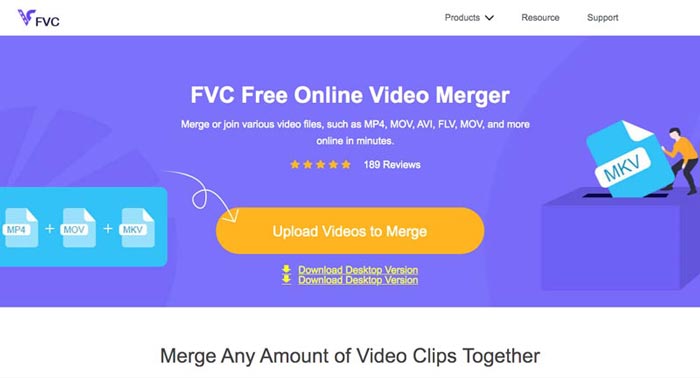
Pentru a îmbina fișierele 3GP fără editare, ai nevoie doar de un instrument comod care poate îmbina gratuit online videoclipuri 3GP. FVC Free Online Video Merger este unul dintre cele mai bune unificatoare de videoclipuri 3GP, cu o interfață simplă. Îți permite să combini fișiere 3GP fără limită de număr sau dimensiune. În plus, poți ajusta rezoluția și formatul video.
Pasul 1: Accesează Free Online Video Merger cu orice browser web. Poți face clic pe butonul Upload Videos to Merge pentru a încărca un fișier 3GP în instrumentul online de îmbinare video. Vei fi direcționat către o interfață de unire online a videoclipurilor.
Pasul 2. Încarcă apoi mai multe fișiere 3GP pe care trebuie să le combini. Apoi poți schimba rezoluția și formatul videoclipului făcând clic pe câmpurile Resolution și Format. Îți poți îmbina fișierele 3GP în fișiere video populare precum MP4 sau MKV.
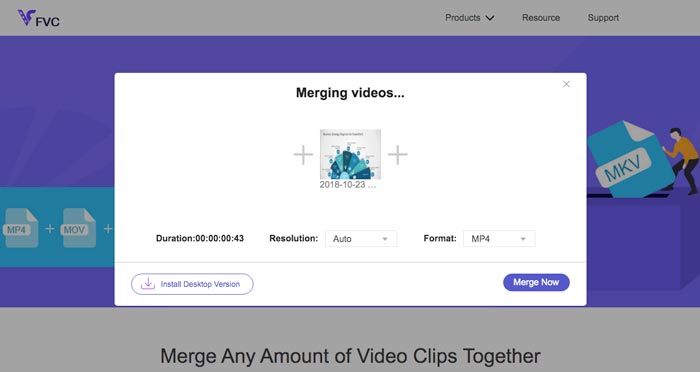
Pasul 3. După ce ești mulțumit de videoclipul de ieșire, poți face clic pe butonul Merge Now pentru a porni procesul de combinare. Când îmbinarea este finalizată, videoclipul unit va fi salvat pe hard disk.
Este o modalitate ușoară de a vă alătura fișierelor 3GP online gratuit. Dar dacă doriți să faceți mai multe editări pentru fișierele dvs. video, aveți nevoie de un instrument mai profesional.
Partea 2. Cum se combină videoclipurile 3GP într-un film
Indiferent dacă trebuie să combini videoclipuri 3GP într-un film cu filtre uimitoare sau pur și simplu să unești mai multe fișiere 3GP într-unul singur, Video Converter Ultimate este un convertor video versatil pe care ar trebui să îl iei în considerare. Îți permite să decupezi și să îmbini clipuri video, să selectezi teme video, să adaugi filigrane pe videoclipuri și chiar să convertești direct videoclipuri 3GP în alte formate video pentru site-uri de social media.
- 1. Vă permite să decupați părțile dorite sau să combinați mai multe 3GP într-o singură.
- 2. Oferiți funcții de editare video de bază, cum ar fi tăierea, împărțirea, decuparea și rotirea.
- 3. Alăturați videoclipuri 3GP într-un film cu diferite filtre, teme, fișiere muzicale etc.
- 4. Adăugați subtitrare, piese audio, efecte 3D, filigran, comprimați videoclipul, și altele.
Descărcare gratuită pentru Windows 7 sau o versiune ulterioară Descărcare securizată
Descărcare gratuită pentru MacOS 10.7 sau o versiune ulterioară Descărcare securizată
Metoda 1: Cum să combinați mai multe videoclipuri 3GP direct
Pasul 1: Descarcă și lansează Video Converter Ultimate de pe site-ul oficial. Alege interfața Converter și fă clic pe butonul Add Files pentru a adăuga fișierele 3GP pe care vrei să le îmbini. În plus, poți trage direct videoclipurile 3GP în program.

Pasul 2: După ce ai importat fișierele 3GP, trebuie să alegi formatul fișierului de ieșire. Fă clic pe pictograma foarfecă pentru a decupa partea dorită. În plus, poți roti/decupa videoclipurile, aplica filtre, adăuga un filigran sau ajusta pistele audio pentru videoclipul final.

Pasul 3: Mergi în partea de jos a interfeței utilizator pentru a alege folderul de destinație pentru fișierele 3GP îmbinate. După aceea, poți bifa opțiunea Merge into One File și face clic pe Convert All pentru a începe îmbinarea fișierelor 3GP.

Metoda 2: Cum să alăturați fișierele 3GP într-un film
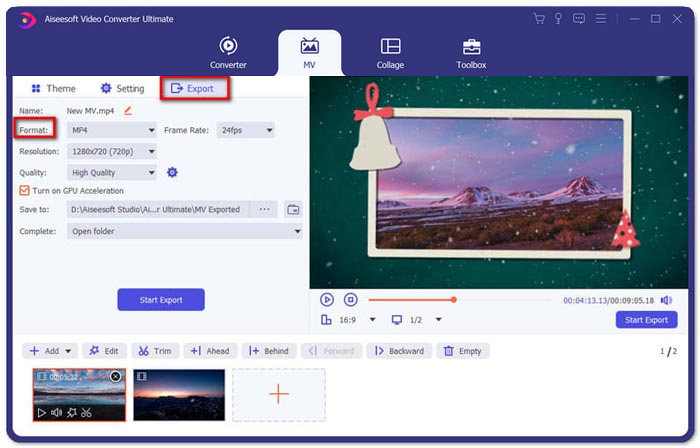
Pasul 1: Când trebuie să unești fișiere 3GP într-un film, poți alege meniul MV, iar apoi vei intra în interfața de creare MV. Fă clic pe butonul Add din partea stângă jos a ferestrei pentru a importa videoclipurile și imaginile tale 3GP.
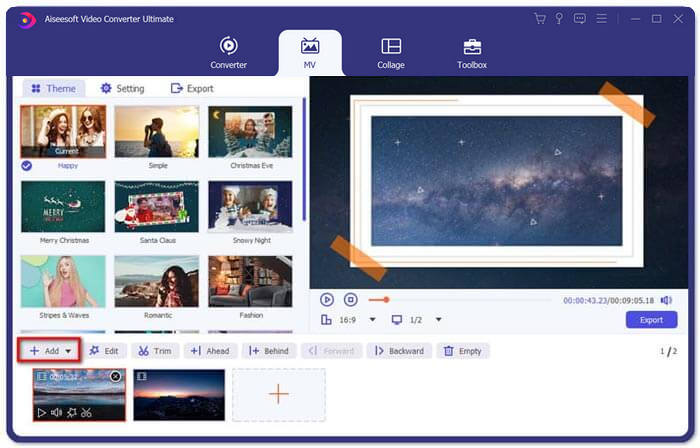
Pasul 2: După aceea, poți face clic pe butonul Edit pentru a aplica efecte video. În plus, poți selecta o temă pentru filmul tău MV. În secțiunea din stânga, fă clic pe fila Theme, apoi alege tema dorită pentru MV-ul tău.
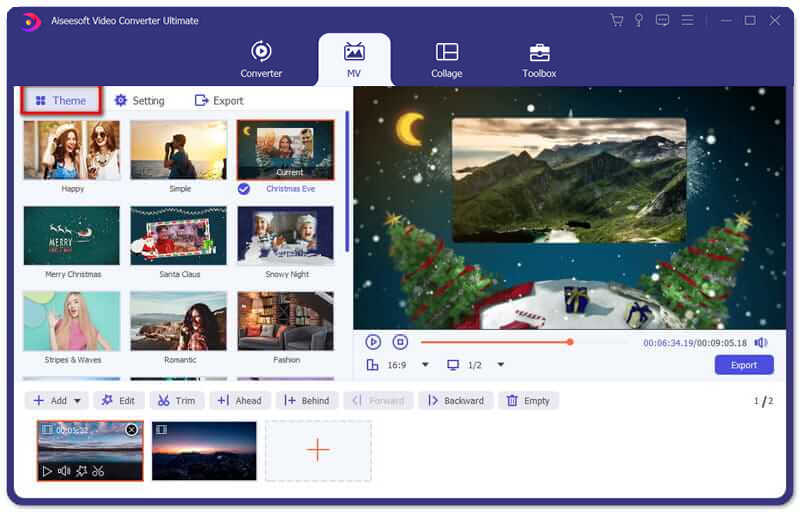
Pasul 3: Dacă ești mulțumit de fișierul 3GP combinat, poți face clic pe butonul Export pentru a salva fișierul video. În mod prestabilit, formatul de ieșire este MP4. Desigur, poți alege și formatul video preferat în funcție de nevoile tale.
Partea 3. Întrebări frecvente despre cum se îmbină 3GP
1. Ce este un format 3GP?
3GP este un format de fișier multimedia conceput pentru a economisi stocarea datelor. Este utilizat pe scară largă pe dispozitivele mobile. Când faceți fotografii sau filmați videoclipuri cu telefonul mobil, de obicei fișierul este salvat în format 3GP. În mod normal, 3GP este utilizat pe telefoanele mobile 3G și poate fi redat și pe unele telefoane 2G și 4G.
2. Cum se îmbină fișierele 3GP pe un smartphone?
Când doriți să îmbinați fișiere 3GP pe un telefon iPhone sau Android, puteți utiliza Video Merger pentru un telefon Android, VivaVideo pentru un iPhone sau puteți descărca alte aplicații pentru a combina videoclipurile. Dar când trebuie să vă alăturați fișierelor 3GP ca film, trebuie totuși să utilizați o fuziune video profesională.
3. Pot combina videoclipuri 3GP cu fișiere audio?
Da. Dar nu puteți utiliza fișierele audio ca fundal pentru video 3GP. Fie că trebuie să combinați două fișiere sau să utilizați sunetul ca fundal al unui videoclip 3GP, combinatorul profesional 3GP ar trebui să fie alegerea dvs.
Concluzie
Când ai nevoie să îmbini fișiere video 3GP pe dispozitivele mobile într-un singur fișier video, poți afla 2 metode eficiente din acest articol. Poți îmbina gratuit 3GP online folosind Free Online Video Joiner. Dacă trebuie să editezi și să adaugi efecte speciale în videoclipul tău, Video Converter Ultimate ar trebui să fie un instrument ideal pentru tine. Dacă ai orice întrebări despre îmbinarea fișierelor 3GP, nu ezita să ne contactezi.
-
 Top 3 moduri gratuite de a converti FLV în 3GP pe Windows / Mac
 Nu puteți deschide fișiere FLV pe smartphone sau tabletă? Nu-ți face griji! Aici împărtășim trei metode pentru a converti FLV în 3GP fără a pierde calitatea pentru a juca pe mobil.
-
 3 metode pentru a converti MP4 în 3GP fără probleme
 Doriți să convertiți MP4 în 3GP într-un mod rapid și ușor? Aici vom împărți 3 convertoare MP4 în 3GP pentru a schimba MP4 în 3GP pentru redare pe diferite telefoane mobile.
-
 Cele mai bune 3 playere 3GP gratuite pentru computere și dispozitive mobile pe care ar trebui să le cunoașteți
 Când doriți să redați filmul 3GP cu ușurință fără instalarea sau conversia codecurilor video, puteți afla mai multe despre cele mai bune 3 playere 3GP pe Windows, Mac, Android și iPhone în acest articol.
