


 Video Converter Ultimate
 Screen Recorder
 Reparație video
 Descărcare sigură
Cum să vă convertiți fișierele video DAT în format FLV gratuit
Deoarece există atât de multe formate video, este posibil să fie nevoie să convertești un format în altul. Acest articol se concentrează pe modul în care poți converti DAT în FLV pe desktop și online, gratuit. Un fișier cu extensia DAT nu este un fișier standard, ci un fișier de date care stochează informații. Prin urmare, niciun program specific nu este responsabil de deschiderea fișierelor DAT. Dacă un fișier video este stocat astfel, un convertor DAT în FLV potrivit te poate ajuta să îl deschizi.

Partea 1: Cele mai bune moduri gratuite de a converti DAT în FLV
Modul 1: Convertiți DAT în FLV cu convertorul FLV gratuit
FVC Free FLV Converter este un convertor video puternic, deși este un program gratuit. Asta înseamnă că poți obține funcții similare cu cele ale software‑ului profesional fără să plătești niciun ban.
Funcții cheie ale celui mai bun convertor DAT în FLV gratuit
- 1. Convertiți rapid fișierele DAT în format FLV.
- 2. Produceți rezultate de înaltă calitate folosind tehnologie avansată.
- 3. Includeți o gamă largă de instrumente bonus, cum ar fi editarea video.
Descărcare gratuităPentru Windows 7 sau versiuni ulterioareDescărcare sigură
Descărcare gratuităPentru MacOS 10.7 sau versiuni ulterioareDescărcare sigură
Cum să convertești DAT în FLV gratuit
Pasul 1: Deschideți fișierele DAT
Rulează cel mai bun convertor DAT în FLV gratuit după ce îl instalezi pe computer. Pentru a‑ți menține datele în siguranță, este mai bine să îl descarci de pe site‑ul oficial. Fă clic pe butonul mare Add File(s) din interfața principală, caută și selectează fișierele video DAT și deschide‑le. Apoi vor apărea în zona bibliotecii.

Pasul 2: Setați FLV ca format de ieșire
Mergi în zona de jos, fă clic pentru a extinde opțiunea Output format. Accesează fila General Video din listă, derulează în jos și selectează FLV sau un format înrudit. Poți de asemenea să resetezi rata de cadre, rezoluția și alți parametri apăsând pictograma Gear de pe fiecare titlu.

Pasul 3: Convertiți DAT în FLV
Apoi, fă clic pe butonul Open Folder și schimbă dosarul de destinație în funcție de preferințele tale. În mod implicit, convertorul DAT în FLV va salva rezultatul în biblioteca ta video. La final, fă clic pe butonul Convert pentru a începe imediat conversia DAT în FLV pe desktop. Finalizarea conversiei durează doar câteva minute.

Modul 2: Cum se convertește DAT în FLV prin VLC
VLC este un alt mod de a converti DAT în FLV gratuit. Playerul media open-source poate deschide un fișier video cu extensie DAT și îl poate converti în fișiere video standard. Având în vedere procedura complicată, împărtășim pașii de bază de mai jos.
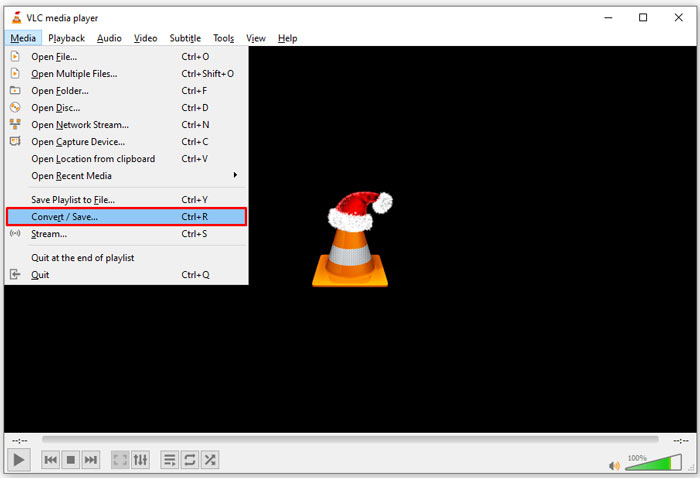
Pasul 1: Deschide VLC și fă clic pe opțiunea Convert/Save din meniul Media de pe bara superioară. Apoi va apărea fereastra de dialog Open Media.
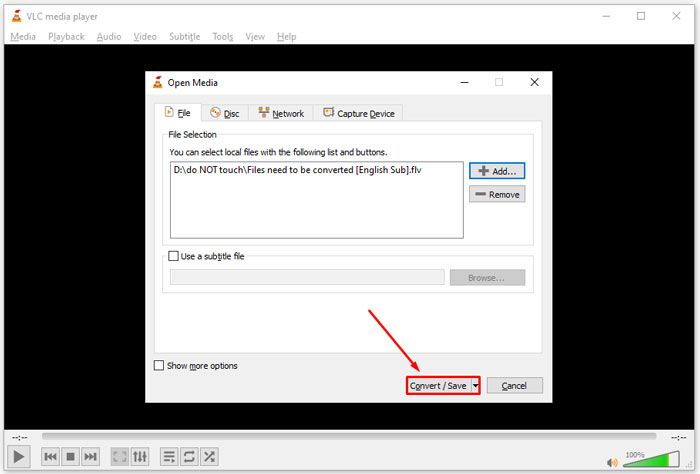
Pasul 2: Fă clic pe butonul Add și deschide fișierele video DAT în VLC. Apasă butonul Convert/Save pentru a continua.
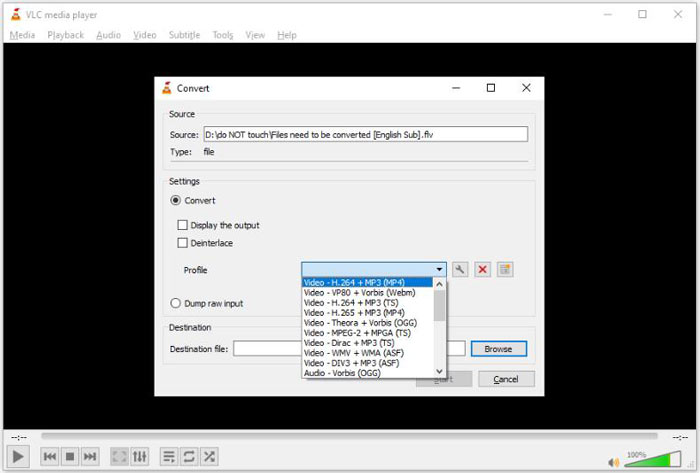
Pasul 3: Desfă lista derulantă Profile și setează FLV ca format de ieșire. Fă clic pe butonul Browse pentru a selecta un dosar de ieșire în secțiunea Destination.
Pasul 4: Fă clic pe butonul Start pentru a iniția conversia din DAT în FLV. Conversia în VLC durează aproximativ cât lungimea fișierului video.
Partea 2: Cum se convertește DAT în FLV online
FVC Free Online Video Converter este o modalitate simplă de a converti online fișiere DAT în FLV, gratuit. Comparativ cu alte convertoare video online, îți permite să faci acest lucru fără nicio limitare, cum ar fi dimensiunea fișierului, înregistrarea, filigranul etc.
Pasul 1: Deschide un browser și vizitează https://www.free-videoconverter.net/free-online-video-converter/. Fă clic pe butonul Add Files to Convert pentru a descărca lansatorul.

Pasul 2: Fă clic pe butonul Add File din lansator și încarcă fișierele video DAT de pe computer. Apoi mergi la secțiunea de format din partea de jos și selectează FLV.

Pasul 3: Apasă butonul Convert pentru a începe conversia DAT în FLV online. Când procesul s‑a încheiat, descarcă fișierele video pe hard disk.
S-ar putea să vă placă și:
Convertește fișierele tale TS în format FLV
Partea 3: Întrebări frecvente despre DAT în FLV
Pot converti fișiere DAT în FLV din Internet Explorer?
Dacă fișierele DAT din IE stochează conținut video, le puteți converti în videoclipuri standard. Cu toate acestea, DAT nu numai stochează date video, ci și alte informații. Pentru alte date, nu puteți converti în videoclipuri.
Cum se deschid fișiere DAT?
Un fișier DAT este un fișier de date care conține informații despre programul cu care este asociat. Puteți încerca să deschideți un fișier DAT făcând dublu clic pe el. Sistemul dvs. poate distribui programul adecvat.
Pot converti DAT în QuickTime?
Depinde de situația ta. În primul rând, fișierele DAT trebuie să stocheze date video. Apoi, aveți nevoie și de un convertor video care acceptă DAT și QuickTime.
Concluzie
Acest ghid a împărtășit trei moduri de a vă converti DAT în FLV pe desktop sau online. VLC este un mod gratuit de a face treaba pe Windows, Mac și Linux. Cu toate acestea, convertorul FVC Free FLV oferă mai multe funcții de nivel pro cu solicitarea oricărei plăți. Dacă aveți alte întrebări, vă rugăm să lăsați un mesaj sub această postare.
-
 MP4 în FLV | Top 3 Convertor gratuit (Online / Mac / Windows)
 Această postare este ghidul detaliat pentru conversia MP4 în FLV. Puteți lua primii 3 convertoare gratuite pentru a schimba cu ușurință MP4 în FLV online, pe computerul Windows sau Mac.
-
 3 soluții pentru a converti MTS în FLV gratuit și online
 Doriți să convertiți MTS în FLV? Iată 3 software-uri gratuite de conversie MTS în FLV pe care le puteți încerca să convertiți MTS în FLV pe Mac OS X și Windows 10/8/7.
-
 Top 4 moduri gratuite de a converti videoclipurile FLV în MP4 pe desktop și online
 Acest ghid împărtășește patru metode gratuite pentru a vă converti fișierele video FLV în format MP4 pe Windows 10/8/7 / XP și Mac OS X, astfel încât să vă puteți bucura de videoclipurile de pe orice dispozitiv.
