


 Video Converter Ultimate
 Screen Recorder
 Reparație video
 Descărcare sigură
Ce este un fișier MTS și cum se poate converti / reda fișierul MTS
Vei obține un fișier video în format MTS dacă folosești o cameră video Sony sau Panasonic. De fapt, nici nu îți vei da seama până când nu poți reda fișierul MTS cu playerul media sau dispozitivul tău. De aici apare întrebarea: ce este un fișier MTS?

Acum, în multe domenii și produse electronice, există o cerință din ce în ce mai mare de calitate a imaginii pentru procesiunea video. MTS este un format video de flux de înaltă definiție care poate oferi o experiență vizuală de înaltă calitate.
Totuși, MTS nu este un format de fișier popular. Multe playere media uzuale și dispozitive portabile iOS/Android nu pot reda direct fișierele MTS. Ținând cont de acest lucru, în această postare dorim să îți oferim o prezentare detaliată a formatului MTS. În plus, îți vom arăta 3 metode simple de a converti și reda fișiere MTS.
Partea 1. Ce este un fișier MTS - MTS vs MP4
MTS este extensia de fișier a AVCHD (Advanced Video Coding High Definition), folosit în principal de camerele video HD Sony și Panasonic. A fost dezvoltat în comun de Sony și Panasonic și este conceput special pentru videoclipuri digitale high definition. MTS este un format video de tip transport stream, de înaltă definiție, bazat pe MPEG și H.264 și oferă suport extins pentru HD 720p și 1080i. Așadar, în comparație cu alte formate, fișierul MTS poate oferi o calitate video superioară.
MTS este extensia de fișier a videoclipului AVCHD pe camera video digitală. Când importați un fișier MTS pe computer, extensia de fișier se va transforma automat în M2TS. MTS este, de asemenea, utilizat pe scară largă pentru Blu-ray Disc Audio-Video (BDAV). Are capacitatea de a transporta diverse fluxuri video, audio și alte fluxuri.
Fișierul MTS poate furniza o calitate ridicată a imaginii cu o dimensiune relativ mică a fișierului. Însă, așa cum am menționat mai sus, MTS nu este acceptat de multe playere media, programe de editare video, computere și dispozitive mobile. Poți primi ușor o eroare la redarea fișierului MTS din cauza incompatibilității. Din acest motiv, foarte mulți oameni caută pe internet player MTS, cum să redai un fișier MTS și cum să convertești MTS în MP4 și așa mai departe.
MTS vs MP4
În comparație cu MTS, MP4 poate fi redat cu ușurință de aproape toate playerele media, instrumentele și dispozitivele de editare video. MP4 este cel mai popular format de container multimedia digital pentru stocarea videoclipurilor. MP4 este, de asemenea, capabil să transporte audio și text.
MP4 este compatibil cu Windows 10/8/7 / XP / Vista PC, Mac, software de editare, playere media, dispozitive iOS / Android precum iPhone, iPad, iPod touch, telefon Android, telefon Windows și multe altele. MP4 poate oferi o calitate video înaltă, păstrând în același timp o dimensiune de fișier adecvată. Deci, când obțineți un format neacceptat, cum ar fi MTS, puteți alege să îl convertiți în MP4 pentru o redare mai bună.
Partea 2. Cum se poate converti gratuit MTS în MP4 online
Când doriți să partajați videoclipul MTS înregistrat pe YouTube, Facebook sau alte platforme sau doriți să îl editați și să îl vizualizați pe dispozitivul dvs., poate fi necesar să convertiți MTS în MP4. Din fericire, există o mulțime de convertoare video MTS, inclusiv unele online gratuite care vă pot ajuta să faceți conversia fișierului MTS. Aici, la această parte, vă vom prezenta un popular convertor video online gratuit, FVC Free Online Video Converter pentru a vă converti fișierul MTS.
Pasul 1. Mai întâi, deschide browserul și mergi pe site-ul oficial FVC Free Online Video Converter. Poți accesa direct https://www.free-videoconverter.net/free-online-video-converter/. Apoi dă clic pe butonul Add Files to Convert pentru a descărca și instala lansatorul.
Pasul 2. Când lansatorul este activat, încarcă fișierul MTS pe care vrei să îl convertești în MP4. Apoi dă clic pe butonul Convert pentru a porni conversia video din MTS în MP4.

Partea 3. Mod gratuit de a converti MTS în MP4 fără pierderi de calitate (recomandat)
Cu ajutorul convertorului video online gratuit de mai sus, poți face cu ușurință conversia video din MTS în MP4. Dacă acorzi mai multă atenție calității fișierului MP4 de ieșire, ar trebui să încerci Free MTS Converter. Acesta îți permite să convertești MTS în MP4 fără pierderi de calitate a imaginii sau a sunetului.
Descărcare gratuităPentru Windows 7 sau versiuni ulterioareDescărcare sigură
Descărcare gratuităPentru MacOS 10.7 sau versiuni ulterioareDescărcare sigură
Pasul 1. Dă dublu clic pe butonul de descărcare de mai sus, apoi urmează instrucțiunile de pe ecran pentru a instala și rula rapid acest convertor gratuit MTS în MP4 pe computerul tău.
Pasul 2. Când intri în prima fereastră a acestui convertor video MTS, dă clic pe Add File(s) pentru a încărca fișierul MTS pe care vrei să îl convertești. În acest pas, poți adăuga unul sau mai multe fișiere, în funcție de nevoile tale.
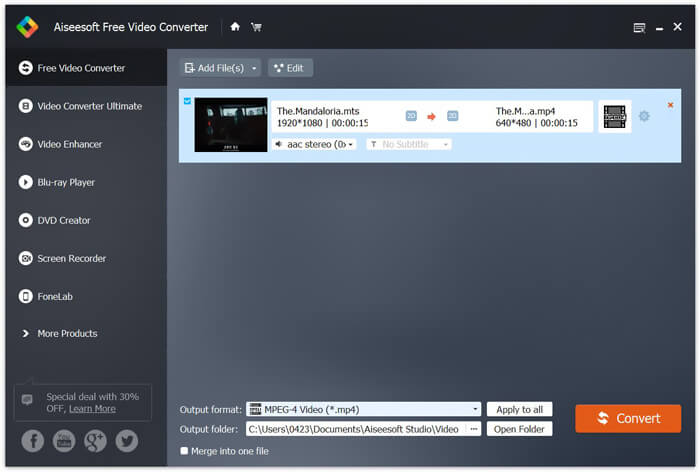
Pasul 3. Dă clic pe Output format, apoi alege MP4 ca format țintă. Aici poți selecta și un folder de destinație potrivit pentru fișierul video convertit, dând clic pe opțiunea Output folder. După aceea, dă clic pe butonul Convert pentru a începe conversia video gratuită din MTS în MP4.

Free Video Converter este proiectat cu cea mai recentă tehnologie de accelerare, care vă garantează o viteză de conversie MTS / M2TS în MP4 foarte rapidă. Mai mult decât atât, oferă și câteva funcții de editare de bază pentru videoclipuri personalizate înainte de conversia finală. Ar trebui să o descărcați gratuit și să încercați.
Partea 4. Cum să convertiți gratuit și să redați un fișier MTS cu VLC Player
Dacă aveți VLC Media Player instalat pe computer, vă puteți baza pe acesta pentru a converti gratuit un fișier MTS în MP4, MOV, FLV și multe altele pentru a încărca sau reda mai bine. De fapt, ca player media open-source, VLC Player vă permite să vă bucurați direct de fișierul MTS cu o experiență vizuală excelentă. Aici, în această parte, ne place să vă arătăm cum să redați și să convertiți un fișier MTS pe VLC player.
Redați un fișier MTS cu VLC Player
Pasul 1. Mai întâi, trebuie să vă asigurați că aveți un VLC Player pe computer. Apoi deschideți acest player media pentru redarea fișierului MTS.
Pasul 2. Dă clic pe Media > Open File pentru a încărca fișierul MTS pe care vrei să îl redai. După încărcare, VLC Player va reda automat fișierul MTS pentru tine.
Aici trebuie să știți că nu toate fișierele MTS pot fi vizualizate cu efecte bune pe VLC Player.
În unele cazuri, este mai probabil să primiți o eroare de redare MTS. Trebuie să adăugați câteva extensii pentru ca VLC Player să vă sprijine fișierul MTS. De exemplu, aveți nevoie de o bibliotecă pentru decodarea AACS pentru a reda un fișier MTS.
Convertiți un fișier MTS cu VLC Player
De fapt, când primiți eroarea de redare a fișierului MTS, puteți alege să vă convertiți MTS într-un format video popular, cum ar fi MP4, MOV, FLV și AVI și așa mai departe. După aceea, puteți urmări cu ușurință fișierul MTS pe orice dispozitiv cu ușurință.
Pasul 1. Deschide VLC Player pe computer. Dă clic pe Media > Convert/Save pentru a afișa fereastra pop-up Open Media. Aici poți da clic pe Add pentru a importa fișierul MTS pe care vrei să îl convertești.
Pasul 2. După import, dă clic pe Convert Save pentru a deschide fereastra Convert. Dă clic pe Profile, apoi alege MP4 ca format țintă. În acest pas, poți selecta un folder de destinație potrivit pentru videoclipul de ieșire, dând clic pe opțiunea Browse.
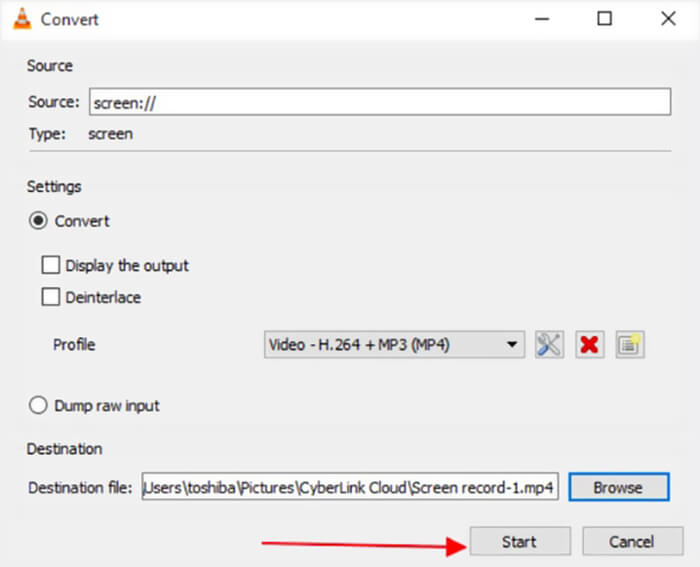
Pasul 3. VLC Player îți oferă câteva funcții de editare de bază. Înainte de conversia finală a fișierului MTS, poți personaliza efectele video în funcție de nevoile tale. Apoi poți da clic pe Start pentru a începe conversia gratuită a fișierului MTS.
După ce ai citit această pagină, poți înțelege clar ce este fișierul MTS. În plus, poți afla cum să convertești și să redai un fișier MTS. Lasă-ne un mesaj dacă mai ai întrebări despre formatul MTS.
-
 2 moduri simple de a converti gratuit MTS în MP3
 Aveți nevoie să extrageți audio MP3 din fișierul MTS, dar nu știți cum? Care este cel mai bun convertor MTS în MP3? Această postare împărtășește 2 moduri ușoare de a vă ajuta să convertiți MTS / M2TS în MP3 cu o calitate audio ridicată.
-
 Top 4 moduri gratuite de a converti MTS în MOV
 Nu puteți reda fișierul MTS pe computer sau pe telefonul iPhone / Android? Ce este un fișier MTS și cum îl puteți reda? Care este cel mai bun convertor video MTS? Această postare prezintă 4 moduri simple și gratuite de a vă ajuta să convertiți MTS în MOV pentru o redare mai bună.
-
 Care este diferența dintre MTS și M2TS
 Ce este fișierul MTS sau M2TS? Care este diferența dintre M2TS și MTS? Cum pot viziona camera video înregistrată în fișiere MTS sau M2TS? Găsiți toate răspunsurile în această postare.
