


 Video Converter Ultimate
 Screen Recorder
 Reparație video
 Descărcare sigură
Top 4 moduri gratuite de a converti MTS în MOV
Am capturat câteva videoclipuri cu camera mea Sony care exportau fișiere MTS. Observ că MTS nu poate fi acceptat de playerul media și de iMovie. Folosesc un Mac și vreau să editez aceste videoclipuri MTS capturate. Orice ajutor? Există vreo modalitate simplă, în special gratuită de a converti MTS în MOV?
MTS is a high-definition video format which widely used by Sony and Panasonic camcorders, as the file extension of AVCHD (Advanced Video Coding High Definition). After recording video with your digital camera, you are more likely get a MTS file. It carries 720p/1080i HD and can provide a higher video quality. However, MTS is not a popular format which can be supported by most media players or editors.

When you have the need to edit MTS in iMovie or play it with media player, you should convert MTS to MOV or MP4 for the better compatibility. Here in this post, we will show you 4 free MTS converters to help you convert MTS to MOV with ease.
Partea 1. Cel mai bun mod gratuit de a converti MTS în MOV fără pierderi de calitate
There are a large number of MTS converting tools offered on the internet that can help you convert MTS to MOV with high quality. Here at the first part, we like to recommend the best free MTS to MOV converting software, Free MTS Converter for you.
Este special conceput pentru a face față tuturor tipurilor de conversii. Este compatibil cu aproape toate formatele video și audio precum MP4, MOV, MKV, MTS, AVI, FLV, WMV, MP3, AAC, FLAC și multe altele. Puteți să o descărcați gratuit și să urmați următorul ghid pentru a converti MTS în MOV gratuit.
Free DownloadFor Windows 7 or laterSecure Download
Free DownloadFor MacOS 10.7 or laterSecure Download
Pasul 1. Mai întâi, trebuie să instalați și să rulați acest convertor gratuit MTS în MOV pe computer. Oferă atât versiuni Windows, cât și Mac pentru descărcare.
Step 2. Click Add File(s) to import the MTS file(s) you want to convert. You are allowed to convert one or more MTS files at a time.
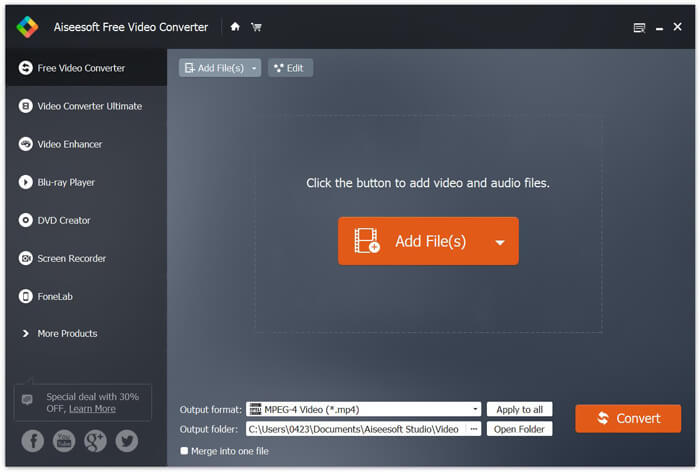
Step 3. Select MOV as your target format from the list of Output format. Then click on Convert button to start the conversion from MTS to MOV.
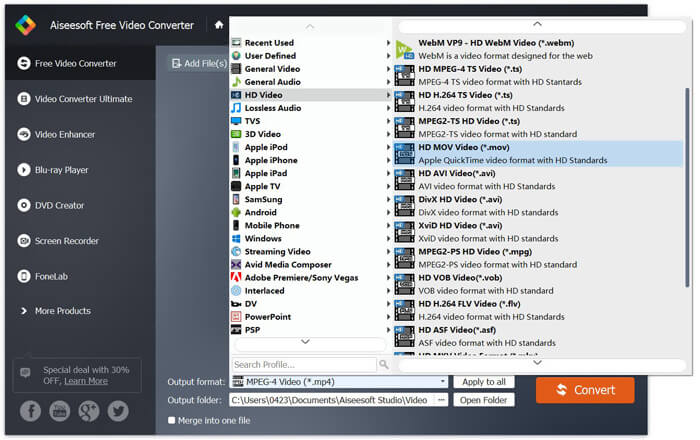
După cum puteți vedea de mai sus, acest convertor gratuit MTS în MOV are, de asemenea, câteva caracteristici de editare de bază. Înainte de conversia finală, le puteți utiliza pentru a vă personaliza fișierul MTS. Comparativ cu convertoarele online, acest convertor video gratuit vă poate oferi o viteză de conversie mai mare și o calitate video mai mare. De aceea o facem prima noastră recomandare.
Partea 2. Convertorul gratuit online vă ajută să convertiți videoclipuri cu ușurință
When you Google how to convert MTS to MOV, you can get many free online converter results. Here we introduce you with an easy-to-use free online MTS to MOV converter, FVC Free Online Video Converter. Without installing any softwares, you can convert any popular video formats to MP4, AVI, MOV, etc. for free. And you don’t need to worry anything because the conversion is safe and stable. No data will lose during the conversion process.
Step 1. Open the link above and click the Add Files to Convert button. Before converting, please download FVC launcher and install it. It only takes a few seconds.

Step 2. After installing and updating the launcher, just pick the video you want to convert. Then choose the format you need and press Convert.

Step 3. Open the link above and click the Add Files to Convert button. Before converting, please download FVC launcher and install it. It only takes a few seconds.
Partea 3. Cum se convertește MTS în MOV gratuit online cu ZAMZAR
ZAMZAR este unul dintre cele mai populare programe de conversie video online care vă pot ajuta să convertiți gratuit MTS în MOV. Este proiectat cu interfață concisă și funcție de conversie simplă. Puteți lua următorul ghid pentru conversia video MTS.
Pasul 1. Deschideți browserul și navigați la site-ul oficial al ZAMZAR. Aici puteți accesa direct pagina https://www.zamzar.com/convert/mts-to-mov/. Aici aveți permisiunea de a converti direct MTS în MOV fără a face alte setări.
Pasul 2. Faceți clic pe butonul Adăugare fișiere pentru a încărca fișierul MTS pe care doriți să îl convertiți. Puteți trage și plasa pentru încărcarea fișierului MTS. Un lucru pe care trebuie să-l știți este că, acest convertor MTS online gratuit vă permite să convertiți un fișier MTS mai puțin de 150 MB.
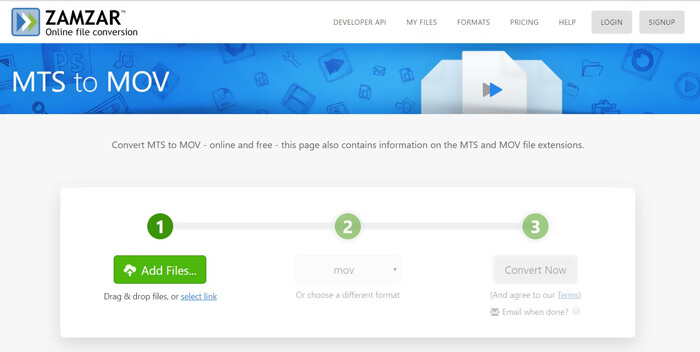
Step 3. After uploading, you can click the Convert Now button to start converting MTS to MOV free online.
Partea 4. Mod online de a converti MTS în MOV cu FreeConvert
FreeConvert is another popular online video converter which has the capability to make the MTS to MOV video conversion free. This free MTS to MOV converter highly supports MTS and M2TS. It enables you to upload a MTS file up to 1GB. What’s more, it allows you to upload 20 MTS files at a time for converting. Now you can follow the steps below to convert your MTS to MOV.
Step 1. First, you need to go to FreeConvert.com on your browser. Here you can directly go to https://www.freeconvert.com/mts-to-mov for the conversion.
Step 2. Click the big blue Choose MTS Files to upload the MTS file you want to convert to MOV. At it mentioned above, here you are allowed to upload one or more MTS files for the conversion.
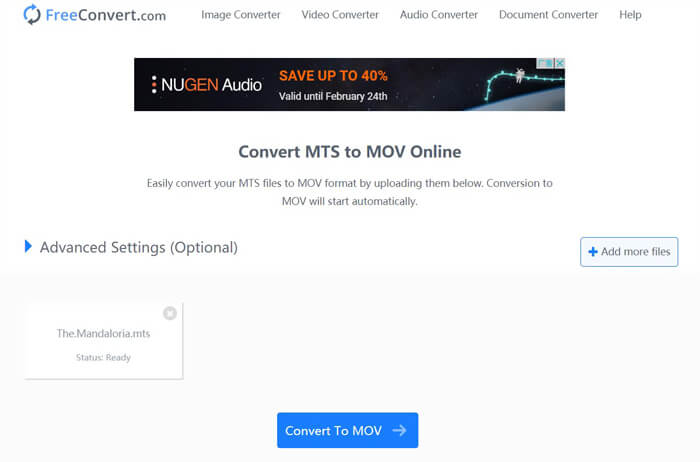
Step 3. Click Convert To MOV button to start the uploading and converting process. After that, you need to click the Download button to save the converted file on your computer.
When you choose free online converters to convert MTS to MOV, you need to take a relatively long time for the uploading and converting. So you’d better convert a small-size MTS file with online converting software. If you want to convert a large MTS or M2TS video, you should rely on the highly-recommended Free Video Converter.
-
 6 moduri simple de a converti TS în AVI / MKV / MOV / WMV pe Windows / Mac
 Doriți să convertiți rapid fișiere TS în AVI / MKV / MOV / WMV? Acest articol prezintă convertoare video online și offline cu ghid complet. Poate puteți obține cel mai bun convertor TS gratuit aici.
-
 MOV VS MP4 - Care este mai bun
 MOV VS MP4, care este mai bun? Această postare spune diferența dintre MP4 și MOV, astfel încât să puteți obține alegerea mai bună de utilizat pentru fișierele dvs. video.
-
 Cum să vă alăturați fișierelor MOV (QuickTime) gratuit
 Poate fi dificil pentru începători să se alăture mai multor videoclipuri MOV împreună. Deci, există o modalitate simplă și rapidă de a combina fișiere MOV? Dacă există, atunci cum să-l folosiți? Această postare vă va ajuta să obțineți aceste răspunsuri.
