


 Video Converter Ultimate
 Screen Recorder
 Reparație video
 Descărcare sigură
Cunoașteți elementele de bază despre aplicațiile Recorder Format AMR
AMR, cunoscut și ca Adaptive Multi-Rate, este un format cu pierderi. Acest tip de fișier conține înregistrări vocale, mesaje MMS și altele asemenea. A fost creat inițial special pentru telefoanele 3G, dar acum îl poți deschide și cu alte playere media care acceptă acest format. În plus, utilizatorii întâmpină adesea dificultăți în a alege cel mai bun înregistrator AMR care să le satisfacă nevoile. Așadar, acest articol prezintă instrumente selectate în funcție de specificațiile, pașii și informațiile de care ai nevoie și multe altele. Citește acest material pentru a afla ce ți se potrivește cel mai bine, în calitate de viitor utilizator. Fără alte întârzieri, să trecem mai departe.
Partea 1. Cel mai bun recorder AMR pentru Windows și Mac
FVC Free Audio Recorder

Un instrument online care îți permite să înregistrezi apeluri, sesiuni de jam, voice-over și multe altele. FVC Free Audio Recorder este un instrument dezvoltat de FVC, care le oferă utilizatorilor o experiență de înregistrare online mai bună. Acest instrument îndeplinește funcția de înregistrator audio. Dacă ai îndoieli cu privire la acest instrument, de ce nu îl încerci mai întâi? Așadar, fără alte explicații, să explorăm acest instrument incredibil și să învățăm să-l folosim urmând acest pas simplu pus la dispoziția ta.
Pasul 1. Apasă pe acest link pentru a merge pe site-ul principal. Nu-ți face griji, este lipsit de malware.
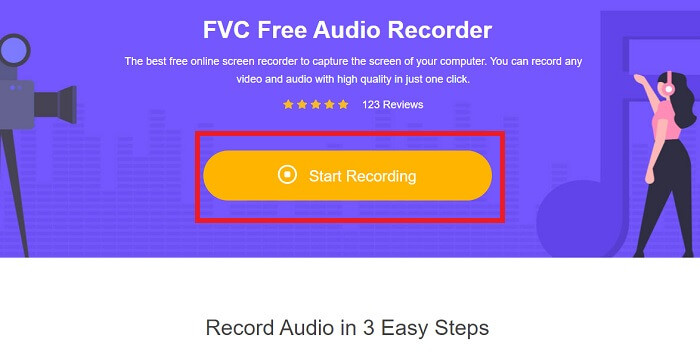
Pasul 2. Lansează instrumentul făcând clic pe Start Recording.
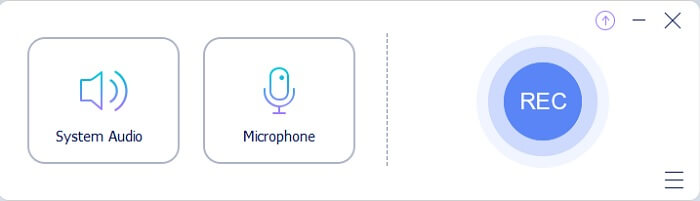
Pasul 3. O bară de instrumente ca aceasta va apărea pe ecran. Asta înseamnă doar că instrumentul rulează deja.
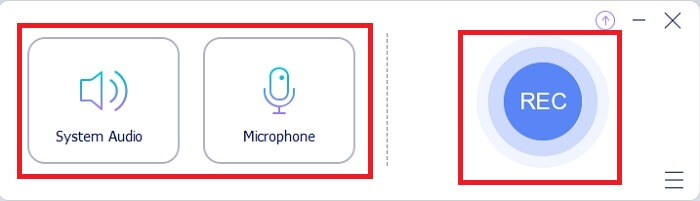
Pasul 4. Bara de instrumente are un buton Speaker pentru a adăuga sunetul de sistem și un Mic pentru vocea ta. Când ești gata, apasă butonul rotund pentru a Start.
Pasul 5. Dacă înregistrarea s-a încheiat, apasă butonul în formă de cub pentru a opri înregistrarea. Fișierul va fi salvat automat în spațiul tău de stocare. Dacă vrei să asculți din nou înregistrarea, apasă pe pictograma cu trei linii de dedesubt și lista de înregistrări îți va afișa prima oară fișierul cel mai recent.
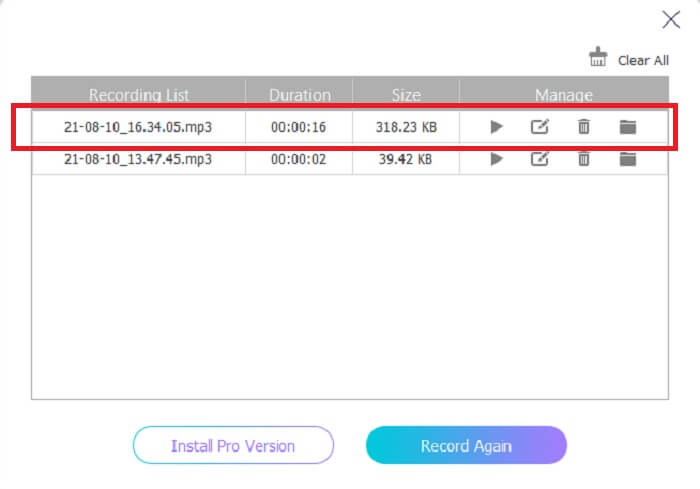
Partea 2. 4 Cele mai bune instrumente alternative pentru Recorder AMR pentru Windows și Mac
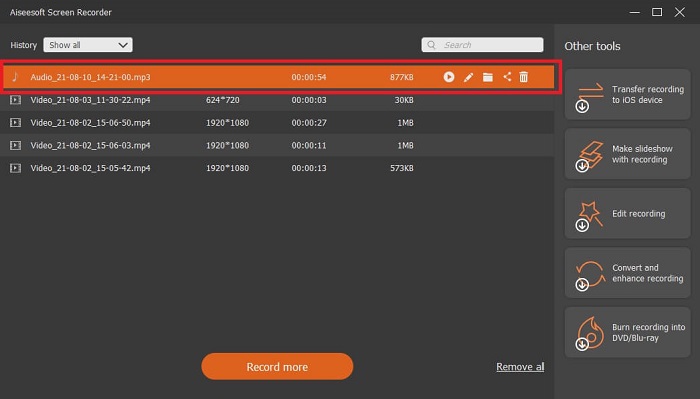
1. FVC Screen Recorder
Dacă ești în căutarea celui mai bun înregistrator audio mp3, amr, wav, ac3, atunci acesta este pentru tine. Nu mai este nevoie să cauți alte instrumente, concentrează-te în schimb pe ceea ce îți poate oferi acest program. Pentru că acest instrument este unic, este vorba despre FVC Screen Recorder. Acesta este cel mai bun înregistrator video-audio premium, pe care majoritatea utilizatorilor îl aleg ca primă opțiune. Mai mult, poate te întrebi de ce ar trebui să folosești acest instrument ca înregistrator personal. Atunci este o onoare să ți-l prezentăm și să îți oferim acești pași simpli. Fără alte introduceri, să trecem la pași. Urmează-i cu atenție ca să devii un profesionist în înregistrare.
Pasul 1. Alege platforma pe care o folosești în prezent. Descarcă apoi instalează. Schimbă Preferences (Preferințele) după cum dorești și apasă Finish pentru a salva.
Descărcare gratuităPentru Windows 7 sau versiuni mai noiDescărcare sigură
Descărcare gratuităPentru MacOS 10.7 sau versiuni mai noiDescărcare sigură
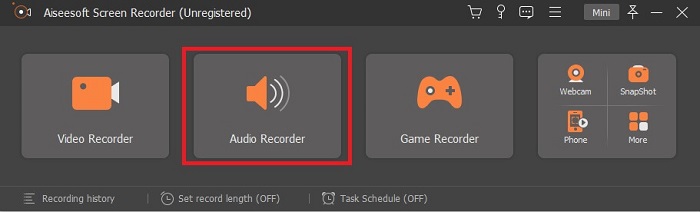
Pasul 2. După lansarea instrumentului, pe ecran va apărea o bară de instrumente plutitoare ca aceasta. Apoi apasă pe Audio Recorder pentru a continua.
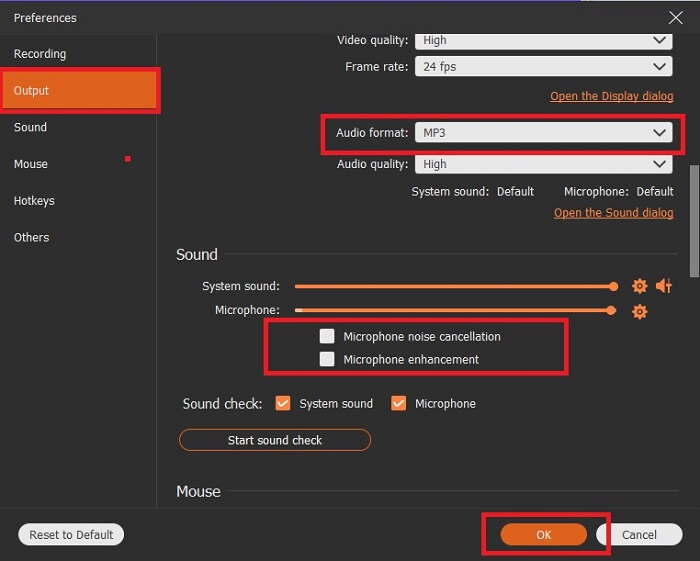
Pasul 3. Găsește pictograma în formă de gear (rotiță) pentru a intra în setări. Schimbă Audio output în formatul dorit și ajustează celelalte opțiuni, apoi apasă OK pentru a salva.
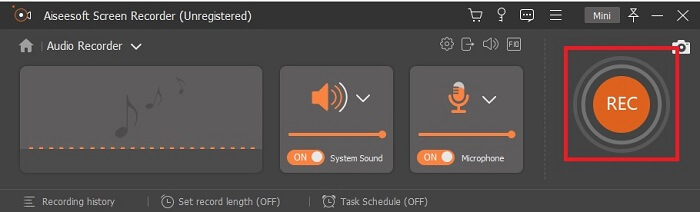
Pasul 4. În bara de instrumente, apasă pe System Sound și Microphone pentru a adăuga sunetul de sistem și vocea ta. Dacă totul este setat, ești gata de înregistrare. Apasă butonul rotund REC pentru a începe înregistrarea.
Pasul 5. Când totul este gata și înregistrarea s-a încheiat, apasă butonul în formă de box (pătrat) pentru a opri înregistrarea. Apasă Save și Next pentru a salva rezultatul final. Dacă vrei să revezi înregistrarea, apasă pe liniile paralele și va apărea un history (istoric) al înregistrărilor tale.
2. Tupeul
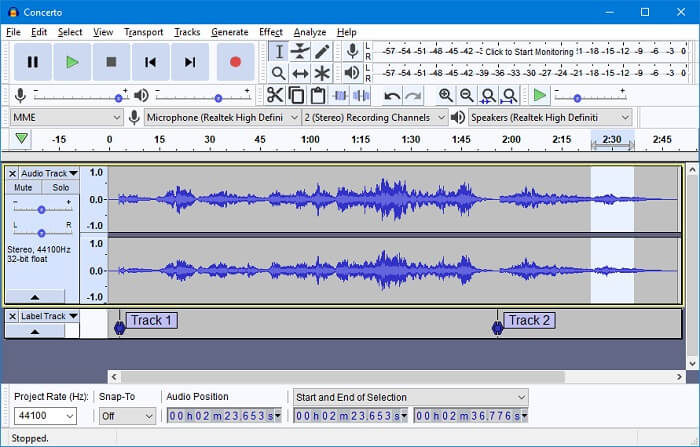
Un alt instrument pentru înregistrare audio. Audacity este puțin complicat dacă ești nou în utilizarea interfeței, dar după câteva zile te vei obișnui. Poți, de asemenea, să înregistrezi și să editezi, de exemplu să îmbini piste audio. Totuși, programul are capacități limitate de mixare, iar fișierele de instalare pentru plug-in-uri și encodere sunt separate.
3. Wavosaur
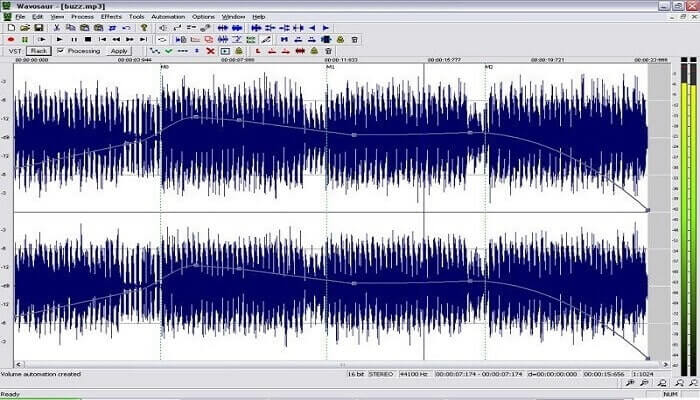
Wavosaur are instrumente pentru înregistrare și editare, precum copiere, decupare, împărțire etc. Acest instrument poate realiza lucruri mai complexe, cum ar fi aranjamente muzicale, beat-uri complexe și multe altele. Dacă întâmpini dificultăți în folosirea sa pentru că nu ești familiarizat cu programul, îți pune la dispoziție și un tutorial video ca să înțelegi mai bine.
4. Adobe Audition
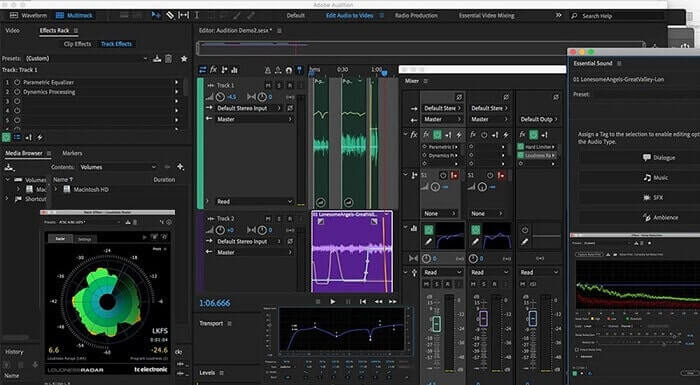
Acest instrument este folosit cel mai des în mediul profesional/industrial de înregistrare. Dacă banii nu sunt o problemă pentru tine, atunci Adobe Audition este un instrument foarte bun pentru producție muzicală. Oferă editare precisă a muzicii, curățarea sunetului, sound design și altele. Totuși, acest program nu oferă posibilitatea unei plăți unice și are o interfață de utilizator copleșitoare. Așadar, trebuie să fii pregătit dacă vrei să încerci acest instrument.
Partea 3. Diagrama comparativă
| Caracteristici | FVC Free Audio Recorder | FVC Screen Recorder | Îndrăzneală | Wavosaur | Adobe Audition |
| Inregistrare audio |  | | | | |
| Anularea zgomotului |  | | | | |
| Instrumente de editare | | | | | |
| Îmbunătățirea microfonului | | | | | |
| Specialitate | Înregistrare simplă, dar eficientă | Mai multe opțiuni sunt oferite utilizatorilor, mai degrabă decât versiunea gratuită cu ieșire profesională. Cu toate acestea, este ușor de utilizat cu rezultate profesionale. | Efecte de bază, editare și adăugare. | Instrumente de editare pentru redare, oprire, înregistrare, derulare înapoi și multe altele. | set de instrumente cuprinzător. |
| Format / s disponibile | MP3 și AMR | MP3, WMA, AAC, M4A, FLAC, OGG, AMR, Opus și multe altele. | WAV, AIFF și MP3 | WAV și MP3 | AC-3, M4A, MAT, VOX, W64, WAV și multe altele |
| Gama de prețuri | Este un instrument online gratuit | Pentru 1 lună: $25.00 Pentru un an: $31.20 Pentru licență pe viață: $55.20 | Software gratuit descărcabil | Software gratuit descărcabil | $27.62 / moment, pentru anual $315.61 / ani, pentru anual $41.43 / plan lunar |
Partea 4. Întrebări frecvente despre AMR Recorder
Care sunt diferitele tipuri de fișiere AMR?
AMR are două tipuri de standarde de format: AMR-NB și AMR-WB.
AMR-NB este versiunea narrowband, cunoscută și ca versiunea de bază. Include un bitrate redus, similar cu ce găsești la MP3, cu valori între 300 și 3400, fiind cel mai des folosit pentru telefoanele tradiționale. Exemple de bitrate pentru acest format sunt: 06.70 kbps, 07.40 kbps, 07.95 kbps, 10.20 kbps, 12.20 kbps.
În schimb, AMR-WB ocupă o lățime de bandă mult mai mare. Stochează audio de calitate mai bună decât NB, având un interval de la 50 la 7000 Hz. Datorită acestei plaje largi de frecvențe, GSM și UMTS îl folosesc pentru a optimiza comunicațiile. Iată câteva dintre bitrate-urile pe care le folosește: 15.85 kbps, 18.25 kbps, 19.85 kbps, 23.05 kbps, 23.85 kbps.
De ce RAM-ul meu nu poate fi deschis în playerul media?
Ca orice alte formate de fișiere, unele playere media nu acceptă acest tip de format. Așadar, dacă vrei să redai înregistrările tale AMR, FVC Free Video Player te poate ajuta să le asculți.
Este AMR un format de fișier comprimat?
Da, este un format de compresie audio codec pentru codarea vorbirii.
Concluzie
Pentru a încheia scrierea, aceste instrumente menționate au propriile abilități și unicitate. Dar nu toate sunt cea mai bună alegere pentru începători. Deci, dacă doriți să cunoașteți cel mai bun recorder ales de începător și de expert. FVC Screen Recorder este un instrument multifuncțional care vă permite să faceți ceea ce doriți să faceți. Nu limitează utilizatorul la granița dvs. Dar te ajută să mergi mai mult și să ieși în zona ta sigură. Deci, ce aștepți, acest instrument special nu va fi o povară pentru tine, ci va fi marele tău ajutor.
-
 Top 5 Cele mai bune înregistratoare de ecran WebM pentru Windows / Mac: o analiză aprofundată
 Aflați mai multe despre fișierele extensiei WebM citind articolul și descoperiți aplicațiile de înregistrare a ecranului WebM pe care le puteți utiliza pentru a înregistra videoclipuri WebM.
-
 Cele mai bune 4 înregistratoare video SWF accesibile online gratuit
 Ați auzit despre fișierul SWF? Aflați mai multe despre acest format de fișier și descoperiți modalități de înregistrare a fișierelor SWF folosind instrumente online gratuite.
-
 Recordere video MTV incomparabile Compatibile pe computer Mac / Windows
 Acest articol vă va ajuta să aflați despre formatul de fișier MTV și o listă de înregistratoare video MTV pe care le puteți utiliza pentru a înregistra cu ușurință ecranele computerului.
