


 Video Converter Ultimate
 Screen Recorder
 Reparație video
 Descărcare sigură
Top 4 moduri gratuite de a converti MTS în MOV
Am capturat câteva videoclipuri cu camera mea Sony care exportau fișiere MTS. Observ că MTS nu poate fi acceptat de playerul media și de iMovie. Folosesc un Mac și vreau să editez aceste videoclipuri MTS capturate. Orice ajutor? Există vreo modalitate simplă, în special gratuită de a converti MTS în MOV?
MTS este un format video de înaltă definiție utilizat pe scară largă de camerele video Sony și Panasonic, ca extensie de fișier pentru AVCHD (Advanced Video Coding High Definition). După înregistrarea video cu camera ta digitală, cel mai probabil vei obține un fișier MTS. Acesta suportă 720p/1080i HD și poate oferi o calitate video superioară. Totuși, MTS nu este un format popular, care să fie acceptat de majoritatea playerelor media sau a programelor de editare.

Când ai nevoie să editezi MTS în iMovie sau să îl redai cu un player media, ar trebui să convertești MTS în MOV sau MP4 pentru o compatibilitate mai bună. În acest articol îți vom prezenta 4 convertoare MTS gratuite care te ajută să convertești MTS în MOV cu ușurință.
Partea 1. Cel mai bun mod gratuit de a converti MTS în MOV fără pierderi de calitate
Există un număr foarte mare de instrumente de conversie MTS disponibile pe internet, care te pot ajuta să convertești MTS în MOV cu o calitate ridicată. În prima parte, dorim să îți recomandăm cel mai bun software gratuit de conversie MTS în MOV, Free MTS Converter.
Este special conceput pentru a face față tuturor tipurilor de conversii. Este compatibil cu aproape toate formatele video și audio precum MP4, MOV, MKV, MTS, AVI, FLV, WMV, MP3, AAC, FLAC și multe altele. Puteți să o descărcați gratuit și să urmați următorul ghid pentru a converti MTS în MOV gratuit.
Descărcare gratuităPentru Windows 7 sau versiuni ulterioareDescărcare sigură
Descărcare gratuităPentru MacOS 10.7 sau versiuni ulterioareDescărcare sigură
Pasul 1. Mai întâi, trebuie să instalați și să rulați acest convertor gratuit MTS în MOV pe computer. Oferă atât versiuni Windows, cât și Mac pentru descărcare.
Pasul 2. Fă clic pe Add File(s) pentru a importa fișierul(ele) MTS pe care vrei să le convertești. Poți converti unul sau mai multe fișiere MTS deodată.
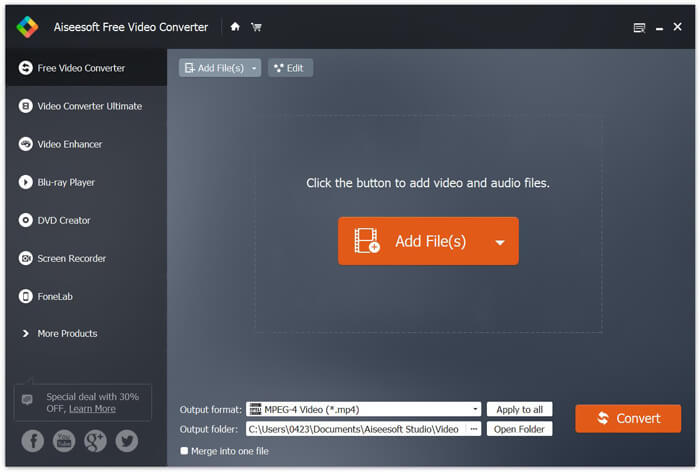
Pasul 3. Selectează MOV ca format țintă din lista de Output format. Apoi fă clic pe butonul Convert pentru a începe conversia din MTS în MOV.
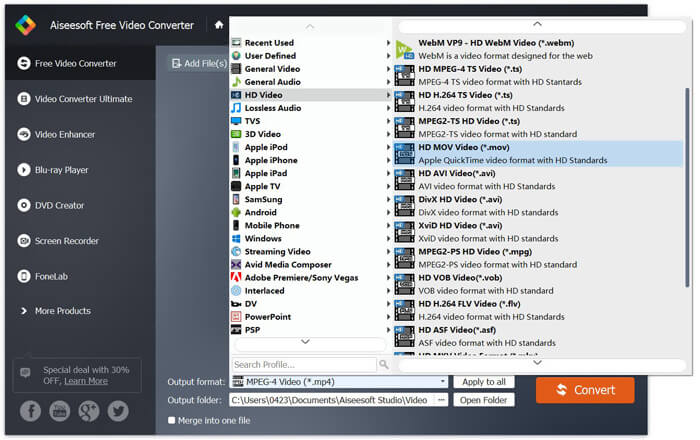
După cum puteți vedea de mai sus, acest convertor gratuit MTS în MOV are, de asemenea, câteva caracteristici de editare de bază. Înainte de conversia finală, le puteți utiliza pentru a vă personaliza fișierul MTS. Comparativ cu convertoarele online, acest convertor video gratuit vă poate oferi o viteză de conversie mai mare și o calitate video mai mare. De aceea o facem prima noastră recomandare.
Partea 2. Convertorul gratuit online vă ajută să convertiți videoclipuri cu ușurință
Când cauți pe Google cum să convertești MTS în MOV, vei obține multe rezultate de convertoare online gratuite. Aici îți prezentăm un convertor online MTS în MOV ușor de folosit, FVC Free Online Video Converter. Fără să instalezi niciun software, poți converti gratuit orice format video popular în MP4, AVI, MOV etc. Și nu trebuie să îți faci griji, deoarece conversia este sigură și stabilă. Niciun fel de date nu se vor pierde în timpul procesului de conversie.
Pasul 1. Deschide linkul de mai sus și fă clic pe butonul Add Files to Convert. Înainte de conversie, descarcă și instalează FVC launcher. Durează doar câteva secunde.

Pasul 2. După instalarea și actualizarea launcher-ului, alege pur și simplu videoclipul pe care vrei să îl convertești. Apoi selectează formatul de care ai nevoie și apasă Convert.

Pasul 3. Deschide linkul de mai sus și fă clic pe butonul Add Files to Convert. Înainte de conversie, descarcă și instalează FVC launcher. Durează doar câteva secunde.
Partea 3. Cum se convertește MTS în MOV gratuit online cu ZAMZAR
ZAMZAR este unul dintre cele mai populare programe de conversie video online care vă pot ajuta să convertiți gratuit MTS în MOV. Este proiectat cu interfață concisă și funcție de conversie simplă. Puteți lua următorul ghid pentru conversia video MTS.
Pasul 1. Deschideți browserul și navigați la site-ul oficial al ZAMZAR. Aici puteți accesa direct pagina https://www.zamzar.com/convert/mts-to-mov/. Aici aveți permisiunea de a converti direct MTS în MOV fără a face alte setări.
Pasul 2. Faceți clic pe butonul Adăugare fișiere pentru a încărca fișierul MTS pe care doriți să îl convertiți. Puteți trage și plasa pentru încărcarea fișierului MTS. Un lucru pe care trebuie să-l știți este că, acest convertor MTS online gratuit vă permite să convertiți un fișier MTS mai puțin de 150 MB.
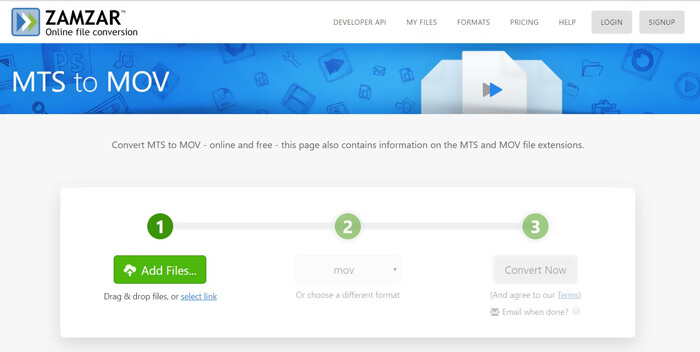
Pasul 3. După încărcare, poți da clic pe butonul Convert Now pentru a începe conversia online, gratuit, din MTS în MOV.
Partea 4. Mod online de a converti MTS în MOV cu FreeConvert
FreeConvert este un alt convertor video online popular, care poate realiza gratuit conversia video din MTS în MOV. Acest convertor MTS în MOV gratuit acceptă foarte bine MTS și M2TS. Îți permite să încarci un fișier MTS de până la 1 GB. În plus, îți permite să încarci până la 20 de fișiere MTS simultan pentru conversie. Acum poți urma pașii de mai jos pentru a-ți converti fișierele MTS în MOV.
Pasul 1. Mai întâi, trebuie să accesezi FreeConvert.com în browserul tău. Poți merge direct la https://www.freeconvert.com/mts-to-mov pentru conversie.
Pasul 2. Fă clic pe butonul mare albastru Choose MTS Files pentru a încărca fișierul MTS pe care vrei să îl convertești în MOV. După cum s-a menționat mai sus, aici poți încărca unul sau mai multe fișiere MTS pentru conversie.
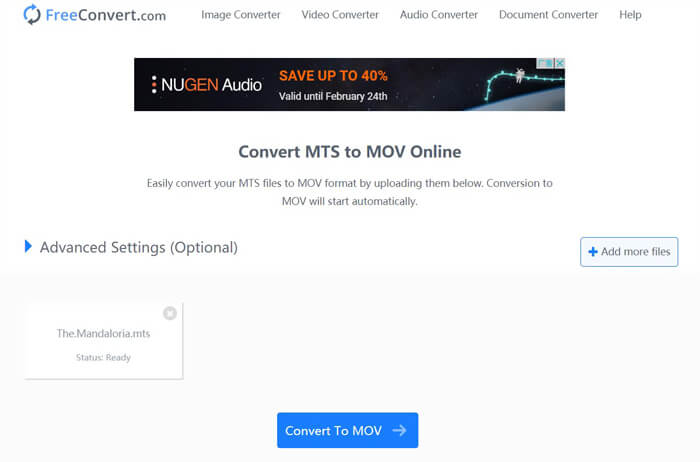
Pasul 3. Fă clic pe butonul Convert To MOV pentru a începe procesul de încărcare și conversie. După aceea, trebuie să faci clic pe butonul Download pentru a salva fișierul convertit pe computerul tău.
Când alegi convertoare online gratuite pentru a converti MTS în MOV, ai nevoie de destul de mult timp pentru încărcare și conversie. Așadar, este mai bine să convertești fișiere MTS de dimensiuni mici cu software de conversie online. Dacă vrei să convertești un fișier MTS sau M2TS mare, ar trebui să te bazezi pe Free Video Converter, recomandat cu căldură.
-
 6 moduri simple de a converti TS în AVI / MKV / MOV / WMV pe Windows / Mac
 Doriți să convertiți rapid fișiere TS în AVI / MKV / MOV / WMV? Acest articol prezintă convertoare video online și offline cu ghid complet. Poate puteți obține cel mai bun convertor TS gratuit aici.
-
 MOV VS MP4 - Care este mai bun
 MOV VS MP4, care este mai bun? Această postare spune diferența dintre MP4 și MOV, astfel încât să puteți obține alegerea mai bună de utilizat pentru fișierele dvs. video.
-
 Cum să vă alăturați fișierelor MOV (QuickTime) gratuit
 Poate fi dificil pentru începători să se alăture mai multor videoclipuri MOV împreună. Deci, există o modalitate simplă și rapidă de a combina fișiere MOV? Dacă există, atunci cum să-l folosiți? Această postare vă va ajuta să obțineți aceste răspunsuri.
