


 Video Converter Ultimate
 Screen Recorder
 Reparație video
Aflați care sunt cele mai bune 3 convertoare FLV în MKV pentru a vă converti fișierele FLV în MKV
Te-ai săturat să cauți pe internet cea mai bună metodă de a converti FLV în MKV gratuit? Poate fi o coincidență, dar astăzi am descoperit cele mai bune convertoare FLV pe care le poți folosi; desigur, le-am ales doar pe cele mai bune. Pentru ca explorarea ta să fie mult mai ușoară, trebuie să continui să citești articolul de mai jos, pentru că vei afla multe despre FLV și MKV și despre convertoarele pe care le poți folosi.

Partea 1. 2 moduri de a converti FLV în MKV gratuit
Primul drum. Utilizați convertorul online pentru a converti FLV în MKV
Acest convertor online este, fără îndoială, unul dintre marii transcodori pentru a converti FLV în MKV online. FVC Free Video Converter Online este un convertor simplu și ușor de înțeles, pe care îl poți folosi online. Însă acest instrument depinde de conexiunea la internet, ceea ce înseamnă că, dacă nu ai internet, aceasta este ultima ta opțiune pentru conversie. Deși este bazat pe internet, instrumentul nu are reclame în interfață care să te deranjeze și este lipsit de malware. Așadar, dacă vrei să ai o experiență practică cu acest instrument, urmează pașii de mai jos.
Pasul 1. Apasă pe acest link pentru a deschide FVC Free Video Converter Online într-o filă nouă.
Pasul 2. Apasă butonul Add Files to Convert pentru a deschide folderul de pe computerul pe care îl folosești. Alege fișierul FLV pe care vrei să îl convertești și apasă Open pentru a încărca fișierul.
Descărcați versiunea pentru desktop pentru a converti fișiere în lot.
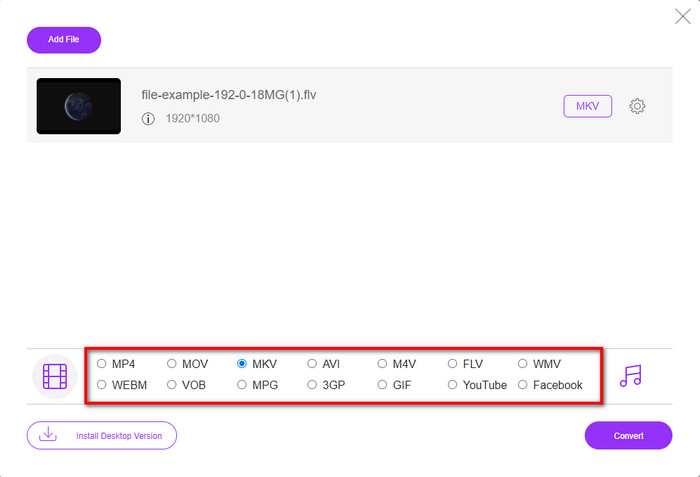
Pasul 3. Selectează formatul MKV din lista de formate afișată mai jos.
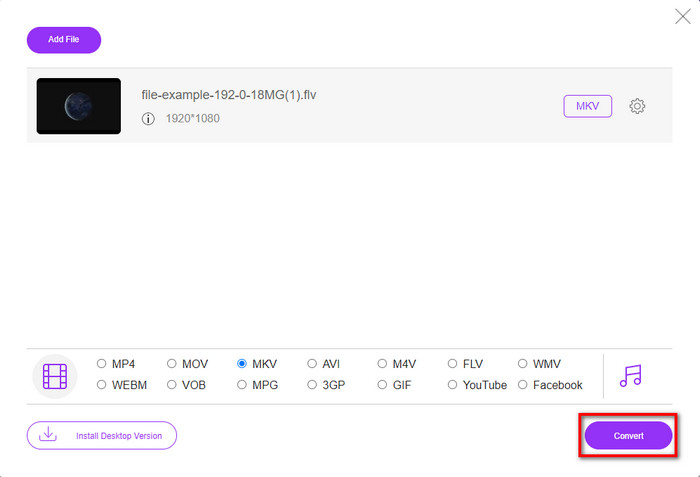
Pasul 4. Pornește procesul de conversie făcând clic pe butonul Convert, iar fișierul convertit va fi salvat automat pe unitatea de stocare a computerului.
Calea a 2-a. Utilizați convertizorul gratuit disponibil pentru descărcare pe Windows și Mac
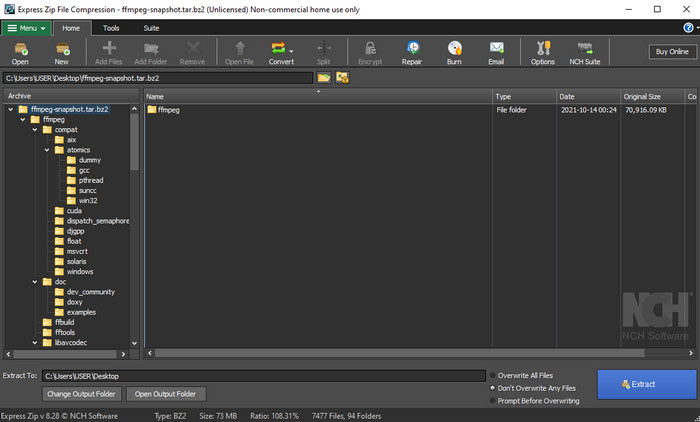
FFmpeg nu este convertorul clasic pe care îl folosești de obicei. Chiar dacă nu este un convertor obișnuit, tot îți poate converti fișierul FLV. Așadar, ceea ce face ca acest instrument să fie diferit este faptul că folosește o interfață bazată pe linie de comandă (CLI), ceea ce înseamnă că, înainte de a efectua conversia, va trebui să îi dai comenzi prin codare sau, mai simplu spus, să tastezi comenzi. Dacă acest convertor ți se pare interesant, citește detaliile de mai jos pentru a folosi acest FFmpeg FLV în MKV, urmând pașii de mai jos.
Pasul 1. Descarcă și deschide FFmpeg.exe.
Pasul 2. Deschide Command Prompt pe computerul tău.
Pasul 3. Caută fișierul FLV folosind CMD. Apoi copiază acest cod și lipește-l în Command Prompt: ffmpeg -i input.flv -vn -ar 44100 -ac 2 -b:a 192k output.mkv, după care apasă Enter pe tastatură pentru a începe procesul.
Partea 2. Convertiți FLV în MKV cu cel mai bun convertor FLV în MKV fără pierderi
a 3-a cale. Utilizați Professional Converter pentru a converti FLV în WMV
Încă nu ești mulțumit de primele două convertoare prezentate mai sus? Dacă da, trebuie să încerci FVC Video Converter Ultimate. De ce? Pentru că oferă un rezultat profesional chiar dacă nu depui prea mult efort în conversie. De asemenea, suportă mai multe formate pentru a-ți converti fișierul FLV în MKV, AVI, MOV, AVI, MP4 și peste 200 de alte formate. Tot nu ești impresionat? Poate vrei să adaugi puțină magie videoclipului tău? În acest caz, ești norocos că ai acest convertor, deoarece oferă funcții avansate de editare video pe care le poți folosi. Te îndoiești pentru că instrumentul ți se pare poate prea complex de folosit? Atunci urmează pașii de mai jos pentru a experimenta și a învăța cum să folosești acest convertor FLV în MKV.
Pasul 1. Înainte de a folosi acest convertor, trebuie mai întâi să îl descarci făcând clic pe butonul de descărcare de mai jos. Urmează instrucțiunile de instalare după descărcare și apoi lansează programul.
Descărcare gratuită pentru Windows 7 sau o versiune ulterioară Descărcare securizată
Descărcare gratuită pentru MacOS 10.7 sau o versiune ulterioară Descărcare securizată
Pasul 2. Pentru a adăuga fișierul FLV pe care vrei să îl convertești, apasă butonul +. Caută fișierul FLV în folderul care va apărea pe interfață și apasă Open pentru a trece la pasul următor.
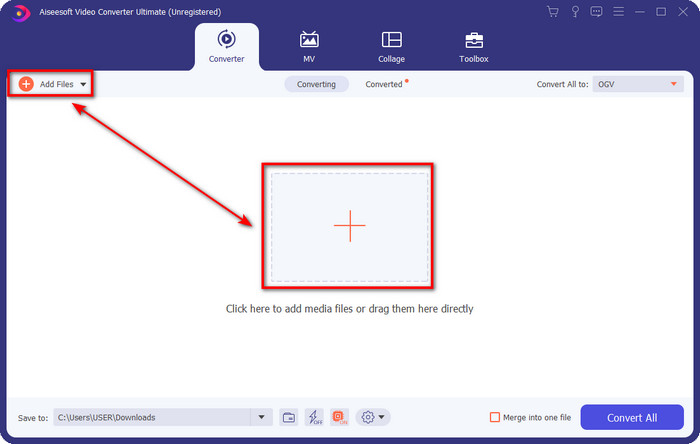
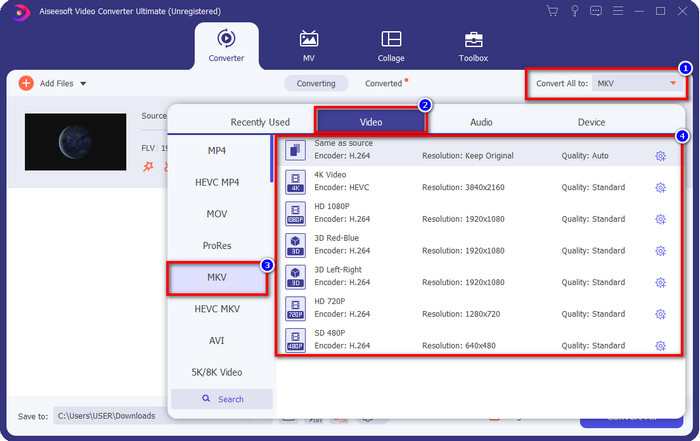
Pasul 3. După aceea, schimbă formatul în MKV făcând clic pe butonul drop-down din partea dreaptă sus a interfeței utilizator.
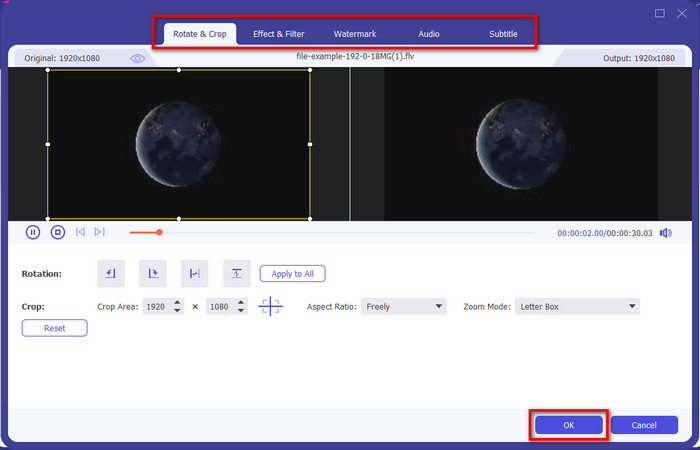
Opțional. Dacă ai nevoie să editezi videoclipul, poți să faci clic pe butonul în formă de baghetă magică. Va apărea o nouă interfață; aici poți Rota, Decupa (Crop), adăuga Efecte, Filtru, Watermark, ajusta Audio și Subtitrare. Nu-ți limita imaginația, fă ce dorești, iar pentru a aplica toată „magia” pe care ai creat-o, apasă OK.
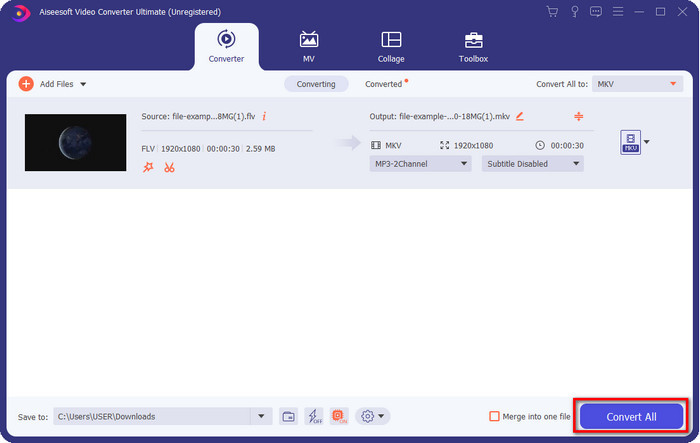
Pasul 4. La final, fă clic pe Convert All pentru a converti fișierul FLV în format MKV. Procesul va dura mai puțin de un minut, deci nu trebuie să aștepți prea mult. Un folder va apărea pe ecran cu fișierul FLV convertit.
Articole similare:
Partea 3. Care este diferența dintre FLV și MKV
FLV și MKV sunt cunoscute pentru că sunt printre cele mai bune containere pe care toată lumea le cunoaște. Dar înainte de orice, să comparăm și să vedem informații mai detaliate despre cele două formate.
FLV este cunoscut pe toate site-urile web deoarece este popular pe paginile web, în principal pentru că Adobe l-a creat. Mai mult, .flv redă fluxuri video online, deoarece sunt mult mai ușor de încărcat decât celălalt format. De asemenea, acest format are nevoie de un plug-in-play înainte de a putea vizualiza sau viziona videoclipul în acest format sau puteți descărca cu ușurință Flash Player. Chiar dacă formatul este excelent, plug-in-play-urile pe care le folosește deja au luat amploare, ceea ce înseamnă că formatul nu este cea mai bună alegere. Cu toate acestea, multe playere media acceptă în continuare acest format și utilizatorii care încă îl folosesc.
MKV este cunoscut pentru că este cel mai viitor format disponibil. Acest format nu ar fi ca orice alt format în mare măsură dacă am fi pe cale să-l comparăm. De exemplu, structura construită în acest format nu este aceeași cu MP4 sau AVI, dar este diferită. Designul și stocarea unică a fișierelor media îl fac mai impresionant. În zilele noastre, este greu să alegi ce format este învechit, iar unul este MKV.
Dacă săpăm mai multe detalii, vom găsi o mulțime de motive pentru care trebuie să convertiți FLV în MKV. Deși cele două formate conțin conținut media, MKV este mai puternic decât FLV. Deci, dacă doriți să aveți puterea unică MKV, trebuie să vă convertiți fișierul în acest format.
FLV vs. MKV
Adobe Flash Player a folosit FLV pentru a furniza conținut video, cum ar fi filme și emisiuni TV. În prezent, Adobe nu mai dezvoltă playerul și recomandă utilizatorilor să-l dezinstaleze din motive de securitate. Cu toate acestea, puteți utiliza în continuare formatul FLV pe multe programe non-Adobe/Macromedia.
Formatul container multimedia Matroska, lansat în 2002, este un format open-source care poate include o serie de piese video, audio, imagini și subtitrare. Deci, îl puteți folosi pentru a stoca cu ușurință clipuri video scurte, emisiuni TV și filme. Este destul de popular pentru fan-subbing anime.
Partea 4. Întrebări frecvente despre conversia FLV în MKV
Este sigur să convertiți FLV în MKV online?
Ei bine, formatul de conversie ar trebui să fie sigur dacă utilizați un instrument web. Cu toate acestea, nu toți convertoarele online sunt sigure pentru a vă converti formatul de fișier. Deoarece există unele tendințe, vor exista multe erori neașteptate atunci când utilizați convertorul greșit. De exemplu, pierderea calității este o problemă larg răspândită, viruși la descărcarea fișierului după conversie, mai multe reclame pop-up, malware infecțios și multe altele. Deci, dacă doriți să aveți un proces de conversie online sigur, trebuie să utilizați în schimb FVC Free Video Converter Online.
Convertirea FLV va dura timp?
Procesul de conversie va depinde de mulți factori, iar unul dintre aceștia este instrumentul pe care îl utilizați și dimensiunea fișierului. Dacă aveți un fișier FLV mare, trebuie să utilizați FVC Video Converter Ultimate, mai ales în grabă. Deoarece acest instrument oferă un proces cu o viteză fulgerătoare, nu veți avea nevoie de o conexiune la internet pentru a-l folosi. Și acum, dacă sunteți în căutarea unui convertor care să vă proceseze formatul mai rapid, atunci instrumentul suprem este alegerea.
De ce nu pot deschide fișierul meu FLV?
Există mai multe motive pentru care nu vă puteți deschide fișierele FLV. Ia-ti notite; acest detaliu următor este unul dintre al sutelea motive pentru care nu puteți deschide fișierul FLV. În primul rând, nu puteți deschide un FLV dacă fișierul este spart sau are un virus în el. În al doilea rând, cea mai frecventă problemă este fișierul video neacceptat de aplicația pe care o utilizați. În al treilea rând, dacă descărcați un fișier FLV de pe internet, va exista un caz în care fișierul pierde unele informații vitale pentru a-l reda. Deși aceasta este o problemă, vă putem ajuta totuși prin conversia FLV-ului dvs. într-un alt format. Dar rețineți că nu puteți restaura FLV schimbând formatul dacă este deteriorat sau incomplet.
Concluzie
Am aflat ce trebuie să știm pentru a converti FLV în MKV în mai multe moduri. Instrumentele de mai sus sunt foarte bune dacă vrem să convertim formatul într-o versiune nouă. Așadar, acum este în mâinile tale să alegi care format ți se potrivește cel mai bine pentru transformarea fișierului. Oricare dintre cele trei instrumente de mai sus îți garantează reușita, dar dacă vrei un rezultat profesional și să scoți tot ce e mai bun din fișierul tău video, trebuie să alegi FVC Video Converter Ultimate. Nu mai este nevoie de explicații, deoarece acest instrument va acoperi toate nevoile tale.
-
 3 soluții despre cum să convertiți FLV în PSP fără pierderi
 Cum se convertește FLV în PSP? Aici veți obține ghidul pas cu pas pentru a converti videoclipurile Flash în formate acceptate de PSP (WMV, MP4, AVI, FLV etc.) pe Windows și Mac.
-
 2 metode de a converti FLV în WMA audio [gratuit și online]
 Doriți să extrageți audio WMA din video FLV? Iată 2 extracte audio WMA gratuite pentru a converti FLV (Flash Video) în WMA (Windows Media Audio) cu viteză de conversie rapidă pe Mac OS X și Windows 10/8/7.
-
 [Rezolvat] Cum să convertiți gratuit videoclipuri FLV în fișiere GIF animate
 Dacă doriți să creați GIF-uri din segmentele video FLV pentru o mai bună trimitere, puteți afla mai multe despre cum să convertiți cu ușurință videoclipurile FLV în fișiere GIF din acest articol.

