


 Video Converter Ultimate
 Screen Recorder
 Reparație video
 Descărcare sigură
3 moduri gratuite de a converti FLV pentru a juca pe Xbox
FLV este utilizat pe scară largă pentru site-uri de știri și de partajare video. Când descarci unele videoclipuri online de pe YouTube, Hulu sau Facebook, cel mai probabil vei obține fișiere FLV. Formatul FLV poate fi redat de mulți playere, dispozitive, platforme și browsere. Însă nu poate fi redat pe Xbox.
Mai mult decât o simplă consolă de jocuri, Xbox îți permite și să redai videoclipuri și muzică printr-un stick USB sau un hard extern. Xbox este compatibil cu multe fișiere media populare. Dar, așa cum s-a menționat mai sus, nu poți reda direct FLV pe Xbox. Când vrei să vizualizezi fișiere FLV pe Xbox, trebuie să convertești FLV în format compatibil Xbox.

Acest articol prezintă 3 metode gratuite de a converti FLV în Xbox. Când vrei să urmărești fișiere FLV pe consola ta Xbox One, Xbox 360, noul Xbox Series X sau Xbox Series S, te poți baza pe ele pentru a converti FLV într-un fișier acceptat de Xbox.
Partea 1. Cum se poate converti gratuit FLV în Xbox Online
Multe convertizoare video vă pot ajuta să convertiți FLV în format acceptat Xbox, cum ar fi AVI sau MP4. Dacă aveți de-a face cu câteva clipuri video FLV mici, ar trebui mai întâi să încercați convertorul FLV online gratuit la Xbox.
Free Online Video Converter este un convertor video ușor de utilizat, care îți permite să convertești FLV în MP4, AVI, WMV, MOV sau alt format acceptat de consola Xbox. În comparație cu alte convertoare online, nu necesită crearea sau autentificarea într-un cont. În plus, nu există nicio limită de dimensiune a fișierului pentru conversia FLV. Ghidul de mai jos îți va arăta cum să îl folosești.
Pasul 1. Acest convertor online FLV în Xbox este compatibil cu orice browser web, precum Chrome, Safari, IE și Firefox. Poți deschide browserul și accesa site-ul Online FLV to Xbox converter.
Pasul 2. Când ajungi acolo, dă clic pe Add Files to Convert și apoi pe butonul Download pentru a instala un launcher pentru conversia FLV. Când launcher‑ul este pregătit, va apărea o fereastră pop-up prin care poți adăuga fișierul FLV.

Pasul 3. Poți vedea că sub fișierul FLV încărcat sunt listate câteva formate video populare, inclusiv MP4, AVI, MOV, FLV, WMV, MKV și altele. Poți alege un format compatibil cu Xbox, cum ar fi MP4 sau AVI.
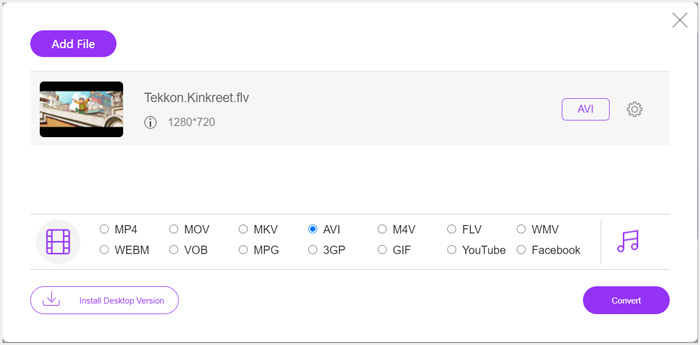
Pasul 4. Dacă vrei să personalizezi mai multe setări pentru video și audio la ieșire, poți da clic pe pictograma Settings de lângă formatul de ieșire. După aceea, poți da clic pe butonul Convert pentru a începe conversia FLV în Xbox. Videoclipul rezultat va fi salvat automat pe computer imediat ce conversia este finalizată.
Partea 2. Cum se convertește FLV în Xbox Online cu FreeConvert
FreeConvert este un alt convertor popular de fișiere video și audio, care te poate ajuta să convertești FLV în MP4, AVI sau WMV compatibile cu Xbox. Are un FLV to Xbox Video Converter dedicat, prin care îți poți converti direct fișierele FLV pentru Xbox.
Pasul 1. Deschide browserul și accesează această pagină FLV to Xbox Video Converter.
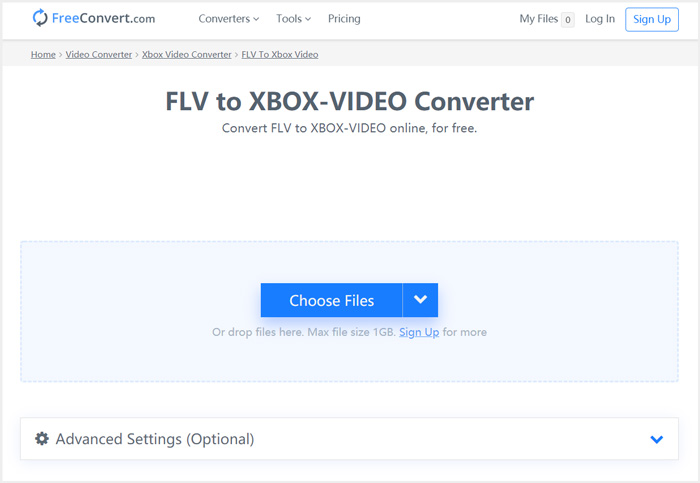
Pasul 2. Dă clic pe butonul Choose Files pentru a răsfoi și încărca fișierul FLV. De asemenea, poți adăuga fișiere prin URL, Google Drive și Dropbox.
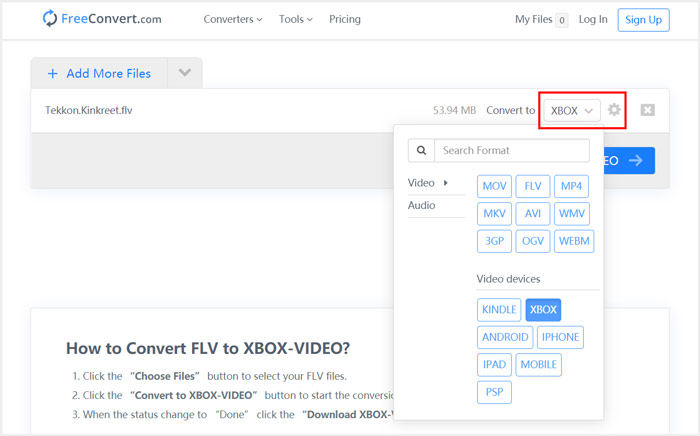
Pasul 3. Poți da clic pe Add More Files pentru a încărca și alte fișiere FLV pe care vrei să le convertești. Formatul țintă va fi setat implicit la XBOX. Poți pur și simplu să dai clic pe butonul Convert to Xbox Video pentru a începe conversia FLV în Xbox.
Urmând pași similari, poți reda orice muzică pe Xbox după ce o convertești în formate compatibile cu Xbox.
Acest FLV to Xbox Video Converter va începe să încarce și să convertească videoclipul. După conversie, poți da clic pe butonul Download pentru a-l salva pe Mac sau pe PC cu Windows. Sau poți alege să îl salvezi pe Google Drive sau Dropbox. Vei vedea unele reclame în timp ce folosești acest convertor FLV în Xbox gratuit.
Partea 3. O modalitate mai bună de a converti gratuit FLV în Xbox pe Mac și PC Windows
Pe lângă convertoarele FLV online, te poți baza și pe alte convertoare video gratuite pentru a converti și reda fișierele FLV pe consola de jocuri Xbox. Aici îți prezentăm puternicul Free FLV Converter. Este conceput special pentru a realiza diverse conversii FLV.

- Convertiți orice format FLV în Xbox, cum ar fi MP4, AVI, WMV, MOV și multe altele.
- Oferiți o serie de teme pentru editarea și personalizarea fișierului FLV.
- CPU-uri multi-core avansate și accelerații GPU pentru a converti FLV în Xbox cu viteză mare.
- Convertiți unul sau mai multe fișiere FLV în Xbox fără pierderi de calitate a imaginii sau a sunetului.
Descărcare gratuităPentru Windows 7 sau versiuni ulterioareDescărcare sigură
Descărcare gratuităPentru MacOS 10.7 sau versiuni ulterioareDescărcare sigură
Pasul 1. Mai întâi, poți face dublu clic pe butonul de descărcare pentru a-l instala gratuit pe computer. Deschide-l și dă clic pe Add Files pentru a importa fișierul(ele) FLV.

Pasul 2. Selectează MP4 sau AVI ca format țintă din lista derulantă Output format. Pentru mai multe setări, poți da clic pe pictograma Settings de lângă formatul de ieșire pentru a intra în fereastra Profile Settings.
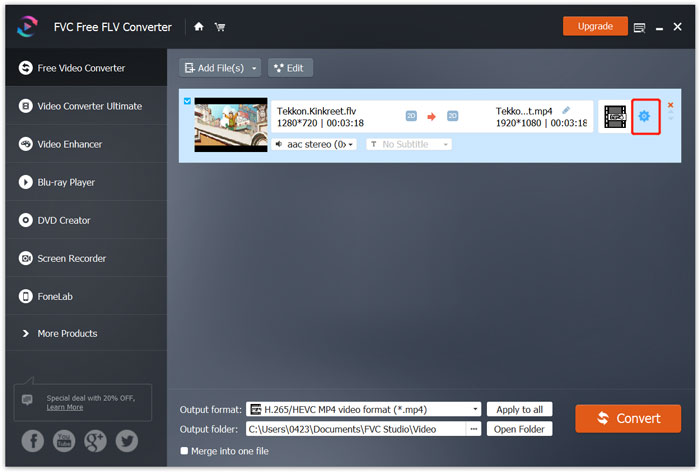
În lista Output format există și o categorie Xbox specială, pentru a converti direct FLV în fișiere compatibile Xbox One sau Xbox 360. Însă trebuie să faci upgrade la versiunea plătită.
Pasul 3. Dă clic pe butonul Convert pentru a începe conversia video de la FLV la MP4 sau la un alt format video compatibil cu Xbox.
Partea 4. Întrebări frecvente despre redarea FLV pe Xbox
Întrebarea 1. Ce formate pot fi acceptate de Xbox One?
Fiind una dintre cele mai populare console de jocuri, XBox este compatibil cu multe formate video și audio utilizate frecvent, inclusiv MP4, AVI, M4V, MOV, WMV, MKV, H.264 AVCHD, WAV, WMA, video 3GP, audio 3GP, AAC , MP3 și multe altele.
Întrebarea 2. Cum se redă videoclipuri pe Xbox?
Dacă aveți aplicația Filme și TV pe Xbox One sau Xbox 360, atunci când transmiteți videoclipuri pe Xbox sau conectați unitatea externă la Xbox, o puteți folosi pentru a viziona videoclipuri cu ușurință.
Întrebarea 3. Ce jucător poate reda fișiere FLV?
Când doriți să redați fișiere FLV pe computerul dvs. Mac, Windows PC sau dispozitiv iOS / Android portabil, VLC Media Player este întotdeauna o opțiune bună pentru a face acest lucru. Oferă aplicații desktop și mobile pentru a reda fișiere FLV pe computer sau telefon.
Concluzie
Nu puteți reda fișiere FLV pe consola dvs. de jocuri Xbox? Pentru a face acest lucru, ar trebui să convertiți mai întâi fișierul FLV în Xbox. Puteți găsi 3 metode gratuite pentru a converti și reda FLV pe Xbox din această postare.
-
 Top 10 jucători FLV pentru Windows, Mac, iOS și Android în 2021
 FLV player vă ajută să accesați cu ușurință fișierele FLV de pe dispozitivul dvs. Windows, Mac, Android, iOS. Consultați cei mai buni jucători de fișiere FLV pe care îi puteți descărca chiar acum.
-
 Tutorial pentru comprimarea GIF și reducerea dimensiunii fișierului cu calitate înaltă
 Iată 2 moduri simple de a comprima GIF pe computer sau pe telefonul mobil. Puteți utiliza FVC Free Online Video Compressor și Photoshop reduce dimensiunea fișierului GIF în diferite aspecte.
-
 Top 4 moduri gratuite de a converti videoclipurile FLV în MP4 pe desktop și online
 Acest ghid împărtășește patru metode gratuite pentru a vă converti fișierele video FLV în format MP4 pe Windows 10/8/7 / XP și Mac OS X, astfel încât să vă puteți bucura de videoclipurile de pe orice dispozitiv.
