


 Video Converter Ultimate
 Screen Recorder
 Reparație video
Instrumente fenomenale de folosit la conversia XviD în FLV [Offline și Online]
O bibliotecă open-source de codec video MPEG-4 distribuită în conformitate cu termenii Licenței Publice Generale GNU, XviD este o bibliotecă de codec video care poate fi descărcată gratuit. Ca rival al codec‑ului proprietar DivX Pro, care este supus unor restricții de licență și, prin urmare, este disponibil doar membrilor DivX Advanced Research Center (DARC), acesta a fost dezvoltat. Între timp, un fișier cu extensia .flv este o prescurtare de la Flash Video. Extensia de fișier FLV se referă la un fișier video sau audio transmis pe internet folosind Adobe Flash Player sau Adobe Air. Aceste două formate video se exclud reciproc, însă le poți transforma sau converti unul în celălalt. Iată instrumentele pe care trebuie să le iei în considerare pentru a converti XviD în FLV.

Partea 1. Metodă eficientă de utilizat în conversia XviD în FLV [Offline]
Convertirea de la XviD la FLV nu a fost niciodată mai ușoară datorită Video Converter Ultimate, care oferă o soluție all-in-one, cu zero pierderi de calitate. În plus, interfața este ușor de utilizat și vă puteți converti cu ușurință fișierele XviD în FLV fără probleme. Pe lângă capacitatea de a converti XviD în FLV, Video Converter Ultimate oferă o mulțime de alte funcții utile. De exemplu, puteți îmbunătăți calitatea unui videoclip și puteți realiza un videoclip muzical. Acum că ați aflat despre acest software, puteți afla cum să-l utilizați urmând procedurile de mai jos:
Pasul 1: Începe descărcarea software‑ului făcând clic pe butonul Descărcare gratuită de mai jos. Este disponibil pentru Mac și Windows, astfel că trebuie să alegi sistemul de operare pe care îl folosești. După ce descarci software‑ul, instalează‑l pe computer.
Descărcare gratuită pentru Windows 7 sau o versiune ulterioară Descărcare securizată
Descărcare gratuită pentru MacOS 10.7 sau o versiune ulterioară Descărcare securizată
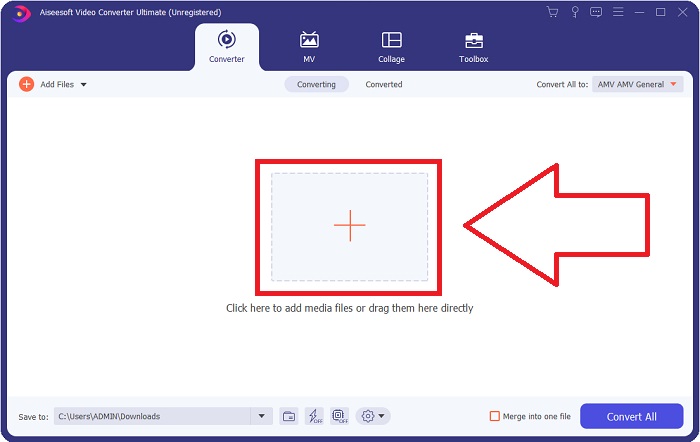
Pasul 2: Lansează software‑ul pentru a începe conversia din XviD în FLV. După lansarea programului, vei vedea o fereastră care apare pe ecran și afișează interfața Converter. Fă clic pe butonul + aflat în mijlocul ferestrei sau poți trage videoclipurile în fereastră pentru a importa fișierele din computer.
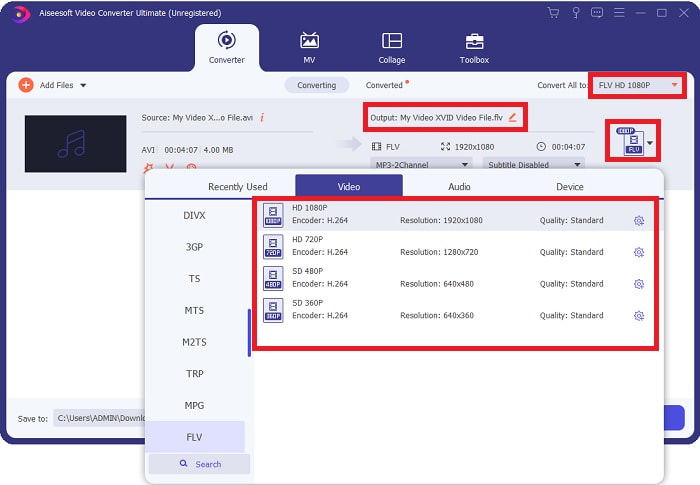
Pasul 3: Apoi va apărea o altă fereastră. Fă clic pe selecția de format video din colțul din dreapta al ecranului. Găsește formatul video FLV și dă clic pe calitatea video pe care o preferi.
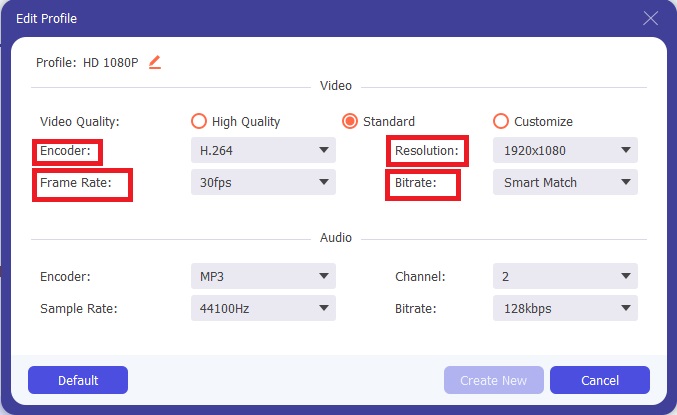
Pasul 4: Atunci când calitatea dorită nu este disponibilă în opțiunile de calitate video oferite de software, îți poți crea propria calitate video ajustând rezoluția, bitrate‑ul, rata de cadre etc. Pentru a face acest lucru, fă clic pe pictograma rotiță de lângă calitatea video afișată după ce ai ales formatul video. Fă clic pe OK când ai terminat de ajustat setările video.
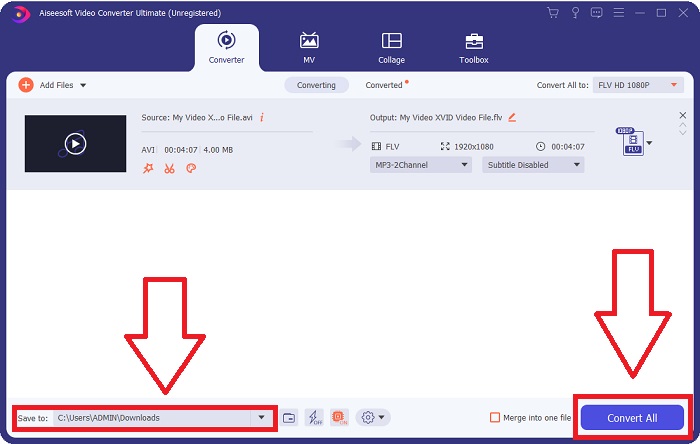
Pasul 5: După ce ai făcut toate ajustările, poți converti acum videoclipul făcând clic pe Convert All. De asemenea, poți face clic pe butonul Save to pentru a specifica folderul în care vrei să fie salvate videoclipurile convertite.
Partea 2. Alternativă excelentă de utilizat în conversia XviD în FLV [Online]
Nu este nevoie să descarci, instalezi sau să înregistrezi niciun software pentru a utiliza convertoare online precum Free Video Converter Online. Folosind acest instrument online, îți poți converti fișierele rapid și ușor direct din fereastra browserului. În doar câteva secunde îți poți converti videoclipurile HD în MP4, FLV sau orice alt format video popular, păstrându‑le calitatea originală. Acest instrument online te poate ajuta în orice situație, de aceea este nevoie să înveți pașii de mai jos:
Pasul 1: Fă clic pe acest link pentru a accesa pagina principală a Free Video Converter Online. După ce ajungi pe pagina principală, fă clic pe Add Files to Convert, apoi va apărea o fereastră în partea de sus a ecranului și fă clic pe Download pentru a descărca lansatorul necesar pentru a folosi instrumentul online. Instalează‑l pe computer și apoi fă din nou clic pe Add Files to Convert pentru a deschide instrumentul online.
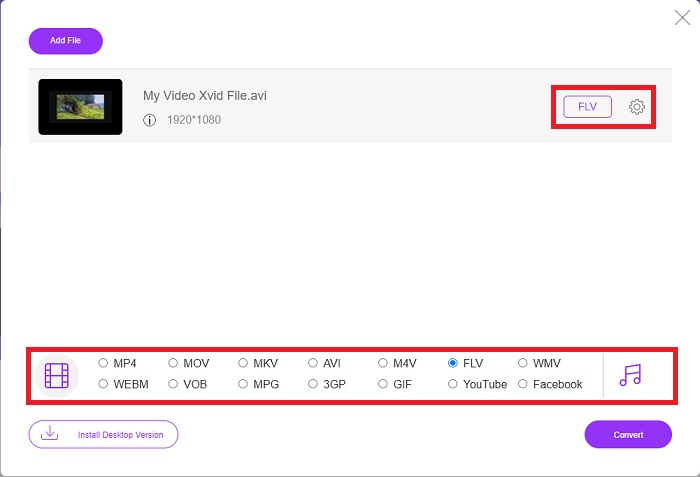
Pasul 2: Acum poți alege formatul video FLV din selecția de formate aflată mai jos. Apoi fă clic pe pictograma rotiță de lângă formatul video FLV pentru a ajusta toate specificațiile detaliate ale unui videoclip, de exemplu rezoluția, rata de cadre etc. Fă clic pe OK când ai terminat.
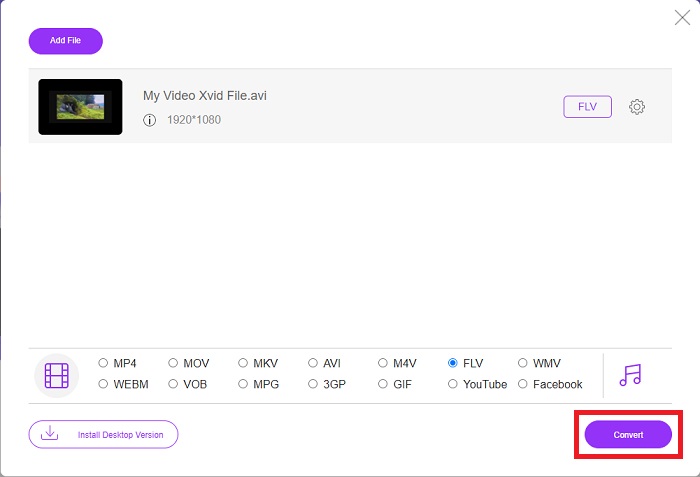
Pasul 3: În final, îți poți converti fișierul video făcând clic pe pictograma Convert din partea de jos a ecranului. Așteaptă un minut sau două și va apărea o fereastră care îți va indica finalizarea conversiei.
Apropo, poți folosi acest instrument și pentru a converti cu ușurință fișierele tale FLV în XviD.
Partea 3. Diagramă de comparație: XviD și FLV
XviD folosește codecul formatului XviD. Un program care comprimă și decomprimă video în MPEG-4 ASP, un standard de compresie, mai degrabă decât un format video precum MP4, este ceea ce este. Datorită capacităților de compresie ale conținutului XviD, este posibil să scurtați un film de lungă durată pentru a se potrivi pe un CD, păstrând în același timp calitatea DVD-ului. Conținutul video XviD poate fi stocat în diferite containere de fișiere, chiar dacă se utilizează extensia de fișier .xvid. Un fișier AVI poate fi numit video.xvid.avi, de exemplu, în funcție de cine l-a creat. XviD este sub GPL, o licență gratuită și open-source pentru software.
Cu toate acestea, fișierele video salvate în formatul de container Adobe Flash (FLV) sunt fișiere FLV. Fluxuri de date audio și video codificate în același mod ca flash-ul standard. Formatul SWF și pachetele de metadate sunt incluse în antetul scurt. Cu plug-in-ul Flash Video Exporter (inclus cu Adobe Animate) sau cu o altă aplicație care acceptă fișiere FLV, utilizatorii își pot exporta conținutul Flash Video în format FLV. Pe lângă QuickTime și Windows Media, Adobe Media Encoder poate codifica și alte formate video. Pentru a afla mai multe despre comparația detaliată, vă oferim un grafic de comparație mai jos:
| Extensie de fișier | XviD | FLV |
| Tip fișier | MPEG-4 Partea 2-Video compatibil | Fișier video Flash |
| Dezvoltat de | DivX, Inc. | Sistemul Adobe |
| Pro | DivX este renumit pentru capacitatea sa de a atinge un echilibru delicat între calitate și dimensiunea fișierului în ceea ce privește compresia. Ca rezultat, poate fi folosit pentru extragere, procesul de copiere a fișierelor audio și video de la o sursă pe hard disk-ul unui computer, în pregătirea pentru stocare și conversie. | Adobe Flash este o alegere excelentă pentru site-urile web care doresc să încorporeze animație și elemente interactive. Are potențialul de a avea un impact semnificativ pe termen lung. Cele mai populare jocuri Flash la acea vreme erau simple. |
| Contra | Nu este disponibil pentru fiecare platformă. | În ultimii ani, popularitatea FLV a scăzut. Conținutul FLV necesită mult timp și bani pentru a fi produs. Unul dintre dezavantajele majore ale Flash este că nu poate fi vizualizat pe dispozitivele iOS, limitându-i sever capacitatea de a atrage noi adepți. |
| Programele deschid formatul video | ◆VLC Media Player◆ Windows Media Player& ◆ BS Player ◆ DivX Media Player ◆ Elmedia Player | ◆ VLC Media Player ◆ Adobe Flash Player |
Partea 4. Întrebări frecvente despre conversia XviD în FLV
Codecul XviD este sigur?
Xvid este un codec popular și eficient și este complet sigur de utilizat. Descărcarea codec‑ului Xvid de pe un site sau un serviciu pe care nu îl cunoști sau în care nu ai încredere este o idee proastă. De exemplu, recomandăm cu fermitate să nu instalezi un pachet de codecuri de pe un site de tip torrent, deoarece acestea pot fi instrumente software malițioase deghizate în programe legitime. Problema apare și atunci când încerci să vizionezi videoclipuri pe internet. Pentru a reda fișierele XviD, iată recenzia celor mai bune playere XviD pe care le poți încerca.
Codecul XviD este gratuit?
Xvid Codec Pack este un codec gratuit de compresie video și de calitate. Xvid este extrem de rapid deoarece se poate optimiza pentru procesoarele moderne. Înregistrarea video în timp real de la o cameră și redarea video HD lină nu necesită probleme. Puterea rămasă a computerului dvs. va fi suficientă pentru alte lucruri!
Ce este fluxul FLV?
FLV este un container simplu care „suportă” streaming progresiv bazat pe fișiere, deoarece permite primirea doar o parte din intervalul de octeți a unui videoclip în timp ce redați videoclipul în întregime (pentru mp4, veți avea nevoie de meta ca Moov etc. pentru redare). .)
Concluzie
Pentru a încheia toate punctele date, știm că conversia XviD în FLV este posibilă datorită acestor două convertoare cele mai bune și ușor de utilizat în ceea ce privește software-ul și instrumentele online. Acest articol îl recomandă cel mai mult, deoarece nu este un instrument comparabil cu alte programe software și instrumente online și nu trebuie să alegeți dacă îl puteți utiliza pe Windows sau Mac deoarece îl puteți utiliza gratuit pe ambele sisteme de operare.
-
 4 metode verificate pentru a converti TS în FLV pe desktop / online
 Nu puteți deschide TS în mod implicit pe computer sau pe mobil. Singura modalitate de a viziona fișierele video este de a converti TS în FLV sau alte formate cu ghidul nostru concret.
-
 3 soluții pentru a converti MTS în FLV gratuit și online
 Doriți să convertiți MTS în FLV? Iată 3 software-uri gratuite de conversie MTS în FLV pe care le puteți încerca să convertiți MTS în FLV pe Mac OS X și Windows 10/8/7.
-
 Cele mai bune modalități de a converti VOB în FLV [gratuit și online inclus]
 Doriți să convertiți un fișier VOB într-un fișier FLV? Puteți finaliza cu ușurință sarcina fie cu desktop, fie cu convertoare online. Citiți acest ghid și aflați cum să transformați VOB în FLV ușor și rapid.
