


 Video Converter Ultimate
 Screen Recorder
 Reparație video
Alegeți cel mai bun convertor GIF în AVI disponibil pe PC și Mac
Conversia GIF în formatul de fișier AVI a devenit posibilă cu ajutorul acestor instrumente incredibile. Fără nicio pierdere de calitate și într-un fel pentru a o îmbunătăți. Dar unele dintre convertoarele pe care le puteți folosi nu vă pot oferi cea mai bună calitate pe care doriți să o utilizați. Deci, nu trebuie să vă faceți griji dacă doriți să înlocuiți GIF-ul cu un format AVI. Convertiți-vă videoclipul într-un format AVI fără pierderi de calitate urmând pasul furnizat mai jos și alegeți care este cel mai bun convertor pe care ar trebui să-l utilizați.

Partea 1. Gratuit și profesional pentru a converti GIF în AVI cu pași detaliați
1. Free Way - FVC Free Video to GIF Maker
FVC Free Video to GIF Maker este cel mai bun convertor GIF în AVI gratuit oferit de FVC. De asemenea, cu ajutorul acestui instrument poți converti gratuit orice fișier video sau audio într-un nou format. Acest instrument îți oferă în mod special cel mai bun convertor gratuit. Deși majoritatea funcțiilor avansate ale versiunii premium nu sunt disponibile gratuit, el rămâne la fel de bun în ceea ce privește conversia. Pentru a afla cum să folosești acest instrument gratuit, urmează pașii de mai jos pentru a învăța cum să îți convertești GIF-ul.
Pasul 1. Instalează instrumentul pe desktop.
Descărcare gratuităPentru Windows 7 sau o versiune mai nouăDescărcare sigură
Descărcare gratuităPentru MacOS 10.7 sau o versiune mai nouăDescărcare sigură
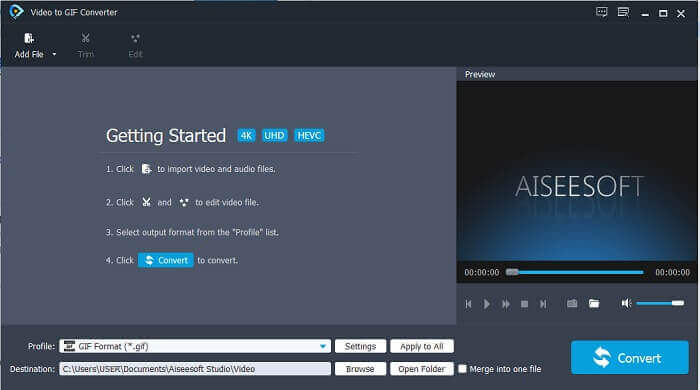
Pasul 2. Acesta este un exemplu de interfață pe care o vei vedea dacă ai descărcat deja instrumentul.
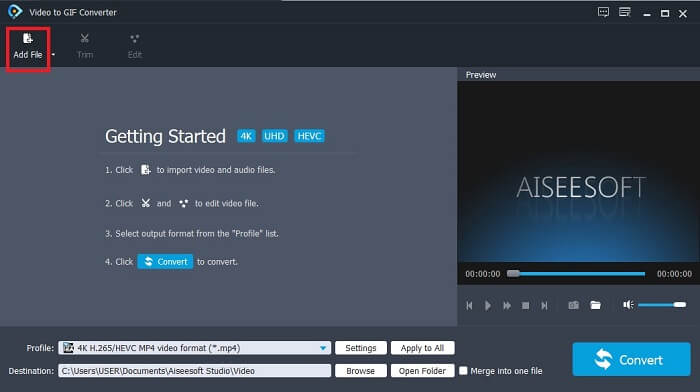
Pasul 3. Fă clic pe Add File și selectează fișierul GIF pe care vrei să îl convertești. Dacă fișierul este deja selectat, fă clic pe Open pentru a-l insera în interfață.
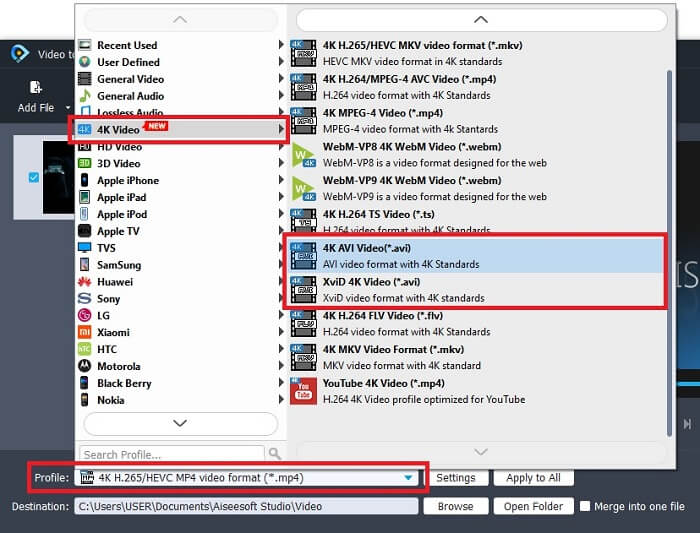
Pasul 4. Schimbă formatul în AVI în secțiunea Profile. La 4K Video fă clic pe formatul AVI. Dacă totul este gata, fă clic pe Convert pentru a porni conversia.
Pasul 5. Conversia GIF-ului nu va dura prea mult. Apoi te poți bucura de materialul finalizat.
2. Professional Way - Video Converter Ultimate
Poate te întrebi cum să transformi un GIF în AVI sau invers. Și dacă există un instrument special care să ofere o conversie excelentă. Acesta trebuie să fie Video Converter Ultimate, deoarece acceptă mai multe formate decât instrumentul gratuit și alte convertoare premium. De asemenea, oferă mai multe funcții pe care le poți folosi pentru a îmbunătăți calitatea videoclipului sau a fișierului audio. Folosind acest convertor „ultimate” poți da viață GIF-ului tău. Află cum să convertești formatul GIF în AVI fără pierderi de calitate și cum să îmbunătățești videoclipul dacă devine puțin neclar. Urmează pașii de mai jos pentru a afla metoda corectă de conversie a GIF-ului tău preferat.
Pasul 1. Fă clic pe butonul de descărcare în funcție de sistemul tău de operare. Instalează-l pe unitatea desktop și schimbă preferințele înainte de a lansa instrumentul.
Descărcare gratuită pentru Windows 7 sau o versiune ulterioară Descărcare securizată
Descărcare gratuită pentru MacOS 10.7 sau o versiune ulterioară Descărcare securizată
Pasul 2. Dacă instrumentul rulează deja în program, vei vedea această mini interfață „ultimate” pe ecran, ceea ce înseamnă că a fost lansat.
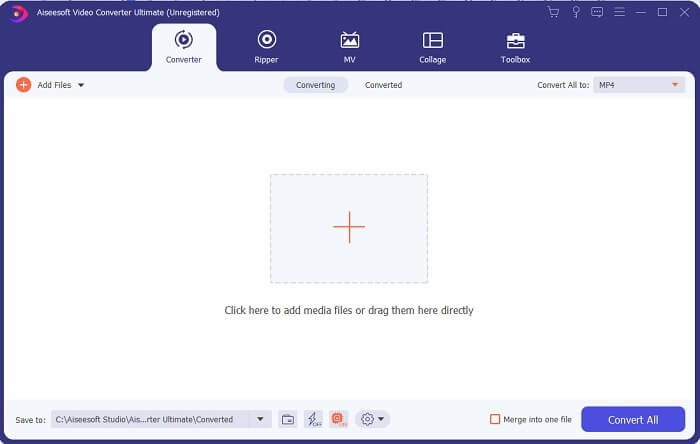
Pasul 3. Fă clic pe butonul cu semnul plus pentru a adăuga fișierul sau, alternativ, poți trage fișierul acolo.
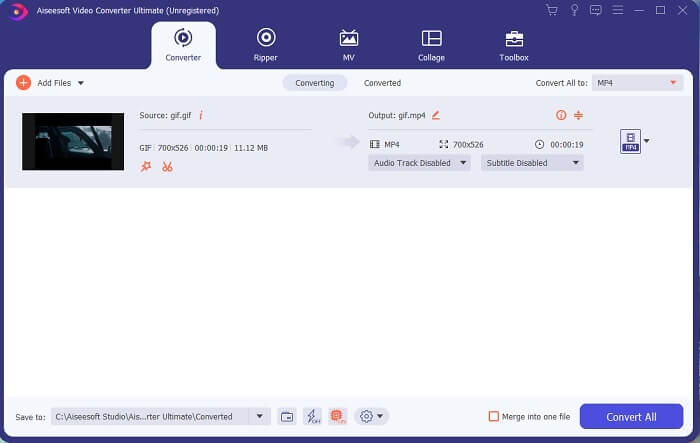
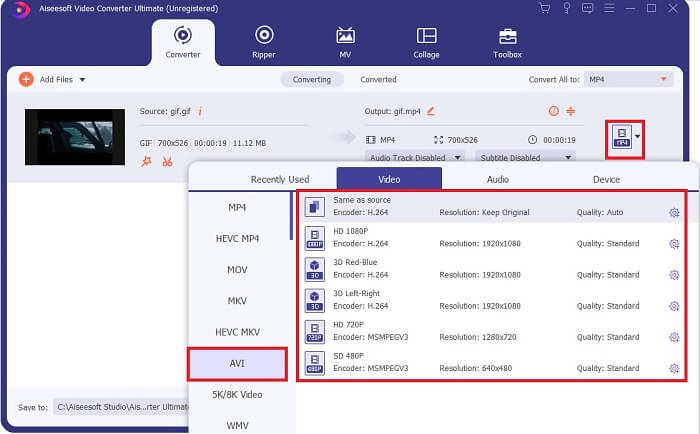
Pasul 4. Fă clic pe butonul drop-down pentru a schimba formatul și setează-l pe AVI. Poți, de asemenea, să selectezi encoderul, rezoluția și calitatea fișierului de ieșire. Dacă totul este setat, fă clic pe Convert All pentru a începe procesul de conversie.
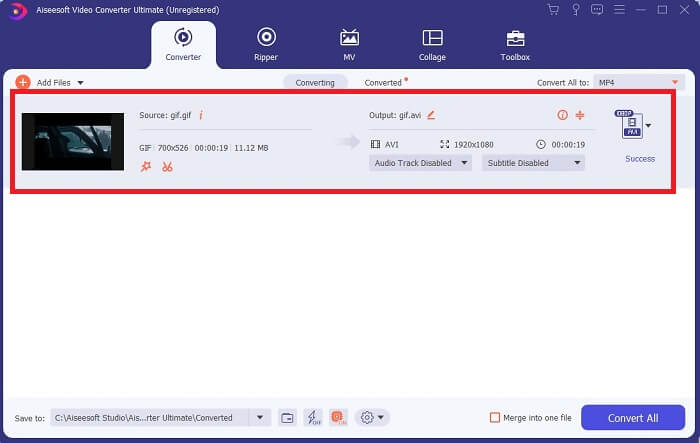
Pasul 5. Acest instrument oferă o conversie de 30x mai rapidă decât instrumentul gratuit și de 100x mai rapidă decât celălalt, așa că nu te aștepta să aștepți prea mult. După finalizarea conversiei, un manager de fișiere se va deschide automat pe ecran.
Instrument bonus și pași pentru a îmbunătăți videoclipul
Nu toate convertoarele premium oferă un astfel de set de funcții. În unele cazuri, dacă convertești GIF în AVI, videoclipul devine puțin neclar deoarece rata de cadre pe secundă (fps) a GIF-ului este mai mică decât cea a AVI-ului. Dar există o modalitate de a îmbunătăți videoclipul pentru un rezultat mai bun. Urmează acești pași pentru a îmbunătăți videoclipul pe care deja l-ai convertit.
Pasul 1. În Toolbox-ul software-ului, fă clic pe Video Enhancer.
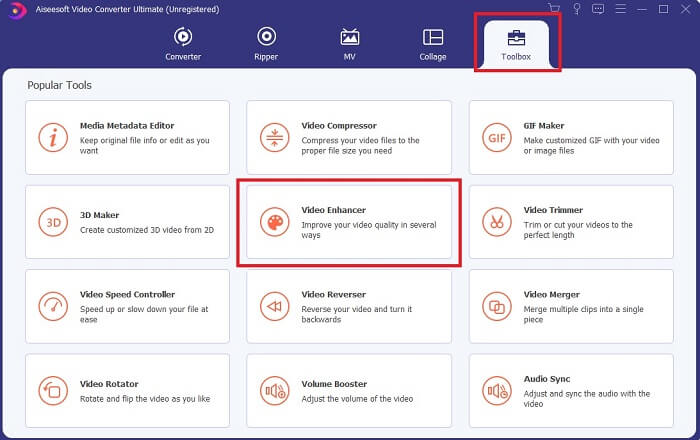
Pasul 2. Fă clic pe butonul cu plus și selectează videoclipul pe care vrei să îl îmbunătățești. Bifează Upscale Resolution pentru a îmbunătăți calitatea videoclipului și poți marca și celelalte opțiuni pentru a ridica și mai mult calitatea. Apoi fă clic pe Enhance pentru a începe procesul.
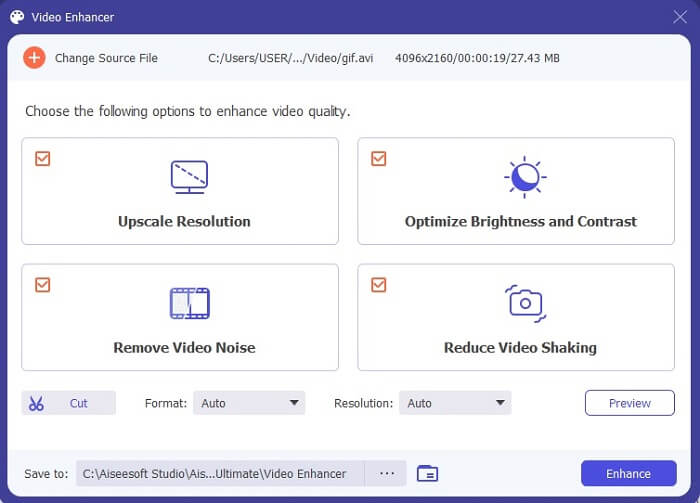
Pasul 3. Îmbunătățirea videoclipului va fi gata imediat. După îmbunătățire, managerul de fișiere va deschide automat videoclipul, astfel încât să îl poți viziona într-o variantă mult mai bună.
Partea 2. Top 3: Cele mai bune convertoare online disponibile pe web.
1. CloudConvert
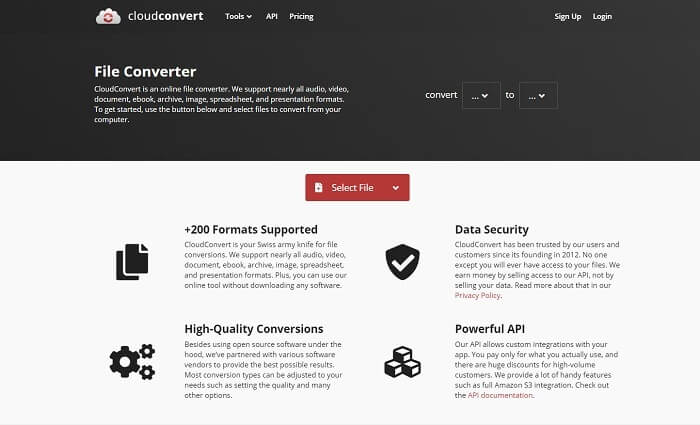
Cel mai bun convertor GIF în AVI online este Cloud Convert. Acest instrument suportă aproape toate tipurile de formate pentru video, audio, documente, eBook-uri, foi de calcul, prezentări și, de asemenea, imagini. Poți folosi acest instrument fără a-l instala, deoarece este un instrument online; asta înseamnă că, dacă nu ai conexiune la internet, nu îl poți folosi, spre deosebire de celelalte două instrumente de mai jos. Interfața web este mult mai informativă decât AnyConv. În plus, are o interfață mult mai bună, foarte interactivă și ușor de utilizat.
2. AnyConv
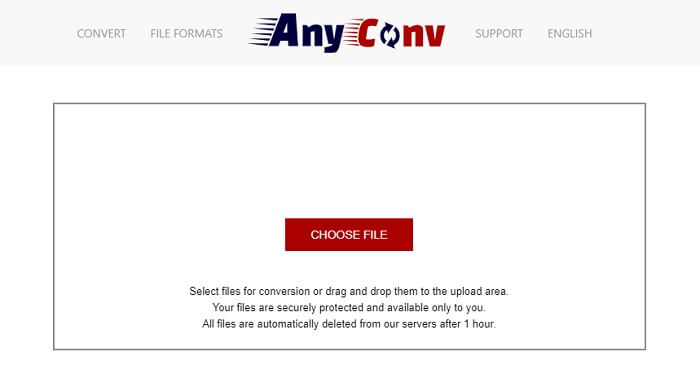
Cel mai sigur mod de a-ți converti videoclipul este folosind AnyConv. Poți crea cu ușurință un fișier GIF animat în AVI. Este cunoscut ca fiind cel mai sigur convertor, deoarece doar tu poți accesa fișierele convertite. Iar toate fișierele convertite cu acest instrument online vor fi șterse automat după conversie. Site-ul instrumentului este însă puțin neinformativ, astfel că utilizarea lui îți poate crea confuzie din cauza lipsei de informații.
3. online-convert.com
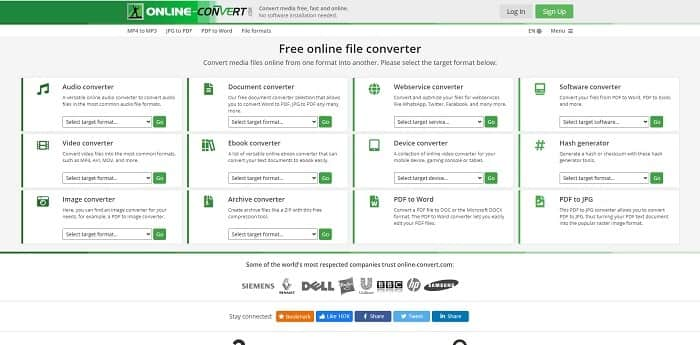
Un alt instrument pe care îl poți folosi ca convertor este online-convert.com. Acest instrument le permite utilizatorilor sau clienților ca tine să convertească orice fișier video, audio, imagine și altele. De asemenea, este posibilă conversia serviciilor web, dispozitivelor și software-ului cu acest instrument. Îl poți folosi și pentru a converti AVI în GIF animat sau invers. Pagina web a instrumentului este informativă, prezentând o scurtă descriere a fiecărui instrument și modul corect de utilizare. Însă interfața este destul de modestă, din cauza nuanței de verde care nu este foarte plăcută pentru utilizator.
Partea 3. Întrebări frecvente despre GIF în AVI
Care este cel mai bun cropper GIF disponibil în toate software-urile? si cum se face?
Funcția de decupare GIF îți oferă libertatea de a decupa GIF-ul într-un detaliu mai specific. Fă clic pe acest link pentru a afla mai multe detalii.
Formatul AVI este comprimat sau necomprimat?
Se știe că AVI produce un format video de înaltă calitate, mai bun decât MPEG sau MOV. Însă acest format este necomprimat, așa că trebuie să te aștepți la o dimensiune mai mare a fiecărui fișier. Chiar și pentru un videoclip de un minut, spațiul ocupat poate depăși 1,5 GB sau chiar mai mult. Dacă vrei să îți comprimi fișierele AVI mari, fă clic aici pentru a afla mai multe.
Cine a dezvoltat AVI?
Dezvoltatorul formatului AVI este Microsoft; Lansarea sa inițială a fost în noiembrie 1992.
Concluzie
Pentru a încheia detaliile, se știe că alegerea instrumentului potrivit pentru locul de muncă potrivit este o necesitate mai ales în conversie. Deoarece conversia unui fișier într-un nou format este puțin sensibilă, ceea ce înseamnă că dacă utilizați un convertor greșit, așteptați-vă să pierdeți unele date. Dar dacă utilizați Ultimate Converter, puteți converti orice fișier chiar și fără conexiune la internet și fără pierderi de date. Acest instrument este alegerea potrivită pe care o puteți utiliza, deoarece nu este grozav doar pentru a face o singură lucrare și, de asemenea, este cel mai bun dintre celelalte.
-
 Cele mai bune 5 opțiuni pentru înregistrarea formatului GIF cu înregistratoarele GIF pentru PC și Mac
 Care este cel mai bun recorder GIF pe care ar trebui să îl utilizați pentru a înregistra GIF-uri? Lista de mai jos oferă dovezi cu privire la care este cel mai bun înregistrator de ecran.
-
 Cum să convertiți MPG în format GIF [Online și Offline]
 Doriți să exprimați o emoție mult mai bună? Apoi, trebuie să utilizați GIF în loc. Această scriere vă va învăța cum să convertiți un fișier MPG în GIF pentru a vă exprima sentimentul mult mai bine.
-
 [Actualizat 2021] 9 cele mai bune editoare GIF pentru PC, Mac, iOS și Android
 Trebuie să adăugați o notă personală GIF-ului dvs. pentru a deveni mai expresiv? Continuați să citiți acest articol pentru a ști cum să editați și cel mai bun instrument pentru job.
