


 Video Converter Ultimate
 Screen Recorder
 Reparație video
 Descărcare sigură
Cum să convertiți JPEG în JPG utilizând convertoare de imagini dovedite și testate
Unii oameni spun că JPEG și JPG sunt același format. Ei bine, așa este. Însă unele programe acceptă doar o extensie din trei litere. Așadar, în loc de JPEG se folosește JPG. Formatul JPG este foarte popular în zilele noastre. Așadar, dacă vrei și tu să convertești fișierul tău de imagine JPEG în format JPG, ești norocos. Acest ghid îți va oferi cea mai bună soluție pe care o poți încerca. Poți converti instant JPEG în JPG folosind convertoare JPEG în JPG. Aceste convertoare sunt disponibile online și pe dispozitive mobile. Dacă vrei să descoperi aceste aplicații, profită de ocazie și citește acest articol.

Partea 1. Modalități utile de a converti online JPEG în JPG
Cum să convertiți JPEG în JPG pe FVC Free Image Converter
Cea mai bună modalitate de a schimba JPEG în JPG este să folosești FVC Free Image Converter. Este o alegere excelentă pentru a converti JPEG în JPG sau în alte formate, precum PNG și GIF. Poate gestiona toate formatele de imagine, inclusiv JPG, JPEG, PNG, SVG, BMP, TIFF și GIF. În acest fel, nu trebuie să îți faci griji că fișierele tale de imagine nu pot fi deschise pe anumite instrumente sau dispozitive. Cea mai bună soluție este să le convertești folosind acest convertor de imagini online. De asemenea, poate menține calitatea excelentă a imaginilor originale. Nu vei observa diferențe față de original după procesul de conversie. În plus, convertorul de fișiere de imagine FVC acceptă conversia în lot. Asta înseamnă că poți converti o mulțime de imagini în același timp. Este mult mai convenabil și eficient. Este incomparabil cu alte convertoare de formate de imagine de pe piață.
FVC Free Image Converter poate gestiona până la 40 de imagini simultan. Astfel, puteți economisi mai mult timp. De asemenea, nu trebuie să plătiți un ban pentru acest program. Este un convertor de imagini gratuit. De asemenea, nu trebuie să creați un cont pentru a-l opera. Tot ce trebuie să faceți este să vizitați site-ul web și să începeți conversia. Știm cu toții că reclamele sunt enervante. Dar acest instrument nu are reclame, astfel încât să puteți converti în mod pașnic. Puteți accesa acest software online în toate browserele web, inclusiv Chrome, Mozilla, Edge, Explorer și multe altele.
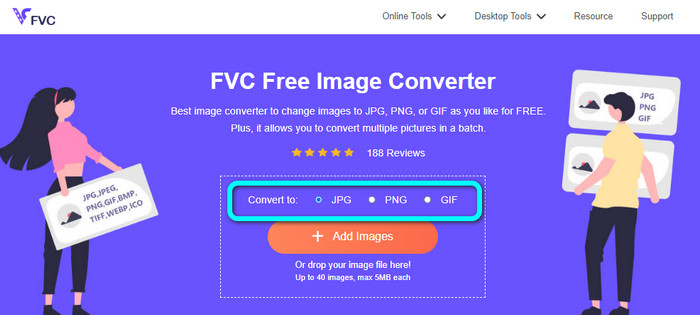
Pasul 1: Deschide browserul și accesează site-ul principal al FVC Free Image Converter. Mergi la opțiunea Convert to și selectează formatul JPG.
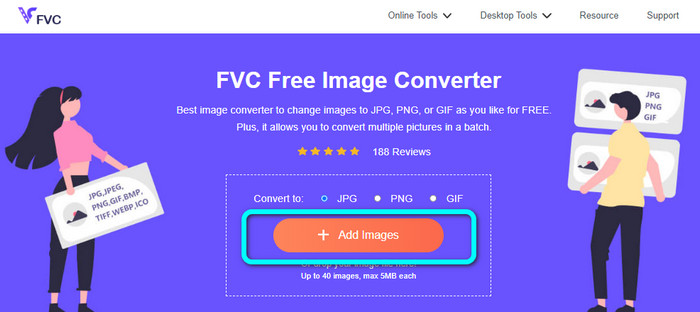
Pasul 2: După ce ai selectat formatul de fișier JPG, apasă butonul Add Images. Apoi, folderul tău de fișiere va apărea pe ecranul computerului. Adaugă imaginea JPEG pe care dorești să o convertești.
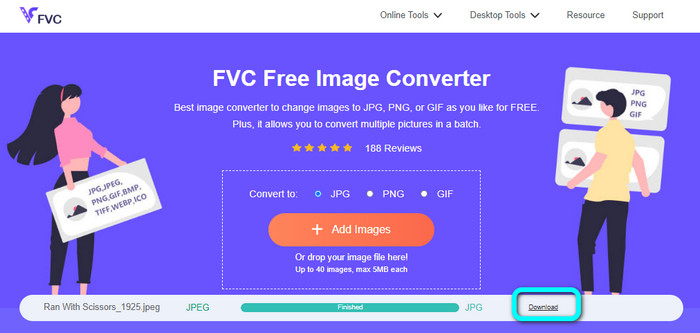
Pasul 3: După ce adaugi imaginea în format JPEG, vei vedea că imaginea va fi convertită automat. Din JPEG va deveni JPG. Când procesul de conversie se termină, apasă butonul Download. Astfel, poți salva imaginea JPG pe computerul tău.
Cum să convertiți JPEG în JPG pe Convertio
Un alt convertor JPEG în JPG pe care îl poți folosi este Convertio. Acest convertor de imagini îți poate converti JPEG în JPG printr-o metodă foarte simplă. Oferă, de asemenea, o interfață prietenoasă, ușor de înțeles. Astfel, atât utilizatorii profesioniști, cât și cei neprofesioniști pot folosi acest convertor online. În plus, programul oferă și conversia în lot. Prin urmare, poți converti simultan mai multe formate de imagine. Procesul de conversie este, de asemenea, rapid. Poți converti imaginile în câteva secunde. Convertio este disponibil în browsere populare precum Google, Firefox, Explorer și altele. Mai mult, Convertio are și alte funcții de oferit. Pe lângă conversia imaginilor, poți converti și fișiere video, audio, documente și multe altele.
Cu toate acestea, versiunea accesibilă a acestui program are restricții. Puteți încărca doar imagini de până la 100 MB. După aceea, nu mai puteți converti imagini. Deci, dacă doriți să experimentați funcțiile sale complete, cumpărați un plan de abonament. De asemenea, este nevoie de o conexiune puternică la internet pentru a-i vedea performanța la nivel înalt.
Pasul 1: Accesează site-ul principal al Convertio. Selectează butonul Choose files. Alege fișierul de imagine JPEG din folderul computerului și deschide-l.

Pasul 2: După ce ai deschis fișierul de imagine JPEG, selectează formatul JPG din opțiunile de format.
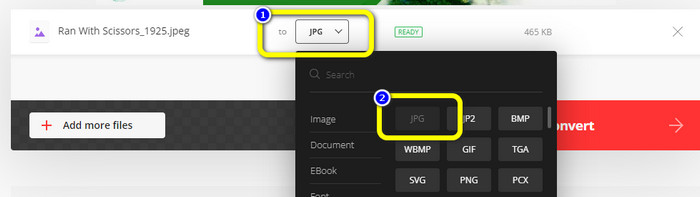
Pasul 3: După ce ai deschis fișierul de imagine JPEG, selectează formatul JPG din opțiunile de format. Poți, de asemenea, să faci clic pe butonul Add more files pentru a efectua o conversie în lot.
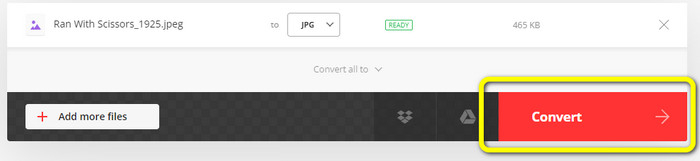
Pasul 4: Apasă butonul Convert pentru a începe procesul de conversie. Apoi, după conversie, apasă butonul Download.
Cum să convertiți JPEG în JPG pe CloudConvert
CloudConvert este un instrument web pentru a converti JPEG în JPG. Cu ajutorul acestui convertor, poți transforma rapid JPEG în JPG. De asemenea, acest instrument oferă o interfață intuitivă, cu instrucțiuni de bază pentru conversie. Astfel, este ușor să convertești JPEG în JPG, indiferent dacă ești utilizator experimentat sau începător. Mai mult, CloudConvert este disponibil în diverse browsere. Include Mozilla, Explorer și Firefox, ceea ce îl face mai accesibil. Cea mai bună parte a acestui instrument este că poți face modificări imaginilor. Poți folosi opțiunile pentru a ajusta rezoluția imaginii, dimensiunea fișierului și calitatea. Una dintre prioritățile acestui software, pe lângă conversie, este confidențialitatea utilizatorului. CloudConvert se asigură că informațiile tale sunt în siguranță. Nu îți va împărtăși datele cu alte persoane. După procesul de conversie, imaginea ta va fi ștearsă automat după 24 de ore.
Cu toate acestea, acest convertor de imagini bazat pe web are dezavantaje. Dacă utilizați doar versiunea gratuită, puteți converti doar 25 de imagini zilnic. Trebuie să achiziționați un plan de abonament pentru a converti mai multe imagini. De asemenea, una dintre cerințele acestui convertor este accesul la internet. Deoarece este un instrument online, este necesară o conexiune la internet.
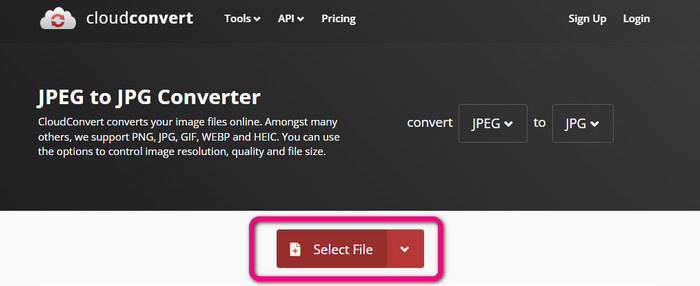
Pasul 1: Fă clic pe butonul Select File. Apoi deschide imaginea JPEG din fișierele tale.
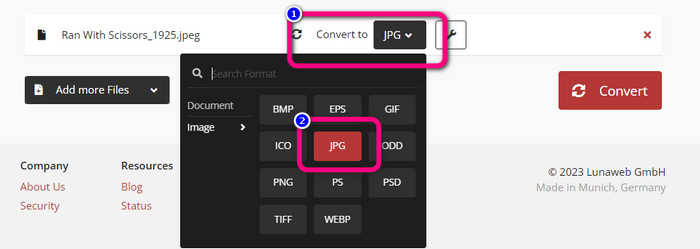
Pasul 2: Mergi la opțiunea Convert to. Selectează formatul dorit, adică JPG.
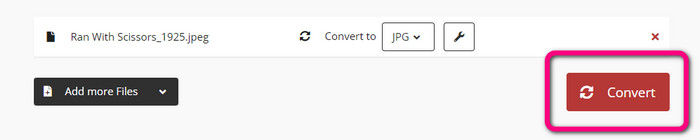
Pasul 3: Când selectezi fișierul JPG, apasă butonul Convert. Așteaptă procesul de conversie și salvează imaginea finală pe desktop. Poți folosi acest instrument și pentru a converti JPG în PNG.
Partea 2. Cum să convertiți JPEG în JPG utilizând Android și iPhone
Cum să convertiți JPEG în JPG pe Image Converter
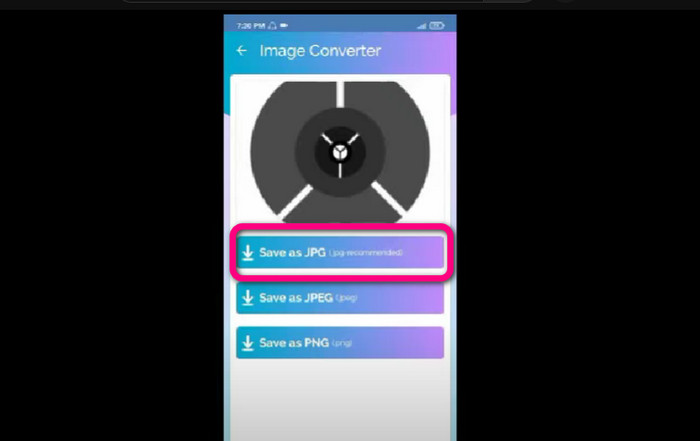
Dacă vrei să convertești JPEG în JPG pe Android, folosește Image Converter. Această aplicație este disponibilă pe dispozitivele Android. Are o procedură ușoară pentru conversia imaginilor, ceea ce o face potrivită pentru utilizatorii neprofesioniști. De asemenea, poți descărca aplicația gratuit. Oferă și o interfață ușor de înțeles. În acest fel, nimeni nu se va încurca atunci când folosește convertorul. În plus, Image Converter are un proces de conversie fluent. După selectarea formatului, va converti și va salva imaginea pe telefon fără bătăi de cap. Totuși, acceptă doar un număr limitat de formate de ieșire, precum PNG, JPG și JPEG. Așadar, nu poți folosi această aplicație dacă vrei să convertești imaginea în GIF, SVG, BMP și altele.
Pasul 1: Deschide aplicația Play Store și descarcă aplicația Image Converter. Apoi lansează aplicația după finalizarea instalării.
Pasul 2: Apasă butonul Select Photo pentru a atașa fotografia JPEG din galeria telefonului.
Pasul 3: Apasă opțiunea Save as JPG pentru pasul final. Așteaptă procesul de conversie. După finalizare, imaginea va fi salvată automat în galeria ta.
Cum să convertiți JPEG în JPG pe JPG Image Converter & Resizer
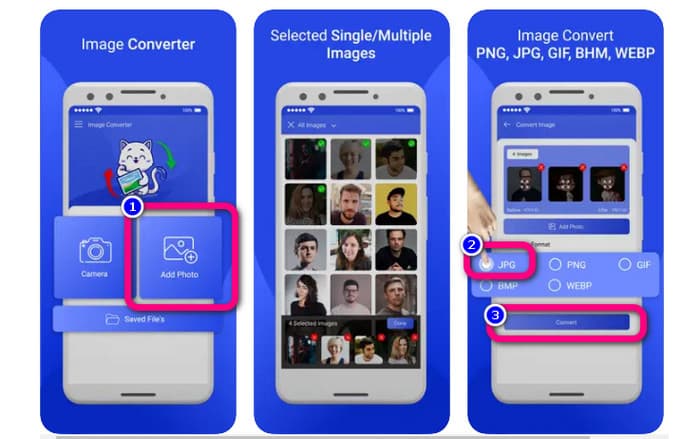
Dacă vrei să convertești JPEG în JPG folosind un iPhone, folosește JPG Image Converter & Resizer. Acest software este disponibil în Apple Store. Îl poți descărca gratuit. În plus, procesul de conversie este simplu. Are o interfață intuitivă, ceea ce îl face ușor de utilizat. Aplicația oferă și conversie în lot. Astfel, poți converti mai multe formate de imagine deodată. De asemenea, acceptă diverse formate de imagine, inclusiv PNG, BMP, GIF, WebP etc. Totuși, poți folosi această aplicație doar dacă iPhone-ul tău rulează iOS 12.0 sau o versiune mai nouă. O poți descărca pe dispozitive cu iOS 12.0 și versiuni ulterioare.
Pasul 1: Accesează Apple Store și descarcă JPG Image Converter & Resizer. Apoi pornește aplicația.
Pasul 2: Apasă pictograma Add Photo pentru a insera imaginea JPEG pe care vrei să o convertești. Poți adăuga mai multe imagini dacă dorești.
Pasul 3: Selectează formatul JPG din opțiunile de format. După aceea, selectează butonul Convert pentru a începe procesul de conversie.
Partea 3. Întrebări frecvente despre conversia JPEG în JPG
1. Cum convertesc imaginile din PNG în JPG?
Poți folosi FVC Free Image Converter. Acest convertor de imagini online acceptă formate de intrare precum PNG. Astfel, poți transforma imaginea PNG în format JPEG. Pur și simplu mergi la opțiunea de formate și selectezi JPG. Apoi apasă butonul Add Images pentru a adăuga imaginea PNG. După aceea, apasă butonul de descărcare.
2. De ce fișierele mele JPEG nu funcționează pe Mac-ul meu?
Există două motive posibile pentru care imaginea dvs. JPEG nu funcționează. Poate că MacOS-ul tău nu este actualizat. Un alt motiv este că imaginea JPEG poate fi coruptă din cauza infecției cu virusul. Trebuie să remediați imaginea JPEG sau să vă actualizați macOS.
3. Cum să salvezi o fotografie trimisă prin e-mail în format .jpg?
O casetă de dialog vă va întreba unde doriți să salvați imaginea atunci când descărcați imaginea. În acel moment, puteți salva imaginea în formatul dorit din opțiunea de format.
Concluzie
În concluzie, acest articol ți-a prezentat cele mai eficiente modalități de a converti JPEG în JPG folosind diverse convertoare de imagini. Totuși, majoritatea utilizatorilor preferă metode simple pentru a converti fișierele de imagine. În acest caz, poți folosi FVC Free Image Converter, care poate converti diverse fișiere ușor și instantaneu.
-
 Ce este un fișier PNG: Cum se deschide și se convertește? [Toate detaliile]
 Știți ce este un format PNG? Puteți afla toate detaliile esențiale ale acestui fișier. Citiți acest ghid și absorbiți toate informațiile pe care le puteți obține.
-
 Detalii complete despre diferențele dintre JPEG și JPG și PNG
 Această postare vă va oferi suficiente informații despre diferențele dintre JPEG și JPG și PNG. În plus, veți învăța cum să convertiți imagini în aceste fișiere.
-
 Metode despre cum să convertiți imagini în JPG online și offline
 Doriți să convertiți fișierul în format JPG dintr-un motiv oarecare? Atunci acest articol este pentru tine. Vă vom învăța cea mai bună metodă de a vă converti imaginea în JPG
