


 Video Converter Ultimate
 Screen Recorder
 Reparație video
 Descărcare sigură
Cum să convertiți rapid SVG în JPG [Moduri super ușoare]
Este posibil să doriți să convertiți o imagine SVG într-una JPG din mai multe motive. Unul dintre ele este simplificarea editării. Pentru fișierele SVG este necesar un editor de imagini bazat pe vectori. Totuși, editorii de imagini raster sunt mult mai răspândiți printre utilizatori. Microsoft Paint și Adobe Lightroom fac parte dintre aceștia. Folosirea Lightroom pentru a edita un SVG ar putea fi posibilă dacă îl convertiți mai întâi în JPG. Partajarea online este un alt motiv pentru a converti SVG în JPG. JPG‑urile sunt aproape întotdeauna acceptate de site‑uri și aplicații care permit încărcarea de imagini. În schimb, este puțin probabil ca acestea să accepte un fișier SVG. De exemplu, Instagram acceptă fișiere JPG, dar nu acceptă SVG. Acest articol vă va prezenta metode practice pentru a schimba SVG în JPG. De asemenea, veți descoperi cele mai bune convertoare de imagini pe care le puteți folosi online și offline.

Partea 1. Comparați SVG și JPG
| Tipul fisierului | SVG | JPG |
| Extensie de nume de fișier | .svg | .jng |
| Dezvoltat de | Consorțiul World Wide Web | Comitetul JPEG |
| Dezvoltat de | SVG este un format de fișier imagine vectorială pentru grafică 2D bazată pe XML. Animația și interactivitatea sunt acceptate. În fișierele text XML, imaginile SVG și comportamentul lor sunt definite. Deoarece fișierele SVG sunt doar fișiere XML, ele pot fi editate cu orice editor de text. | JPG sunt folosite pentru site-uri web și e-mail deoarece au dimensiuni reduse ale fișierelor. Cu toate acestea, deoarece JPG are pierderi, aceasta va afecta calitatea imaginii după compresie. Fișierul „cu pierderi” rezultat înseamnă că s-a pierdut calitatea. Cardurile de memorie pentru camerele digitale folosesc formatul JPG. |
| Detalii tehnice | SVG este un format folosit pentru a defini grafica vectorială bazată pe XML pentru Web. Acest fișier nu va pierde calitatea imaginii chiar și atunci când este mărit sau redimensionat. Elementele și atributele fișierului SVG pot fi toate animate. | JPG este un format de fișier imagine pentru editarea fotografiilor statice. Oferă o tehnică de compresie simetrică care necesită mult procesor. Este, de asemenea, consumator de timp atât la compresie, cât și la decompresie. JPEG este un standard comun al Uniunii Internaționale de Telecomunicații. Include, de asemenea, Organizația Internațională pentru Standardizare. |
| Programe asociate | Adobe Photoshop Adobe Preview Corel Paint Shop Pro Corel SVG Viewer | Microsoft Windows Photo Gallery Viewer Adobe Photoshop Adobe Preview Corel Paint Shop Pro |
Partea 2. Cel mai bun mod de a converti SVG în JPG online
Cel mai bun instrument pe care îl puteți folosi este FVC Free Image Converter. Poate converti cu ușurință SVG în JPG. În plus, este posibil să convertiți mai multe fișiere SVG în JPG în același timp. Oferă o interfață și instrucțiuni ușor de urmărit, ideale pentru utilizatori. Acest convertor de imagini are capacitatea de conversie în lot. De asemenea, puteți descărca numeroase fișiere convertite cu un singur clic. Unul dintre aspectele pozitive ale acestui instrument este lipsa reclamelor enervante. Vă puteți concentra pe convertirea fișierelor fără a întâmpina reclame. În plus, acceptă fișiere de intrare în diverse formate, cum ar fi PNG, BMP, TIFF, GIF etc. Nu este nevoie nici să instalați acest convertor. Poate fi controlat direct din browser. Mai mult, după conversie, calitatea imaginii va fi aceeași ca a originalului. În acest fel, vă puteți asigura că imaginea va arăta în continuare excelent. De asemenea, informațiile dumneavoastră sunt în siguranță pe acest site. După convertirea și salvarea imaginilor, toate datele vor fi eliminate automat.
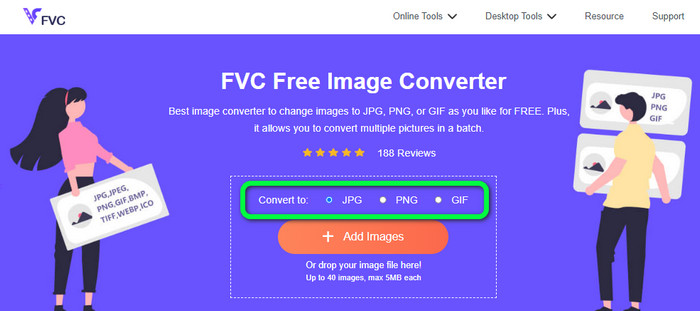
Pasul 1: Accesați site‑ul principal al FVC Free Image Converter. Înainte de a adăuga fișierul de imagine SVG, alegeți formatul de ieșire dorit. Dați clic pe formatul JPG din opțiunile de format.
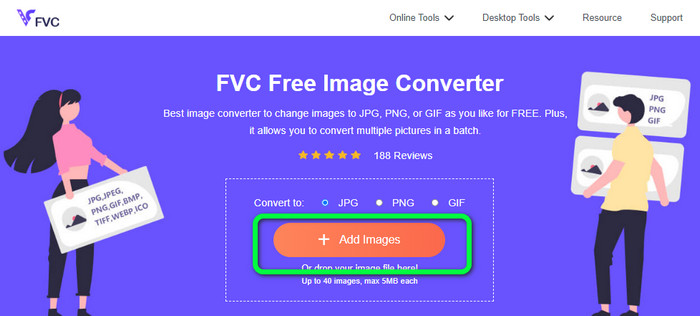
Pasul 2: Dați clic pe butonul Add Images din partea centrală a interfeței. După aceea, folderul de fișiere va apărea pe ecran. Alegeți imaginea SVG pe care doriți să o convertiți și deschideți‑o. Puteți, de asemenea, să trageți fișierul SVG direct în căsuță. Dați din nou clic pe butonul Add Images pentru a efectua un proces de conversie în lot.
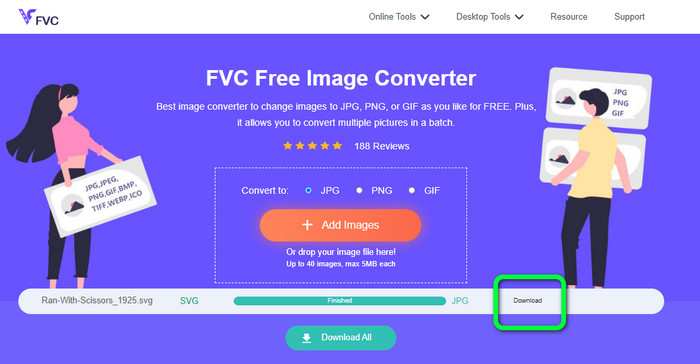
Pasul 3: În timp ce încărcați fișierul, imaginea va fi convertită automat. Pentru ultimul pas, dați clic pe butonul Download din partea dreaptă a interfeței. După procesul de salvare, deschideți imaginea convertită pe computer.
Partea 3. Metodă ușoară de a converti SVG în JPG pe Windows
În această secțiune veți descoperi cea mai bună metodă de a converti SVG în JPG offline pe computerele cu Windows. Utilizarea HitPaw Video Converter este una dintre metodele eficiente. Funcția Image Convert din HitPaw Video Converter face simplă conversia în lot a imaginilor. Puteți importa fotografii și elemente grafice în diverse formate și le puteți converti în formatul dorit. Pentru ajustarea în masă sau individuală a formatului imaginilor, aceasta este o alegere excelentă. De asemenea, acceptă toate formatele de fotografie utilizate pe scară largă. Aceste formate includ PNG, JPG, HEIC, RAW, BMP și altele. Așadar, puteți folosi acest instrument și pentru a converti BMP în JPG sau PNG. În plus, acest program descărcabil oferă și alte opțiuni pe lângă conversie. Puteți descărca fișiere muzicale și video folosind acest software. De asemenea, vă puteți edita videoclipurile prin rotire, decupare și aplicare de filtre. Totuși, HitPaw Video Converter este dificil de utilizat, mai ales pentru începători. Are o interfață derutantă, ceea ce îl face greu de înțeles. De asemenea, procesul de instalare durează mult timp.
Pasul 1: Instalați HitPaw Video Converter pe Windows. Apoi, după instalare, rulați aplicația.
Pasul 2: Navigați la panoul Toolbox și selectați instrumentul Image Converter. Selectați fișierul de imagine SVG pe care doriți să îl convertiți din folderul de pe computer.
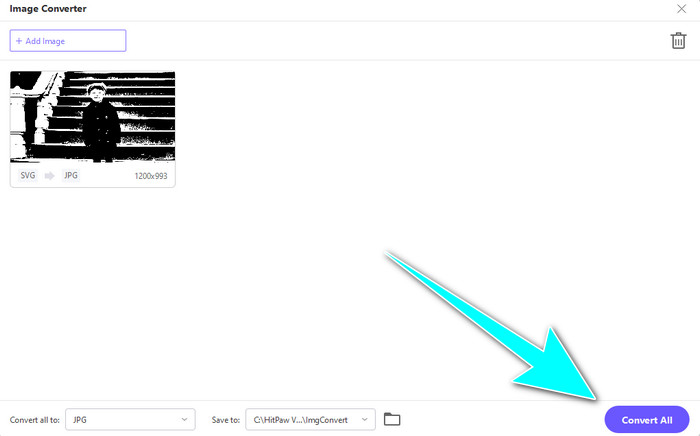
Pasul 3: Dați clic pe opțiunea Convert All to din colțul din stânga jos al interfeței. Apoi, selectați formatul JPG ca format de ieșire.
Pasul 4: În final, dați clic pe butonul Convert All din colțul din dreapta jos al interfeței. Așteptați procesul de conversie. Apoi veți putea deja să deschideți imaginea în format de fișier PNG.
Partea 4. Cum să convertiți SVG în JPG pe Mac
Dacă doriți să convertiți SVG în JPG pe Mac, folosiți BatchPhoto Pro. Acesta acceptă diverse formate de imagine. Printre ele se numără JPG, PNG, ICO, SVG, EPS și peste 170 de alte formate. Puteți chiar salva imaginile ca fișiere PDF. De asemenea, oferă un proces de conversie în lot. Astfel, puteți converti mai multe fișiere simultan. În plus, pe lângă conversia imaginilor, are și alte funcții. Vă puteți edita fotografia redimensionând‑o, rotind‑o și ajustând setările de culoare. Totuși, trebuie să cumpărați programul dacă doriți să îl folosiți în mod continuu. Poate oferi doar o versiune de probă de câteva zile. Procesul de conversie este, de asemenea, greu de înțeles. Utilizatorii neprofesioniști vor considera complicată conversia imaginilor.
Pasul 1: Descărcați și instalați BatchPhoto Pro. Puteți obține versiunea de probă gratuită. După instalarea aplicației, lansați‑o.
Pasul 2: În partea superioară a interfeței, selectați opțiunea Add Photos. După ce dați clic, adăugați imaginile SVG pe care doriți să le convertiți în format JPG. Puteți adăuga mai multe fișiere deodată.
Pasul 3: Accesați opțiunea Set Up din partea superioară a interfeței. Navigați la opțiunile Output Format și selectați formatul JPG.
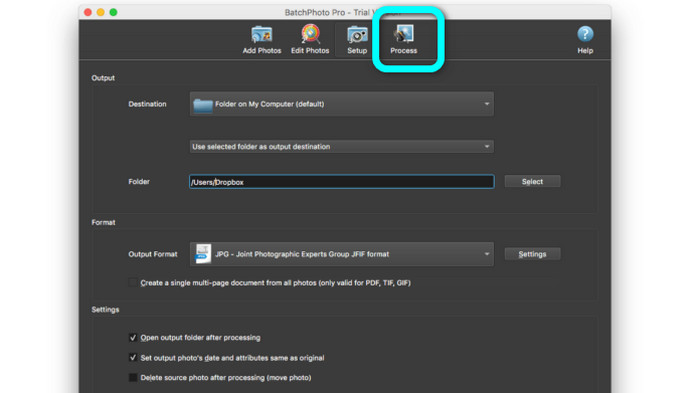
Pasul 4: Dați clic pe opțiunea Process pentru a începe procesul de conversie. După finalizare, accesați folderul de ieșire și verificați imaginea convertită.
Partea 5. Întrebări frecvente despre conversia SVG în JPG
1. De ce ar trebui să convertiți SVG în JPG?
În comparație cu SVG, JPG este mai potrivit pentru rețelele sociale și alte dispozitive. Este unul dintre formatele de imagine populare pe care le puteți folosi în zilele noastre. În SVG, puteți deschide acest fișier numai în browsere web. Deci, convertirea SVG în JPG este necesară pentru o utilizare mai compatibilă.
2. Care sunt avantajele și dezavantajele fișierelor SVG?
Puteți extinde sau micșora un fișier SVG la orice dimensiune fără a pierde calitatea. SVG-urilor nu le pasă de tipul de afișare sau de dimensiunea imaginii. Felul în care par ele este constant. De asemenea, SVG-urile oferă designerilor și dezvoltatorilor un mare control asupra modului în care arată. Este mai bine decât editarea lor într-un editor de text. Chiar și alte elemente vizuale, cum ar fi umbrele și gradațiile de culoare, sunt reglabile. Cu toate acestea, există formate mai bune decât SVG pentru o fotografie detaliată, de înaltă calitate. Utilizatorii construiesc grafice vectoriale folosind puncte și căi mai degrabă decât pixeli. Codul este de asemenea necesar.
3. Cum deschid un fișier SVG?
Cel mai bun mod de a deschide un fișier SVG este să folosiți browserul. Apăsați ctrl+o pe tastatură. Apoi alegeți fișierul SVG pe care doriți să îl vizualizați și dați clic pe Open.
Concluzie
Asta este tot! Informațiile de mai sus prezintă modalități de a converti SVG în JPG pe Windows, Mac și online. Totuși, descărcarea unui convertor de imagini este anevoioasă. Așadar, dacă doriți o modalitate mai simplă de a converti imagini, folosiți FVC Free Image Converter. Acest convertor de imagini online vă permite să convertiți imagini direct în browser.
-
 Metode utile despre cum să convertiți cu ușurință TIFF în JPG/PNG
 Nu ratați aceste modalități excelente de a transforma TIF în formate JPG/PNG. Această postare vă va oferi informațiile necesare pe care trebuie să le cunoașteți. Include diferențele lor.
-
 Conversia JPEG în JPG eficient [Cinci metode enumerate]
 Vino și obține cele mai simple tutoriale despre conversia formatului de fișier imagine JPEG în JPG. Faceți clic pe acest ghid și începeți să învățați metodele preferate
-
 Top 5 tutoriale de top pentru a converti rapid PNG în JPG
 Dacă trebuie să convertiți fișierul PNG în format JPG, puteți afla cele mai bune modalități aici. De asemenea, veți afla diferența dintre formatele de fișiere PNG și JPG
