


 Video Converter Ultimate
 Screen Recorder
 Reparație video
 Descărcare sigură
Conversia TGA în PNG: Aflați primele 3 convertoare excepționale TGA în PNG
Truevision Inc. a creat formatul TGA pentru editare și animație. Totuși, acest format de fișier nu a devenit popular în comparație cu alte formate (precum PNG și JPG). Unii utilizatori nici măcar nu pot deschide acest fișier în alte platforme sau programe. Astfel, unii utilizatori nu știu ce să facă și cum să folosească și să deschidă acest fișier de imagine. În acest caz, vrei să afli cum să transcodezi fișierul TGA în format PNG? Din fericire, acest ghid are cel mai bun răspuns pentru tine. Îți vom oferi metode excelente de a converti TGA în PNG cu ajutorul convertoarelor de imagini. Așadar, dacă abia aștepți să descoperi aceste soluții eficiente, citește articolul de la început până la sfârșit.

Partea 1. Cum să convertiți TGA în PNG pe FVC Free Image Converter
Deoarece formatul de fișier TGA nu este popular, este dificil să îl deschizi în alte programe. Însă, dacă vrei să folosești imaginea, cel mai bine este să o transcodezi într-un alt format de imagine. Dacă vrei un răspuns despre cum să o transcodezi, folosește FVC Free Image Converter. Cu ajutorul acestui convertor de imagini online, poți transforma fișierul TGA într-un alt format standard precum PNG. În plus, poți converti mai multe fișiere TGA în PNG într-o singură procedură. Acest lucru este posibil deoarece convertorul de imagini oferă un proces de conversie în lot (batch). Astfel, poți converti mai multe fișiere într-un timp scurt. În plus, acceptă diverse formate de fișiere de intrare. Acestea includ BMP, JPG, PNG, BMP, TIFF, SVG și altele. Așadar, poți încărca orice imagini în această unealtă online. Mai mult, după încărcarea imaginilor, unealta le convertește automat în formatul de ieșire dorit.
Dar stai, sunt mai multe. FVC Free Image Converter nu necesită instalare. Înseamnă că puteți începe să convertiți imaginile direct în browsere. Puteți accesa instrumentul pe toate browserele, făcându-l mai convenabil pentru utilizatori. În plus, după descărcare, nu veți primi obiecte nedorite din imaginile dvs. Instrumentul nu va pune filigrane, sigle, autocolante și multe altele. De asemenea, vă va garanta confidențialitatea. Instrumentul va șterge automat fotografiile după salvarea imaginilor convertite. Utilizați instrucțiunile simple ale acestui convertor online de mai jos pentru a converti TGA în PNG.
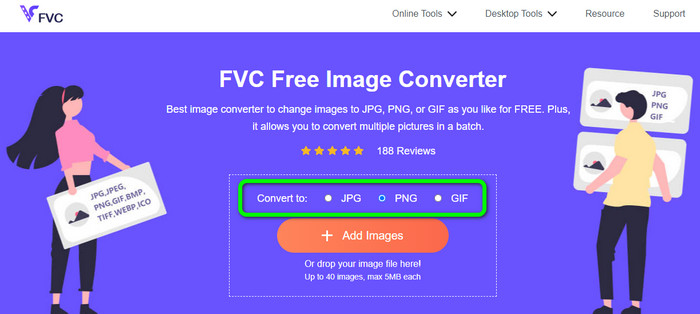
Pasul 1. Deschide orice browser de pe desktop și accesează site-ul oficial FVC Free Image Converter. Apoi, selectează formatul de fișier PNG din opțiunea Convert to din partea centrală a interfeței.
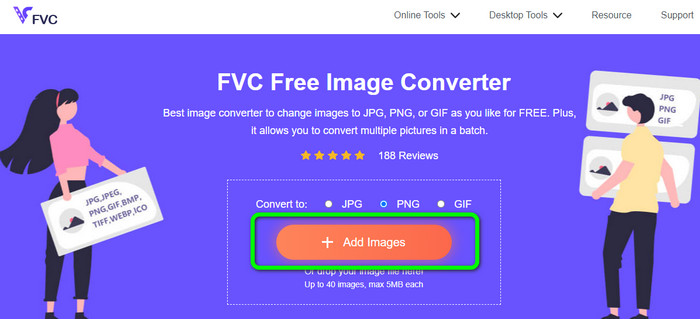
Pasul 2. După selectarea formatului de ieșire dorit, apasă butonul Add Images. Când apare fereastra cu folderele calculatorului, selectează fișierul în format TGA pe care vrei să îl convertești și deschide-l. Reține că poți insera mai mult de un fișier imagine. De asemenea, poți trage și plasa fișierul direct în căsuță.
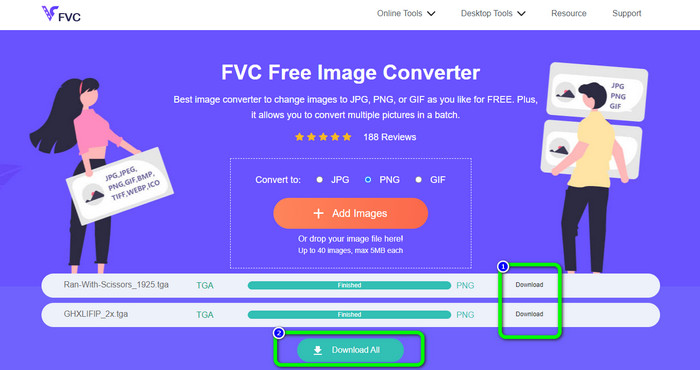
Pasul 3. După ce ai terminat încărcarea, vei vedea că unealta convertește imaginile automat. După procesul de conversie, apasă butonul Download pentru a salva imaginile una câte una. Dacă vrei să le descarci dintr-un singur click, apasă butonul Download All.
Partea 2. Cum se convertesc TGA în PNG pe Zamzar
Zamzar este un alt convertor online TGA în PNG pe care îl poți utiliza. Toți utilizatorii, în special începătorii, vor găsi acest convertor web mai ușor de folosit. Acest lucru se datorează interfeței simple. Cu ajutorul acestui instrument poți încărca fotografii în formate precum CR2, ARW, PNG, 3FR, JPG, GIF, ERF, TIFF și alte formate de intrare. De asemenea, îți poți converti fișierul de imagine în multe formate, precum BMP, EPS, PDF, PNG, JPG și WBMP, pentru a fi mai ușor pentru toți utilizatorii. Poți fie să aștepți apariția linkurilor de descărcare pe pagină, fie să deschizi fișierul convertit dintr-un e-mail. Posibilitatea de a încărca fotografii de până la 50 MB este excelentă. Poți încărca fișierul de pe calculator, Dropbox, Google Drive sau de pe un alt site introducând URL-ul acestuia. Zamzar este disponibil în aproape toate browserele, precum Google, Firefox, Edge și altele. Acest instrument te poate ajuta, de asemenea, să convertești SVG în PNG.
Cu toate acestea, are unele dezavantaje. Procesul de conversie este foarte lung. Procesul durează mult timp în această situație. În plus, fiecare sesiune este limitată la două conversii de fotografii. Urmați pașii de mai jos pentru a converti TGA în PNG folosind Zamzar.
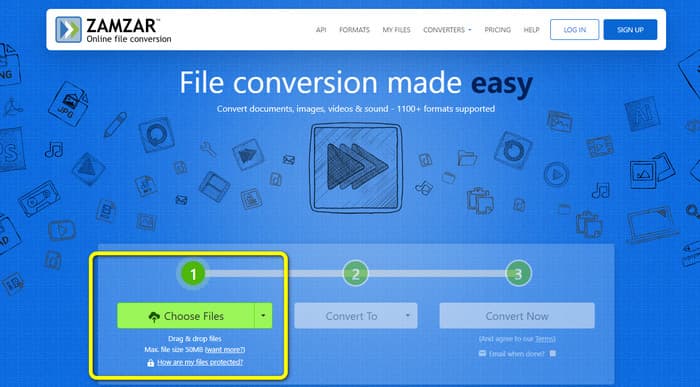
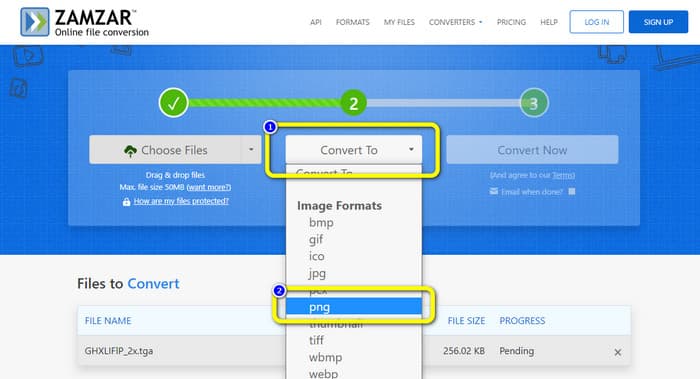
Pasul 1. Accesează browserul și mergi pe site-ul principal Zamzar. Apasă butonul Choose Files de pe pagină pentru a încărca fișierul imagine TGA. O altă modalitate de a încărca imaginea este să tragi fișierul direct în unealtă.
Pasul 2. După încărcarea fișierului imagine TGA, mergi la opțiunile Convert to. Când apar opțiunile de format, selectează PNG ca format de ieșire.
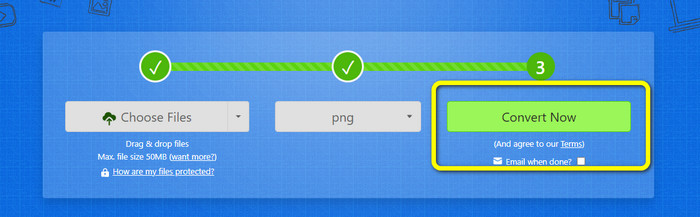
Pasul 3. Apoi, apasă butonul Convert Now pentru a trece la procesul de conversie. La final, apasă butonul Download pentru a salva imaginea convertită pe desktop, după terminarea conversiei.
Partea 3. Cum să convertiți TGA în PNG folosind Convertio
Dacă ești în căutarea unui alt convertor eficient TGA în PNG, folosește Convertio. Acest convertor de imagini online îți poate converti fișierul TGA în PNG. Începătorii îl vor înțelege mai ușor datorită aspectului său simplu. Poți converti imaginile cu ușurință cu Convertio. În plus, acesta acceptă multe formate de imagine, inclusiv PNG, GIF, BMP și SVG. Acest convertor de imagini acceptă, de asemenea, o metodă de conversie în lot. Poți converti imediat mai multe fotografii simultan cu acest instrument excelent. Pe lângă fotografii, poți converti fișiere video, audio și documente. Astfel, nu mai este nevoie să cauți o altă unealtă online. Poți folosi acest instrument și pentru a converti WebP în PNG.
Cu toate acestea, versiunea gratuită are o limită de încărcare de 100 MB. Pentru a adăuga cea mai mare dimensiune de fișier, trebuie să cumpărați un plan de membru. În versiunea gratuită, puteți converti doar două fișiere simultan folosind o metodă de conversie în lot. Un pachet scump este, de asemenea, o opțiune dacă doriți acces la toate serviciile. Puteți folosi pașii simpli de mai jos pentru a converti fișierul TGA în format PNG folosind Convertio.
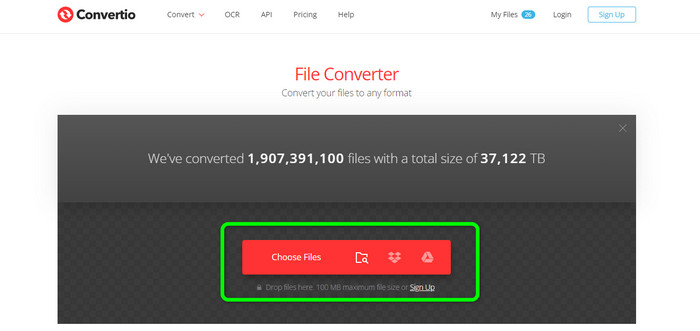
Pasul 1. Din browserul tău, caută și găsește site-ul oficial Convertio. Când ești deja pe pagină, apasă butonul Choose Files. Apoi, deschide fișierul imagine TGA din fișierele de pe calculator. Poți încărca până la două imagini când folosești versiunea gratuită.
Pasul 2. După ce ai încărcat imaginile TGA, mergi la opțiunile de format. După ce dai click, selectează formatul de ieșire dorit, care este PNG.
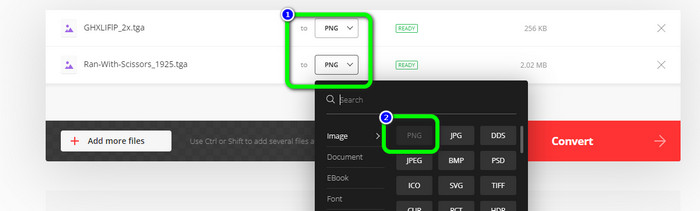
Pasul 3. După schimbarea formatului de ieșire din opțiunile de format, apasă butonul Convert. Așteaptă procesul de conversie. Va dura doar câteva secunde.
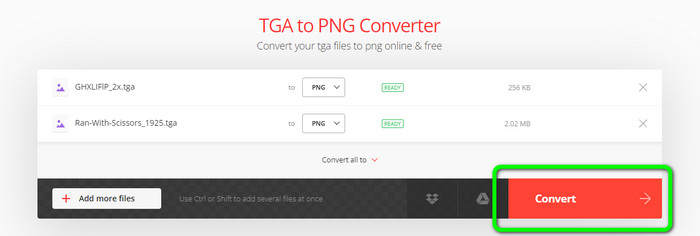
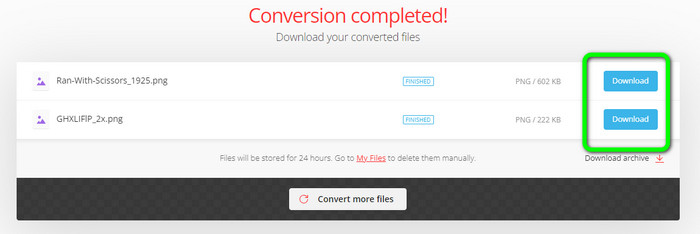
Pasul 4. În final, pentru a salva imaginile convertite, apasă butonul Download. După aceea, poți deschide imaginile convertite din folderul Download.
Partea 4. Întrebări frecvente despre conversia TGA în PNG
1. Ce este un fișier TGA?
Un fișier imagine Truevision Graphics Adapter are extensia de fișier TGA. Acronimul TARGA, înseamnă Truevision Advanced Raster Graphics Adapter. Formatul Targa Graphic permite stocarea imaginilor comprimate și necomprimate. Poate fi ales pentru pictograme, desene linii și alte elemente grafice simple. Fișierele imagine utilizate în jocurile video sunt considerate a fi legate de acest format.
2. De ce sunt imaginile TGA atât de mari?
Imaginile TGA constau de obicei din fișiere mari datorită utilizării biților pentru reprezentarea pixelilor. Mărimea fișierelor în acest format depinde de adâncimea culorii.
3. Cum pot vizualiza fotografiile TGA?
Puteți vizualiza imagini TGA pe Adobe Photoshop, GIMP și TGA Viewer.
Concluzie
Deoarece formatul de fișier TGA este nepopular, unele programe nu îl acceptă. Cea mai bună soluție pentru a-l deschide este să îl transcodezi într-un format foarte cunoscut, precum PNG. Prin urmare, articolul ți-a oferit cele mai bune metode de a converti TGA în PNG. Totuși, unele unelte online necesită un abonament pentru a le folosi pe deplin funcțiile remarcabile. În acest caz, folosește FVC Free Image Converter. Acest convertor de imagini online îți permite să te bucuri gratuit de toate funcțiile sale.
-
 Modalități ușor de înțeles de a converti PSD în PNG sau JPG
 Această postare vă va oferi pași gestionați pentru a converti PSD în JPG sau PNG. Există diverse convertoare pe care le puteți folosi pentru a vă converti fișierele. Citiți mai multe pentru a afla.
-
 Metode de vârf despre cum să convertiți EPS în PNG și JPG
 Cele mai notabile metode de a converti EPS în PNG și JPG sunt aici. Să citim acest ghid pentru a obține modalitățile cu ajutorul convertoarelor de imagini.
-
 Cele mai ușoare metode de a converti BMP în formate JPG și PNG
 Aflați cele mai bune metode de a converti BMP în JPG sau PNG folosind convertoare excelente. De asemenea, veți descoperi diferența dintre formatele de fișiere BMP, JPG și PNG.
