


 Video Converter Ultimate
 Screen Recorder
 Reparație video
 Descărcare sigură
3 moduri de a comprima cu ușurință fotografiile pentru e-mail [Ghid]
E-mailul este o platformă excelentă pentru trimiterea de mesaje cu atașamente foto și alte fișiere necesare. Cu toate acestea, unii utilizatori întâmpină dificultăți în a trimite fotografii cu fișiere mari, deoarece duc la lenți timpi de încărcare, livrări eșuate sau depășirea limitelor de dimensiune a atașamentelor impuse de furnizorii de e-mail. Pentru a evita aceste probleme, redimensionarea fotografiilor înainte de a le trimite este esențială.
Așadar, în acest articol îți vom prezenta 3 metode prin care să înveți cum să comprimi fotografii pentru email, asigurându-te că atașamentele foto sunt ușor de trimis și de primit, fără a compromite calitatea.

Partea 1. Beneficiile comprimării fotografiilor pentru e-mail
Comprimarea fotografiilor, în general, are o mulțime de beneficii, inclusiv pentru utilizarea e-mailului. Următoarele sunt lucrurile de care vă puteți bucura când redimensionați fotografiile pentru e-mail:
• Deoarece comprimarea imaginilor presupune redimensionarea fotografiei la o dimensiune mai mică, poți trimite cu ușurință mai multe fotografii atașate într-un email, comparativ cu fotografiile necomprimate.
• De multe ori, furnizorii de email impun limite privind dimensiunea atașamentelor pe care le poți trimite. Prin comprimarea fotografiilor pentru email, te poți încadra în aceste limite, asigurându-te că emailul este livrat fără probleme. Acest lucru este util când trimiți emailuri către mai mulți destinatari sau când incluzi și alte tipuri de atașamente împreună cu fotografiile.
• Atunci când fotografiile sunt comprimate, înseamnă doar că vor ocupa mai puțin spațiu, permițându-ți să folosești mai eficient cota de stocare a emailului.
• Atașamentele mari din email pot fi uneori marcate de serverele de email, ceea ce duce la eșecul livrării sau la clasificarea emailului ca spam. Comprimarea fotografiilor pentru email ajută la evitarea acestor probleme, asigurând că atașamentele tale ajung la destinatarii doriți fără dificultăți.
• În anumite situații, atunci când utilizatorii își verifică emailul de pe telefonul mobil, fotografiile comprimate sunt mai ușor de descărcat și vizualizat pe dispozitivele mobile comparativ cu cele necomprimate.
Partea 2. Comprimați fotografii pentru e-mail prin conversia formatului de imagine
Dacă doriți să comprimați fotografiile pentru e-mail, prima metodă pe care o puteți încerca este să utilizați un instrument de conversie a imaginilor. Cu aceasta, vă va converti imaginea într-un format pe care îl doriți, în care procesul de conversie vă optimizează și fotografia la o dimensiune de dorit și mai ușor de gestionat.
FVC Free Image Converter este un instrument gratuit de conversie care le permite utilizatorilor să își convertească fotografiile în diverse formate de fișiere de imagine, cum ar fi JPG, PNG și GIF. Așadar, dacă trimiți prin email o imagine într-un format care reține mai multe date și mărește dimensiunea fișierului, poți profita din plin de acest instrument. În plus, este ideal atunci când vrei să trimiți mai multe fișiere mari, deoarece poate converti în lot până la 40 de imagini deodată. Iată cum poți folosi acest instrument pentru a-ți comprima fotografiile pentru email:
Pasul 1. Mai întâi, în browser, caută FVC Free Image Converter pentru a putea accesa acest instrument online.
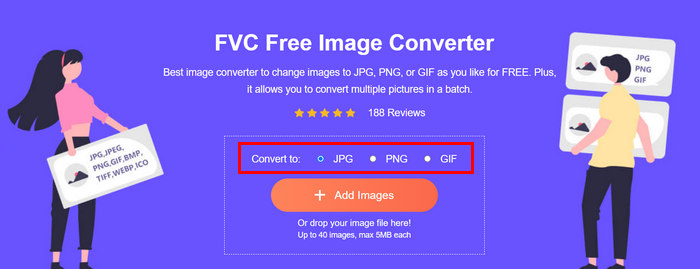
Pasul 2. Apoi, alege formatul de fișier de ieșire preferat în opțiunea Convert to. După aceea, dă clic pe butonul Add Images pentru a importa imaginile pe care dorești să le convertești.
Pasul 3. După ce ai terminat, dă clic pe butonul Download All.
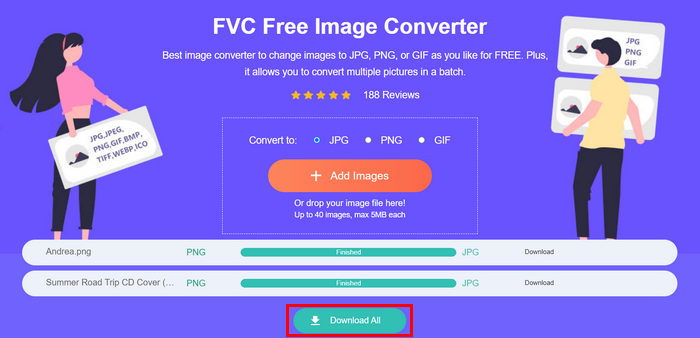 Cu instrumentul Free Image Converter FVC, este garantat că fotografiile dvs. convertite sunt acum comprimate și au avut dimensiunea redusă, ceea ce este perfect pentru utilizarea prin e-mail.
 Partea 3. Reduceți fotografiile pentru e-mail cu Instrumentul de compresie online
FVC Free Image Compressor este un instrument gratuit online de comprimare care simplifică procesul de comprimare a fotografiilor pentru email. Trebuie doar să încarci sau să imporți fișierele imagine și instrumentul le va comprima automat. Dacă îți faci griji în privința pierderii calității, acest instrument utilizează cea mai bună optimizare și algoritmi avansați de comprimare. Acest lucru va asigura păstrarea calității imaginilor atunci când le comprimi pentru email.
De asemenea, dacă trebuie să comprimați o imagine în loturi, acest instrument vă permite să comprimați simultan 40 de imagini simultan. În cele din urmă, acceptă diverse formate de imagine populare, cum ar fi JPEG, PNG, SVG și GIF-uri animate.
Pasul 1. Din browser, accesează site-ul lor oficial.
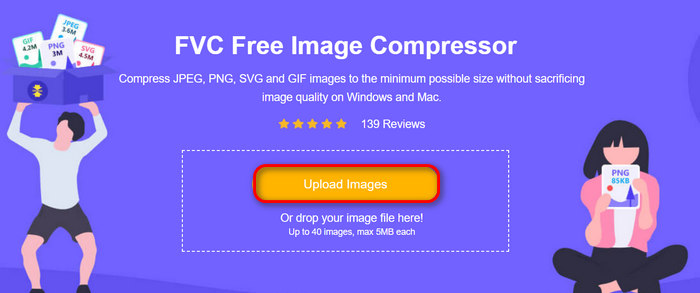
Pasul 2. După aceea, dă clic pe Upload Images pentru a importa imaginile pe care dorești să le comprim i pentru web. Te rugăm să reții că acest instrument îți va comprima automat fotografiile imediat ce le-ai selectat și ai dat clic pe Deschide (Open).
Pasul 3. După ce ți-ai comprimat imaginile, le poți previzualiza verificându-le noua dimensiune după comprimare. În final, fă clic pe Download All pentru a-ți salva imaginea.
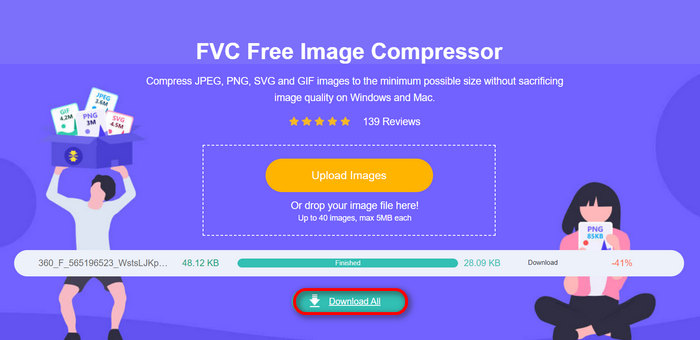
Această metodă vă poate ajuta cu adevărat să comprimați fotografiile pentru e-mail fără a îndura pași complexi și taxe de abonament. În plus, interfața sa ușor de utilizat și intuitivă îl face un instrument ideal pentru orice nivel de utilizator. Deci, dacă doriți să vă optimizați fotografiile pentru utilizarea prin e-mail, încercați această metodă acum.
Partea 4. Redimensionați fotografiile pentru e-mail la o dimensiune specificată
Dacă doriți să redimensionați fotografiile pentru e-mail la o dimensiune specificată, atunci puteți încerca instrumentul IMGonline. Acest instrument de compresor de imagini vă permite să vă redimensionați imaginea la dimensiunea dorită. Iată cum să o faci:
Pasul 1. Pe site-ul lor, fă clic pe butonul Choose File pentru a adăuga fotografia pe care vrei să o comprimi.

Pasul 2. Apoi, setează opțiunile pentru comprimarea fișierelor JPEG. Introdu dimensiunea dorită, în KB sau MB, în funcție de preferință.

Pasul 3. În meniul Size Reducing in Megapixel, alege cât de mult vrei să comprimi fotografia sau cum vrei să limitezi nivelul de comprimare al fotografiei.
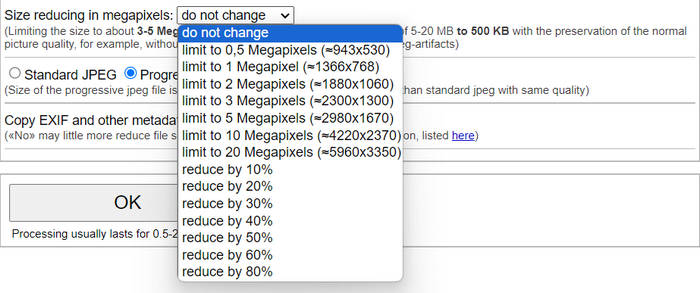
Pasul 4. După aceea, alege între Standard JPG sau Progressive JPG.

Pasul 5. Când ai terminat, dă clic pe butonul OK.
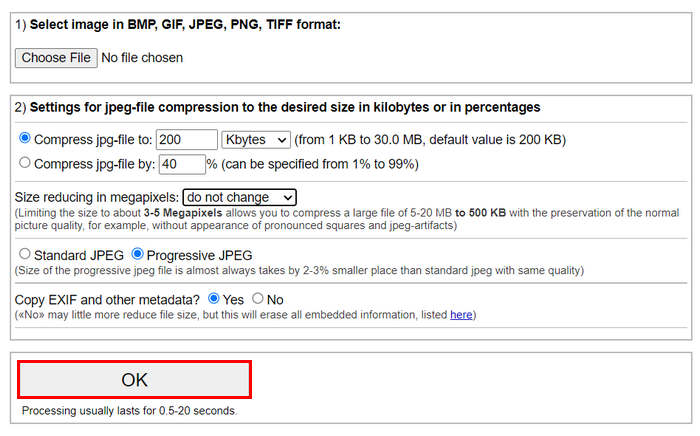
În ceea ce privește alegerea între JPG standard și JPG progresiv, rețineți că dimensiunea fișierului jpeg progresiv este întotdeauna luată de 2-3% loc mai mic decât jpeg standard cu aceeași calitate.
Partea 5. Întrebări frecvente despre comprimarea fotografiilor pentru e-mail
Ce dimensiune ar trebui să îmi redimensionez fotografiile pentru e-mail?
Când vine vorba de dimensiunea ideală pentru trimiterea fotografiilor prin e-mail, deși nu există nicio restricție, totuși, se recomandă, în general, să redimensionați fotografiile la maximum 1024x768 pixeli. De asemenea, menținerea dimensiunii imaginii sub 1 MB ajută la evitarea problemelor legate de limitele atașărilor și facilitează descărcarea și vizualizarea imaginilor de către destinatari.
Cum să comprimați imaginile pentru Gmail?
Comprimarea imaginilor pentru Gmail poate fi realizată prin diverse metode. Una dintre cele mai simple este utilizarea instrumentelor online de comprimare, cum ar fi instrumentul gratuit FVC image compressor. Pentru a-l folosi, trebuie doar să încarci fișierele imagine, iar acesta le va comprima automat.
Ce tip de imagine este cel mai bun pentru e-mailuri?
Cele mai bune tipuri de imagini pentru email sunt JPEG și PNG. JPEG este utilizat pe scară largă datorită ratei bune de comprimare și a echilibrului dintre dimensiunea fișierului și calitate, fiind ideal pentru fotografii și imagini cu multe culori. PNG este preferat pentru imagini care necesită transparență sau care conțin text, logo-uri sau elemente grafice cu muchii clare, deoarece păstrează o calitate mai ridicată pentru aceste elemente, deși dimensiunea fișierului poate fi mai mare comparativ cu JPEG.
Concluzie
Este foarte important să știi cum să comprim i fotografii pentru email pentru a evita timpii lungi de încărcare, eșecurile de livrare și limitele de dimensiune ale atașamentelor. Urmând metodele prezentate detaliat în acest articol, te poți asigura că atașamentele foto sunt ușor de gestionat și rapid de trimis și de primit.
Ce aştepţi? Începeți să vă optimizați atașamentele de e-mail astăzi cu aceste 3 moduri simple.
-
 Fotografie prea comprimată: iată cum să le remediați cu ușurință
 Te întrebi ce să faci când imaginea ta este prea comprimată? Citiți acest articol și aflați de ce se întâmplă această problemă de imagine și aflați 2 metode despre cum să le remediați.
-
 Redimensionați imaginea la 100KB: 3 cele mai bune moduri de compresie eficientă
 Căutați un instrument care să vă ajute să redimensionați imaginea la 100 KB? Citiți acest articol și aflați 3 metode despre cum vă puteți micșora imaginile la dimensiunea dorită a fișierului.
-
 Cum să comprimați imagini în Word [Windows și Mac]
 Vă întrebați cum vă puteți folosi Word pentru compresia imaginilor? Acest ghid vă va învăța modalități de comprimare a imaginilor în Word pentru o comprimare fără întreruperi.
