


 Video Converter Ultimate
 Screen Recorder
 Reparație video
 Descărcare sigură
4 Metode eficiente: Cum să reduceți dimensiunea fișierului foto pe iPhone
De obicei, cu iPhone-urile noastre, trebuie să încărcăm direct fotografii pe anumite site‑uri sau să le trimitem prin e‑mail ori alte platforme. Totuși, fotografiile făcute cu iPhone‑ul au de obicei dimensiuni mari ale fișierelor, datorită calității ridicate a imaginilor capturate de camerele sale avansate. Pentru a reduce dimensiunea fișierelor foto pe iPhone fără să compromiți prea mult calitatea, iată patru metode eficiente pe care trebuie să le încerci. Continuă să citești pentru a le afla pe toate!

Partea 1. Reduceți dimensiunea fișierului foto pe iPhone în Setările camerei
Cel mai simplu și rapid mod de a reduce dimensiunea fișierelor foto pe iPhone este din aplicația Configurări. Cu această metodă, poți alege formatul pentru toate fotografiile pe care le faci cu camera iPhone‑ului. Problema cu iPhone‑urile este că sunt de obicei setate pe cel mai compatibil format, ceea ce va salva fotografiile la dimensiuni mari. Totuși, dacă vrei să economisești spațiu de stocare, trebuie să îți ajustezi setările camerei pe eficiență ridicată și să dezactivezi formatul HEIC. Acest tip de setare a camerei nu va reduce calitatea imaginilor, dar îți va economisi mult spațiu pe iPhone.
Iată cum puteți reduce dimensiunea fișierului în setările camerei:
Pasul 1. Pe iPhone, accesează Configurări, caută Cameră și alege Formate.
Pasul 2. În partea de sus a ecranului, selectează High Efficiency (Eficiență ridicată). Acest format îți permite să obții cea mai mică dimensiune a fotografiei fără a reduce calitatea.
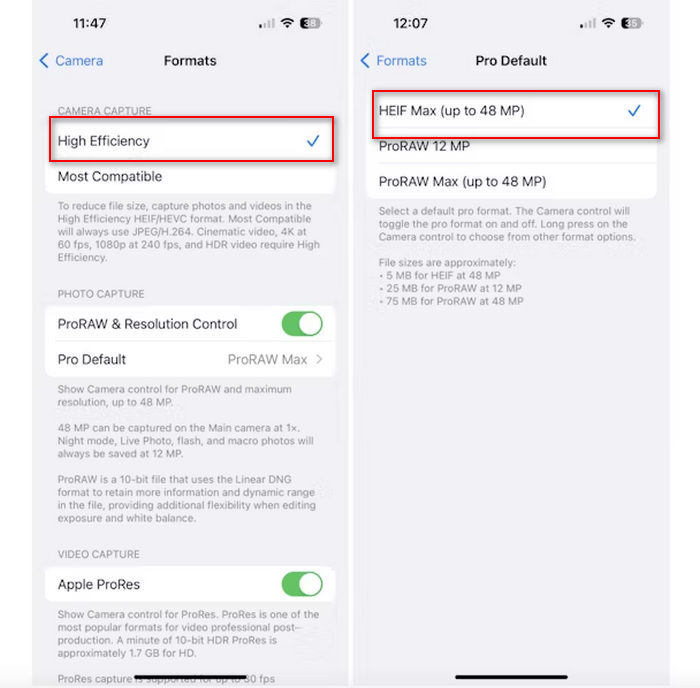
Pasul 3. Pentru a micșora și mai mult dimensiunea fișierelor de imagine, atinge Pro Default și alege HEIF Max up to 48 MP. Astfel, dimensiunea fotografiilor va fi limitată la aproximativ 5 MB.
Reducerea dimensiunii fișierului pe un iPhone prin modificarea setărilor camerei sale ar putea fi o modalitate bună de a comprima imagini. Cu toate acestea, ar dura ceva timp când doriți să schimbați setarea camerei când doriți și să faceți fotografii de înaltă calitate care ar putea avea o dimensiune mare a fișierului.
Partea 2. Comprimați fotografiile de pe iPhone prin decupare
Decuparea este o metodă eficientă de a reduce dimensiunea unei imagini pe un iPhone, deoarece elimină porțiuni inutile ale fotografiei, scăzând astfel dimensiunea totală a fișierului. Când decupați o fotografie, decupați în esență părți ale imaginii de care nu aveți nevoie, ceea ce nu numai că se concentrează pe elementele importante ale imaginii, ci și reduce cantitatea de date pe care fișierul le conține. Acest lucru poate fi deosebit de util pentru a economisi spațiu de stocare pe iPhone și pentru a facilita partajarea fotografiilor pe diverse platforme.
Iată cum puteți comprima fotografiile de pe iPhone decupându-le:
Pasul 1. Deschide în aplicația Poze fotografia căreia vrei să îi reduci dimensiunea fișierului și atinge Editați.
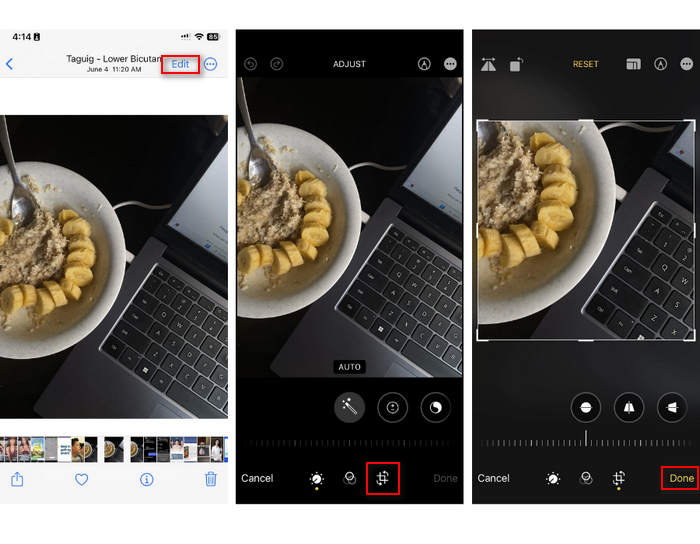
Pasul 2. Acum, atinge butonul Decupare din partea de jos și decupează părțile nedorite din fotografie.
Pasul 3. Ajustează decuparea după cum dorești, apoi atinge OK.
Deși acest lucru poate reduce dimensiunea fișierului foto pe un iPhone, această metodă nu va fi întotdeauna aplicabilă în orice moment, așa că se recomandă ca alte instrumente să fie utilizate pentru a comprima fotografiile de pe un iPhone în afară de aceasta.
Partea 3. Reduceți dimensiunea fișierului foto pe iPhone prin intermediul aplicației Social Media
WhatsApp le permite utilizatorilor să reducă dimensiunea fișierelor foto pe iPhone‑urile lor. Oferă o opțiune de comprimare a imaginii la o dimensiune mai mică înainte de trimitere, ceea ce ajută la economisirea spațiului de stocare și face partajarea fotografiilor mai ușoară.
Iată cum puteți comprima fotografiile de pe iPhone folosind WhatsApp:
Pasul 1. În WhatsApp, deschide o conversație text.
Pasul 2. Apoi, atinge pictograma foto și alege fotografia pe care vrei să o trimiți.
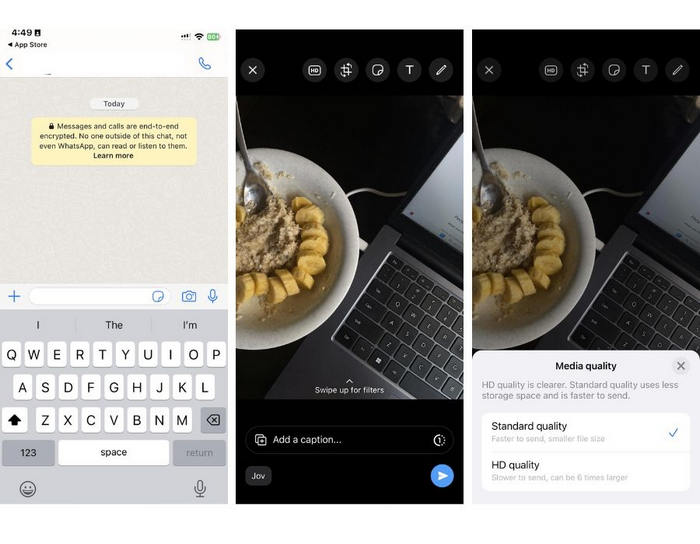
Pasul 3. După aceea, atinge HD pentru a ajusta dimensiunea fișierului, alegând să trimiți fotografia în calitate standard.
Pasul 4. Atinge săgeata pentru a trimite mesajul și a descărca fotografia.
Această metodă este foarte recomandată celor care au WhatsApp instalat pe iPhone-urile lor. Deși este o modalitate excelentă de a reduce dimensiunea fișierului foto pe un iPhone, aceasta va afecta semnificativ calitatea fotografiei.
Partea 4. Comprimați fotografii pe iPhone cu Instrumentul online
Dacă, în același timp, cauți o metodă directă și foarte simplă de a reduce dimensiunea fișierelor foto pe iPhone, cel mai bun instrument pe care îl poți folosi este FVC Free Image Compressor. Trebuie doar să accesezi acest instrument online, să încarci fotografia pe care vrei să o comprimi și gata. Mai mult, cu acest instrument poți comprima mai multe fotografii direct de pe iPhone și le poți reduce considerabil dimensiunea fără a pierde prea mult din calitatea lor, comparativ cu celelalte metode menționate mai sus.
Iată cum puteți comprima fotografiile de pe iPhone folosind FVC Free Image Compressor:
Pasul 1. Pe Safari, caută FVC Free Image Compressor.
Pasul 2. Atinge butonul Upload Images pentru a importa fotografiile cărora vrei să le reduci dimensiunea fișierului.
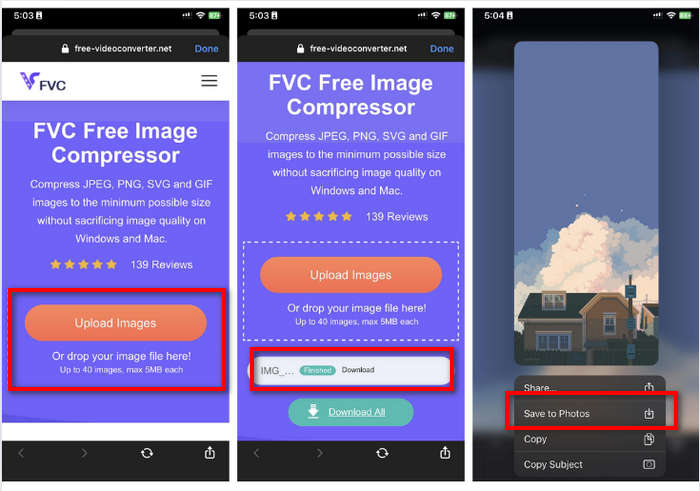
Pasul 3. După aceea, fotografiile vor fi comprimate automat. Atinge butonul Download, apasă lung pe fotografia comprimată și alege opțiunea Save to Photos.
Cu FVC Free Image Compressor, reducerea dimensiunii fișierului foto pe iPhone se poate face atât de rapid, fără a pierde mult din calitatea acestuia. În plus, accesibilitatea și interfața prietenoasă fac din acesta un instrument de bază pentru utilizatorii de iPhone pentru a-și comprima fotografiile.
Partea 5. Întrebări frecvente despre reducerea dimensiunii fișierului foto pe iPhone
Cum reduc dimensiunea unui fișier JPEG fără a pierde rezoluția?
Pentru a reduce dimensiunea unui JPEG fără a pierde rezoluția, puteți utiliza compresorul de imagini gratuit FVC. Acest instrument online vă permite să vă comprimați fotografiile, păstrându-le în același timp calitatea. Pur și simplu încărcați sau importați fișierul imagine în instrument, iar acesta îl va comprima automat pentru dvs. Apoi puteți descărca fotografia comprimată înapoi pe iPhone.
Cum văd dimensiunea fișierului fotografiilor de pe un iPhone?
Puteți vedea dimensiunea fișierului fotografiilor dvs. în aplicația Fișiere de pe iPhone. Dacă fotografia nu se află în aplicația Fișiere, mai întâi trebuie să o încărcați pe iCloud. Odată ce fotografia este în iCloud, îi puteți vedea dimensiunea fișierului accesând-o prin aplicația Fișiere.
Ce tip de fotografie este făcută de iPhone?
De obicei, iPhone-urile salvează fotografiile în format HEIC sau în formatul de codare a imaginii de înaltă eficiență în mod implicit. HEIC oferă o compresie mai bună decât JPEG, menținând în același timp calitate înaltă. Puteți modifica această setare în secțiunea Cameră a aplicației Setări, sub Formate.
Concluzie
Deoarece iPhone‑urile generează fișiere de dimensiuni mari atunci când fac fotografii, partajarea și încărcarea acestora poate fi dificilă. Prin urmare, să înveți cum să reduci dimensiunea fișierelor foto pe iPhone este o idee excelentă atunci când vrei să îți optimizezi fotografiile pentru o utilizare cât mai ușoară. Acum, depinde de tine ce metodă folosești pentru a‑ți comprima fotografiile. Ce mai aștepți? Comprimă‑ți fotografiile pe iPhone chiar acum!
-
 Cum să redimensionați imaginea – Adobe Redimensionați imaginea [Online și Offline]
 Dacă sunteți în căutarea unei imagini de redimensionare Adobe, atunci avem soluția pentru dvs. Vizualizați această postare în detaliu pentru a afla cum să redimensionați imaginile folosind Adobe pe computer.
-
 Instrumente creative pentru programul de redimensionare GIF disponibile cu comoditate
 Redimensionarea GIF-urilor poate fi o sarcină dureroasă. Utilizați programele potrivite pentru a vă redimensiona GIF-urile și pentru a vă realiza munca fără cusur. Consultați acest articol pentru mai multe informații.
-
 3 moduri de a redimensiona imaginea pentru Twitter fără a pierde calitatea
 Pentru a redimensiona imaginea pentru Twitter, va trebui să aveți un dispozitiv de redimensionare a fotografiilor în mână. Nu are unul? Apoi alegeți din listă.
