


 Video Converter Ultimate
 Screen Recorder
 Reparație video
 Descărcare sigură
Cum să eliminați cu ușurință filigranul din imaginile de absolvire
Filigranele sunt o criză în ochi ori de câte ori le vezi în orice fotografie și strică calitatea fotografiei. Veți vedea filigrane pe fotografii ori de câte ori creatorul nu dorește ca opera lui să fie furată. Și dacă ești student, probabil vei vedea filigrane pe fotografia ta de absolvire, indicând numele studioului sau al fotografului care a făcut-o.
Dacă vrei să elimini filigranul de pe poza ta de absolvire, ai nevoie de instrumente care să te ajute să îl ștergi. În acest articol, am enumerat primele trei cele mai folosite programe de eliminare a filigranelor și vei învăța, de asemenea, pașii pentru a elimina filigranele din pozele de absolvire.

Partea 1. Cum să eliminați filigranul din imaginile de absolvire online
Există multe instrumente de îndepărtare a filigranelor pe care le veți vedea pe internet. Cu toate acestea, nu toate sunt gratuite și ușor de utilizat. De asemenea, în această parte, veți ști cum să eliminați filigranele convenabil și eficient.
FVC Free Watermark Remover este un instrument online de eliminare a filigranelor care îți permite să ștergi cu ușurință filigranele de pe pozele tale de absolvire. Acest instrument online este popular deoarece nu trebuie să descarci nimic înainte de a-l folosi. În plus, suportă cele mai comune formate de imagine, precum PNG, JPG, JPEG, BMP și altele. Iar chiar dacă elimini filigranul de pe imagine, atunci când o descarci va avea același format de fișier ca înainte.
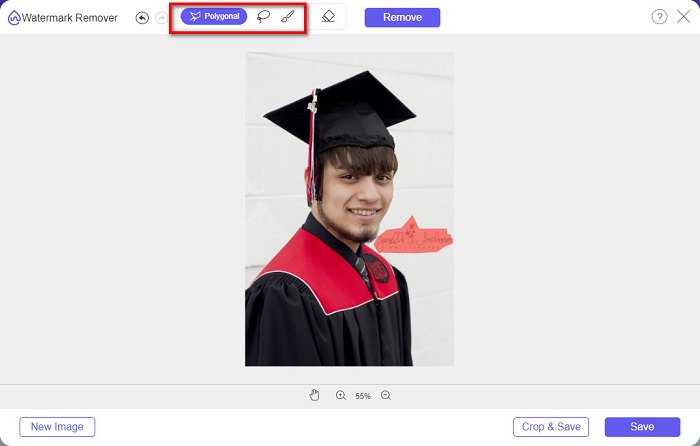
Folosind acest dispozitiv de îndepărtare a filigranului, puteți alege dintre setările prestabilite pentru îndepărtarea filigranului în selectarea zonei de filigran. Puteți alege între poligonal, lasso sau pensulă. În plus, puteți folosi acest instrument pentru a șterge alte lucruri inutile de pe imaginea dvs.
Pro
- Are o interfață software de operare rapidă.
- Este sigur de utilizat.
- Este 100% de utilizat gratuit.
- Disponibil pentru toate browserele web, inclusiv Google, Firefox și Safari.
Contra
- Este dependent de internet.
Cum să scapi de filigranul de pe fotografiile de absolvire folosind FVC Free Watermark Remover:
Pasul 1. În browserul pe care îl folosești, caută FVC Free Watermark Remover. Poți da clic pe acest link pentru a merge direct pe pagina lor web.
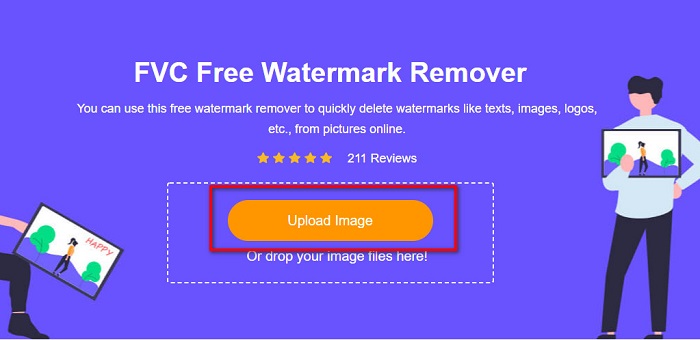
Pasul 2. În interfața principală a software‑ului, dă clic pe butonul Upload Image. Se vor deschide folderele de pe computer, unde vei selecta fotografia de absolvire și o vei încărca.
Pasul 3. Apoi, selectează instrumentul de ștergere pe care vrei să‑l folosești pentru a elimina filigranul. Alege între Polygonal, Lasso sau Brush. După aceea, selectează zona filigranului pe care vrei să o elimini.
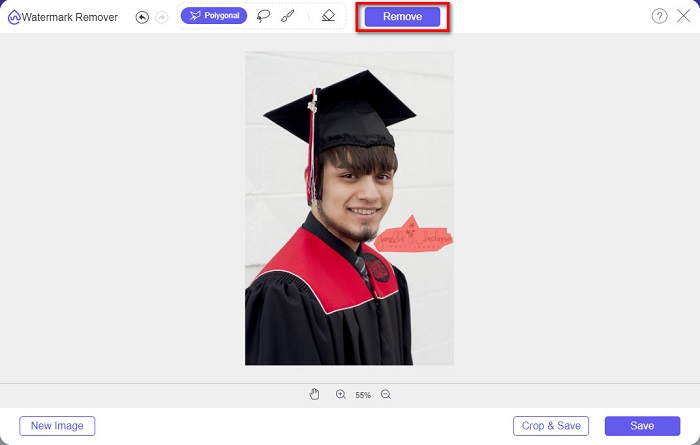
Pasul 4. După ce ai selectat zona filigranului, dă clic pe butonul Remove pentru a șterge filigranul.
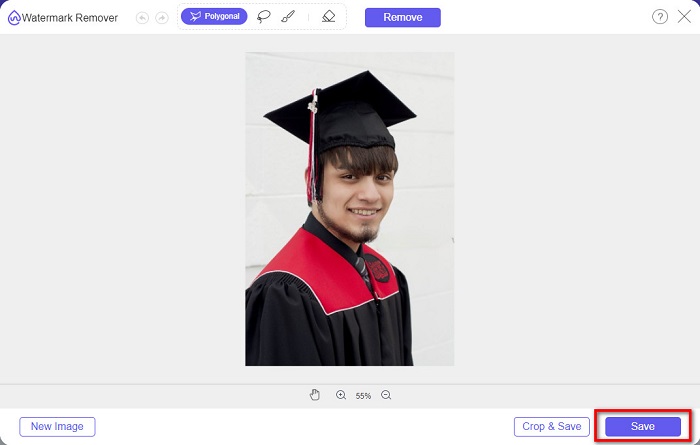
Pasul 5. Vei vedea că filigranul a fost eliminat. Dă clic pe butonul Save pentru a descărca imaginea pe dispozitivul tău. În plus, acest instrument online de eliminare a filigranelor este și un instrument de eliminare a filigranelor Photobucket.
Partea 2. Cum să eliminați filigranul din imaginile de absolvire folosind Inpaint
Oamenii retușează uneori filigranul pentru a aduce fotografia la aspectul inițial. Dar cum fac asta? Profesioniștii folosesc un editor foto și pictează eticheta pixel cu pixel, rezultând câteva ore de lucru. Cu toate acestea, există un alt instrument care vă va ajuta să vă faceți viața mai ușoară. În această parte, veți învăța cum să utilizați Inpaint și avantajele sale.
Inpaint este un instrument online de eliminare a filigranelor care te va ajuta, de asemenea, să ștergi filigranele de pe poza ta de absolvire. Acest software online are și o versiune descărcabilă, disponibilă pe Windows și Mac. Mai mult, îți permite să elimini elementele nedorite din fotografie, precum sigle, texte, obiecte etc. Și mai surprinzător este că are o funcție cu ajutorul căreia poți repara fotografii vechi și le poți readuce la calitatea lor inițială. De asemenea, are instrumente de ștergere pentru a selecta zona filigranului pe care vrei să îl elimini.
Pro
- Are o interfață software ușor de utilizat.
- Vă permite să faceți retușuri faciale digitale.
- Vă permite să umpleți zonele negre din Panorame.
- Accesibil pe aproape toate browserele web, cum ar fi Google și Firefox.
Contra
- Este dependent de internet.
Cum să eliminați filigranul din imaginea de absolvire folosind Inpaint:
Pasul 1. Caută Inpaint în browser, apoi accesează pagina lor web. Apoi, în interfața principală a software‑ului, dă clic pe butonul Upload Image pentru a încărca poza ta de absolvire.
Pasul 2. Apoi, selectează instrumentul de ștergere pe care vrei să‑l folosești pentru a selecta zona filigranului. Alege între marker tool, lasso tool și polygonal lasso tool.
Pasul 3. Apoi, folosind instrumentul pe care dorești să îl utilizezi, selectează zona filigranului pe care vrei să o elimini.

Pasul 4. La final, dă clic pe butonul Erase pentru a elimina filigranul de pe poza ta de absolvire. Apoi dă clic pe butonul Download pentru a descărca fotografia.
Partea 3. Cum să eliminați filigranul din imaginea de absolvire folosind Photoshop
Adobe Photoshop este cel mai faimos software de editare pe care îl folosesc mulți profesioniști. Dar ceea ce mulți utilizatori nu știu este că nu este doar un software de editare; de asemenea, poate elimina filigranele nedorite de pe fotografia dvs. Pentru a afla cum să eliminați filigranul din fotografia dvs., citiți această parte cuprinzător.
Adobe Photoshop este cel mai popular software de editare foto, cu numeroase funcții de editare. Mulți profesioniști folosesc această aplicație de editare pentru că poți modifica imaginea în moduri foarte avansate. Conține instrumente care îți permit să editezi imaginea în detaliu. În plus, produce rezultate de înaltă calitate pe care le poți distribui pe orice platformă de socializare.
Pro
- Are multe funcții avansate de editare de utilizat.
- Conține multe instrumente de utilizat pentru editare.
- Produce rezultate de înaltă calitate.
- Vă permite să editați și să creați imagini atât pentru imprimare, cât și pentru web.
Contra
- Are o interfață software greu de utilizat.
- Trebuie să cumpărați aplicația pentru a o descărca.
Cum să eliminați orice filigran de pe fotografie folosind Adobe Photoshop:
Pasul 1. Descarcă Adobe Photoshop pe dispozitivul tău, apoi pornește aplicația. În interfața principală, deschide imaginea în Photoshop.
Pasul 2. Selectează zona filigranului. Poți folosi Pen tool, Quick Selection tool sau Magic Wand tool.
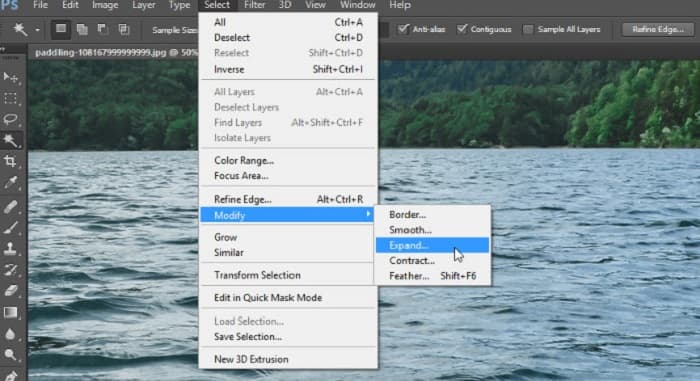
Pasul 3. Mergi la Select > Modify > Expand pentru a include pixelii de fundal.
Pasul 4. Mergi la Edit > Fill, apoi selectează Content-Aware în secțiunea Contents.
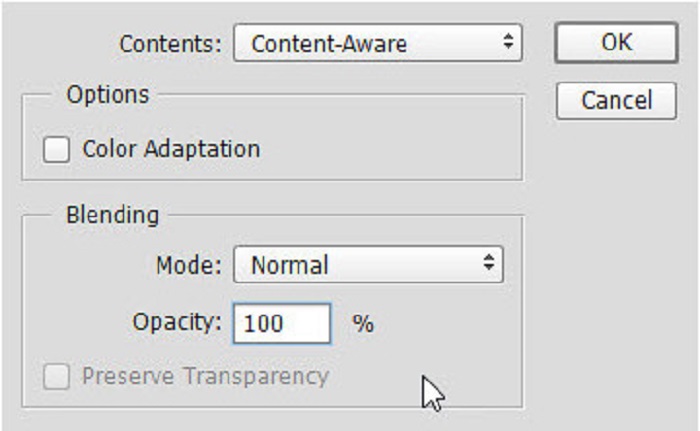
Pasul 5. Apoi apasă CTRL+D. Vei vedea că filigranul este umplut cu fundalul. Apoi, pentru a elimina conturul filigranului, folosește Clone Stamp Tool.
Pasul 6. Ține apăsată tasta Alt și trasează conturul filigranului. Când ai terminat de eliminat urmele, vei observa că filigranul a dispărut.
Partea 4. Întrebări frecvente despre eliminarea filigranului din imaginea de absolvire
Eliminarea filigranelor din pozele de absolvire strica calitatea?
Eliminarea filigranului din pozele de absolvire nu va strica neapărat calitatea. Cu toate acestea, atunci când eliminați filigranul, unele instrumente încă mai lasă urme.
Puteți elimina filigranele de pe Canva?
Da. Canva are o funcție prin care puteți elimina gratuit filigranele. Doar faceți clic pe butonul Eliminați filigranele pentru a face acest lucru.
Puteți elimina filigranele de pe PDF?
Folosind instrumentele prezentate mai sus, poți elimina orice fel de filigran din fișierul tău PDF.
Concluzie
Acum că ai învățat cum să elimini filigranele din pozele de absolvire, poți să o faci singur(ă) și să încerci instrumentele prezentate mai sus. Eliminarea filigranului devine simplă folosind un program de ștergere a filigranelor. Totuși, multe persoane recomandă utilizarea FVC Free Watermark Remover deoarece este comod și ușor de folosit.
-
 Cum să eliminați cu ușurință filigranul Lumion pe Windows și Mac
 Trebuie să eliminați filigranul Lumion pentru a-l prezenta profesional? Ei bine, există instrumente pe care le puteți folosi pentru a vă ajuta să scăpați de filigranul pe care îl lasă.
-
 Cum să eliminați cu ușurință filigranul Weibo de pe videoclipuri și imagini
 Întâmpinați probleme la eliminarea Weibo Watermark de pe videoclipurile și imaginile exportate? În acest caz, trebuie să aveți un dispozitiv de îndepărtare a filigranului, pe care îl enumeram mai jos, care vă poate ajuta.
-
 Aflați cum să eliminați Movavi Watermark gratuit $91;Must Have!$93;
 Exportarea unui videoclip sau a unei imagini pe Movavi va lăsa un filigran, dar este posibil să o eliminați? Pentru a învăța cum să eliminați filigranul gratuit, citiți acest lucru.
