


 Video Converter Ultimate
 Screen Recorder
 Reparație video
 Descărcare sigură
Modalități remarcabile despre cum să eliminați filigranele din fotografie
Dorești să înveți cum să elimini watermark-urile din fotografii? Există situații în care pozele pe care vrei să le salvezi au watermark-uri care deranjează privirea și nu poți vedea adevărata frumusețe a imaginilor. Din fericire, poți folosi aplicații software pentru a elimina aceste watermark-uri inutile pe computerul tău, pe iPhone și pe Android. În felul acesta, poți salva fotografiile dorite folosind aceste aplicații de eliminare a watermark-urilor. Citirea acestui articol este cea mai bună alegere pentru a afla mai multe despre metode simple de eliminare a watermark-urilor.

Partea 1. Cum să eliminați filigranul din fotografia de pe computer
1. Eliminator de filigran fără FVC
Dacă vrei să elimini gratuit online un watermark dintr-o fotografie, poți folosi FVC Free Watermark Remover. Această aplicație te poate ajuta să elimini orice watermark din poze, cum ar fi logo-uri, texte, imagini și altele. În plus, poate gestiona diverse formate de imagine, precum JPG, PNG, JPEG, BMP și altele. Mai mult, acest software este ușor de utilizat și de înțeles, deoarece are o interfață clară, ghid detaliat și butoane simple. În ceea ce privește eliminarea efectivă a watermark-urilor, FVC Free Watermark Remover îți permite să folosești mouse-ul pentru a trasa o linie poligonală sau un lasso pe imagine, pentru a selecta watermark-ul pe care vrei să îl elimini. Peria (Brush) este o altă opțiune pentru eliminarea watermark-urilor din poze. Dacă vrei să elimini gratuit watermark-ul din fotografie, urmează pașii simpli de mai jos.
Pasul 1: Accesează site-ul FVC Free Watermark Remover și fă clic pe Upload Image. Apoi adaugă imaginea cu watermark-ul pe care vrei să îl elimini.

Pasul 2: După ce deschizi imaginea cu watermark, poți folosi opțiunile pentru eliminarea watermark-ului, cum ar fi Polygonal tool, Lasso și instrumentul Brush, pentru a șterge watermark-urile.
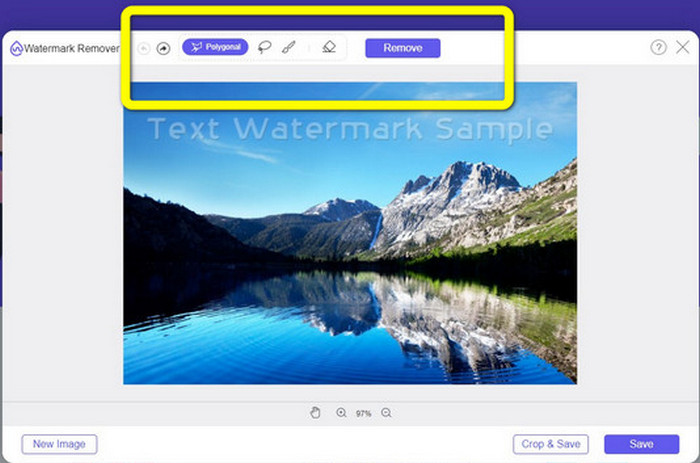
Pasul 3: Folosind instrumentul Brush, Lasso sau din nou instrumentul Brush, evidențiază watermark-urile din fotografie.
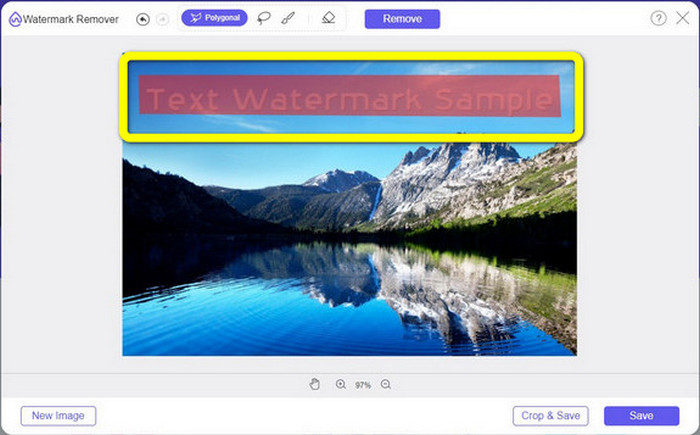
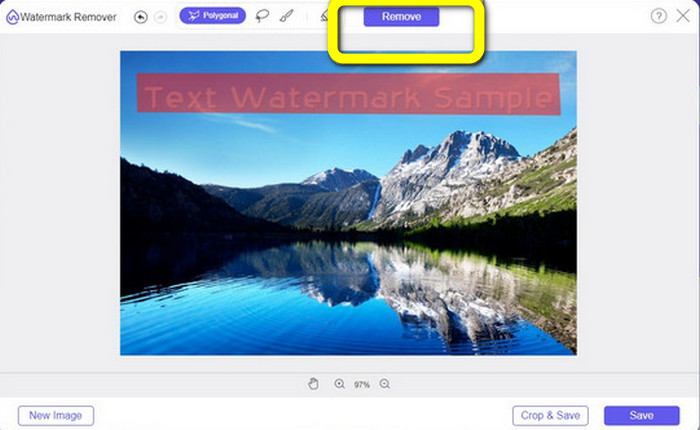
Pasul 4: După ce ai terminat de evidențiat watermark-urile din fotografie, fă clic pe butonul Remove.
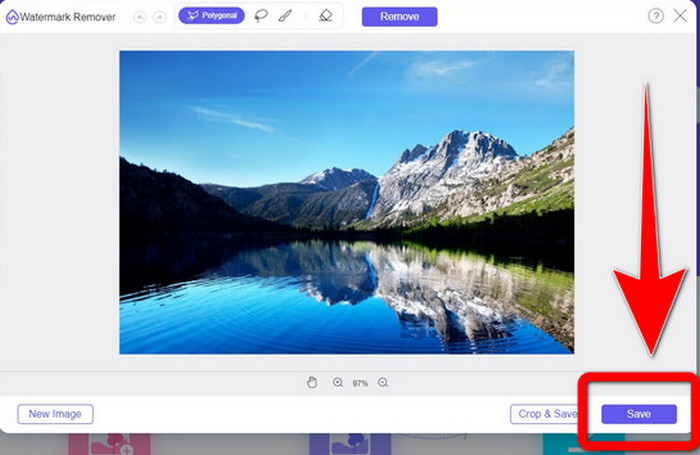
Pasul 5: Dacă watermark-ul a fost deja eliminat din fotografie, fă clic pe butonul Save pentru a descărca imaginea, iar acum te poți bucura să îți privești pozele fără să te mai enerveze watermark-urile.
2. Photoshop
Dacă ești în căutarea unei aplicații excelente și de încredere pe care să o descarci pe computer, atunci Adobe Photoshop este una dintre aplicațiile de încredere pe care le poți utiliza. Această parte îți va arăta cum poate Photoshop să elimine watermark-urile din fotografii. Aplicația este potrivită pentru fotografi, web designeri, designeri grafici, creatori de meme etc. Totuși, trebuie să achiziționezi Adobe Photoshop, deoarece are doar o perioadă de probă gratuită de 7 zile. De asemenea, Photoshop nu este potrivit pentru procesarea în lot a fotografiilor și are o curbă de învățare complicată. Dacă vrei să cunoști cea mai simplă modalitate de a elimina watermark-urile de pe imagini, urmează pașii simpli de mai jos.
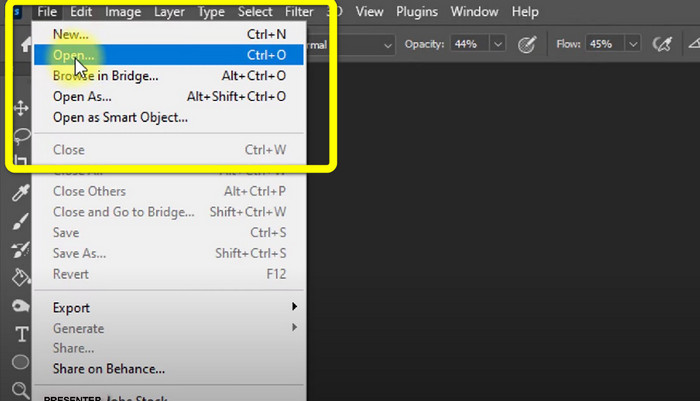
Pasul 1: Deschide Adobe Photoshop. Selectează File > Open și adaugă fotografia cu watermark-uri.
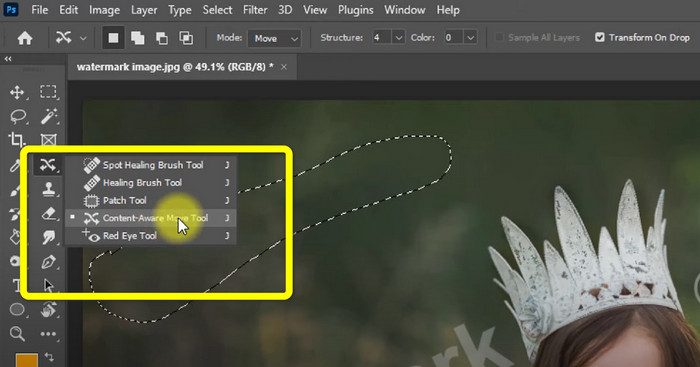
Pasul 2: Fă clic pe Content-Aware Move Tool din bara de instrumente de editare.
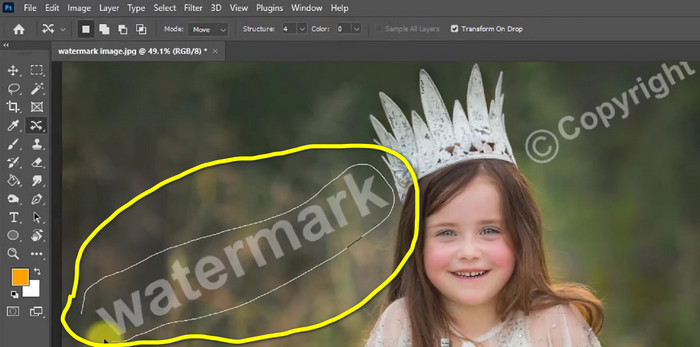
Pasul 3: După ce ai făcut clic pe Content-Aware Move Tool, selectează zona cu watermark din fotografie și apasă tasta Delete de pe tastatură.
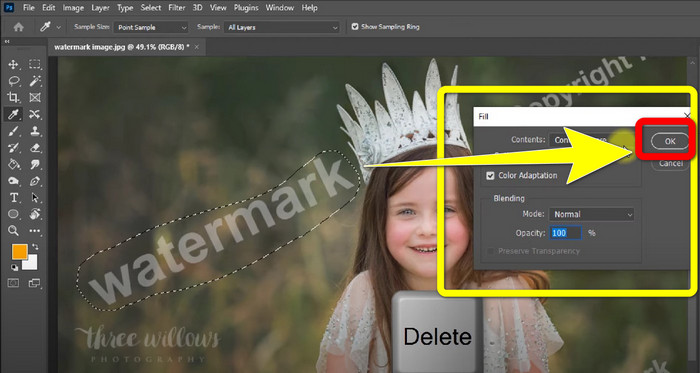
Pasul 4: După ce ai apăsat Delete, va apărea o mini interfață; fă clic pe OK.
3. GIMP
O altă aplicație potrivită pentru eliminarea watermark-urilor din fotografii este GIMP. Este un editor grafic raster open‑source folosit pentru manipularea și editarea imaginilor, ceea ce îl face un instrument util pentru editare foto. În plus, suportă numeroase formate de fișiere, cum ar fi JPG, PNG, TIFF, GIF și altele. Totuși, uneori aplicația se poate închide brusc și este dificil să organizezi straturile (layers). Dacă vrei să afli cum să elimini watermark-urile din fotografii folosind GIMP, urmează pașii simpli de mai jos.
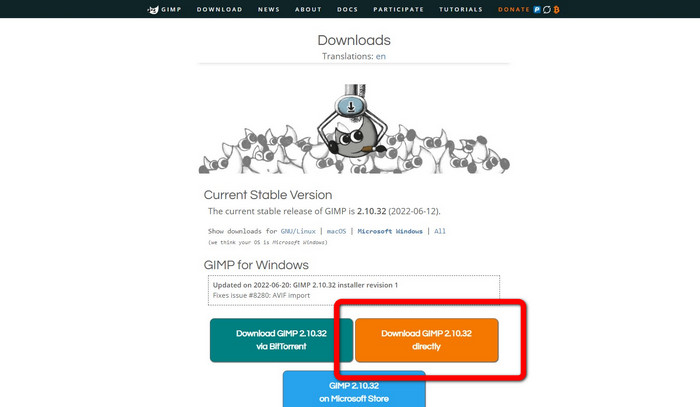
Pasul 1: Dacă ești pe site-ul GIMP, fă clic pe Download Directly pentru a descărca aplicația și urmează procesul de instalare.
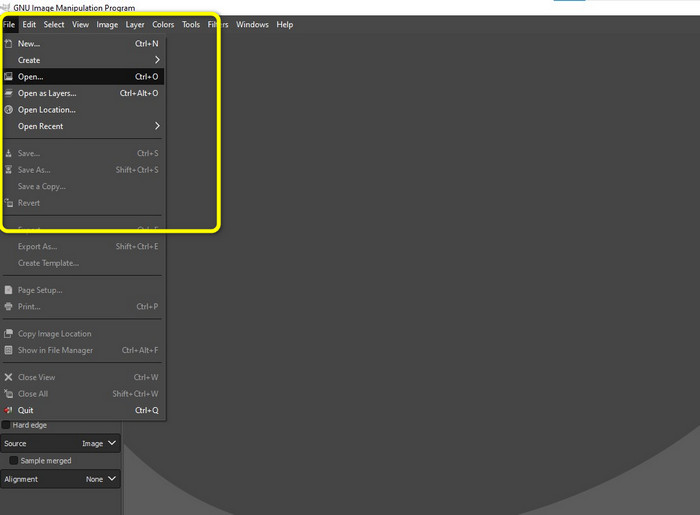
Pasul 2: Deschide aplicația și fă clic pe File > Open pentru a adăuga fotografia cu watermark.
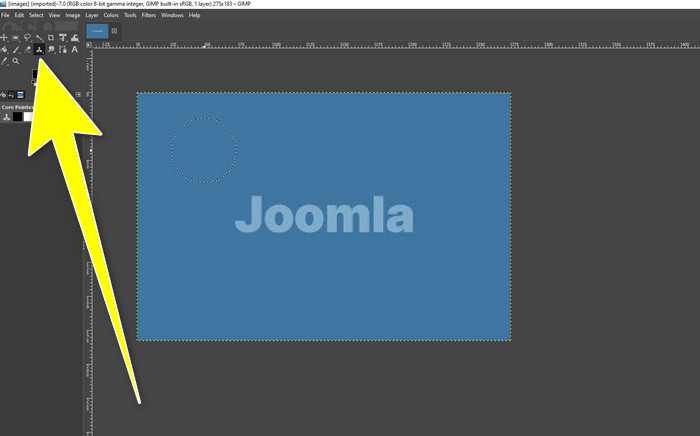
Pasul 3: Fă clic pe Clone tool și poziționează cursorul pe o zonă liberă. Apasă tasta Ctrl și fă clic pe zona liberă.
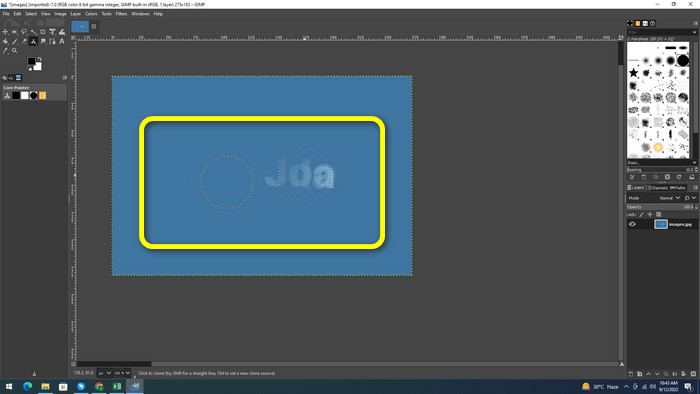
Pasul 4: Trage cursorul peste watermark-uri pentru a le elimina. Watermark-ul a dispărut. Acum poți salva fotografia.
4. Aiseesoft Free Watermark Remover Online
Dacă vrei cel mai bun instrument online pentru eliminarea watermark-urilor din fotografii, Aiseesoft Free Watermark Remover Online este pentru tine. Această aplicație te poate ajuta să elimini multiple watermark-uri, texte, ștampile de dată, logo-uri și altele din fotografii. În plus, este ușor de utilizat, fiind perfectă pentru începători. De asemenea, acceptă diverse formate de imagine, cum ar fi PNG, JPEG, BMP, JPG și altele. Totuși, această aplicație nu este 100% gratuită; trebuie să achiziționezi o licență pentru a te bucura de funcțiile avansate. Dacă vrei să elimini watermark-urile de pe imagini, urmează acești pași.
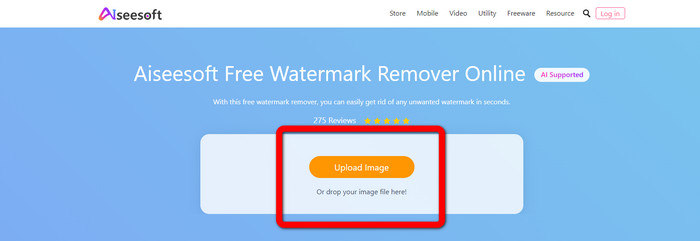
Pasul 1: Accesează site-ul Aiseesoft Free Watermark Remover Online. Apoi fă clic pe Upload Image pentru a adăuga fotografia cu watermark.
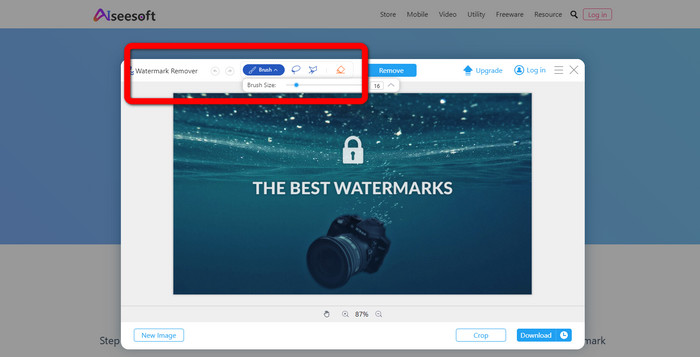
Pasul 2: După ce ai atașat fotografia, mergi la watermark remover tool. Acolo vei vedea instrumentele de eliminare, precum Brush, Polygonal și Lasso.
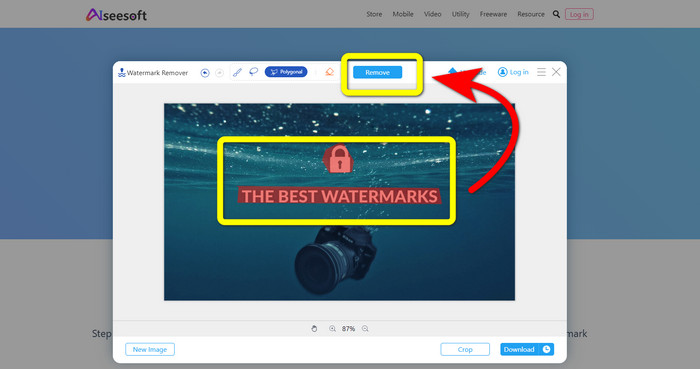
Pasul 3: Folosește aceste instrumente și evidențiază watermark-urile din fotografie, apoi fă clic pe Remove.
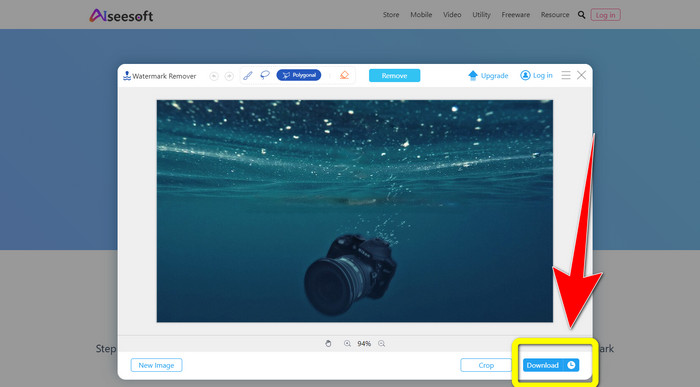
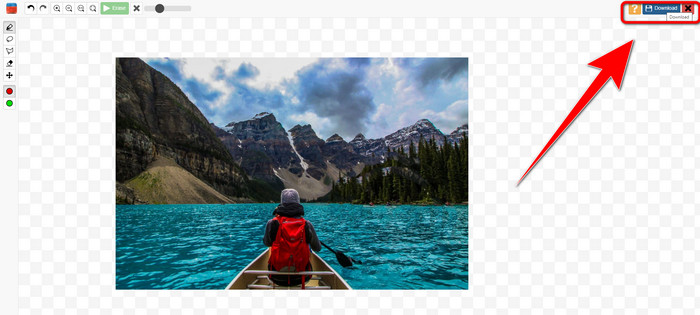
Pasul 4: Dacă ești deja mulțumit de rezultat, fă clic pe Download pentru a salva fotografia.
5. Pixlr
Pixlr este un alt instrument online pe care îl poți folosi pentru a elimina watermark-urile din fotografii. Este ușor de utilizat și potrivit pentru începători. Suportă diferite formate de imagine, precum PSD, PNG, JPEG, WEBP și PXZ. Mai mult, poți folosi această aplicație pe diverse dispozitive, cum ar fi iPhone, Android, desktop și laptop. Totuși, nu are la fel de multe opțiuni ca alte aplicații și oferă efecte limitate. Dacă vrei să înveți cum să ștergi watermark-ul dintr-o poză, urmează pașii de mai jos.
Pasul 1: Accesează site-ul Pixlr. Fă clic pe Open Image pentru a adăuga imaginea cu watermark.

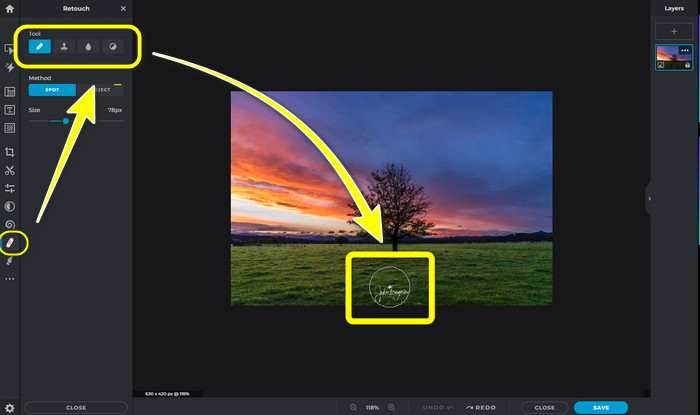
Pasul 2: După ce ai adăugat fotografia, mergi la instrumentul retouch > heal.
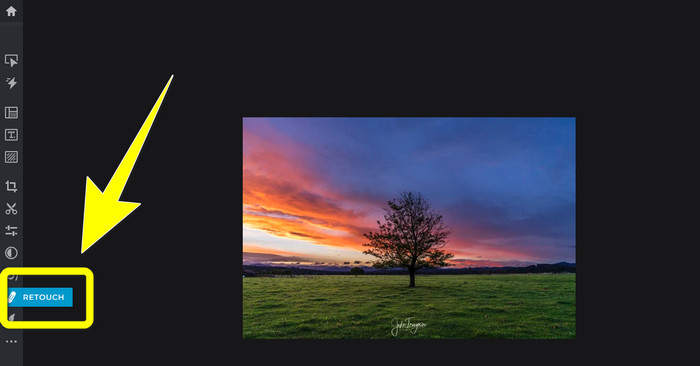
Pasul 3: După ce ai făcut clic pe instrumentul retouch > heal, fă clic pe watermark-ul din imagine.
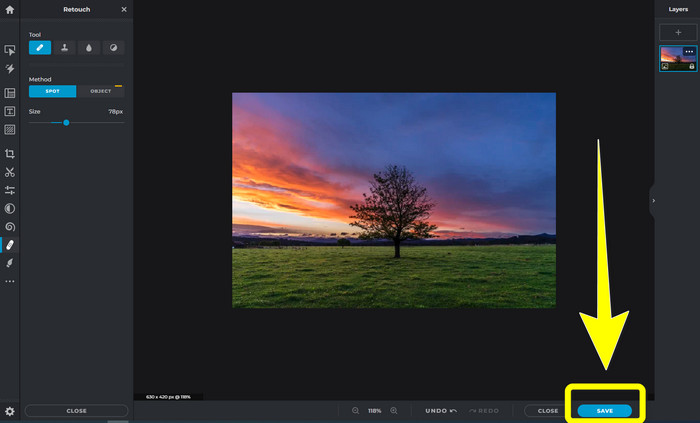
Pasul 4: Dacă watermark-ul a dispărut, fă clic pe butonul Save.
6. Inpaint
Inpaint este o altă aplicație online pe care o poți folosi dacă vrei să elimini watermark-urile din imagini. Nu doar watermark-uri, ci și logo-uri și texte. De asemenea, acceptă formate de imagine precum JPG, PNG și WEBP. Totuși, dacă vrei imagini de înaltă calitate, trebuie să achiziționezi aplicația. Dacă vrei să elimini watermark-urile din fotografii, urmează pașii simpli de mai jos.
Pasul 1: Accesează site-ul Inpaint. Fă clic pe Upload Image și încarcă imaginea cu watermark.

Pasul 2: După ce ai încărcat imaginea, selectează watermark remover tools, cum ar fi Marker, Polygonal, Lasso și Eraser tool, și evidențiază watermark-urile din fotografie.
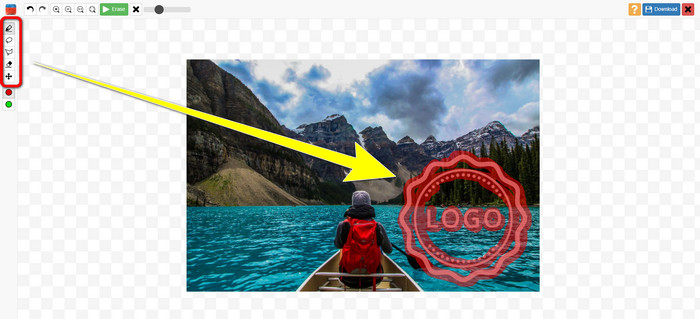
Pasul 3: După ce ai terminat de evidențiat watermark-urile, fă clic pe Erase.

Pasul 4: Dacă watermark-ul a dispărut, fă clic pe butonul Download pentru a salva imaginea.
7. Photo Stamp Remover
Photo Stamp Remover este o aplicație pe care o puteți utiliza cu computerul. Îl poți descărca gratuit. Această aplicație poate elimina rapid obiectele inutile de pe imagini, cum ar fi sigle, text, filigrane și date. Dar, nu funcționează bine pe imaginile cu fundaluri complicate. Mai mult, acest software poate restabili culorile și textura fotografiei originale pentru a acoperi filigranele, astfel încât să arate autentic. Urmați acești pași pentru a elimina filigranele de pe imagini.
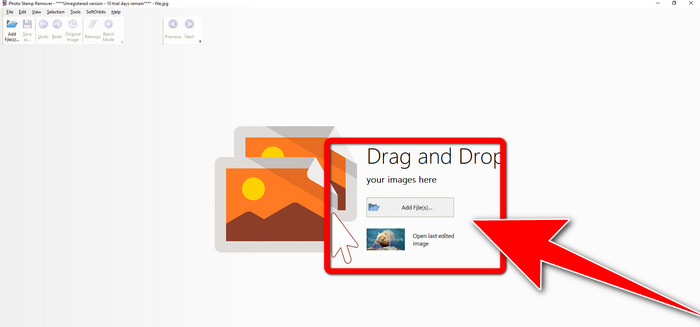
Pasul 1: Fă clic pe butonul Download pentru a descărca Photo Stamp Remover pe Windows și urmează procesul de instalare.

Pasul 2: Lansează aplicația și fă clic pe Add File pentru a adăuga fotografia cu watermark-uri.
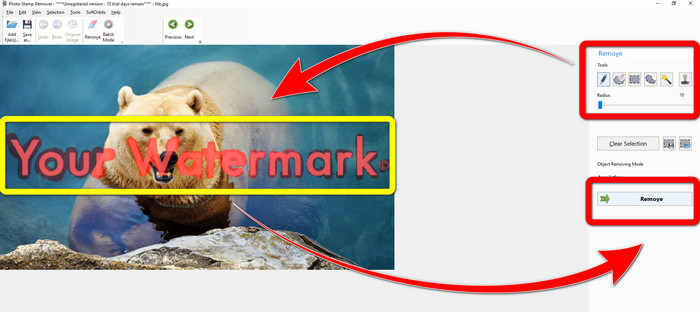
Pasul 3: Mergi la Remover tools și fă clic pe Selection Marker. Evidențiază watermark-urile și fă clic pe Remove.
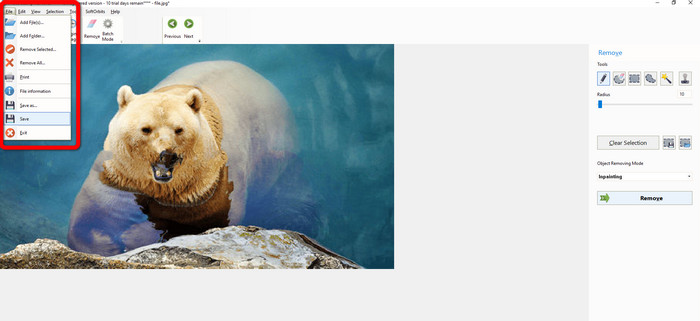
Pasul 4: După ce ai eliminat watermark-urile din imagine, fă clic pe File > Save. Ai terminat de eliminat watermark-urile din imagine.
Partea 2. Cum să eliminați filigranul din fotografie pe iPhone și Android
1. Eraser video
Dacă vrei să știi ce aplicație te poate ajuta să înveți cum să elimini watermark-urile dintr-o fotografie pe Android, Video Eraser este pentru tine. Această aplicație poate elimina obiecte nedorite din fotografii, cum ar fi text, watermark-uri etc. În plus, cu această aplicație poți elimina și watermark-urile din videoclipuri. Totuși, zona în care a fost șters watermark-ul poate deveni pătată sau neomogenă. Dacă vrei să înveți cum să folosești Video Eraser, urmează pașii de mai jos.
Pasul 1: Instalează Video Eraser pe Android. Deschide aplicația după ce instalarea s-a încheiat.

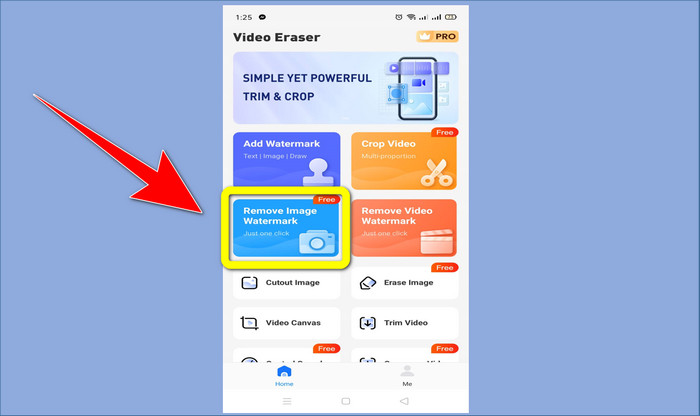
Pasul 2: Fă clic pe Remove Image Watermark pentru a adăuga fotografia cu watermark-uri.
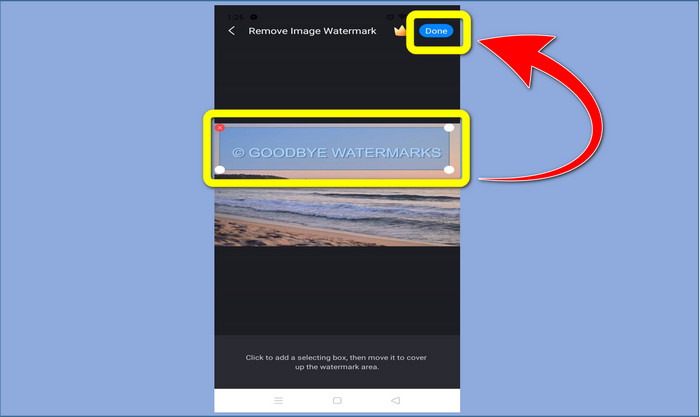
Pasul 3: Evidențiază watermark-ul din fotografie și fă clic pe Done.
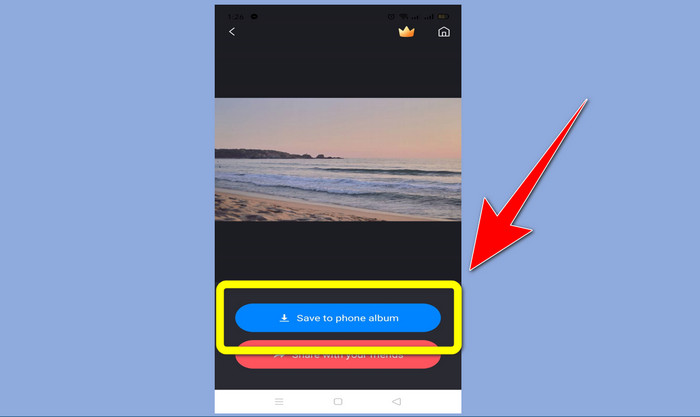
Pasul 4: După ce ai făcut clic pe Done, watermark-ul va dispărea. Fă clic pe Save to Photo Album pentru a salva fotografia.
2. Snapseed
Snapseed este un editor excelent pe care îl poți folosi mai ales dacă vrei să înveți cum să elimini un watermark dintr-o fotografie pe iPhone. Această aplicație este foarte bună pentru a elimina watermark-urile din imagini. În plus, are diverse instrumente de editare pe care le poți folosi, precum decupare (crop), rotire și altele. Totuși, aplicația nu este ideală pentru începători, mai ales în ceea ce privește editarea avansată și, deși este prietenoasă cu utilizatorul, are un mic proces de învățare. Urmează pașii de mai jos pentru a elimina watermark-urile din fotografii folosind această aplicație.
Pasul 1: Instalează Snapseed pe iPhone. Când instalarea s-a încheiat, deschide aplicația.
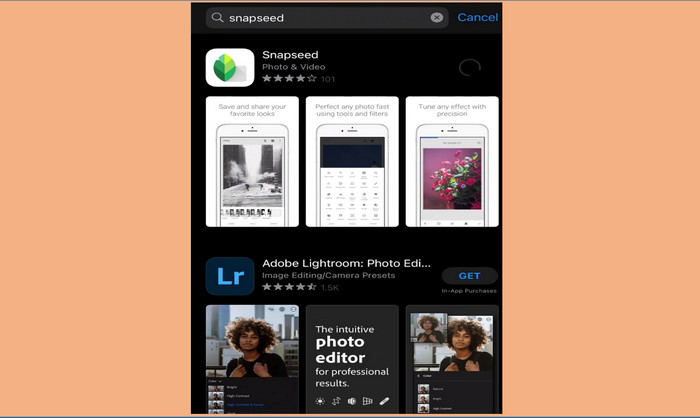
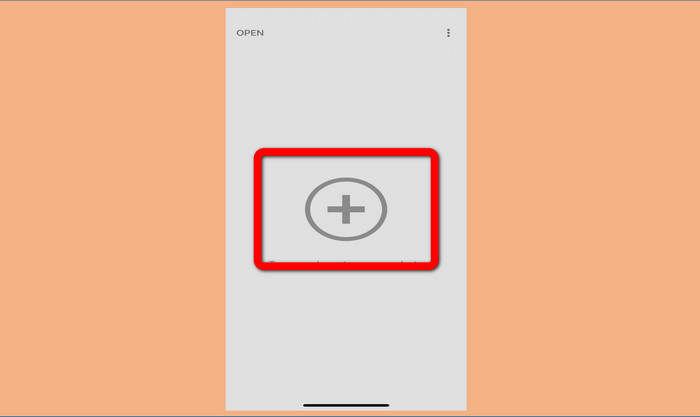
Pasul 2: Fă clic pe butonul cu semnul Plus pentru a adăuga fotografia cu watermark-uri.
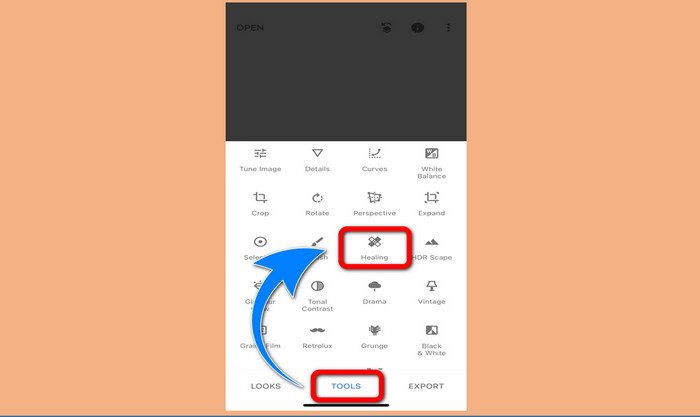
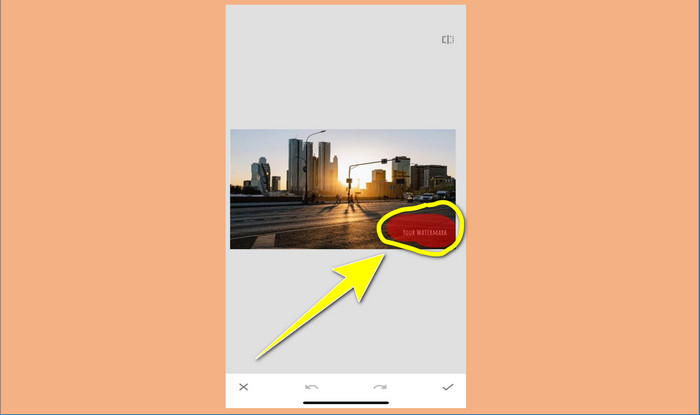
Pasul 3: După ce ai adăugat fotografia, selectează Tools > Healing și evidențiază watermark-urile din imagine. După ce le evidențiezi, acestea vor dispărea automat.
Pasul 4: După ce evidențiezi watermark-urile, acestea vor dispărea automat.
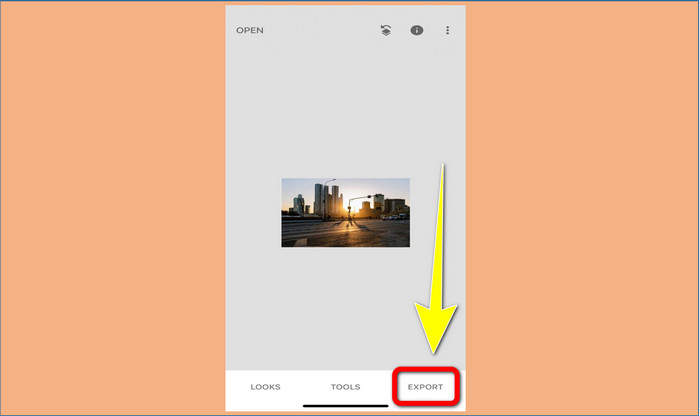
Pasul 5: Când ai terminat de eliminat watermark-urile din fotografie, fă clic pe Check și apoi pe Export pentru a salva imaginea pe iPhone.
Legat de:
Cel mai rapid truc pentru a elimina filigranul Adobe Stock dintr-un videoclip [ Tutorial ]
5 moduri de a elimina un watermark dintr-un videoclip într-un mod profesionist
Partea 3. Întrebări frecvente despre eliminarea filigranelor din fotografii
Există un dispozitiv de îndepărtare a filigranelor pe care îl pot folosi gratuit, în special pentru Mac?
Da, există! Poți folosi multe unelte de eliminare a watermark-urilor pe Mac, precum FVC Free Watermark Remover. Este o aplicație online pentru eliminarea watermark-urilor pe Mac.
Există vreo modalitate de a elimina filigranele dintr-un videoclip?
Categoric! Este un lucru ușor de făcut. Unele dintre aplicațiile de eliminare a filigranelor pe care le puteți utiliza acum pot elimina filigranele de pe fotografii și videoclipuri. Tot ce trebuie să faceți este să căutați dispozitivul de eliminare a filigranului în caseta de căutare și să vedeți pagina cu rezultate.
Este ușor să eliminați filigranele?
Da, desigur! Dacă aveți deja aplicația pe care o veți folosi, trebuie să căutați instrumente de îndepărtare, cum ar fi perie, marker, laso și instrumente poligonale. Apoi, evidențiați filigranele și gata.
Concluzie
După cum s-a arătat mai sus, acest articol oferă metode remarcabile de a elimina watermark-urile din fotografii. Însă, dacă vrei un instrument excelent pe care să îl folosești pentru a elimina watermark-urile, FVC Free Watermark Remover este cea mai bună alegere pentru tine.
-
 Cum să scapi de filigranul Power Director gratuit [Complet]
 Cum să scapi de filigranul Power Director gratuit? Cele mai bune instrumente pentru a elimina filigranul sunt aici, așa că învață-le citind aceasta.
-
 Cele mai bune tehnici pentru a elimina filigranul versiunii de încercare Canvasjs pe care trebuie să le cunoașteți
 Cel mai bun mod de a elimina filigranul Canvasjs va trebui să utilizați un instrument. Dacă nu ați ales un instrument, îl puteți alege în acest articol.
-
 Cum să eliminați filigranul Animaker fără costuri [Moduri dovedite]
 Cum să eliminați filigranul Animaker? Cu cele mai bune instrumente pe care le includem în acest blog, le puteți folosi pentru a scăpa de filigran.
