


 Video Converter Ultimate
 Screen Recorder
 Reparație video
 Descărcare sigură
Convertiți incredibil de MOV în DivX gratuit folosind cele mai bune convertoare
În prezent au apărut numeroase formate de fișiere și este dificil să alegi ce tip de fișier vei folosi pe platforma ta. Fiecare fișier are funcții, codecuri și dimensiuni diferite. Acest articol se va concentra pe cunoașterea acestor două formate și pe modul în care poți converti fișierul tău MOV într-un fișier în format DivX. Așadar, citește acest articol până la final pentru a converti MOV în DivX gratuit, pe Mac și Windows.

Partea 1. De ce să convertiți MOV în DivX
Fișierul MOV este un format de fișier media salvat în QuickTime File Format (QTFF). Este un format utilizat în mod obișnuit, deoarece poate stoca filme, programe TV și clipuri video. În plus, Apple a dezvoltat acest format de fișier, făcându-l redabil pe toate playerele media pe care le acceptă Mac. Prin urmare, dacă doriți să faceți fișierul MOV redabil pe alte playere media Windows OS, trebuie să convertiți MOV în formatul de fișier DivX.
Partea 2. Cum să convertiți MOV în DivX pe Mac folosind Ultimate Converter
Unul dintre cele mai folosite și probabil cel mai bun convertoar offline pe care îl vei găsi pe piață este FVC Video Converter Ultimate. Acest convertor are funcții fantastice pe care le poți folosi, precum adăugarea de efecte la fișier, decupare și rotire, și include un creator 3D. În plus, acest convertor acceptă un număr impresionant de formate de fișiere, precum MOV, DivX, XviD, AVI, MP4, MKV, FLV, WMV și peste 1000 de alte formate. Deși acest convertor poate transforma fișiere MOV în DivX cu un rezultat de nivel profesionist, are o interfață ușor de utilizat, ceea ce îl face un instrument prietenos pentru utilizatori. Citește descrierile de mai jos pentru a afla mai multe despre FVC Video Converter Ultimate.
Funcții:
◆ Poate converti fișiere cu un proces de conversie cu viteza fulgerului.
◆ Suportă peste 1000 de formate de fișiere, inclusiv MOV, DivX, XviD, MP4, AVI, WebM, M4V și multe altele.
◆ Oferă conversie în lot pentru a îmbina mai multe formate de fișiere într-unul singur.
◆ Are funcții avansate precum editarea, îmbunătățirea și comprimarea fișierului.
◆ Descărcabil pe toate platformele cross-media, inclusiv Mac și Windows.
Iată pașii simpli pentru a converti MOV în DivX folosind FVC Video Converter Ultimate.
Pasul 1. Descarcă FVC Video Converter Ultimate făcând clic pe butonul Download de mai jos pentru Mac. Apoi urmează procesul de instalare.
Descărcare gratuită pentru Windows 7 sau o versiune ulterioară Descărcare securizată
Descărcare gratuită pentru MacOS 10.7 sau o versiune ulterioară Descărcare securizată
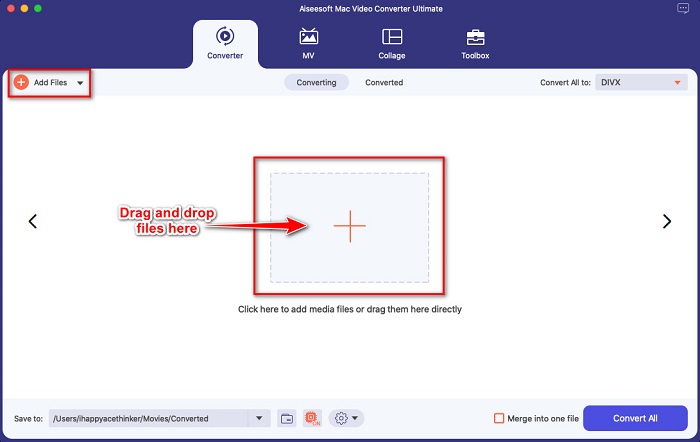
Pasul 2. Apoi, în interfața principală a software‑ului, fă clic pe butonul Add Files sau trage și plasează fișierul tău MOV pe butonul cu semnul +.
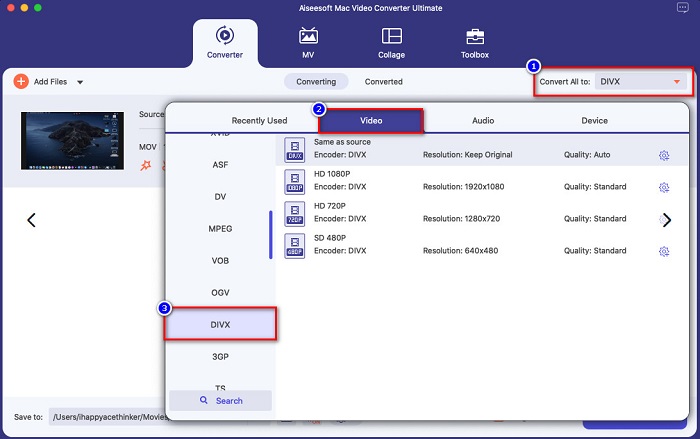
Pasul 3. Apoi alege formatul de ieșire făcând clic pe butonul Convert All to, apoi selectează formatul de fișier DivX.
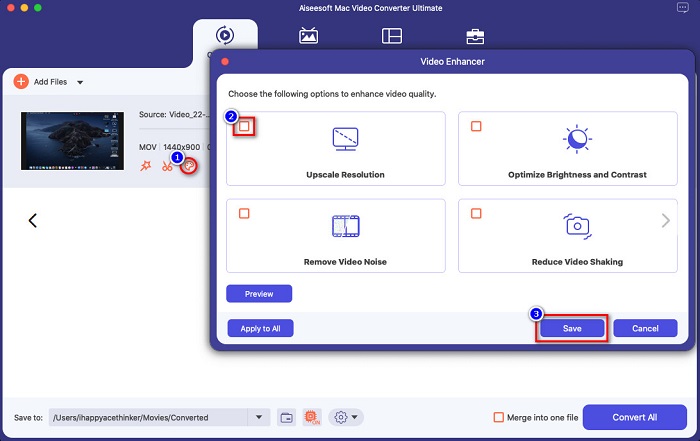
Opțional. Dacă vrei să îmbunătățești fișierul video, fă clic pe pictograma tip pensulă. Apoi bifează căsuța fiecărei opțiuni pe care vrei să o îmbunătățești în fișier. Fă clic pe Save pentru a aplica. Dar dacă nu dorești acest lucru, treci la următoarea parte.
Pasul 4. În cele din urmă, fă clic pe butonul Convert All pentru a începe transcodarea fișierului MOV în format DivX.
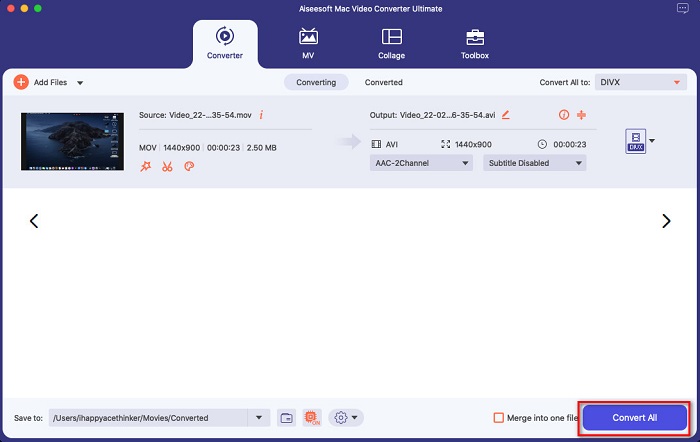
Așteptați doar câteva secunde și gata! Puteți converti fișierul MOV într-un fișier DivX la fel de simplu ca ABC.
Partea 3. 2 Opțiuni pentru a converti MOV în DivX Online
Dacă nu ar trebui să descărcați nimic atunci când vă convertiți fișierul MOV în DivX, avem două opțiuni pe care să le utilizați. Am încercat convertoare celebre care pot fi găsite pe web și am ales cele mai bune două dintre ele.
Opțiunea 1. Convertio
Probabil vei vedea acest convertor în rezultatele paginii de căutare atunci când cauți convertoare MOV în DivX. Convertio este un convertor online care îți permite să convertești MOV în DivX gratuit, direct online. Acceptă multe formate de fișiere, precum MOV, DivX, MPG, WebM, M4V și altele. În plus, are o interfață software ușor de utilizat, ceea ce îl face un instrument prietenos pentru începători. Totuși, deoarece depinde de conexiunea la internet, este posibil să ai parte de un proces de conversie lent.
Pasul 1. Caută Convertio în browserul tău. În interfața principală a instrumentului, fă clic pe butonul Choose Files. Vor apărea fișierele de pe computerul tău, apoi selectează fișierul MOV.

Pasul 2. Apoi, fă clic pe butonul drop‑down pentru a selecta formatul de ieșire dorit. Fă clic pe panoul Video, apoi fă clic pe formatul de fișier DivX.

Pasul 3. Fă clic pe butonul Convert pentru a începe procesul de conversie, ca ultim pas.

Opțiunea 2. Evano
Probabil ai văzut acest convertor online dacă ești utilizator de Mac. Evano este un convertor online care îți permite să convertești MOV în DivX. Acest convertor online are o interfață simplă și acceptă diverse formate audio și video. În plus, nu conține reclame, spre deosebire de alte convertoare online.
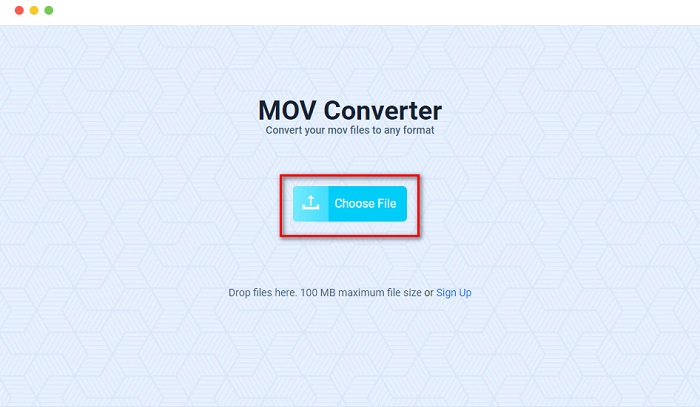
Pasul 1. În browserul tău de încredere, caută convertorul online Evano. Iar în interfața principală a software‑ului, fă clic pe butonul Choos File, apoi vor apărea folderele computerului, unde vei selecta folderul MOV pentru a‑l încărca.
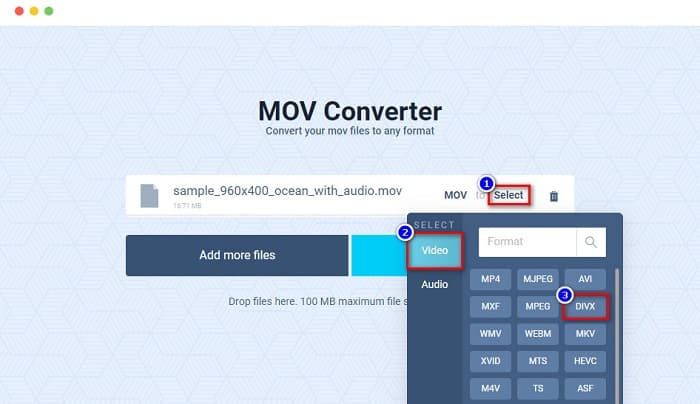
Pasul 2. După încărcarea fișierului, fă clic pe opțiunea Select pentru a alege formatul de ieșire dorit. Apoi fă clic pe formatul DivX.
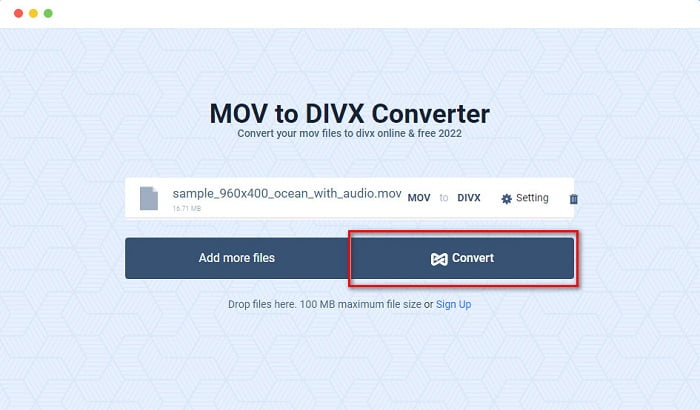
Pasul 3. Apoi fă clic pe butonul Convert pentru a converti MOV în DivX.
Partea 4. Cum să convertiți utilizând un convertor gratuit
O altă modalitate de a converti fișierul MOV într‑un fișier DivX este folosirea unui convertor freeware. Unul dintre cele mai utilizate convertoare freeware este Prism Video File Converter. Acest convertor este gratuit la descărcare și este disponibil pe Windows și Mac. Este, de asemenea, sigur de utilizat, așa că mulți oameni își convertesc fișierele cu ajutorul acestei aplicații. Totuși, alte persoane întâmpină dificultăți în folosirea acestui convertor deoarece interfața sa este oarecum greu de înțeles. Cu toate acestea, rămâne o modalitate excelentă de a converti MOV în DivX gratuit.
Pasul 1. Descarcă Prism Video File Converter pe dispozitivul tău Mac. Urmează procesul de instalare, apoi deschide aplicația. Fă clic pe butonul Add File(s) pentru a încărca fișierul MOV în interfața principală a software‑ului.
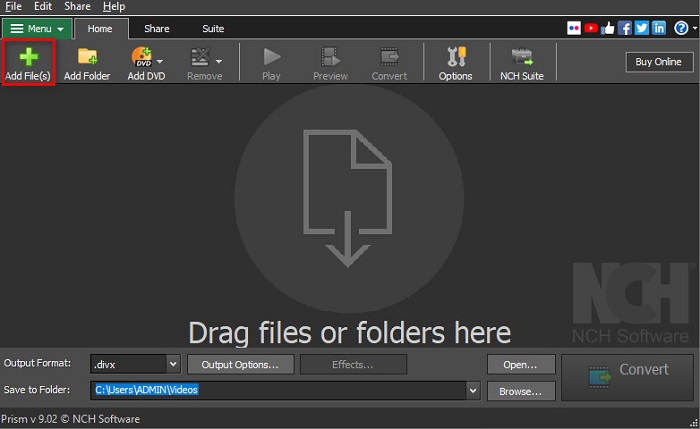
Pasul 2. Apoi, în butonul drop‑down de lângă Output Format, fă clic pe formatul de fișier DivX.
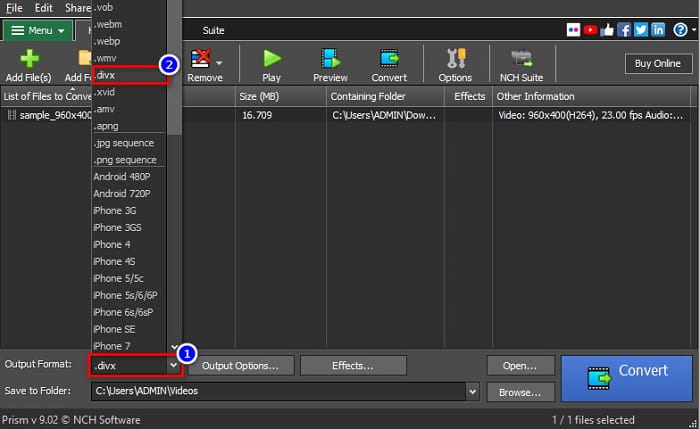
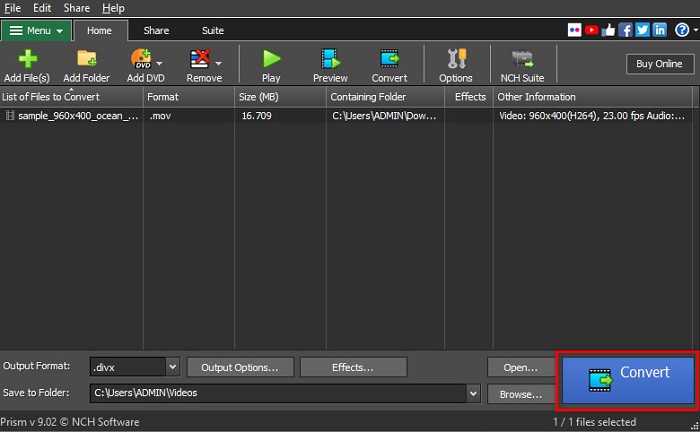
Pasul 3. Pentru a finaliza, fă clic pe butonul Convert situat în colțul din dreapta jos al interfeței software‑ului.
Partea 5. Comparație între MOV și DivX
| MOV | VS | DivX |
| Acceptat numai de dispozitivele Apple | Dispozitiv acceptat | Suportat de aproape toate dispozitivele, inclusiv Mac și Windows |
| Necomprimat | Comprimat/Necomprimat | Comprimat |
| Conține fișier de dimensiune mare | Mărime fișier | Are dimensiune mică a fișierului |
| MOV este cea mai bună utilizare pentru editarea video | Cea mai bună utilizare pentru | DivX este cea mai bună utilizare pentru a comprima dimensiunea fișierului până la a douăsprezecea parte din dimensiunea originală a fișierului |
| Video | Codec | Video |
Partea 6. Întrebări frecvente despre conversia MOV în DivX
Puteți reda MOV pe Windows Media Player?
Din păcate, nu. Windows Media Player nu acceptă fișiere în format MOV. Dar, dacă vrei să redai un fișier MOV în Windows Media Player, poți converti MOV în format WMV. Pentru a afla mai multe despre conversia MOV în WMV, fă clic pe acest link.
Convertirea MOV în DivX afectează dimensiunea fișierului?
Da. Dimensiunea fișierului va deveni mai mică, deoarece fișierul DivX poate comprima până la a douăsprezecea parte din dimensiunea originală.
QuickTime acceptă fișiere DivX?
Nu. QuickTime este un player media integrat pentru Mac care nu acceptă fișiere în format DivX. Totuși, poți converti fișierele DivX în MKV, format acceptat de QuickTime.
Concluzie
Cam asta e! Nu mai ai nevoie să cauți alte soluții pentru a converti MOV în DivX, pentru că aici ai tot ce îți trebuie. Convertoarele offline, online și freeware prezentate mai sus sunt cele mai bune modalități de a transforma fișierul tău MOV în DivX. Depinde de tine ce convertor vei folosi, însă dacă vrei să folosești convertorul cu cele mai bune performanțe, descarcă acum FVC Video Converter Ultimate.
-
 2 moduri simple de a converti fișiere MOV în FLV pe Windows / Mac
 Cum se convertește MOV în FLV gratuit? Iată cele mai bune convertoare video de pe desktop și online pentru a vă converti fișierul MOV în FLV în câteva secunde fără a plăti un ban.
-
 MOV în GIF - Cum să convertiți MOV în GIF animat pe Mac, PC și online gratuit
 Ce este un GIF? Cum se convertesc videoclipurile în GIF? Cum să schimbați MOV-ul în GIF animat online? Această postare spune 3 moduri de a converti MOV în GIF online, pe Mac / PC.
-
 4 moduri eficiente de a converti MOV în AVI pe PC și Mac [2021]
 Vrei să știi care este cel mai bun convertor MOV în AVI de pe web? Și de ce FVC Ultimate Video Converter ar putea fi potrivit pentru tine.
