


 Video Converter Ultimate
 Screen Recorder
 Reparație video
 Descărcare sigură
Conversie M4B și MP3 fără întreruperi: Bucurați-vă de cărți audio oriunde, oricând
Descoperă poarta către versatilitatea cărților audio cu remarcabile convertoare MP3 în M4B. Dacă îți dorești o modalitate lipsită de complicații de a-ți extinde biblioteca de cărți audio, convertoarele prezentate aici îți permit să convertești fără efort fișiere MP3 în format M4B sau invers. Perfect compatibile cu platformele și dispozitivele populare pentru cărți audio, astfel încât să te poți bucura de poveștile tale preferate oriunde te-ai afla. Dezlănțuie adevăratul potențial al colecției tale de cărți audio cu convertoare M4B în MP3 ușor de utilizat, concepute pentru a-ți simplifica experiența de ascultare. Începe să explorezi posibilitățile nelimitate încă de astăzi și pornește într-o tranziție lină către un univers al cărților audio fără granițe.

Partea 1. M4B vs. MP3
Înainte de a ne aprofunda în procesul de conversie, iată un tabel de comparație care evidențiază diferențele majore dintre formatele M4B și MP3:
| M4B | MP3 | |
| DRM | Poate fi protejat prin DRM, limitând utilizarea pe anumite dispozitive | Poate fi fără DRM sau protejat prin DRM, în funcție de fișier |
| Metadate | Acceptă metadate extinse pentru organizarea cărților audio | Suport limitat pentru metadate pentru informațiile de bază ale piesei |
| Mărime fișier | În general, dimensiunea fișierului este mai mare datorită caracteristicilor îmbunătățite | Dimensiune mai mică a fișierului datorită compresiei mai mari |
| Compatibilitate | Folosit în mod obișnuit pe dispozitivele iTunes și Apple | Compatibil universal cu o gamă largă de dispozitive |
| Calitate | Oferă sunet de înaltă calitate cu compresie eficientă | Calitate variabilă în funcție de bitrate |
| Comprimare | Utilizează compresie avansată AAC (Advanced Audio Coding). | Utilizează algoritmul de compresie cu pierderi |
Partea 2. Convertiți MP3 în M4B sau MP3 în M4B pe Windows și Mac
1. Video Converter Ultimate
Când vine vorba de conversia fișierelor video și muzicale, Video Converter Ultimate este standardul de aur. Acesta oferă suport pentru o gamă largă de formate de fișiere video și audio pentru conversie, inclusiv M4B, MP3, AIFF, OGG, AAC și altele. Poți, de asemenea, să schimbi formatul în funcție de dispozitivul pe care îl folosești. Software-ul va selecta automat cele mai bune setări și format pentru gadgeturile tale. În doar câteva secunde, fișierul tău poate fi convertit din MP3 în M4B sau invers. Acest convertor permite, de asemenea, conversia în lot, ceea ce este foarte util când ai de-a face cu un număr mare de fișiere sau când vrei să convertești M4B în MP3 cu capitole. În continuare, găsești un ghid simplu care să te ajute să folosești acest program.
Pasul 1. Obține software‑ul
Pentru început, descarcă programul de instalare alegând opțiunea Free Download. Apoi instalează aplicația pe computer și pornește-o.
Descărcare gratuităPentru Windows 7 sau versiuni mai recenteDescărcare sigură
Descărcare gratuităPentru MacOS 10.7 sau versiuni ulterioareDescărcare sigură
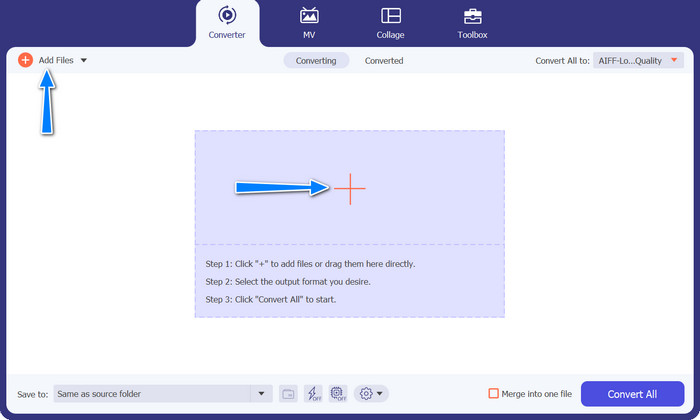
Pasul 2. Încarcă fișierul MP3 sau M4B
Pentru a adăuga fișiere audio, apasă butonul cu semnul Plus din interfața principală sau selectează butonul Add Files. După aceea, miniatura audio ar trebui să fie afișată.
Pasul 3. Selectează un format de ieșire
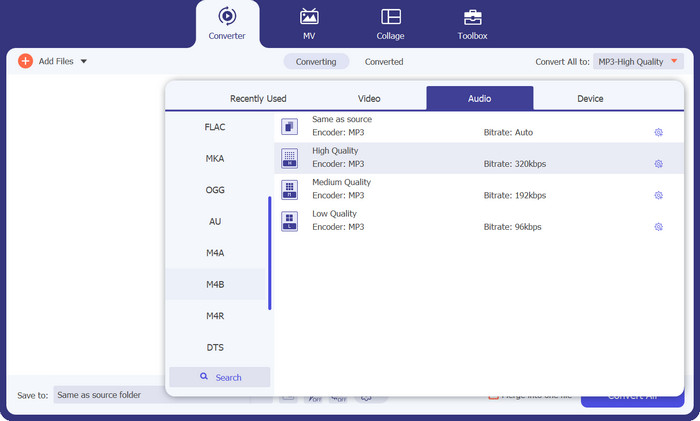
Apoi mergi la fila Profile și navighează la fila Audio. Găsește formatul M4B sau MP3 în meniul din stânga.
Pasul 4. Pornește procesul de conversie
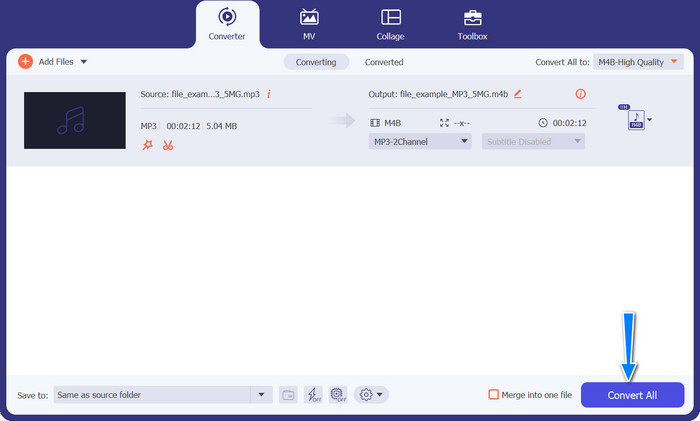
Acum că totul este setat, poți schimba M4B în MP3 și invers. Apasă butonul Convert All din colțul din dreapta de jos pentru a inițializa procesul de conversie. Apoi, procesul ar trebui să înceapă imediat.
Pro
- Acces offline.
- Capacitate de conversie în lot.
- Personalizare și control.
Contra
- Instrumentele bogate în funcții pot avea un preț.
2. Convertor MP3 gratuit online
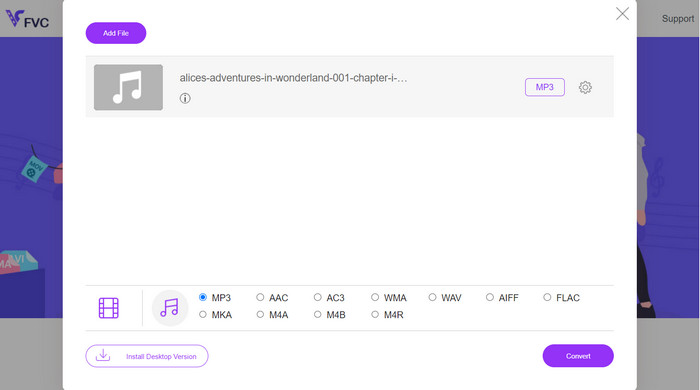
Vă recomandăm să utilizați Free MP3 Converter Online ca un instrument eficient de conversie M4B în MP3. Site-ul web nu impune taxe și nu afișează reclame pe pagina sa web. Este posibilă conversia nelimitată a fișierelor audio și video. Înregistrarea este inutilă. Acesta este cel mai eficient convertor online. Următoarele instrucțiuni oferă îndrumări pentru utilizarea instrumentului pentru a converti M4B în MP3 gratuit.
Pasul 1. Pentru început, tot ce trebuie să faci este să mergi pe site-ul principal al programului. Poți accesa site-ul cu orice browser dorești.
Pasul 2. Dă clic pe butonul Add Files to Convert din partea de sus a paginii pentru a începe încărcarea fișierelor audio. Lansatorul trebuie instalat mai întâi, dacă nu este deja.
Pasul 3. În al treilea rând, decide ce tip de fișier vrei să exporți. Sub Audio Format, selectează butonul radio AIFF. Ultimul pas este să dai clic pe butonul Convert pentru a începe conversia.
Pro
- Acceptă diferite formate de fișiere.
- Platforma independenta.
Contra
- Program dependent de internet.
- Riscuri de securitate și confidențialitate.
3. iTunes
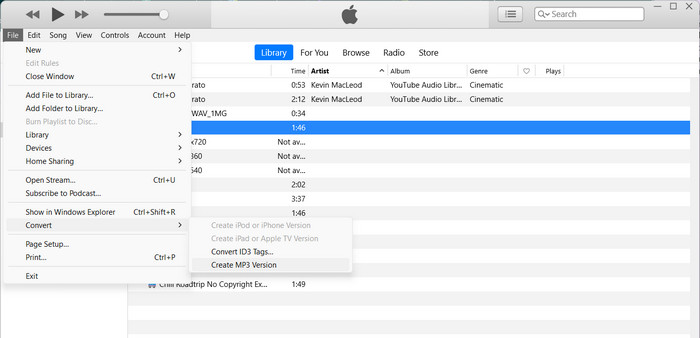
iTunes de la Apple este un popular player și organizator de fișiere audio care acceptă multe formate digitale diferite. Dacă dețineți un Mac, puteți utiliza iTunes pentru a vă converti fișierele M4B în MP3. Mai jos sunt câțiva pași pentru a afla cum să convertiți M4B în MP3 în iTunes.
Pasul 1. Deschide iTunes pe computer. Apoi mergi la meniul Edit (Windows) sau iTunes (Mac) și selectează Preferences.
Pasul 2. În fereastra Preferences, accesează fila General, apoi dă clic pe butonul Import Settings.
Pasul 3. Va apărea o fereastră nouă. În meniul derulant Import Using, selectează MP3 Encoder. Poți ajusta și setările MP3 dând clic pe butonul Settings, dacă dorești. Când ai terminat, dă clic pe OK pentru a închide fereastra de setări.
Pasul 4. Acum mergi în biblioteca ta iTunes și găsește audiobook-ul M4B pe care vrei să-l convertești în MP3. Dacă nu se află deja în iTunes, îl poți adăuga mergând la File (Windows) sau iTunes (Mac) și selectând Add File to Library sau Add Folder to Library.
Pasul 5. Dă clic dreapta (sau Control-clic) pe el și alege Create MP3 Version. iTunes va începe conversia fișierului M4B în format MP3. Versiunea MP3 convertită va apărea alături de fișierul M4B original în biblioteca ta iTunes.
Partea 3. Convertiți MP3 în M4B sau MP3 în M4B pe iOS și Android
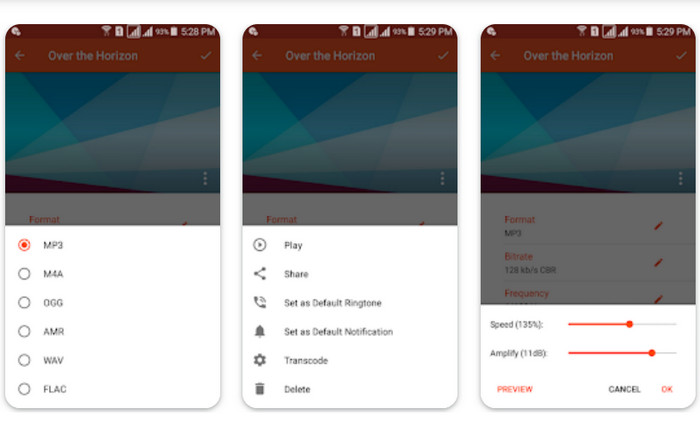
Audio Converter este o aplicație mobilă populară disponibilă atât pentru dispozitivele iOS, cât și pentru Android. Acceptă conversia M4B în MP3 împreună cu alte formate audio. Aplicația vă permite să importați fișierele M4B, să alegeți formatul MP3 ca rezultat și să reglați setările audio, cum ar fi rata de biți și rata de eșantionare. De asemenea, oferă opțiuni pentru tăierea și îmbinarea fișierelor audio. Urmați procedura de mai jos pentru a stăpâni cum să utilizați această aplicație de conversie M4B în MP3 pe dispozitivul dvs. mobil.
Pasul 1. Pornește Audio Converter. Programul are, de obicei, o interfață simplă pentru selectarea și conversia fișierelor audio.
Pasul 2. Alege fișierul M4B pe care vrei să-l convertești în MP3. Programul poate importa fișiere de pe dispozitiv, din stocarea în cloud sau din alte aplicații.
Pasul 3. După selectarea fișierului M4B, vei vedea opțiunile de format de ieșire. Selectează MP3 ca format de ieșire. Aplicația poate include mai multe opțiuni de personalizare. Aceste opțiuni pot include calitatea/bitrate-ul audio, rata de eșantionare, setările canalelor și chiar decuparea sau îmbinarea fișierelor audio. Dacă este necesar, personalizează setările.
Pasul 4. Pornește conversia după ce ai selectat formatul de ieșire și ai modificat opțiunile dorite. Programul convertește M4B în MP3.
Pro
- Funcții suplimentare cum ar fi decuparea, îmbinarea sau capabilitățile de editare de bază.
- Oferă confort mobil.
Contra
- Procesul de conversie poate dura ceva timp.
Lecturi suplimentare:
Top 5 cele mai bune programe M4B Recorder pentru PC și Mac [Gratuite & cu plată]
M4A vs MP3: Ce format de fișier audio ți se potrivește?
Partea 4. Întrebări frecvente despre conversia M4B și MP3
Pot converti fișierele M4B în MP3 fără a pierde calitatea audio?
Convertirea dintr-un format cu pierderi precum M4B în MP3 va implica o oarecare pierdere a calității audio din cauza compresiei. Cu toate acestea, puteți controla calitatea ieșirii ajustând setările în timpul procesului de conversie.
Fișierele MP3 convertite vor păstra informații despre capitole din cărțile audio originale M4B?
Convertirea în MP3 poate duce la pierderea marcatorilor de capitole și a altor funcții avansate prezente în fișierele M4B. MP3 este conceput în primul rând pentru sunet cu o singură pistă.
Pot converti fișierele M4B protejate prin DRM în MP3?
Conversia fișierelor M4B protejate prin DRM în MP3 poate fi restricționată din cauza măsurilor de protecție a drepturilor de autor. Asigurați-vă că aveți drepturile și permisiunile necesare pentru orice proces de conversie.
Concluzie
Conversia fișierelor M4B în MP3 deschide o lume de posibilități atât pentru pasionații de cărți audio, cât și pentru ascultătorii ocazionali. Indiferent dacă alegi să folosești software de desktop sau aplicații mobile pentru conversie, există numeroase opțiuni disponibile care simplifică întregul proces.
-
 Cele mai bune instrumente pe care le puteți folosi pentru a converti în loturi MP3 în M4R
 Căutați un convertor care să vă transforme fișierul MP3 într-un ton de apel M4R pentru iPhone sau iPad pe lot? Citiți articolul pentru a descoperi unele dintre cele mai bune care există.
-
 Conversie MP3 în AAC: Cum să vă îmbunătățiți calitatea audio
 Convertiți AAC în MP3 și MP3 în AAC cu ușurință! Acest ghid de articol acoperă totul despre aceste formate audio populare, inclusiv dimensiunea fișierului, calitatea și compatibilitatea.
-
 FLAC vs. MP3: ce format de fișier audio domnește suprem
 Această postare va compara diferențele cheie dintre FLAC și MP3. Aceasta include calitatea sunetului, dimensiunea fișierului, compatibilitatea și multe altele.
