


 Video Converter Ultimate
 Screen Recorder
 Reparație video
 Descărcare sigură
Lista instrumentelor și platformelor disponibile pe web pentru înregistrator de voce / video 3GP
Un container în format standard ISO, cunoscut pentru dimensiunile sale reduse, foarte potrivit pentru transferul de date prin rețele 3G și similare. Unele dintre cele mai avansate înregistratoare de apeluri 3GP îl folosesc ca format bazat pe standard. La momentul apariției sale, formatul 3GP ne‑a ajutat să vizualizăm fișiere foarte mari pe smartphone‑uri chiar și cu o conexiune lentă la internet. Majoritatea utilizatorilor folosesc acest fișier deoarece acceptă formate video, audio și text. Astfel, utilizatorii vor în continuare să înregistreze videoclipuri 3GP sau să salveze un fișier audio 3GP într‑un nou format, cum ar fi MP3. În acest caz, un înregistrator video 3GP sau un înregistrator vocal 3GP devine un instrument indispensabil. Așadar, continuă și treci la detaliile de mai jos.

Partea 1. Cel mai bun recorder 3GP online pentru a captura videoclipuri 3GP gratuit
FVC Free Screen Recorder
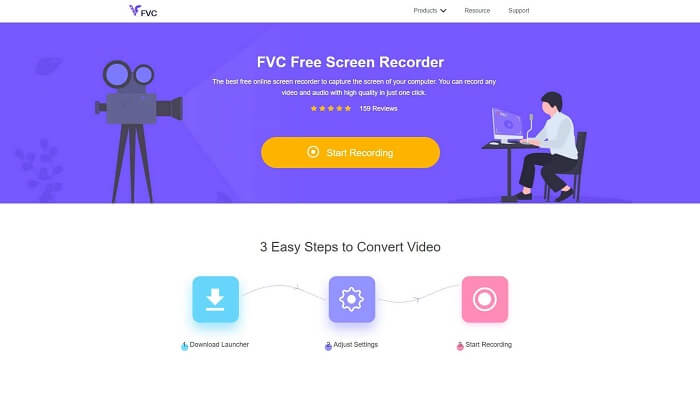
Un instrument ideal pentru utilizatorii care nu doresc să descarce niciun fișier și au o conexiune stabilă pentru a face înregistrarea. Dacă ești un astfel de utilizator, acesta este cel mai bun înregistrator de ecran online și gratuit dezvoltat de FVC, numit FVC Free Screen Recorder. Un instrument care le permite utilizatorilor să surprindă toate acțiunile afișate pe ecranul computerului. Dacă vrei să înregistrezi jocuri, ședințe de afaceri, discuții și altele asemenea, acesta este cel mai potrivit pentru tine. Pentru informații mai detaliate și pași de urmat, citește cu atenție și urmează instrucțiunile enumerate.
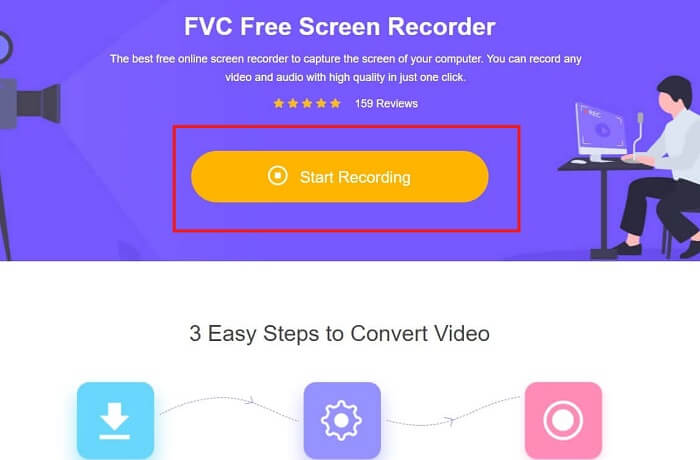
Pasul 1. Dă clic pe acest link pentru a accesa interfața principală a site‑ului. Apasă Start Recording și lansează instrumentul.
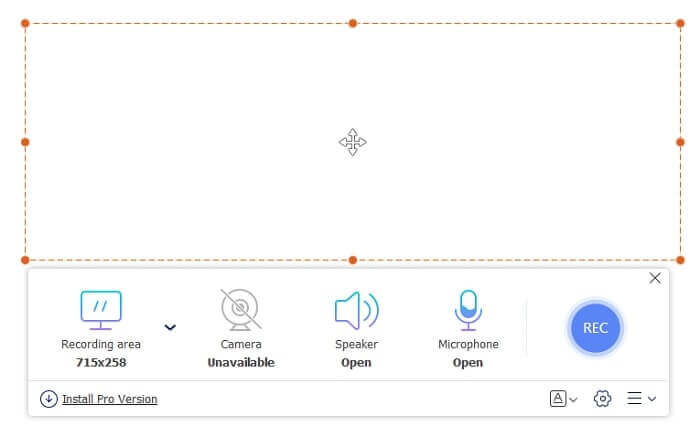
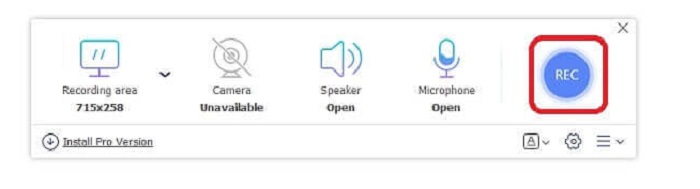
Pasul 2. Dacă instrumentul este deja deschis, vei observa un ecran plutitor ca acesta.
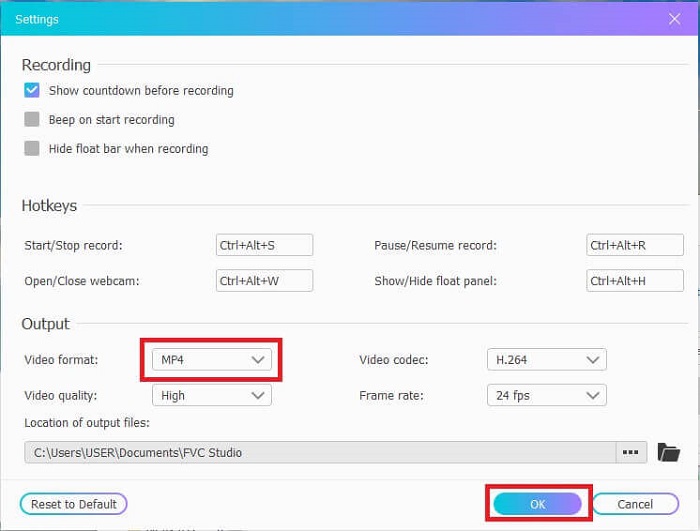
Pasul 3. Apasă pe Settings pentru a ajusta formatul și celelalte setări dorite, apoi fă clic pe OK pentru a salva.
Pasul 4. În bara de instrumente plutitoare poți ajusta dimensiunea frame‑ului sau poți apăsa Full Screen pentru afișare pe întregul ecran. Lângă dimensiunea frame‑ului se află Webcam pentru a‑ți adăuga fața în timp ce înregistrezi, Speaker pentru sunetul de sistem și, în final, Mic pentru a‑ți adăuga vocea. Când ești pregătit să începi, apasă butonul în formă de disc pentru a începe înregistrarea.
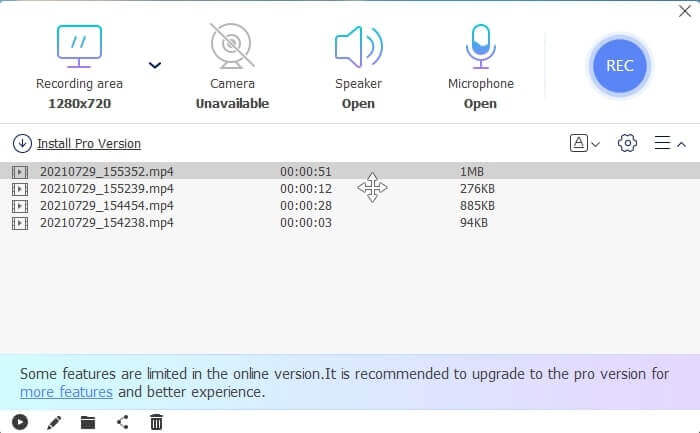
Pasul 5. Când înregistrarea s‑a încheiat, apasă butonul pătrat; o listă History va apărea sub bara de instrumente plutitoare, ordonată de la cele mai noi la cele mai vechi înregistrări.
Pro
- Cel mai bun instrument gratuit online disponibil pentru toate platformele.
- Spre deosebire de orice alt instrument online, este ușor de utilizat și nu vor apărea brusc reclame în timpul înregistrării.
- Pentru a vă înscrie, trebuia să utilizați instrumentul.
Contra
- Depinde de internet, nu va funcționa fără conexiune la internet sau date.
- Nu are caracteristică Lock-in Screen. Este disponibil numai în versiunea premium a instrumentului.
Partea 2. Alte înregistratoare video și vocale 3GP populare pentru Windows și Mac
1. FVC Screen Recorder
Ați auzit vreodată de unul dintre cele mai bune înregistratoare de ecran alese de utilizator la nivel mondial? Atunci, dacă nu este, este pentru tine. FVC Screen Recorder Acest recorder de ecran este disponibil pe toate platformele cunoscute. Cele mai frecvente probleme pe care le puteți întâlni cu celălalt recorder de ecran, unele înregistratoare de voce Android 3gp fără ieșire de sunet. În timp ce utilizați instrumentul, nu veți întâlni niciodată acest tip de problemă, atâta timp cât nu opriți difuzorul pentru sunetul sistemului și microfonul pentru a vă adăuga vocea. Dacă doriți să știți cum să utilizați acest instrument multifuncțional, atunci citiți cu atenție și urmați instrucțiunile de mai jos.
Pasul 1. Descarcă instrumentul. Alege între cele două sisteme de operare pe care le folosești în prezent. Instalează instrumentul, apoi ajustează Preferences după cum dorești și apasă Finish pentru a continua.
Descărcare gratuităPentru Windows 7 sau versiuni mai noiDescărcare sigură
Descărcare gratuităPentru MacOS 10.7 sau versiuni mai noiDescărcare sigură
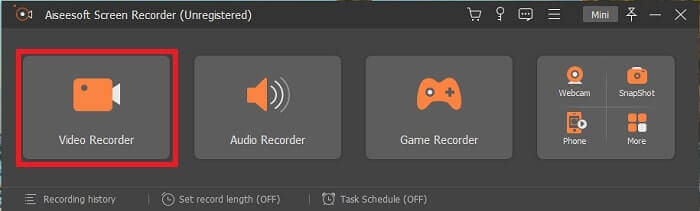
Pasul 2. După instalare, pe ecran va apărea o bară de instrumente plutitoare ca aceasta. Aceasta indică faptul că aplicația pe care o utilizezi rulează deja prin program. Fă clic pe Video Recorder.
Pasul 3. După ce ai dat clic, ajustează afișarea la ecran complet sau selectează o anumită regiune. Apasă System Sound pentru a adăuga sunetul computerului. Celelalte opțiuni depind doar de faptul dacă vrei să le folosești sau nu. Poți de asemenea să‑ți adaugi fața și vocea activând Webcam și Microphone.
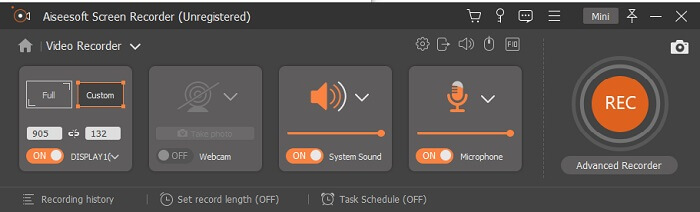
Pasul 4. Înainte de a începe, apasă pe butonul Gear și ajustează setările dacă este nevoie, apoi fă clic pe OK pentru a le salva. După toate pregătirile, apasă butonul rotund pentru a începe înregistrarea.
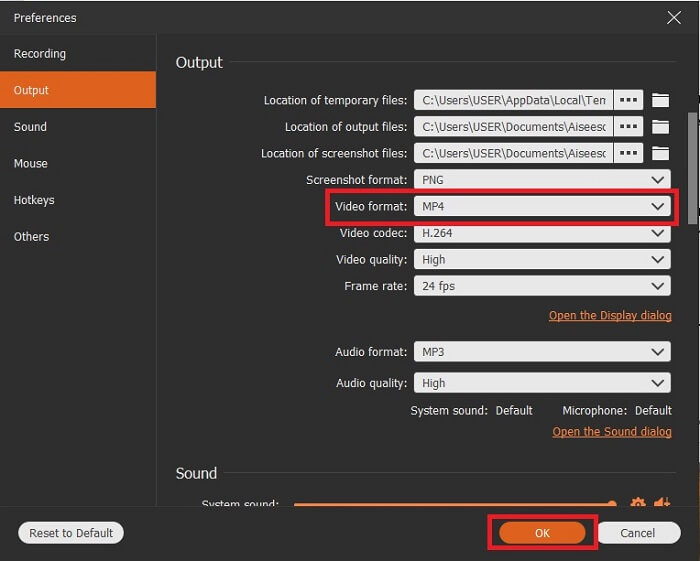
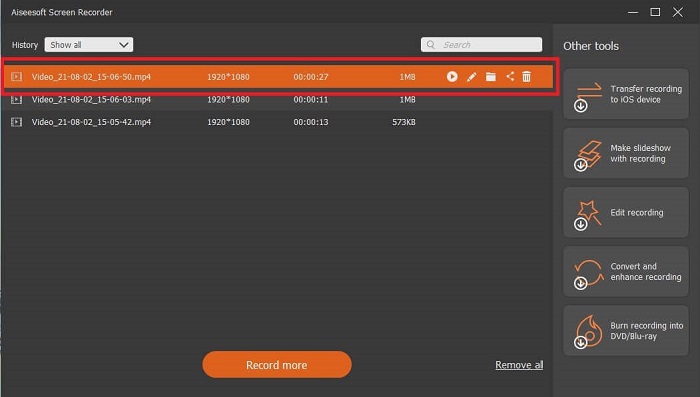
Pasul 5. Dacă vrei să oprești înregistrarea, fă clic pe micul buton pătrat din bara de instrumente pentru a opri. Apasă Save și alege unde să salvezi fișierul. Apoi pe ecran va apărea o listă, ordonată de la cele mai noi la cele mai vechi. Dă clic pe primul videoclip din partea de sus pentru a revedea înregistrarea.
Pro
- Nu depinde de internet. Înregistrați cât doriți, oricând și oriunde.
- Este ușor de utilizat și cea mai bună alegere pentru începătorii care doresc o ieșire profesională sau pentru profesioniștii care caută un înregistrator de ecran ușor de utilizat.
- Are această caracteristică unică, ecranul de blocare.
Contra
- Instrument de plată pentru utilizare și totuși utilizatorii îl folosesc în continuare.
- Este nevoie de 2,4 MB din spațiul de stocare pentru a fi descărcat.
2. ScreenFlow
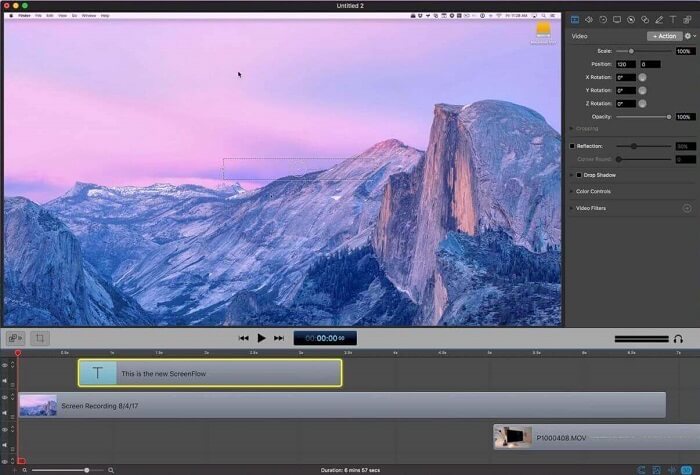
Un alt instrument cel mai bun pentru utilizatorii de Mac. Screenflow este un instrument considerat cel mai bun instrument de înregistrare a ecranului din sistemul de operare Mac. Este un instrument de plată pentru utilizare. Deci, dacă credeți că acest instrument este ieftin, atunci răspunsul nu este. Acest instrument costă aproape peste limita pe care o poate oferi un înregistrator de ecran. Poate oferi ceea ce pot oferi alte înregistratoare de ecran cu plată. Și, dintr-un anumit motiv, utilizatorii de Mac preferă acest lucru ca înregistrator de ecran de alegere personală.
Pro
- Instrument ușor de utilizat, disponibil pentru Mac.
- Instrument actualizat.
- Nu există probleme malware.
Contra
- Disponibil numai pe Mac.
- Poate fi la fel de costisitor ca alegerea ta.
3. Fraps
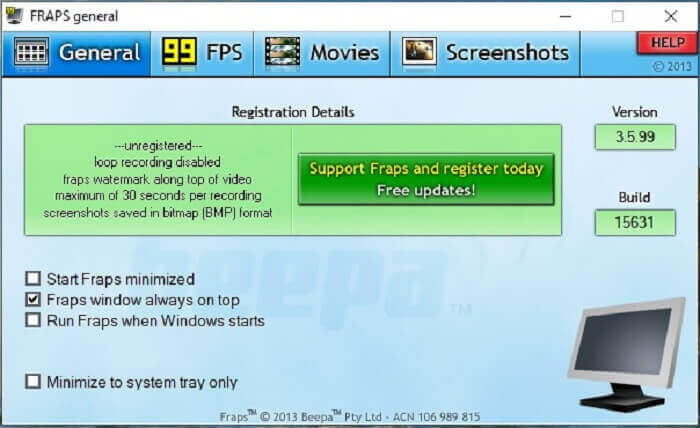
La fel ca celălalt instrument, Fraps poate fi plasat cu ușurință în primele 10 cele mai bune înregistratoare de ecran. Acest instrument face înregistrarea ecranului cât mai ușoară posibil. Datorită instrucțiunii sale on-point a instrumentului. Dar acest instrument nu se află în actualizare. Din cauza actualizărilor mai puține date instrumentului, popularitatea sa a devenit din ce în ce mai mică, dar totuși, unii utilizatori îl preferă așa cum este.
Pro
- Un instrument unic care acceptă formatul de fișier AVI.
- Interfață ușor de utilizat cu instrucțiuni detaliate.
- Suportă rezoluții de până la 7680x4800.
Contra
- Interfața este plictisitoare.
- Datorită formatului de fișier AVI. Dacă înregistrați 20 de minute de videoclip, ar fi nevoie de aproape 4gib de stocare. Nu este cea mai bună alegere pentru înregistrări lungi.
Partea 3. Diagrama comparativă
| Caracteristici | FVC Free Screen Recorder | FVC Screen Recorder | Flux de ecran | Fraps |
| Înregistrare ecran video / audio |  | | | |
| Adnota | | | | |
| Malware Safe | | | | |
| Accelerare hardware |  | | | |
| Ecran de blocare | | | | |
| Mărime fișier | Puțini kbps pentru lansator | 2.1mb | 85,3 mb | 2,4 mb |
| Sistem de operare disponibil | În toate platformele | În toate platformele | Mac OS | Windows XP, 2003, Vista și Windows 7 |
| Gama de prețuri | Un înregistrator online open-source gratuit | Pentru 1 lună: $25.00 Pentru un an: $31.20 Pentru licență pe viață: $55.20 | SCREENFLOW (Prețuri cu reducere de volum): $149 SCREENFLOW Super Pak: $209 SCREENFLOW Suport Super Pak + Premium: $239 | Este gratuit, dar vă puteți înregistra și pentru $37 |
Partea 4. Întrebări frecvente despre 3GP Recorder
De ce nu pot reda formatul de fișier media 3GP pe playerul media?
Este posibil ca playerul tău media să nu suporte acest tip de codec. Dacă vrei să redai fișierul în format 3GP, poți folosi FVC Free Video Player. Acest player media este gratuit și suportă diferite formate video‑audio. Atâta timp cât ai acces la internet, poți opta și pentru versiunea premium, cu mai multe opțiuni și funcții decât versiunea gratuită. Sau poți citi articolul Best 3GP Players pentru a‑l găsi pe cel care ți se potrivește.
Cum pot salva un fișier audio .3gp de pe un înregistrator de voce Android pe mp3?
Folosește un convertor care poate converti 3GP în MP3. Un exemplu foarte bun este FVC Free Online Video Converter. Acesta poate converti peste 200 de formate de fișiere media, disponibile pe toate platformele.
Este posibil să îmbinați diferite fișiere 3GP într-o singură ieșire media?
Da, este posibil cu ajutorul FVC Free Online Merger. Acest instrument online face posibil să îmbini 2 sau mai multe fișiere 3GP într‑unul singur. Este un alt instrument excelent produs de FVC. Dă clic pe Merger pentru a continua.
Concluzie
Concluzionăm că majoritatea utilizatorilor continuă să înregistreze pentru diferite tipuri de scopuri. Indiferent dacă îl folosesc ca reportofon pentru montaj, întâlniri de afaceri, discuții ale profesorilor și multe altele. Dar, indiferent de motivul pentru care înregistrați sau de orice format doriți să fie rezultatul produsului final. Toate înregistratoarele pot face treaba după cum vă puteți cere.
Dar cu toate înregistratoarele diferite de pe web și din această listă, este posibil să te întrebi încă care este cel mai potrivit pentru tine. Înainte de a‑ți face o idee despre ce ar trebui să alegi, trebuie să te gândești bine. Dacă înregistratorul tău de ecran poate îndeplini cerințele pe care le ai acum și, poate, pe cele viitoare. FVC Screen Recorder este cel mai bun instrument pentru tine. Spre deosebire de oricare alt instrument menționat aici, acest program este atât de unic încât reușește să se distingă de toate celelalte înregistratoare de ecran de pe web. Și totuși este mereu ușor de utilizat și oferă performanțe de top, pe care le‑ar putea solicita atât un începător, cât și un profesionist. Atunci, ce mai aștepți? Nu te mulțumi cu un instrument gratuit sau cu unul foarte scump, când poți cumpăra o versiune accesibilă ca preț care poate face mai mult decât toate acestea.
-
 4 cele mai bune înregistratoare de lansare web gratuite pentru a captura videoclipuri pe ecran
 Căutați cel mai bun mod de a înregistra activități pe ecran pe desktop fără a plăti un ban? Iată cele 4 cele mai frecvent utilizate înregistratoare de lansare web gratuite.
-
 Înregistratorul audio fără părtinire Cinch Review și cea mai bună alternativă
 Cinch Audio Recorder este cel mai bun mod de a descărca muzică de pe site-uri de streaming. Aflați mai multe despre recenzie imparțială și cea mai bună alternativă din articol.
-
 Top 5 Cele mai bune înregistratoare de mouse și tastatură pentru Windows și Mac
 Iată primele cinci cele mai bune programe de înregistrare a mouse-ului și a tastaturii, care vă pot salva mișcările mouse-ului și clicurile de pe tastatură și pot repeta evenimentele.
