


 Video Converter Ultimate
 Screen Recorder
 Reparație video
4 dintre cele mai bune înregistratoare AIFF care acceptă calitate audio fără pierderi
Majoritatea oamenilor cred că dispozitivele iPhone sunt aproape perfecte când vine vorba de securitatea telefonului, calitatea video și audio și performanța constantă. Putem spune că acest lucru este adevărat. La fel stau lucrurile și cu calitatea ecranului. Pe cât posibil, Apple dezvoltă funcții care sunt compatibile cu dispozitivele iOS. La fel se întâmplă și cu formatele, codecurile și configurația video. Exact cum au dezvoltat și formatul AIFF, pentru a oferi un format audio de înaltă calitate și necomprimat. Când spui necomprimat, înseamnă în general o calitate mai bună, deoarece sunetul nu este limitat. Așadar, este posibil să ai nevoie să folosești și un înregistrator de sunet AIFF gratuit pentru a produce acest tip de format. Producerea unui astfel de fișier nu este o problemă. Există aplicații și instrumente gratuite pe care le poți folosi online. În continuare, acest articol este exact ce îți trebuie. Consultă lista noastră cu cele mai bune înregistratoare AIFF de mai jos pentru a afla mai multe.

Partea 1. Top 2 înregistratoare AIFF online
FVC Free Audio Recorder
Cu ajutorul FVC Free Audio Recorder, poți obține acum o calitate audio impecabilă, similară cu AIFF. Deși acest instrument nu poate produce exact același format de fișier, calitatea pe care o oferă este la fel de bună. Poate fi accesat din browser și poate fi folosit în orice moment al zilei, atât timp cât ai o conexiune la internet acasă sau oriunde te-ai afla. Așadar, dacă ești mereu pe drum și ai nevoie să înregistrezi pentru vlogul tău, este o opțiune bună. Chiar și atunci când ești afară, poți înregistra fără să îți faci griji în privința zgomotului de fundal din jur. În plus, poți asculta înregistrări fluide pe dispozitivul tău iPhone. Prin urmare, începe chiar acum, testează instrumentul și urmează ghidul de mai jos.
Ce câștigi din asta?
● Este un site web cu acces gratuit.
● Puteți înregistra fișiere muzicale chiar și de pe YouTube pentru a crea liste de redare în galeria dvs. de muzică.
● Înregistrați audio fără limită de timp și fără limită de durată.
● Accesați oricând și oriunde.
Pasul 1. Accesează și activează instrumentul vizitând FVC Free Audio Recorder și dă clic pe butonul Start Recording.
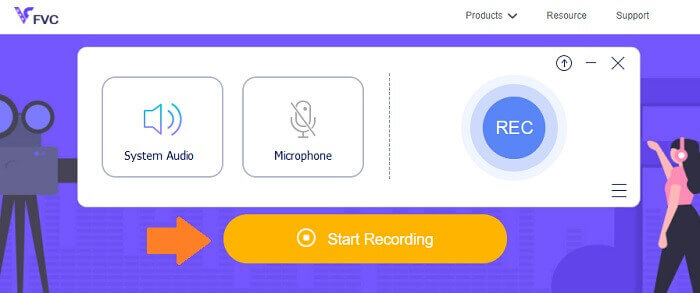
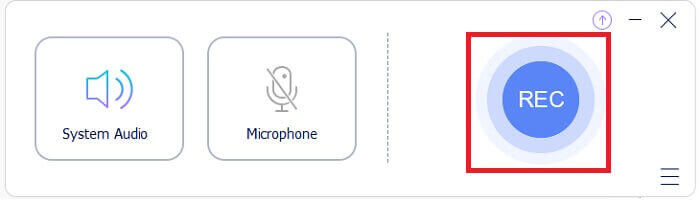
Pasul 2. Apoi activează sunetul, în cazul în care nu este deja activat. În mod implicit, ar trebui să fie activ. Acum, pentru a începe înregistrarea, apasă butonul REC.
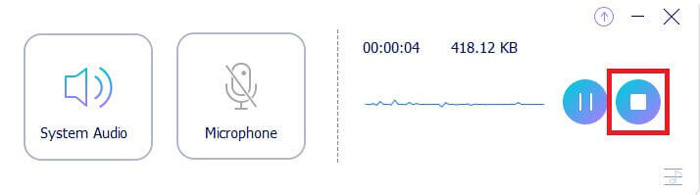
Pasul 3. Când ai terminat, apasă butonul albastru în formă de Pătrat, iar fișierul va fi salvat automat pe PC-ul tău.
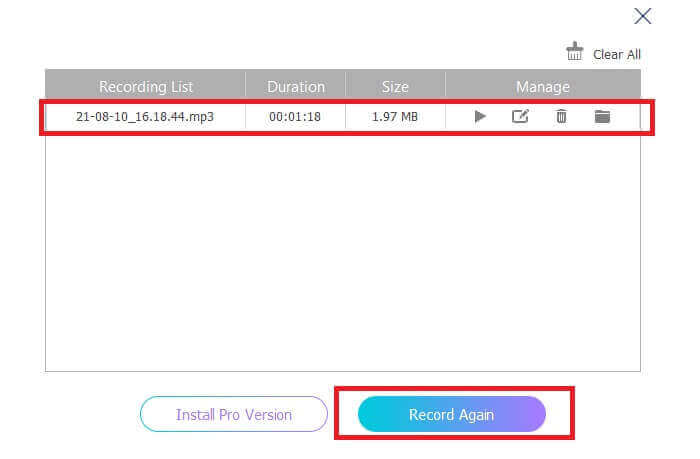
Pasul 4. Pentru a previzualiza fișierul, dă clic pe listă, sub bara plutitoare.
Screencapture.com
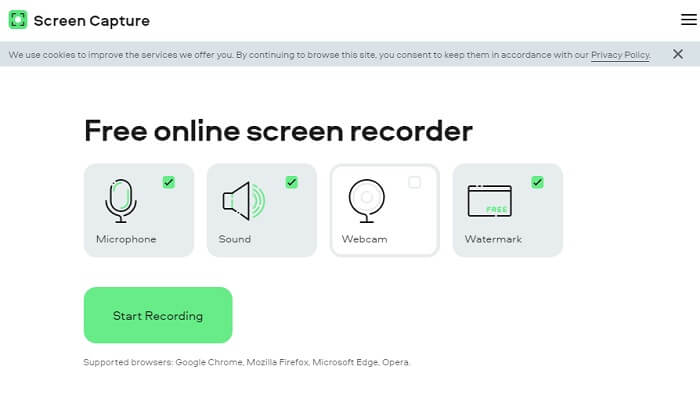
Un alt instrument pe care îl poți lua în considerare pentru a înregistra audio online este Screencapture.com. La fel, este un site gratuit care îți permite să înregistrezi direct sunetul și ecranul fără a fi nevoie să îți creezi un cont. Când apeși pe butonul de start pentru înregistrare, instrumentul va înregistra automat ecranul și sunetul de sistem al computerului. Imediat ce ajungi pe pagina principală, vor fi patru file pe care trebuie să le bifezi, în funcție de nevoile tale. Deoarece noi înregistrăm audio, debifează totul și lasă activ doar sunetul. De acolo, apasă butonul Start Recording și apoi descarcă înregistrarea.
Ce câștigi din asta?
● Acces gratuit.
● Site accesibil și de încredere.
● Securizat.
● Poate înregistra, audio, video și ambele în același timp.
Partea 2.Top 2 AIFF Recorder Software pentru Windows și Mac
FVC Screen Recorder
Când vorbim despre instrumente principale, FVC Screen Recorder este software-ul de bază pentru înregistrarea ecranului și înregistrarea audio. Este dezvoltat special pentru a acoperi acest tip de nevoi. În doar trei pași simpli, veți putea produce o calitate audio similară cu AIFF și cu formatul în sine. Cu FVC Screen Recorder, puteți înregistra fără a fi limitat și aveți libertatea de a regla rata de biți pentru a obține cea mai înaltă calitate pe care o doriți. Mai mult decât atât, nu există nicio limită de câte ori îl folosiți pe zi. Utilizare nelimitată atâta timp cât sunteți înregistrat pentru aceasta.
Ce câștigi din asta?
● Serviciu bun pentru clienți.
● Cu suport tehnic bun care vă poate rezolva problemele.
● Continuă actualizarea instrumentului.
● Cu funcția de blocare a ferestrei care vă permite să înregistrați o anumită fereastră fără a deranja ceea ce faceți.
Pasul 1. Descarcă și instalează aplicația folosind butoanele de mai jos.
Descărcare gratuităPentru Windows 7 sau versiuni ulterioareDescărcare sigură
Descărcare gratuităPentru MacOS 10.7 sau versiuni ulterioareDescărcare sigură
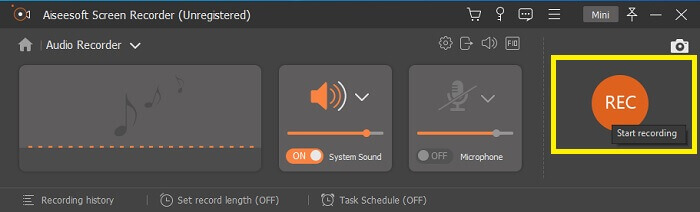
Pasul 2. Deschide aplicația și activează sunetul de sistem. Apoi, apasă butonul REC pentru a începe înregistrarea.
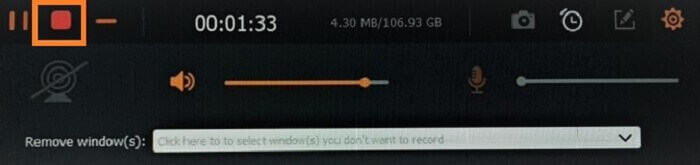
Pasul 3. După ce ai terminat înregistrarea, apasă butonul de oprire. Pictograma este butonul roșu în formă de pătrat.
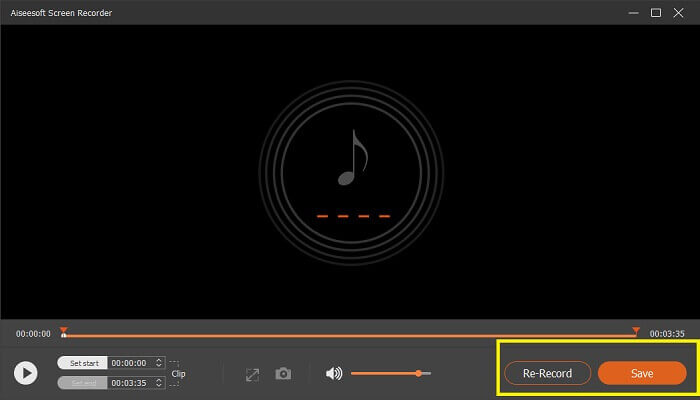
Pasul 4. Apoi instrumentul îți va oferi opțiunea de a salva sau de a reînregistra.
Îndrăzneală
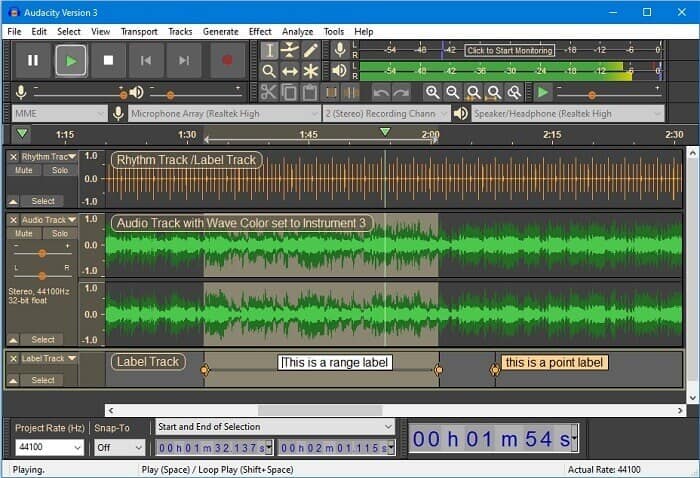
În sfârșit avem Audacity. Este considerat a fi unul dintre cele mai căutate înregistratoare audio de ceva timp. Acest lucru se datorează flexibilității instrumentului. Majoritatea profesioniștilor folosesc această înregistrare datorită fiabilității sale în înregistrarea audio chiar și cu conexiuni terță parte, cum ar fi sunete de la mixere, computere, casete și multe altele.
Ce câștigi din asta?
● Este un software open source.
● Este un recorder și editor.
● Suportat de majoritatea sistemelor de operare.
Partea 3. Grafic comparativ
| Caracteristici | FVC Free Audio Recorder | FVC Screen Recorder | Screen Capture.com | Îndrăzneală |
| Platformă | Bazat pe web | Aplicație desktop | Bazat pe web | Aplicație desktop |
| Preț | Gratuit | Plătit | Gratuit | Plătit |
| Suportă calitate audio înaltă |  | | | |
| Rata de biți reglabilă | | |  | |
| Recomandat | | | | |
| Utilizare nelimitată | | | | |
| Fără limită de durată | | Da la abonament | | Da la abonament |
Partea 4. Întrebări frecvente despre AIFF Recorder
Care este diferența dintre AIFF și WAV?
După cum am menționat, AIFF este folosit în mare parte de utilizatorii Apple. Cu toate acestea, nu înseamnă că este o limitare. Deoarece acest format de fișier este acceptat și de alte playere media. Între timp, WAV este dezvoltat special pentru PC-uri. Este limitat doar la PC-uri desktop. Când vorbim despre tehnică și tipul de codificare, ambele au dimensiuni relativ mari ale fișierelor. Deci sunt exact opusul MP3 și MP4.
AIFF, este fără pierderi?
Răspunsul este că este fără pierderi, dar necomprimat. Acest format de fișier este necomprimat. Nu pierde calitatea și pur și simplu modul în care este dezvoltat pentru a aduce rezultate audio bune în loc să compromită calitatea.
Windows Media Player poate reda fișiere AIFF?
Pentru a-ți răspunde la întrebare, Da! De asemenea, îl puteți reda folosind VLC player și alte playere muzicale.
AIF și AIFF, există o diferență?
Indiferent care este folosit, nu contează și sunt la fel. Indiferent dacă adăugați un sufix sau un afix.
Concluzie
În concluzie, AIFF este un format bun pentru computerele Mac, deoarece este creat special pentru Mac. Deși acest fișier este bun, nu putem nega faptul că consumă multă memorie pe computer. Aplicațiile examinate mai sus o pot accepta și nu, dar unele au alternative excelente pentru acest tip de fișier. Între timp, dacă doriți cu adevărat să aveți acest tip de fișier, puteți lua în considerare și utilizarea unui convertor gratuit.
FVC are, de asemenea, acest Free Audio Online Converter. Tot ce trebuie să faci este să adaugi fișierele și să aștepți finalizarea procesului de conversie și gata, ai fișierul audio convertit. Poți afla mai multe dacă vizitezi pagina oficială. Ca să îți facem o scurtă prezentare, iată câteva dintre formatele acceptate: MP3, WMA, AAC, WAV, AC3, AIFF și FLAC.
-
 Cel mai bun înregistrator 3GP pentru a captura un 3GP într-un format nou pe Windows și Mac
 Formatul de fișier 3GP stochează a treia generație multimedia și este dezvoltat de Proiectul de parteneriat de a treia generație. Pentru informații mai detaliate, continuați mai jos.
-
 7 dintre cele mai bune înregistratoare AAC pentru Windows și Mac [2021]
 Descoperiți ce este AAC și cele mai apreciate înregistratoare AAC pe care le puteți folosi gratuit și descărcabile atât pe computerele Mac, cât și pe cele Windows.
-
 Ghid Spot-On: Care sunt cele mai bune înregistratoare M4A pentru Windows și Mac
 M4A sunt fișiere de containere codificate ACA și ALAC pentru compresie cu pierderi. Lista de mai jos sunt instrumentele de înregistrare M4A pe care le puteți utiliza. Citiți cu atenție următoarele.
