


 Video Converter Ultimate
 Screen Recorder
 Reparație video
 Descărcare sigură
3 Cele mai bune înregistratoare de apeluri Facebook - Cum să înregistrați apeluri video Facebook
Cum să înregistrați apelurile video de pe Facebook pentru a păstra momentele prețioase dintre dumneavoastră și prietenii și familia voastră? După ce Facebook a introdus funcția de apeluri video, din ce în ce mai mulți utilizatori preferă să ia legătura cu alții prin apeluri Facebook în loc de apeluri telefonice. Însă, ca funcție suplimentară de comunicare a unei platforme de socializare, nu are funcție de înregistrare precum apelurile telefonice. Mai mult, aplicația derivată de sine stătătoare – Facebook Messenger – nu are un recorder integrat. În acest caz, puteți afla despre 3 înregistratoare de apeluri Facebook ușor de utilizat pentru computere, dispozitive iOS și telefoane Android, împreună cu instrucțiuni detaliate în acest articol.

Partea 1: Cel mai bun înregistrator de apeluri Facebook online pentru Windows / Mac
Fără a descărca niciun software terț, puteți folosi FVC Free Screen Recorder pentru a înregistra gratuit online apelurile video Facebook. Este un înregistrator de apeluri Facebook ușor de utilizat, care are o interfață concisă, cu multiple funcții de care aveți nevoie.
- 1. Înregistrați gratuit apelurile și videoclipurile de pe Facebook online, cu pași simpli.
- 2. Înregistrare fără pierderi de audio și videoclipuri pentru a păstra videoclipuri de înaltă calitate.
- 3. Fără filigran pentru a vă proteja dreptul de proprietate.
- 4. Înregistrările vor fi salvate automat în biblioteca media și puteți alege să ștergeți, să descărcați și să partajați pe SNS în mod liber.
Pasul 1: Accesați site-ul FVC Free Screen Recorder în orice browser. Faceți clic pe butonul Start Recording pentru a instala lansatorul în câteva secunde, apoi faceți din nou clic pe butonul Start Recording pentru a porni recorderul.

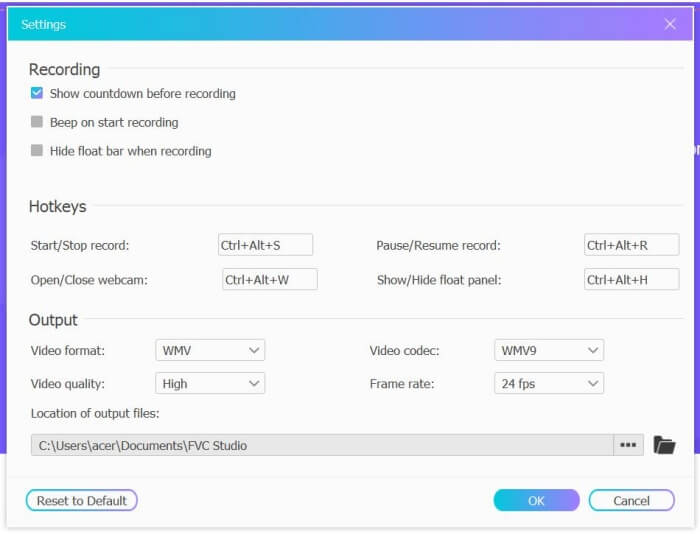
Pasul 2: Faceți clic pe meniul Recording Area pentru a alege ecran complet sau pentru a selecta liber o regiune. Apoi porniți sunetul de la Microphone și Speaker. Pentru ajustarea setărilor video, puteți face clic pe pictograma Setting. Puteți alege formatul MP4, calitate High și 24 fps pentru a menține calitatea ridicată a înregistrărilor. Apoi faceți clic pe butonul REC pentru a începe înregistrarea apelurilor Facebook.
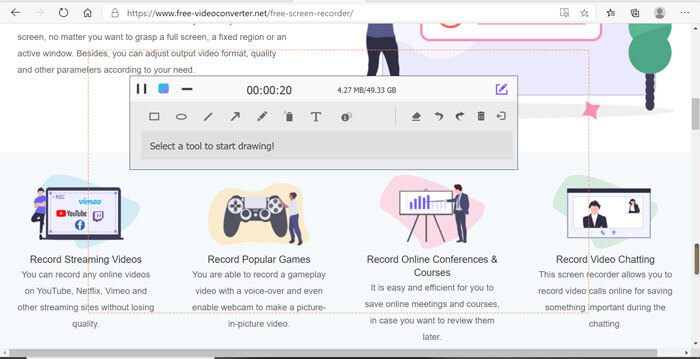
Pasul 3: Va apărea o casetă de instrumente cu multiple unelte de editare. Puteți alege să adăugați forme, text și linii, în funcție de nevoi. Apoi faceți clic pe pictograma Stop pentru a salva înregistrarea în cloud. Puteți face clic dreapta pentru a alege descărcarea acesteia pe computer.
Utilizarea acestui înregistrator de apeluri video Facebook gratuit online este cea mai bună modalitate pentru utilizatorii de computere de a înregistra apeluri video Facebook online. Reglând în prealabil setările de înregistrare, poate salva apelurile Facebook în format MP4 cu dimensiuni mici și calitate înaltă. Dacă sunteți obișnuiți să aveți apeluri Facebook pe mobil, continuați să citiți acest articol.
Partea 2: Cum să înregistrați apelul Facebook pentru iOS prin Recorderul implicit
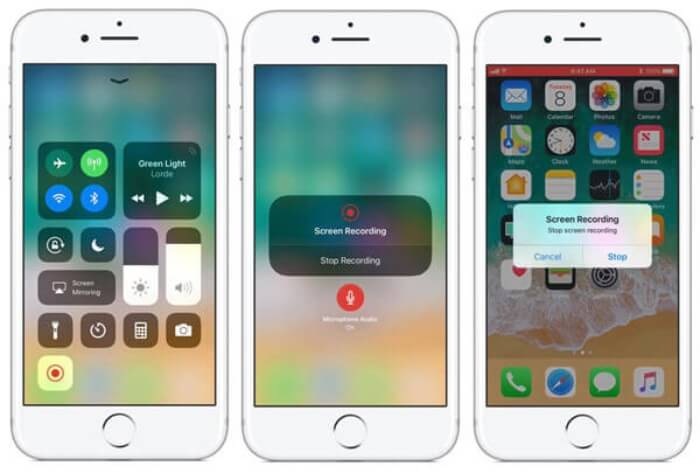
Versiunea actualizată iOS 11 sau o versiune ulterioară are un nou recorder implicit pe iPhone și iPad, care este cea mai bună alegere pentru a captura apeluri video Facebook fără a descărca nicio aplicație. Aici puteți afla cum să adăugați înregistratorul de apeluri Facebook la comenzile rapide din centrul de control și modul de utilizare.
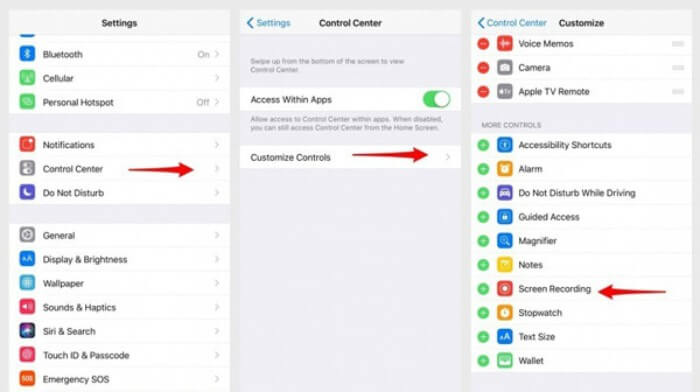
Pasul 1: Atingeți aplicația Settings de pe iPhone/iPad și derulați în jos pentru a alege opțiunea Control Center. Apoi atingeți fila Customize Controls și găsiți funcția Screen Recording. Atingeți pictograma Plus pentru a adăuga această funcție în centrul de control.
Pasul 2: Glisați în jos din partea de sus a ecranului telefonului pentru a deschide centrul de control și veți găsi aplicația de înregistrare în partea de jos. Atingeți pictograma Screen Recording pentru a începe înregistrarea și puteți alege să capturați videoclipul sau să înregistrați doar pista audio. Dacă doriți să o opriți, atingeți Status Bar roșu din partea de sus și apoi atingeți opțiunea Stop din fereastra pop-up.
Partea 3: Un înregistrator Facebook Messenger ușor pentru Android
Unele telefoane Android nu au înregistratoare încorporate și există prea multe înregistratoare de apeluri video Facebook pe care Android le poate alege. Astfel, puteți învăța unul dintre cele mai bune înregistratoare pentru telefoane mobile Android cu pașii detaliați din partea următoare.
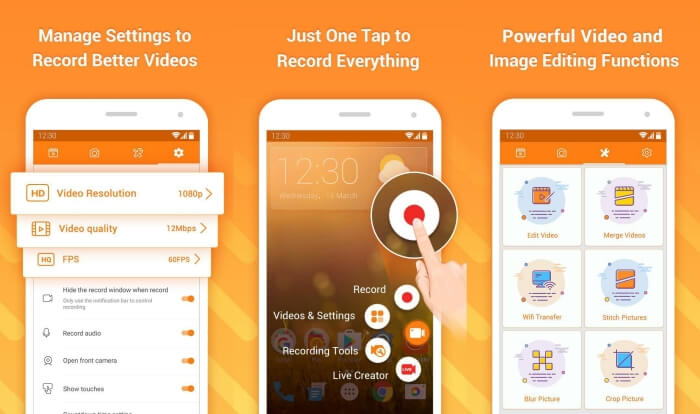
DU Recorder este un înregistrator de apeluri Facebook ușor de utilizat pentru Android și este renumit pentru înregistrarea sa fluidă. Fără root, oricine îl poate folosi pentru a înregistra apelurile Facebook Messenger dintr-o singură atingere.
Pasul 1: Lansați recorderul și vor apărea patru meniuri: înregistrări, capturi de ecran, unelte de editare și setări. Mai întâi, atingeți meniul Settings pentru a ajusta parametrii video. Pentru a păstra o calitate ridicată, puteți alege rezoluția 1080p și rata de cadre de 30 fps.
Pasul 2: Nu închideți recorderul și lansați pur și simplu Facebook Messenger. Apoi veți vedea pictograma recorderului. Atingeți pictograma și alegeți pictograma Recording pentru a începe capturarea ecranului și a sunetului. O puteți atinge din nou pentru a opri înregistrarea. Apoi puteți atinge pictograma Editing pentru a tăia înregistrarea și a adăuga muzică.
S-ar putea să vă placă și:
Recenzie Action Screen Recorder
Partea 4: Întrebări frecvente despre Facebook Call Recorder
1. Doza Facebook are înregistratorul implicit pentru a înregistra apeluri video pe computer?
Nu, nu. Astfel, trebuie să vă bazați pe alte înregistratoare profesionale de apeluri Facebook. Dacă nu doriți să descărcați alte programe care vor ocupa spațiul de stocare de pe computer, FVC Free Screen Recorder este cea mai bună alegere.
2. Cum să pornești un chat cu un prieten pe aplicația Facebook Messager?
În primul rând, deschideți Facebook Messenger pe mobil, apoi alegeți chat-ul prietenului pe care doriți să-l primiți pe Facebook. Și acum puteți vedea pictograma Video, astfel încât să puteți face clic pe ea pentru a începe un apel video.
3. Ce format ar trebui să aleg pentru a salva înregistrările atunci când folosesc înregistratoarele Facebook Messenger?
Fie că utilizați un înregistrator de apeluri Facebook pe computer sau mobil, cel mai bun format pentru a salva apelurile video Facebook este MP4. Poate economisi mai mult spațiu de stocare și este compatibil cu toate dispozitivele.
Concluzie
Articolul de mai sus a prezentat 3 înregistratoare de apeluri video Facebook. Pentru iPhone, iPad și unele telefoane Android, puteți utiliza cu ușurință recorderul integrat în telefon. În caz contrar, puteți alege orice recorder, inclusiv DU Recorder din Google Play. Pentru PC, FVC Free Screen Recorder este cea mai bună alegere pentru a captura apelurile Facebook. Dacă ați întâmpinat alte probleme când folosiți înregistratoarele de apeluri Facebook, vă rugăm să lăsați un comentariu mai jos.
-
 Recenzie Snagit 2021 - Pro, contra și cea mai bună alternativă
 Care este cea mai bună alternativă la Snagit? Există un instrument de captare a ecranului ca Snagit? Această postare va examina Snagit și va împărtăși cea mai bună alternativă la Snagit pentru a captura ecranul.
-
 6 cele mai bune înregistratoare WAV pe care nu trebuie să le ratați pe desktop și online
 Cel mai bun software de înregistrare WAV pe care îl împărtășim în acest articol are o varietate de caracteristici utile, care vă ajută să capturați profesioniști audio și vocali.
-
 Top 4 înregistratoare de sunet AIFF gratuite care produc sunet de înaltă calitate
 Acest articol vorbește despre AIFF și despre unele dintre cele mai populare instrumente pe care le puteți folosi pentru a produce format AIFF de înaltă calitate.
