


 Video Converter Ultimate
 Screen Recorder
 Reparație video
 Descărcare sigură
FLAC vs. MP3: Introducere și comparare a formatelor audio
The debate between FLAC vs. MP3 file formats has been ongoing for years. While MP3 is one of the oldest and most widely-used formats, FLAC has gained popularity among audiophiles for its lossless audio compression. But which one is better? In this guide, we'll take a closer look at the differences between FLAC and MP3, including their sound quality, file size, compatibility, and more, to help you decide which format to choose for your music collection.

Partea 1. FLAC vs. MP3: Introducerea formatelor audio
MP3 Anecdote
MP3 este un format popular pentru fișierele audio digitale care a fost utilizat pe scară largă de la introducerea sa în anii 1990. Utilizează o formă de compresie cu pierderi pentru a reduce dimensiunea fișierelor audio, păstrând în același timp o calitate bună a sunetului. Fișierele MP3 pot fi partajate, descărcate și redate cu ușurință pe diverse dispozitive, făcându-le o alegere convenabilă pentru pasionații de muzică digitală. Întrebarea este, este FLAC mai bun decât MP3? Să aflăm citind descrierea FLAC.
FLAC Anecdote
FLAC (Free Lossless Audio Codec) este un format de fișier audio de înaltă calitate care utilizează compresia fără pierderi pentru a păstra datele audio originale fără a sacrifica calitatea. Aceasta înseamnă că fișierele FLAC sunt mult mai mari decât fișierele MP3, dar păstrează același nivel de fidelitate audio ca materialul sursă original.
Partea 2. Dispozitive/Platforme acceptate de FLAC și MP3
Acum, să vedem comparația MP3 vs. FLAC pentru a vedea cum performează în ceea ce privește platformele sau dispozitivele pe care le acceptă.
MP3 este un format de fișier audio acceptat pe scară largă care poate fi redat pe diferite platforme, inclusiv:
◆ Calculatoare care rulează sisteme de operare Windows, macOS și Linux.
◆ Portable media players, such as iPods and other MP3 players.
◆ Smartphone-uri și tablete care rulează iOS, Android și alte sisteme de operare mobile.
◆ Stereo auto cu USB sau intrări auxiliare.
◆ Sisteme home theater și receptoare stereo cu conexiune USB sau rețea.
◆ Serviciile de streaming muzical, cum ar fi Spotify și Apple Music, folosesc adesea MP3 ca format implicit pentru streaming și descărcarea muzicii.
FLAC nu este la fel de acceptat ca MP3, dar este încă redat pe o varietate de platforme, inclusiv:
◆ Calculatoare care rulează sisteme de operare Windows, macOS și Linux.
◆ Unele playere media portabile, cum ar fi Astell&Kern AK Jr și PonoPlayer.
◆ Unele smartphone-uri și tablete care rulează Android și alte sisteme de operare mobile.
◆ Unele sisteme stereo auto și sisteme home theater cu conectivitate USB sau rețea.
◆ Unele servicii muzicale de streaming, cum ar fi Tidal, care oferă opțiuni de streaming și descărcare FLAC de înaltă fidelitate.
Partea 3. Este FLAC mai bun decât MP3?
De data aceasta, permiteți-ne să enumerăm diferența dintre FLAC și MP3 comparând cuprinzător aceste formate audio.
Iată o comparație cuprinzătoare a FLAC și MP3 bazată pe diverși factori:
Sound quality: FLAC offers better sound quality than MP3, for it is a lossless format that preserves all the audio data in the source material. On the other hand, MP3 is a lossy format that discards some audio data during compression, which can result in a loss of audio quality.
File size: MP3 files are much smaller than FLAC files, as MP3 uses lossy compression to reduce the file size. This makes MP3 a more practical choice for those with limited storage space or those who need to share or download music files quickly over the internet.
Compatibility: MP3 is widely compatible with various devices and software, including desktop and laptop computers, portable media players, smartphones, car stereos, and streaming music services. FLAC, on the other hand, may not be compatible with some devices and software due to its larger file size and lossless compression.
Bitrate: MP3 files can be encoded at a lower bitrate to reduce the file size further, but this also results in a loss of audio quality. FLAC files, on the other hand, always maintain the same bitrate as the original source material.
Editing: FLAC is a better choice for audio editing, as it offers a higher level of audio fidelity and doesn't introduce any additional compression artifacts. MP3 files, on the other hand, may introduce additional compression artifacts during editing due to their lossy compression.
Price: Both FLAC and MP3 are free and open-source formats, so there is no cost associated with using either format.
Partea 4. Convertiți FLAC în MP3 sau MP3 în FLAC
Acum că am terminat cu procesul de a compara FLAC cu MP3, haideți să trecem la procesul de conversie a MP3 în FLAC sau invers.
Video Converter Ultimate is a powerful software tool that allows you to easily convert audio and video files from one format to another. One of the many formats supported by FVC Video Converter Ultimate is FLAC, a high-quality, lossless audio format that is often used by audiophiles and music enthusiasts. You can quickly and easily convert your FLAC files to MP3, allowing you to save space on your device and make your music more easily shareable. Video Converter Ultimate offers a user-friendly interface and a range of options for customization, making it a convenient and helpful tool for anyone who needs to convert audio and video files.
Pentru a converti fișiere audio între formatele FLAC și MP3 folosind acest instrument, trebuie să urmați câțiva pași simpli.
Step 1. First, download and install the program on your computer by clicking on one of the Free Download buttons and following the setup wizard. Next, launch the program to access its user-friendly interface.
Descărcare gratuităPentru Windows 7 sau versiuni mai recenteDescărcare sigură
Descărcare gratuităPentru MacOS 10.7 sau versiuni ulterioareDescărcare sigură
Step 2. Next, add the audio file you want to convert by clicking the plus sign button from the main interface. Once added, you'll see a thumbnail of each file on the interface.
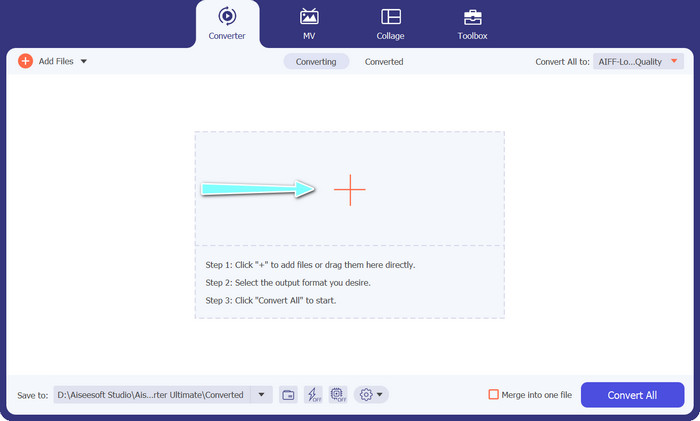
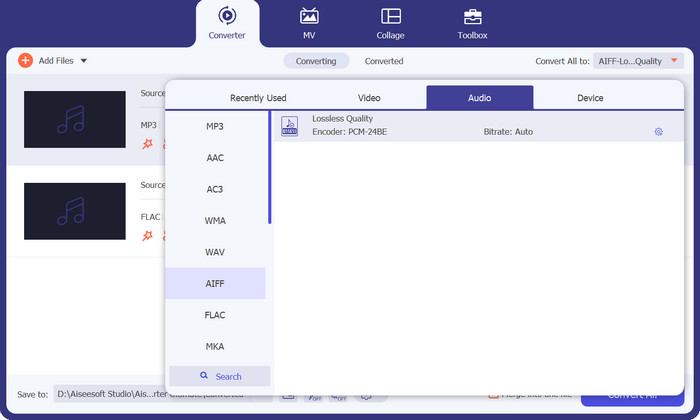
Step 3. Specify the output format by selecting the Audio tab from the Profile menu on the upper right side of the tool. Choose either MP3 or FLAC, depending on the direction of the conversion.
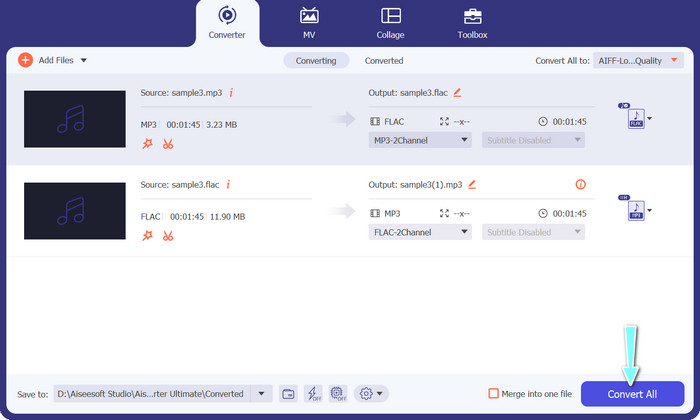
Step 4. Specify the output folder where you want to save the converted files by selecting the appropriate location at the bottom of the interface. Lastly, hit on the Convert All button to start the conversion process.
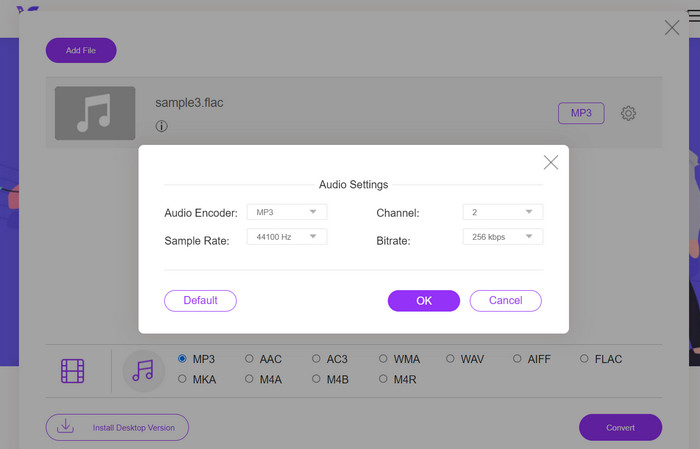
If you're in need of a free online tool to convert FLAC to MP3, look no further than Free Video Converter Online. This convenient program allows users to convert video and audio files without any cost and also offers the ability to customize output settings according to your preference. The conversion speed is also reliable, so long as you have an internet connection. To get started, follow these steps:
Step 1. Launch your preferred web browser and navigate to the Free Video Converter Online website.
Step 2. Click the Add Files to Convert button to upload the FLAC file you want to convert to MP3.
Step 3. Choose MP3 as the output format from the list of available formats under the Audio format menu. You can also select your desired bitrate or output quality for the MP3 file.
Step 4. Click the Convert button to start the conversion process.
Partea 5. Întrebări frecvente despre FLAC vs. MP3
Care este mai bun între FLAC pe 16 biți și MP3 cu 320 Kbps?
Alegerea între FLAC pe 16 biți și MP3 de 320 kbps se reduce la preferințele personale și la utilizarea dorită a fișierului audio. Dacă acordați prioritate calității audio și aveți suficient spațiu de stocare, FLAC pe 16 biți poate fi opțiunea mai bună. Dacă aveți nevoie de o dimensiune mai mică a fișierului fără a compromite prea mult calitatea audio, MP3 de 320 kbps poate fi o alegere bună.
Fișierele FLAC sunt mai mari decât fișierele MP3?
Da, fișierele FLAC sunt de obicei mai mari decât fișierele MP3 datorită naturii lor fără pierderi.
Toate playerele media acceptă FLAC?
Nu, nu toate playerele media acceptă FLAC. Cu toate acestea, multe playere media și software moderne acceptă redarea FLAC, inclusiv VLC, Foobar2000 și Winamp.
Concluzie
Choosing between MP3 and FLAC depends on your personal preference and specific needs. Therefore, FLAC vs. MP3 is a must for your decision-making. Ultimately, the decision on which format to use comes down to your priorities in terms of sound quality, file size, and compatibility.
-
 Cele mai bune 4 metode pentru a converti cu ușurință MOV în MP3 pe Windows și Mac
 Când doriți să extrageți fișierele audio MP3 din fișiere MOV, puteți afla mai multe despre cele mai eficiente 4 convertoare MOV în MP3 pentru a obține fișierele dorite din articol.
-
 Cele mai bune convertoare MP3 pentru a transforma fișierele audio în MP3 cu ușurință
 Convertiți fără efort orice format audio în MP3 cu convertoarele noastre MP3 online și offline ușor de utilizat. Obțineți rezultate de înaltă calitate în doar câteva clicuri.
-
 Top 3 editori de metadate FLAC pe Mac și Windows [Actualizat 2023]
 Doriți să modificați metadatele FLAC? În acest caz, trebuie să citiți acest articol, deoarece oferim suficiente cunoștințe despre cel mai recent editor de metadate FLAC pe care îl puteți utiliza.
