


 Video Converter Ultimate
 Screen Recorder
 Reparație video
Descoperiți cum să măriți volumul pe AirPods și Aid Pods Pro cu pași
Cu AirPods și AirPods Pro, puteți comanda Siri, asculta muzica preferată, răspunde la apeluri telefonice și face mai mult. Un alt lucru grozav despre a avea un Air Pod este că este wireless, ceea ce înseamnă că nu veți avea greu să scoateți firul înnodat din căști. De asemenea, puteți schimba cu ușurință volumul audio, comandând lui Siri să crească sau să scadă volumul.
But there are times that Siri can't detect your voice, so the best to change the volume is to do it manually. Below are the best ways to turn your volume up and the steps indicated between the functions. All of these functions are tested and do great on changing the volume of the sound. Let's learn how to turn up the volume on AirPods or AirPods Pro without further ado.
Partea 1. Cum să măriți volumul pe AirPods/AirPods Pro pe dispozitivele dvs. iOS
All these techniques that we provide will help you if you need to increase the audio on your AirPods. Although some of them are not new to us, we still include them. But before anything else, ensure that your AirPods or Air Pod Pro is connected to your phone via Bluetooth. If you don't know how to connect it, you can bring your AirPods or AirPods Pro next to your iOS device; make sure that it is under 30 meters. Open the case, press and hold the button on the case's back. Immediately a prompt will be on your screen; tap Connect. Once connected, the light on the case will blink, then permanently turn into solid. You can now play the sound on your AirPods after that.
Modul 1. Folosiți butonul de creștere a volumului
Este cel mai obișnuit mod de a crește volumul oricărui sunet redat pe iOS, și anume prin utilizarea tastelor de volum. Aceste taste se află în partea stângă a dispozitivelor dvs. iOS. Să învățăm cum să creștem fără întârziere volumul pe Aird Pods Pro sau pe AirPod-urile dvs.
Step 1. Once the AirPods or AirPods Pro is connected, you can play the sound on your iOS. After playing, click the volume up key on your phone to increase the audio.
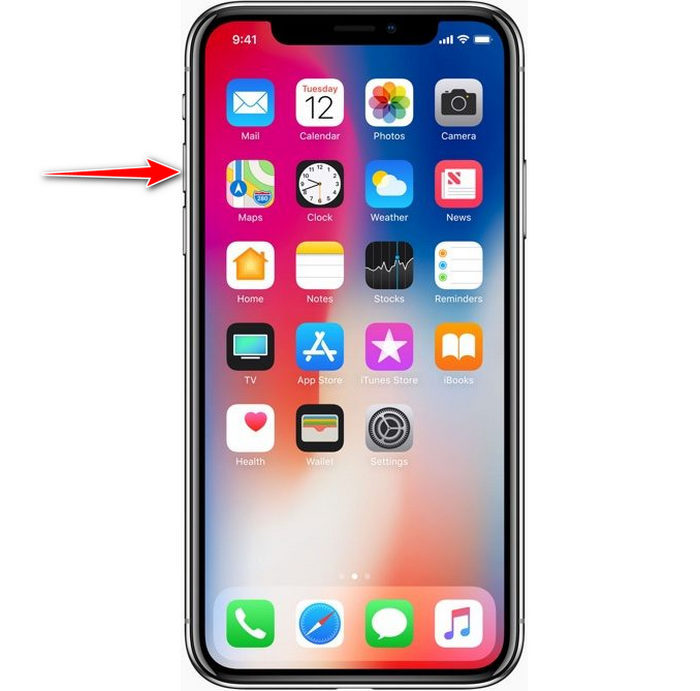
Step 2. If you feel that the sounds became high, click the volume down key to balance it.
Modul 2. Utilizați Centrul de control
Următoarea tehnică este ca prima; cu toate acestea, este neobișnuit să folosiți acest lucru deoarece prima tehnică este mult mai ușoară. Dar acest lucru este util dacă tastele de volum sunt sparte sau nu pot. Deci, dacă doriți să încercați să utilizați această tehnică, puteți urma următorii pași.
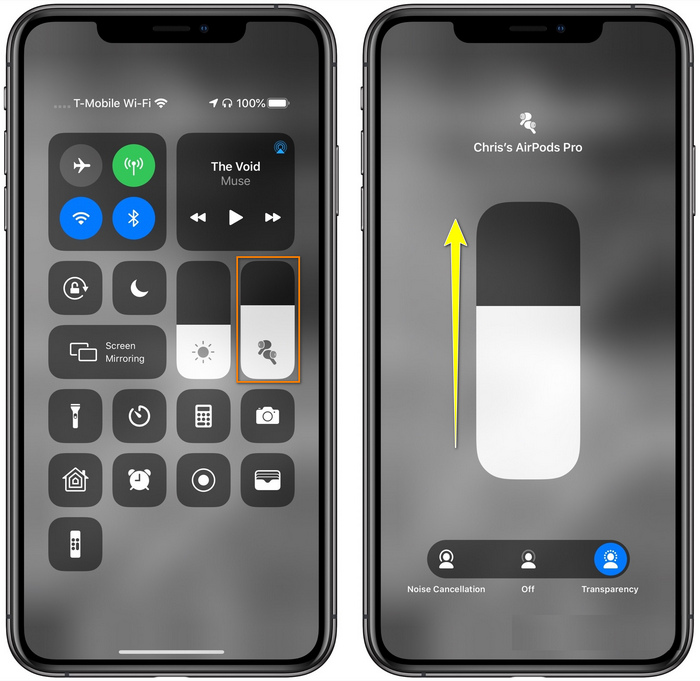
Step 1. Click the System Touch presented on your iOS devices, and click Control Center.
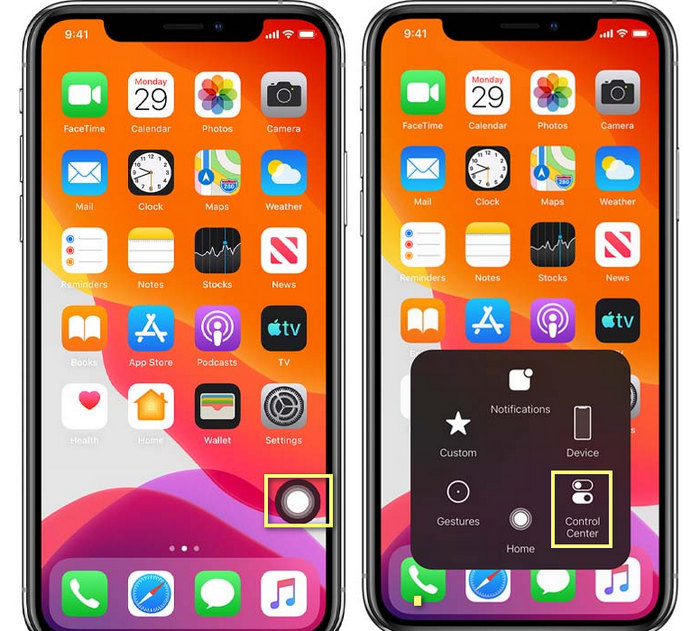
Step 2. At the Control Center, tap and hold the audio slider, adjust the slider up on the next function you will see on the screen, in this area, you can turn on the noise cancellation and transparency if you need.
Modul 3. Utilizați Setările
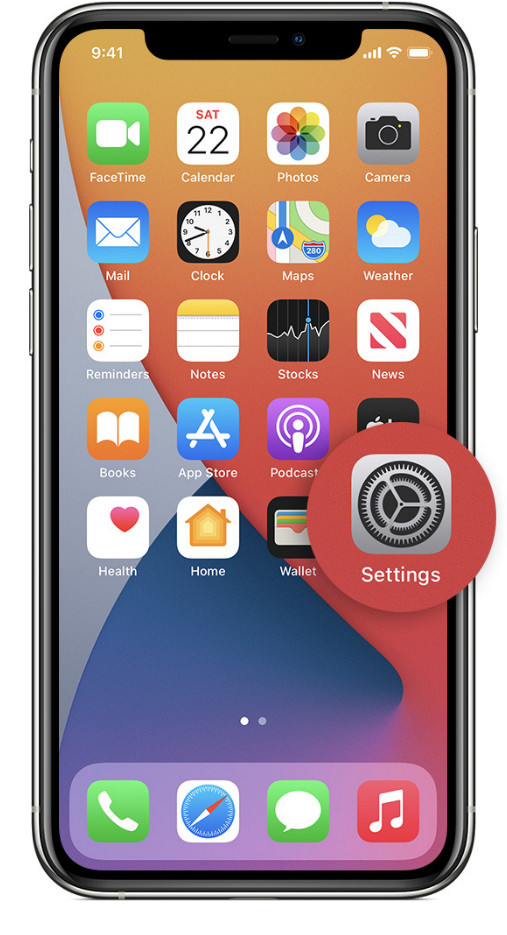
Did you know you can make a major adjustment on your volume if you go to the Settings of your iOS. However, this step only works if you stream music on your AirPods. Also, the volume will change a little bit, but it will increase. So, if you are ready to dig into how to turn up the volume on AirPods thru Settings, you can follow the steps below.
Step 1. Open the Settings, find Music, and click it.
Step 2. Under Playback options, click the EQ choose one of the equalizers you want to add to your music.
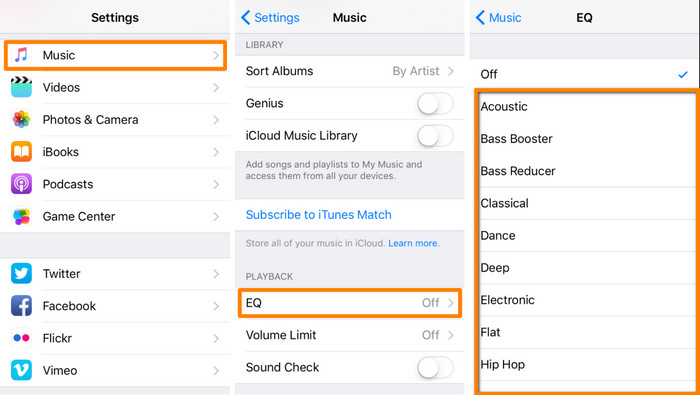
Step 3. After choosing, you can now click the volume key up on your phone to increase.
Bonus: Cum să creșteți volumul videoclipurilor dvs. cu cel mai bun amplificator de volum pe Windows și Mac
Not satisfied with the volume techniques we taught above? In that case, you can use the FVC Video Converter Ultimate to increase the volume of the file to hear it loud and clear. With this tool, you can extend the volume of the video file before you watch it first. But the downside of it is that it is not available on any mobile devices, and it can only increase one file audio.
Mai mult, dacă trebuie să măriți volumul aici, veți auzi diferența dintre sunetul original și unul îmbunătățit; puteți urma pașii furnizați. Dar înainte de orice altceva, nu uitați să transferați fișierul audio pe care doriți să creșteți volumul. Vă rugăm să urmați pașii dictați mai jos pentru a afla cum să măriți volumul pe AirPods.
Step 1. Download the software on your desktop, install it, then follow the installation process, and press Start Now to run the tool on your system.
Descărcare gratuită pentru Windows 7 sau o versiune ulterioară Descărcare securizată
Descărcare gratuită pentru MacOS 10.7 sau o versiune ulterioară Descărcare securizată
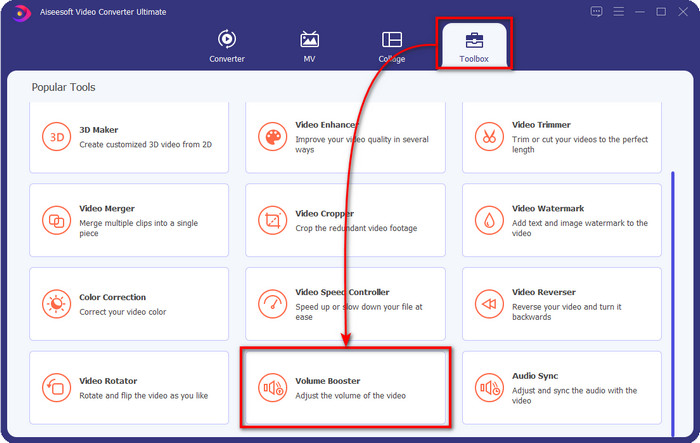
Step 2. Go to the Toolbox tab, look for the Volume Booster, and click it.
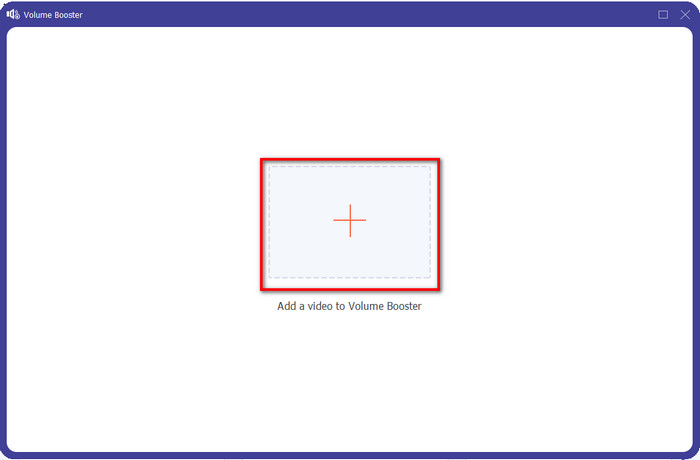
Step 3. A new window will show; click the add button to insert the file to increase the volume. Browse for the file, and press Open.
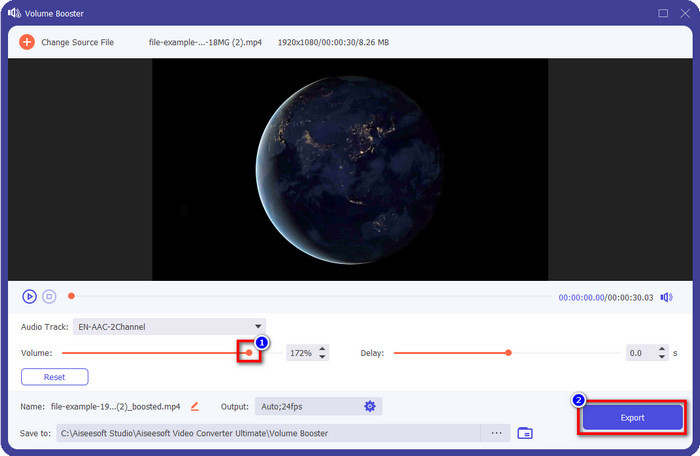
Step 4. After that, go to the Volume and adjust it by dragging the slider to the right to increase volume. Once you've done, click Export to proceed. With that, you have already increased the volume of the video you want.
Articole similare:
Partea 2. Întrebări frecvente despre creșterea volumului pe AirPods
Ascultarea tare sună bine?
Nu, nu este potrivit pentru urechea ta. Deși a asculta muzică la un nivel maxim este bine pentru noi, nu este pentru urechile noastre. Asigurați-vă că nu sunteți supraexpus la 70 de decibeli pentru a evita pierderea auzului și alte daune permanente, în special dacă utilizați căști sau AirPods. În general, acest lucru nu vă va afecta instantaneu urechea, deoarece căștile noastre nu pot crea un sunet asurzitor ca o explozie. Dar, pe termen lung, va fi un rezultat prost. Deci, înainte de a se întâmpla asta, trebuie să preveniți acest lucru.
De ce trebuie să măresc sunetul?
În unele cazuri, va trebui să măriți volumul pentru a auzi mai bine sunetul, în special pentru a asculta unele detalii care fac parte din audio sau video. Dar amintiți-vă, preveniți supraexpunerea urechii la un sunet puternic pentru a evita unele complicații care pot duce la daune permanente.
De ce au AirPod-urile mele buzz?
Există multe motive posibile pentru care AirPod-urile dvs. ar putea declanșa zgomot. Unul dintre motive este că puneți presiune intensă asupra AirPod-urilor în timp ce redați sunetul prea mult timp la bas. Buzz-ul se va întâmpla după presiunea continuă asupra AirPod-urilor. Așadar, pentru a evita acest lucru, trebuie să utilizați corect volumul și nu prea tare.
Concluzie
Now we have learned how to turn up the volume on AirPods on your iOS devices quickly. Although the technique we present can help you increase the volume, it is sometimes not enough. So, if you are still not satisfied with the volume, you can use the FVC Video Converter Ultimate with the ways we taught. With this tool, you can quickly increase the volume of your audio within a few clicks. Today is your lucky day because you can download it right away by clicking the download button below. What are you waiting for? No need to worry; it is safe to download for everyone.
-
 Cum să-ți faci volumul mai puternic și să experimentezi cea mai bună calitate a sunetului [2021]
 Întâmpinați dificultăți deoarece volumul vizionării dvs. este foarte scăzut? Apoi citiți acest articol, deoarece includem trucuri despre cum să creșteți volumul și un instrument pe care îl puteți utiliza.
-
 Modalități rapide și ușoare despre cum să sincronizați audio și video în Adobe Premiere Pro
 Doriți să știți cum să sincronizați audio și video în Premiere Pro? Atunci acest articol se va potrivi nevoilor tale. Pe măsură ce încercăm noi înșine, cum să sincronizăm pentru a oferi doar pașii reali și simpli.
-
 Top 3 soluții despre cum să remediați problema de întârziere audio [2021]
 Doriți să știți cum să remediați întârzierea audio pe videoclipul dvs.? Atunci sunteți în locul potrivit, deoarece vă explicăm care sunt factorii și cum să o remediați.
