


 Video Converter Ultimate
 Screen Recorder
 Reparație video
 Descărcare sigură
Tot ce puteți afla despre Ce este un fișier PNG
În zilele noastre, formatul de fișier PNG este unul dintre formatele standard de imagine. Îl poți vedea pe internet, pe calculatoare, pe telefoane mobile etc. Totuși, unii utilizatori nu știu nimic despre acest format. Din fericire, acest articol îți va oferi suficiente informații de care ai nevoie. Vei descoperi ce este un fișier PNG. În plus, acest articol îți va prezenta metode excelente pentru a converti imaginile în format de fișier PNG.

Partea 1. Informații detaliate despre fișierul PNG
Extensia Portable Network Graphics (PNG) a familiei de raster efectuează compresie fără pierderi de imagine. Nu este brevetat și a fost creat ca înlocuitor pentru GIF, formatul de interschimb grafic. În plus față de imaginile standard în tonuri de gri care oferă transparență, acestea pot fi bazate pe o paletă. PNG nu acceptă tipuri de culori suplimentare, cum ar fi CMYK. Se datorează faptului că unul dintre scopurile sale principale este de a trimite imagini prin Internet. De asemenea, nu a ținut cont de nicio treburi profesionale de imprimare. Imaginea din fișier este împărțită în bucăți cu informații. Include pixeli sau comentarii textuale codificate, iar verificarea integrității se face conform RFC 2083. Mulți utilizatori întâlnesc formatul PNG. Pentru că este unul dintre formatele populare în zilele noastre. Poate fi un atașament de e-mail sau o imagine pe care ați obținut-o de pe un site web. Uneori, capturile de ecran au și această rezoluție. Este mai util pentru profesioniștii care îl pot folosi.
Din punct de vedere istoric, formatul de imagine PNG a început în 1995. Oliver Fromme, un expert IT, a creat formatul PING. Dar mai târziu, a devenit PNG. Acest format de fișier este următoarea evoluție a formatului GIF. Formatul GIF este cu opt ani mai vechi decât PNG. GIF are multe dezavantaje. Are nevoie de o licență de brevet și de o gamă limitată de 256 de culori. Această limitare poate afecta imaginea atunci când o deschideți pe ecranul computerului. Ca rezultat, realizarea unui fișier PNG este cea mai bună alegere. Este fără brevet și are o paletă de culori mai mare.
Partea 2. Cum să deschideți un fișier PNG
Deoarece știți deja ce este un fișier .png, această parte vă va spune cum să deschideți acest format pe dispozitivele dvs. și pe diferite browsere. Puteți deschide fotografiile dvs. PNG în orice browser web popular. Include Firefox, Chrome, Explorer și multe altele. Metoda este fără probleme.
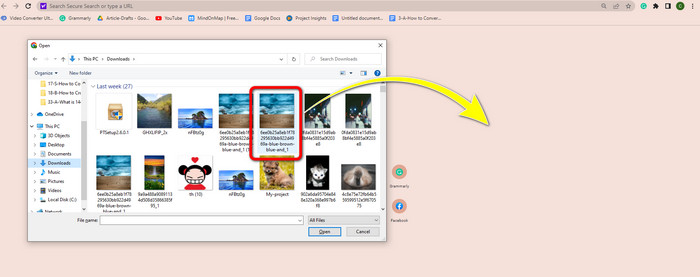
Dacă folosești browserul, poți deschide imaginea PNG apăsând Ctrl + O pe tastatură. Alege imaginea PNG pe care vrei să o deschizi. Apoi, dă clic pe butonul Open din folderul tău de fișiere.
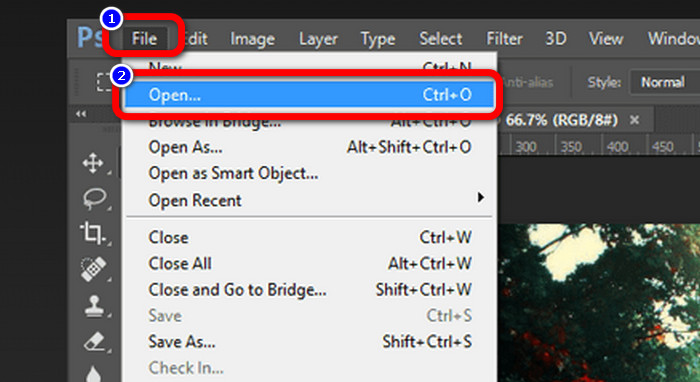
Există, de asemenea, modalități de a deschide imagini PNG în Photoshop, Drive sau alte aplicații. Poți naviga la File > Open > Select the photo. După aceea, apasă Enter. În acest fel, poți vizualiza imaginea PNG în aplicație.
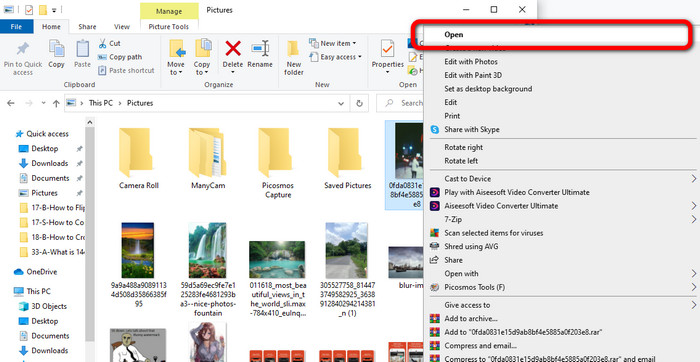
Pe computerul tău cu Windows, este ușor să deschizi un fișier PNG. Dă clic pe File folder din bara de activități pentru a-l deschide. Mergi la fila Quick access pentru a vedea imaginea PNG. Când vezi imaginea, dă clic dreapta pe ea și selectează opțiunea Open. Astfel, poți vizualiza imaginea pe tot ecranul.
Partea 3. Mod eficient de a converti imagini în format PNG
Convertiți imagini în PNG folosind FVC Free Image Converter
Poți folosi diverși convertoare online pentru a converti imaginile în format PNG. Totuși, unele dintre ele nu sunt sigure. De asemenea, alte convertoare sunt costisitoare. Dacă vrei un convertor de imagini sigur și gratuit, folosește FVC Free Image Converter. Acest instrument este una dintre aplicațiile de top pentru convertirea imaginilor online. Îl poți folosi gratuit, ceea ce îl face accesibil tuturor utilizatorilor. De asemenea, poți încărca imagini în formate diferite precum TIFF, JPG, PNG, GIF și multe altele. În plus, convertirea imaginilor este simplă. Oferă doar trei pași pentru a-ți converti imaginile în format PNG. Poți, de asemenea, să convertești simultan mai multe imagini. Acest convertor oferă un proces de conversie în lot. Astfel, poți economisi mai mult timp. Mai mult, îți garantează confidențialitatea prin ștergerea datelor după procesul de conversie. În plus, nu trebuie să te înregistrezi sau să îți creezi un cont în această aplicație. Îl poți folosi imediat ce deschizi site-ul.
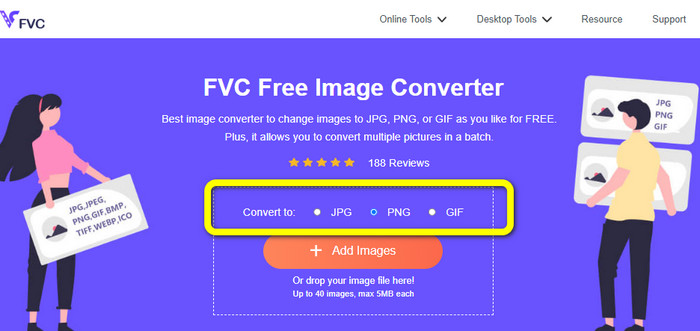
Pasul 1: Mai întâi, vizitează site-ul FVC Free Image Converter. Când ești pe pagina principală, mergi la opțiunea de format și selectează fișierul PNG ca format de ieșire dorit.
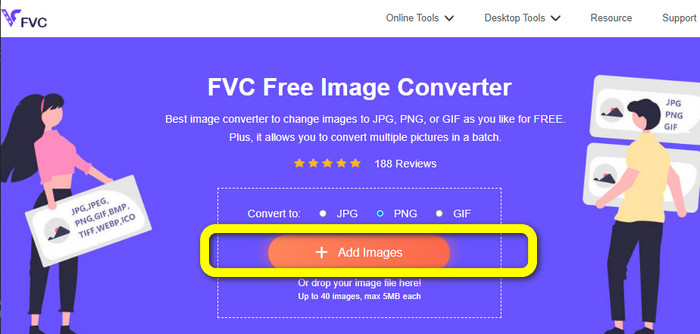
Pasul 2: Dă clic pe butonul Add Images din centrul interfeței pentru a încărca fotografia. Deschide fotografia pe care vrei să o convertești din folderul tău de fișiere.
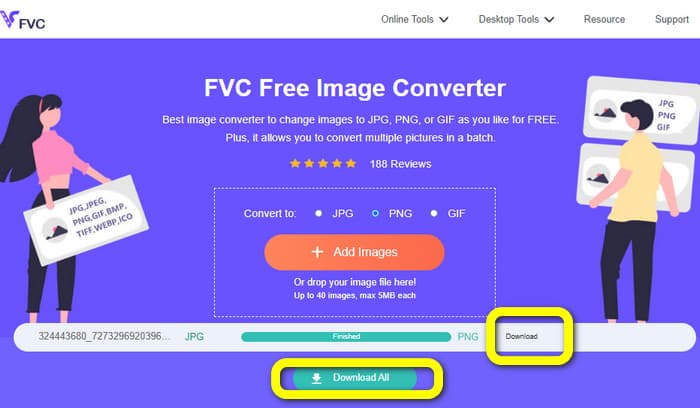
Pasul 3: După procesul de conversie, dă clic pe butonul Download pentru a salva imaginea finală. După aceea, poți deschide imaginea PNG pe computerul tău.
Convertiți imaginile în PNG folosind Coolutils
Poți folosi convertorul de fișiere imagine Coolutils online fără să descarci nimic. Nu este nevoie să aștepți un link prin e-mail, deoarece acest convertor online efectuează imediat conversia pentru tine. Acest instrument online îți permite să convertești imagini în PNG rapid. Un aspect care ne place la acest serviciu este posibilitatea de a roti și redimensiona o imagine înainte de conversie. Totuși, nu arată o previzualizare a modului în care va arăta imaginea rotită după conversie. Deoarece funcționează printr-un browser web, poți folosi această metodă cu orice sistem de operare, inclusiv Windows, Linux și Mac. Acest program acceptă multe formate de intrare, inclusiv JPEG, PNG, GIF, BMP și TIFF.
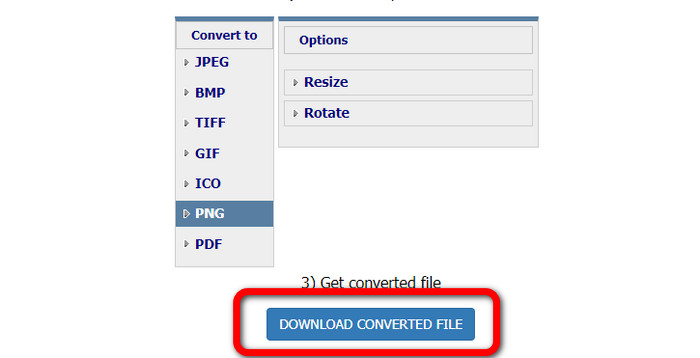
Pasul 1: Deschide browserul și caută Coolutils. Apoi, dă clic pe butonul Upload File to Convert pentru a adăuga imaginea pe care vrei să o convertești.
Pasul 2: Selectează formatul PNG din opțiunile de format.
Pasul 3: Dă clic pe butonul Download converted file pentru a salva imaginea pe desktop. Poți folosi acest instrument și pentru a converti imaginile în JPG.
Partea 4. Întrebări frecvente despre fișierul PNG
1. Care este diferența dintre PNG și JPG?
Principala diferență între formatele de fișiere PNG și JPG este algoritmul lor de compresie. Formatul de fișier PNG folosește un algoritm fără pierderi. Înseamnă că poate păstra toate informațiile din imagine. Formatul JPG folosește un algoritm de compresie cu pierderi. Renunță la unele informații despre imagine pentru a reduce dimensiunea fișierului.
2. Cât de eficient afișează formatul PNG textul scris?
Este eficient. Comprimarea fără pierderi a acestui fișier poate afișa fotografii grele de text. Include aspecte de pagină și capturi de ecran. Sunt incluse scanări ale textului tipărit, cum ar fi documente scrise de mână și pagini de ziare.
3. Ce este mai bun, JPG sau PNG?
Depinde de scopul tău. Fișierul JPG scade calitatea imaginii. De asemenea, funcționează mai bine pentru a reduce dimensiunea fișierului unei imagini. PNG a comprimat fișierul păstrând în același timp calitatea imaginii. Este excelent pentru stocarea articolelor, cum ar fi text, grafică emblematică și desene.
Concluzie
Toate informațiile de mai sus îți prezintă formatul de fișier PNG. Îți oferă chiar și suficiente date despre la ce este folosit un fișier PNG. Mai mult, acest articol îți arată instrucțiuni practice despre cum să convertești imaginile în format PNG folosind FVC Free Image Converter. Așadar, dacă vrei să convertești fișiere imagine, folosește acest convertor de imagini online de încredere.
-
 8 Convertoare de imagini uimitoare [Informații complete]
 Această recenzie vă va spune despre cele mai bune convertoare de fișiere imagine pe care le puteți utiliza pentru a converti fișiere imagine. Citiți această postare pentru a afla cel mai bun convertor de imagini pentru dvs
-
 Detalii complete despre diferențele dintre JPEG și JPG și PNG
 Această postare vă va oferi suficiente informații despre diferențele dintre JPEG și JPG și PNG. În plus, veți învăța cum să convertiți imaginile în aceste fișiere
-
 Ce este JPEG/JPG: convertiți-vă imaginile în JPG fără efort
 Ești curios despre semnificația JPEG? Avem un răspuns pentru tine. De asemenea, veți învăța cum să convertiți diferite formate de imagine în fișiere JPG. Citiți postarea acum.
