


 Video Converter Ultimate
 Screen Recorder
 Reparație video
 Descărcare sigură
Ghiduri ușor de înțeles pentru a converti 3GP în MKV
On 3G phones, the multimedia container format 3GP is used. This format can be used on 2G and 4G mobile devices. However, even though it is a great format, 3GP is still an old-fashioned video format. It implies that using other programs to play this file type is impossible. Your 3GP video must be converted to one of the newest and most popular formats available today, such as MKV if you wish to play it. With the MKV format, you can use its widespread compatibility and play videos on practically any software and hardware. You may easily convert 3GP to MKV with the help of this guide. So, what are you waiting for? Read the article carefully.

Partea 1: Metodă remarcabilă de a converti offline 3GP în MKV
You can use Video Converter Ultimate to convert 3GP to MKV in high quality. It can convert video files instantly because it allows you to do a batch conversion process, wherein converting multiple files is no longer a problem. Even though the 3GP format is not popular in this modern era, Video Converter Ultimate still supports this format. It is one of the reasons why you need to rely on this offline application. It supports over 100 video formats, including AVI, MP4, MOV, MKV, WMV, DV, MTS, VOB, and more. More importantly, you can access this converter whether you are an advanced or a beginner. It has an intuitive interface to understand each button and option on your screen. Also, this downloadable application is reachable on both Mac and Windows.
Funcții
◆ Convertește peste 100 de formate video, cum ar fi 3GP, MKV, MP4, M4V, MTS, MKV, WMV, AVI, FLV, MOV etc.
◆ Procesul de conversie în lot este disponibil.
◆ Editați videoclipuri folosind un amplificator video, un compresor, un trimmer, un rotator, un inversor și multe altele.
◆ Creați un colaj cu filtre gratuite și șabloane gata de utilizare.
◆ Creatorul de videoclipuri muzicale este la îndemână, inclusiv teme gratuite.
◆ Convertiți formate de imagine, cum ar fi JPG, PNG, BMP și multe altele.
Pro
- Perfect pentru toți utilizatorii.
- Procesul de descărcare și instalare nu este solicitant.
- Are o interfață intuitivă.
- Este gratuit să convertești fișiere video nelimitate.
- Utilizatorii Mac și Windows pot utiliza această aplicație.
Contra
- Pentru funcții mai excepționale, utilizați versiunea pro.
Pașii simpli de mai jos vă vor oferi cea mai bună modalitate de a converti 3GP în MKV utilizând FVC Video Converter Ultimate.
Step 1: First, download the FVC Video Converter Ultimate on your computer. Click the Download button below. Then, open the application when the installation is done.
Descărcare gratuită pentru Windows 7 sau o versiune ulterioară Descărcare securizată
Descărcare gratuită pentru MacOS 10.7 sau o versiune ulterioară Descărcare securizată
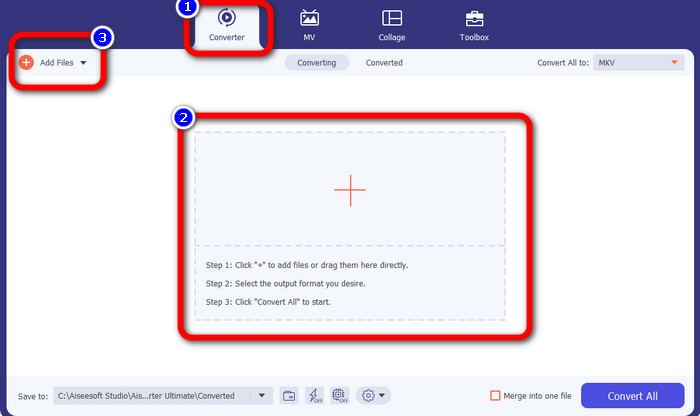
Step 2: Press the Plus icon or Add Files button from the Converter panel. The folder from your computer will pop up. Then, choose the 3GP file you want to convert.
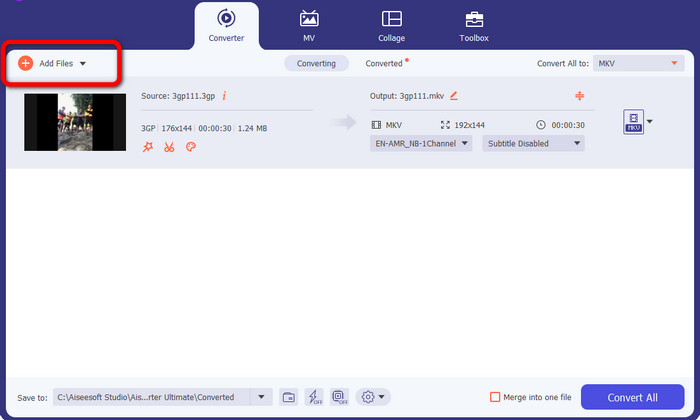
Step 3: Do you want to add another 3GP file? Then click the Add Files button.
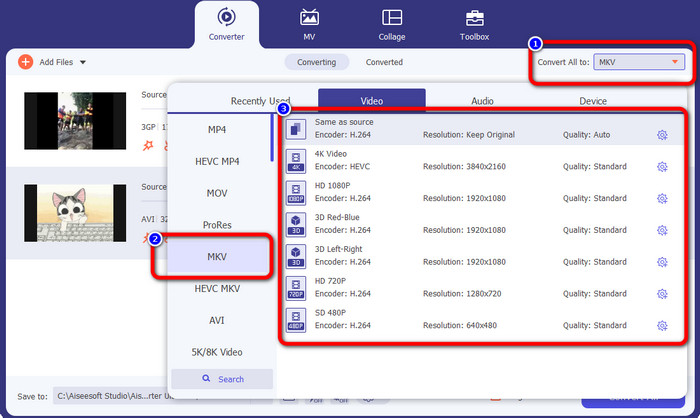
Step 4: To transform them into MKV file format, click the Convert All to button. Then, select the MKV format from the format options. Then, click your chosen video quality.
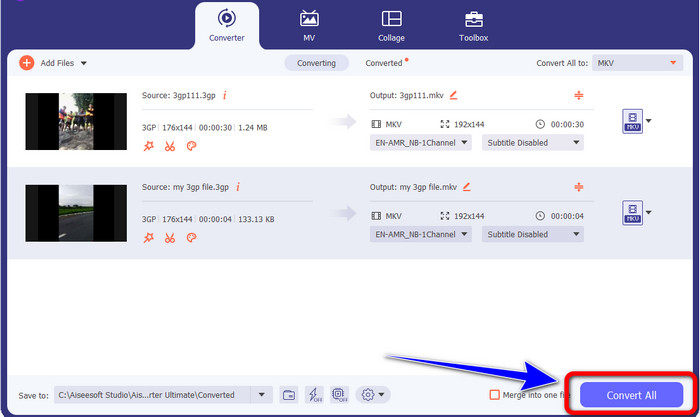
Step 5: Convert your videos by clicking the Convert All button. Then, save your final output after the installation process.
Partea 2: Mod simplu de a converti 3GP în MKV folosind FFmpeg
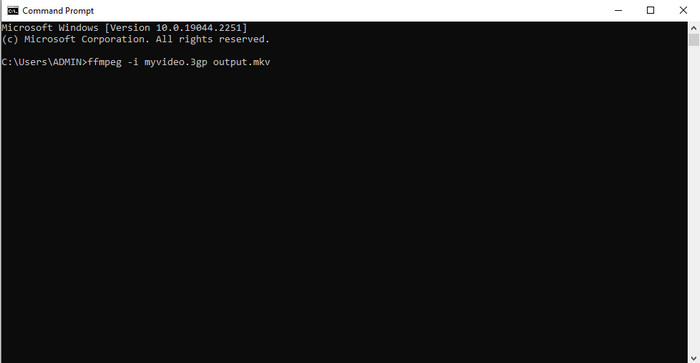
O altă modalitate este utilizarea FFmpeg pentru a converti 3GP în MKV. Acest instrument este, de asemenea, bun la conversia fișierelor. Cu toate acestea, fișierul FFmpeg este complicat de utilizat, ceea ce este nepotrivit pentru începători. Există multe procese pentru a configura această aplicație pe computer înainte de a o putea folosi. Asigurați-vă că aveți tutoriale de urmărit când utilizați acest software.
Step 1: Download and set up the FFmpeg on your computer.
Step 2: Go to the command prompt, and type “FFmpeg -i
Partea 3: Cea mai bună soluție pentru a converti online 3GP în MKV
If you prefer converting files using a browser, use the FVC Free Video Converter Online. This web-based application can convert 3GP to MKV effortlessly. It offers simple methods for converting files, which is excellent for everyone. From the name itself, you can use this converter for free. You can enjoy its features, such as editing video and audio’s bitrate, frame rate, sample rate, resolution, and other parameters. Moreover, aside from 3GP and MKV formats, it supports various video formats, such as MOV, AVI, FLV, MP4, M4V, VOB, and more. You can also convert audio files like WAV, AC3, AAC, FLAC, WMA, etc. Follow the steps below to convert video files easily.
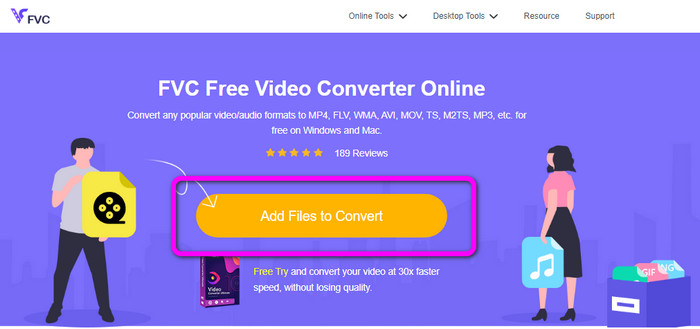
Step 1: Visit the FVC Free Video Converter Online website. Add the 3GP video by clicking the Add Files to Convert button.
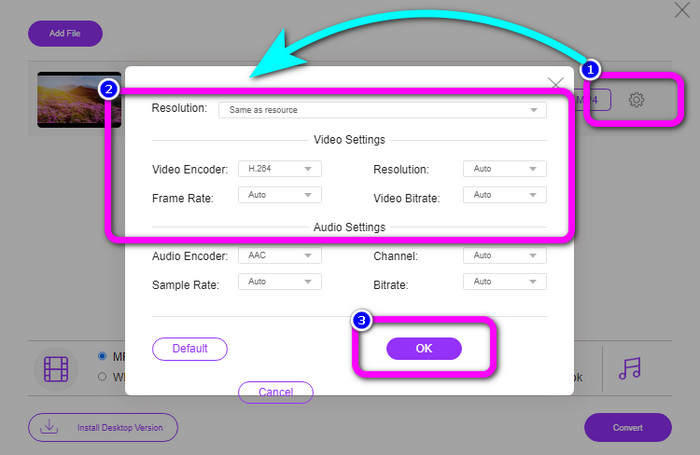
Step 2: You can change your video’s bitrate, frame rate, resolutions, and other parameters by clicking the Setting icon. Then click OK.
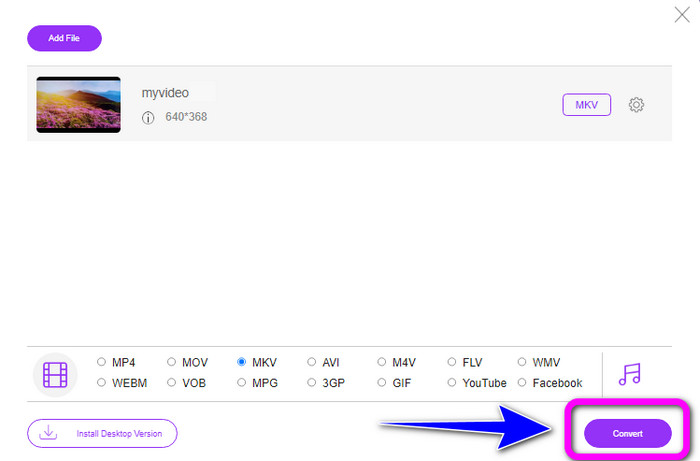
Step 3: On the bottom part of the interface, you will see the format options. Select the MKV format and click the Convert button. You also can use this online tool to change F4V to MKV.
Partea 4: 3GP vs. MKV
| Fişier | 3GP | MKV |
| Extensie | .3gp | .mkv |
| Categorie | Video | Video |
| Descriere | Redat pe telefoane mobile 3G și alte telefoane, 3GP este un format de container multimedia creat de Third Generation Partnership Project (3GPP). În 1998, a fost creat inițial 3GP. Telefoanele mobile cu rețele bazate pe GSM se potrivesc de obicei în acest suport (Global System for Mobile Communications). Este potrivit pentru telefoanele mobile deoarece utilizează o cantitate mică de lățime de bandă și ocupă mai puțin spațiu pentru fișierele care necesită o cantitate mică de date. | Un format de container multimedia open-source numit MKV Matroska permite multe piese audio și subtitrare într-un singur fișier. Este cel mai potrivit tip de fișier pentru adăugarea multor materiale, inclusiv filme, audio, texte și fotografii. Este un format RAW pe care îl puteți răsturna și separa pe baza pistelor de date. |
| Dezvoltat de | Proiect de parteneriat a treia generație | Steve Lhomme |
| Tip MIME | video/3gpp audio/3gpp | video/x-matroska |
| Programe asociate | Filme și TV Microsoft VLC Media Player Windows Media Player QuickTime Player | KMPlayer VLC Media Player Jucător MX Jucător GOM PotPlayer |
Partea 5: Întrebări frecvente despre conversia 3GP în MKV
Care este calitatea 3GP?
Formatul de fișier video 3GP are două rezoluții video. Pentru telefoanele care acceptă formatul 3GP, rezoluția este 176X144. Pentru telefoanele cu ecran lat, PSP, MP4 Player și iPod, rezoluția este 320X240.
Care este avantajul formatului de fișier 3GP?
Dimensiunea 3GP este principalul său beneficiu. Este un fișier video compact creat pentru a reduce utilizarea stocării. Dimensiunea compactă utilizează puține date, ceea ce îl face ideal pentru descărcarea videoclipurilor prin dispozitive mobile.
Este 3GP un codec?
Da. Acest fișier este un format de container multimedia care acceptă alte codecuri, inclusiv H.263, video H.264 și MPEG-2.
Concluzie
These are great solutions to convert 3GP to MKV. But FFmpeg is complicated to install and takes a lot of procedures. So, if you want trouble-free methods, use Video Converter Ultimate and FVC Free Video Converter Online. These are the tools you can utilize without exerting too much effort!
-
 WebM la 3GP: Cele mai eficiente moduri de utilizare a acestor instrumente
 Căutați un convertor remarcabil WebM în 3GP? Acest articol vă va asigura că obțineți cele mai eficiente metode pentru a vă converti WebM în 3GP
-
 Aflați procesul simplu despre cum să convertiți M4V în 3GP
 Iată cele mai simple proceduri pentru a converti M4V în 3GP pe dispozitivul dvs. Dacă sunteți dispus să învățați, atunci să trecem mai departe și să trecem la acest articol
-
 Aflați procesul simplu despre cum să convertiți M4V în 3GP
 Acest articol vă va arăta cele mai bune tehnici pe care le puteți încerca pentru a converti rapid XviD în 3GP. Așadar, rămâneți pe fază și fiți martor la modalitățile minunate din acest articol
