


 Video Converter Ultimate
 Screen Recorder
 Reparație video
 Descărcare sigură
Cele mai rapide moduri de a converti FLAC și WAV (Offline/Online)
Free Lossless Audio Codec, cunoscut în mod obișnuit ca FLAC, este un format de fișier audio care seamănă remarcabil cu MP3. Oferă utilizatorilor o calitate excelentă a sunetului, ocupând în același timp un spațiu relativ mic pe disc. În plus, acest tip de format este fără pierderi, ceea ce înseamnă că o mare parte din datele audio este păstrată în ciuda procesului de compresie. Pe de altă parte, există situații în care trebuie să convertești fișiere FLAC într‑un alt format, cum ar fi WAV, dacă vrei să îți aduci experiența de ascultare la un nivel optim și superior de calitate. Trebuie să alegi între cele două? Află mai jos cum poți obține ambele folosind cele mai bune instrumente de conversie FLAC în WAV disponibile.

Partea 1. Conversia FLAC și WAV offline
Video Converter Ultimate este un instrument de top pentru transformarea fișierelor în orice format audio, inclusiv WAV și FLAC. Acest program oferă o funcție de conversie în lot, care îți permite să convertești o colecție de fișiere audio dintr‑o singură mișcare. Mai mult, poți maximiza calitatea fiecărei melodii la care dorești să lucrezi, deoarece programul le permite utilizatorilor să ajusteze parametrii tehnici ai ieșirii, precum rata de eșantionare și bitrate‑ul. Dacă dorești să convertești în lot WAV în FLAC sau invers, citește ghidul rapid pregătit mai jos.
Pasul 1. Lansează programul pe dispozitiv selectând butonul corespunzător de Descărcare gratuită de mai jos. În pasul următor, urmează instrucțiunile de pe ecran pentru a porni programul. Te poți familiariza cu interfața după instalare.
Descărcare gratuită pentru Windows 7 sau o versiune ulterioară Descărcare securizată
Descărcare gratuită pentru MacOS 10.7 sau o versiune ulterioară Descărcare securizată
Pasul 2. Apasă pictograma Adăugare de pe ecranul principal și importă fișierul audio la care vrei să lucrezi. Ulterior vei fi direcționat către o previzualizare a fișierului importat. Poți încărca și un folder dacă dorești să convertești în bloc. Alege din directorul tău folderul care conține toate fișierele audio de care ai nevoie.
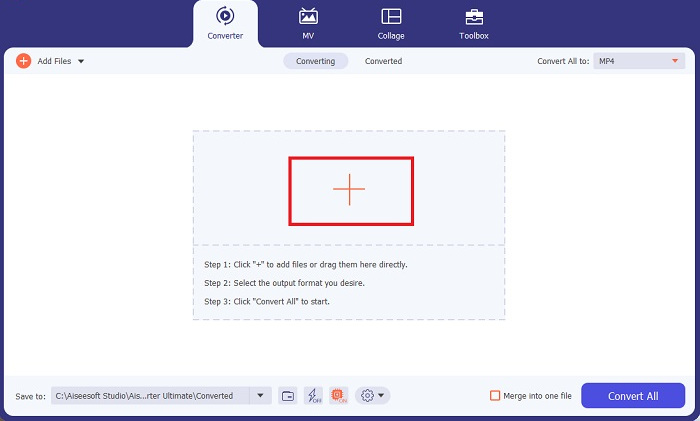
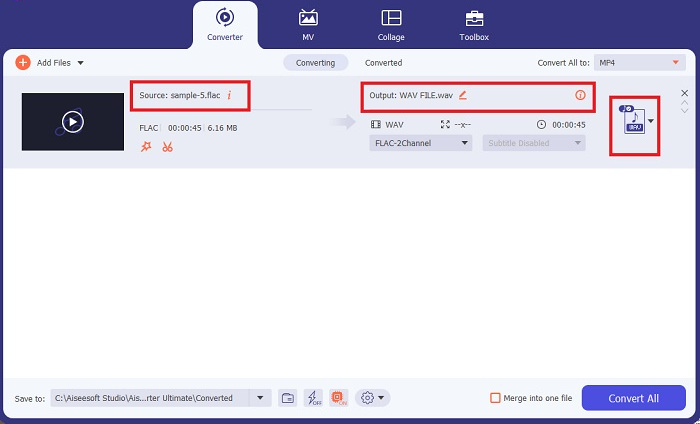
Pasul 3. Acum poți schimba formatul de ieșire făcând clic pe butonul Convertor din partea de sus a ecranului programului. De acolo, alege WAV din fila de selecție Ieșire audio. Între timp, poți ajusta rata de eșantionare și bitrate‑ul fișierului de ieșire pentru a se potrivi cu calitatea dorită.
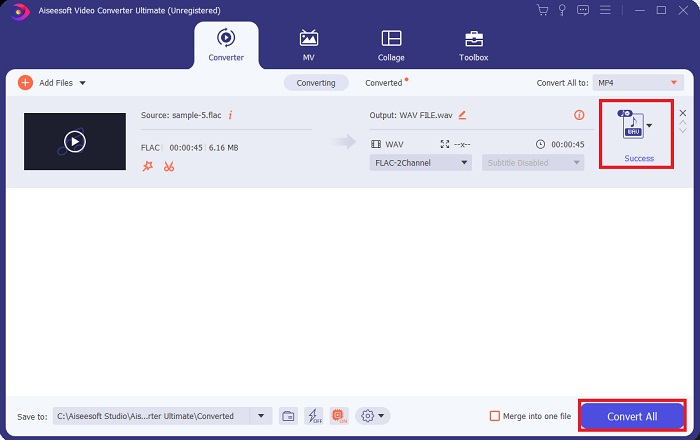
Pasul 4. Pentru ultimul pas, inițiază procesul de conversie făcând clic pe butonul Conversie totală de mai jos. Ulterior, programul va deschide automat folderul de ieșire pentru a verifica noul format al fișierului tău.
Pro
- Poate converti în loturi formatul de fișier audio FLAC în WAV.
- Programul funcționează bine atât cu Windows, cât și cu Mac OS.
- Are o viteză de conversie rapidă.
Contra
- Este nevoie de o taxă de abonament plătită după proba gratuită.
- Programul nu funcționează pe dispozitivele cu sistem de operare Linux.
Partea 2. Convertiți FLAC în WAV sau WAV în FLAC Online
Deși motorul tău de căutare îți poate afișa o multitudine de convertoare online FLAC în WAV sau WAV în FLAC, iată ce poți face pentru a‑ți ușura munca. Free Audio Converter Online este o opțiune excelentă pentru a evita instalarea unui program pe desktop. Acest convertor online funcționează fără probleme, oferind siguranță și securitate datelor tale personale în timp ce realizează conversia. În plus, poți profita de funcția de conversie în masă a software‑ului, ca și cum ai folosi un program pentru desktop.
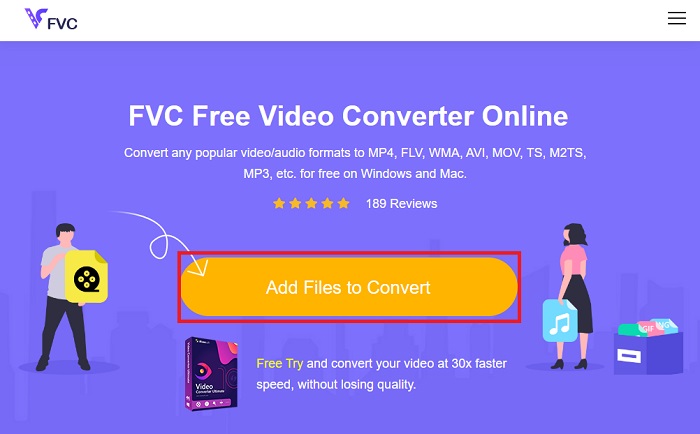
Pasul 1. Fă clic pe linkul de mai sus pentru a ajunge pe site‑ul principal Free Online Video Converter. Selectează Add Files to Convert de pe ecranul principal și încarcă fișierul audio.
Pasul 2. Previzualizarea fișierului original va apărea pe ecran. Din același panou, coboară mai jos și alege formatul de ieșire dorit.
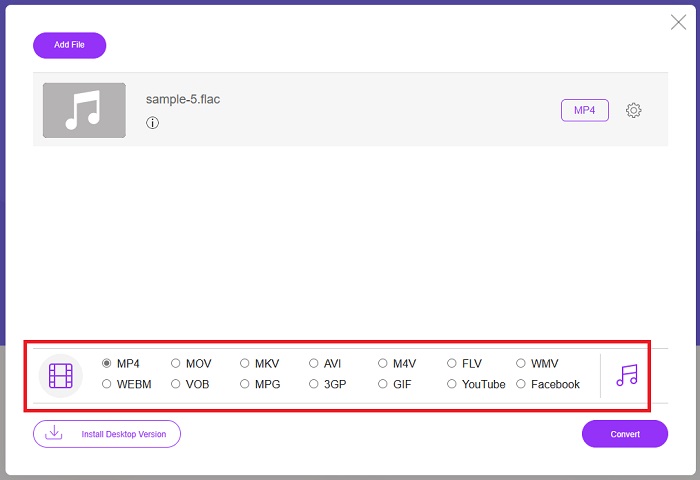
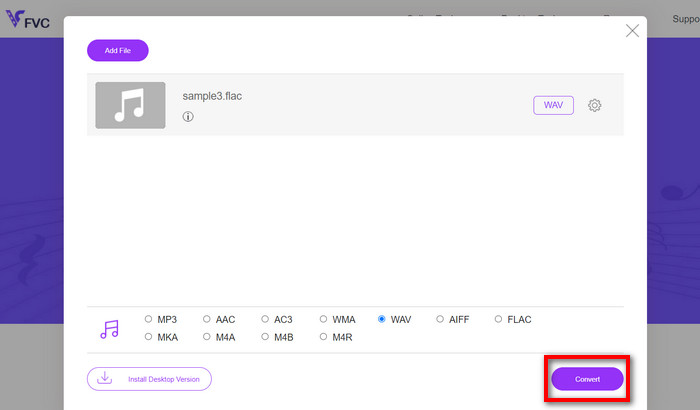
Pasul 3. Apasă butonul Convert pentru a schimba formatul FLAC în WAV. Dacă vrei să convertești un alt fișier, repetă acest ghid de la început.
Pro
- Funcționează pe orice motor de căutare precum Google Chrome, Safari, Firefox și multe altele.
- Oferă diverse formate de fișiere audio populare, cum ar fi MP3, AAC și WMA.
- Utilizatorii se pot bucura de conversii nelimitate pe zi.
Contra
- Viteza de conversie depinde de puterea conexiunii la internet.
Lecturi suplimentare:
Convertește FLAC în MP3 pentru a păstra calitatea audio
Pași simpli pentru a converti WAV în OGG pentru o dimensiune audio optimă
Partea 3. Întrebări frecvente despre conversia FLAC și WAV
Conversia unui fișier din FLAC în WAV va scădea în calitate?
Conversia fișierelor audio din FLAC în WAV nu va degrada calitatea, deoarece rezoluția lor este necomprimată. Cu toate acestea, să presupunem că convertiți un fișier din WAV în FLAC. În acest caz, este posibil să observați ușoare modificări, în special pentru cei ale căror urechi sunt destul de în detalii. Dacă aveți nevoie de asistență pentru a decide pe care să o păstrați, iată o bucată de perspectivă pe care o puteți privi; Formatele audio FLAC sunt o alegere bună pentru stocarea unui tezaur de melodii, în timp ce dimensiunea fișierelor WAV este mai mare, dar potrivită pentru editarea audio.
Este WAV formatul audio cu cea mai înaltă rezoluție?
WAV este abrevierea Waveform Audio File Format dezvoltată de IBM și Microsoft. Acest format este considerat formatul cu cea mai înaltă rezoluție din industria muzicii digitale, deoarece conține frecvențe audio brute și fără compromisuri.
Care este cel mai bun convertor online FLAC în WAV?
Fără îndoială, FVC Free Online Video Converter este cel mai bun convertor gratuit FLAC în WAV online. Nu trebuie să dobândiți pricepere tehnică pentru a transforma orice fișier video și audio folosind software-ul. Îți poate face treaba eficient, deoarece este ușor de utilizat și are o viteză de conversie de neegalat. Mai mult, acest program online oferă, dacă nu toate, dar majoritatea formatelor audio populare pe care le cunoaștem.
Concluzie
Conversia poate avea loc în ambele sensuri, de la FLAC la WAV și de la WAV la FLAC. Deoarece ambele formate de fișiere sunt răspândite în muzica digitală de astăzi, alegerea unuia sau altuia poate depinde de sarcina pentru care le vei folosi. Cu instrumentele menționate mai sus, poți comuta oricând între formate. Urmează pașii indicați mai sus pentru a schimba FLAC în WAV sau WAV în FLAC și nu ar trebui să întâmpini nicio dificultate.
-
 Aflați cum să convertiți MP3 într-un format WAV
 Vrei să știi cum să convertești MP3 în WAV? Determinați care dintre instrumente produce cea mai bună conversie de calitate pe care o puteți obține.
-
 WAV Player - Cele mai bune 5 aplicații WAV Player pentru Android, iPhone, PC și Mac
 Cum să redați fișiere WAV pe telefonul Android? Ce jucător poate juca WAV? Această postare împărtășește cele mai bune 5 playere WAV gratuite pentru Android, iPhone, Mac și PC.
-
 Top 3 editori de metadate FLAC pe Mac și Windows [Actualizat 2023]
 Doriți să modificați metadatele FLAC? În acest caz, trebuie să citiți acest articol, deoarece oferim suficiente cunoștințe despre cel mai recent editor de metadate FLAC pe care îl puteți utiliza.
