


 Video Converter Ultimate
 Screen Recorder
 Reparație video
Înțelegeți ce sunt convertizoarele care pot fi utilizate ușor pentru a converti DivX în AVI
DivX și AVI nu sunt concurenți unul pentru celălalt, deși au fost asociate cu fișierele video; totuși, cele două au o mulțime de diferențe. De exemplu, DivX este folosit pentru a comprima conținutul videoclipurilor lungi și a le face cât mai mici posibil, fără a pierde din calitatea videoclipului în sine. În schimb, AVI este unul dintre tipurile de containere video pe care le poți folosi pentru a stoca un videoclip de înaltă definiție, însă cu o dimensiune de fișier mai mare. Acum că avem un scurt context despre cele două, să aprofundăm pentru a înțelege mai bine aceste formate și să învățăm cum să convertești DivX în AVI gratuit continuând să citești acest articol.
Partea 1. DivX vs AVI
După cum s-a spus mai devreme, DivX și AVI nu sunt cu adevărat un concurent al lor, deoarece pot fi folosite atât într-un fișier sau altul. În plus, DivX este un compresor de fișiere dezvoltat chiar de DivX, Inc. Acest compresor este proprietar și se spune că este următoarea generație de închiriere video de DVD-uri. Dar acum DivX a fost oprit din cauza încercării eșuate de a înlocui DVD-urile. Dar acum, puteți încă accesa instrumentul și îl puteți urmări în unele playere media vechi care acceptă tipul de compresie oferit de DivX.
AVI este un format de fișier media folosit pentru a conține fișiere video și audio cu diferiți codeci. Acest format a fost dezvoltat de Microsoft pentru a fi folosit la redarea oricărui flux video sau audio. La sfârșitul anului 1992, AVI a fost creat pentru a oferi un plus de calitate și un aspect futurist pentru video și audio, fiind destinat inițial doar sistemelor de operare Windows. Dar în zilele noastre poți folosi AVI și pe Mac sau Linux, chiar și pe telefoane. Totuși, există încă un aspect la formatul AVI care nu a fost îmbunătățit: comprimarea și dimensiunea fișierului.
DivX
◆ Compresoare folosite pentru a micșora dimensiunea fișierului unui container fără a atinge calitatea acestuia.
◆ Este un compresor proprietar al DivX Inc.
◆ S-a spus că este versiunea mai bună a DVD-urilor, dar a eșuat în încercarea sa.
◆ Majoritatea noilor playere media din zilele noastre nu acceptă DivX.
AVI
◆ Este cunoscut ca unul dintre containerele video și audio revoluționate în această eră modernă.
◆ Acest format este acceptat de majoritatea platformelor și software-urilor.
◆ Nu are compresie exactă suportată deoarece este fără pierderi.
Și acum că știm diferența dintre cele două, acum este momentul potrivit pentru a cunoaște convertorul DivX în AVI online și offline pe care îl puteți folosi pentru a viziona fișierul DivX.
Partea 2. 4 dintre cele mai bune convertoare și aflați cum să convertiți DivX în AVI
Top 1. FVC Video Converter Ultimate
Dacă problema ta este convertirea fișierului DivX, atunci FVC Video Converter Ultimate trebuie să fie soluția. Spre deosebire de alți convertoare, acest software a fost îmbunătățit de-a lungul anilor, devenind unul dintre convertoarele fenomenale. Pe lângă faptul că este unul dintre cele mai bune, are și cel mai rapid proces de conversie pe care îl vei experimenta, deoarece este alimentat de accelerare hardware și conversie rapidă. Iar datorită funcțiilor sale integrate a ajuns ușor în top. Deși este un program cu plată, nu va trebui să plătești mult pentru a-l folosi. Așadar, dacă vrei să înveți cum să convertești DivX în AVI pe Mac sau PC, urmează pașii de mai jos, în timp ce îl testăm chiar noi.
Pasul 1. În primul rând, înainte de a putea folosi acest instrument, trebuie mai întâi să îl descarci pe unitatea ta. Apoi instalează-l, fă setările inițiale și apasă pe Start Now pentru a continua.
Descărcare gratuită pentru Windows 7 sau o versiune ulterioară Descărcare securizată
Descărcare gratuită pentru MacOS 10.7 sau o versiune ulterioară Descărcare securizată
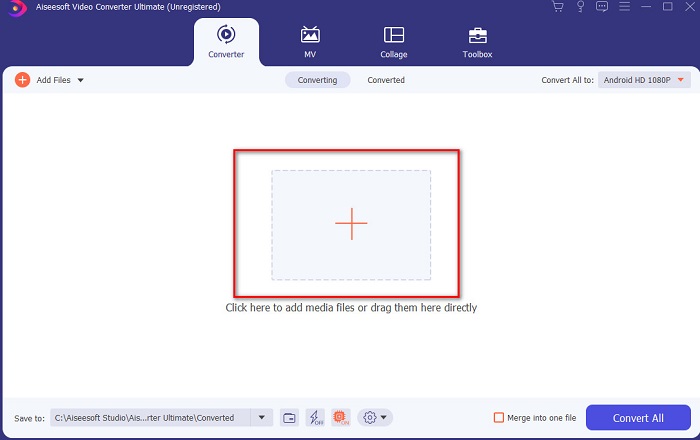
Pasul 2. Lansează instrumentul pentru a continua, apoi va apărea o interfață ca aceasta. În partea din mijloc apasă butonul + și localizează fișierul DivX pe care vrei să îl încarci, apoi apasă pe Open.
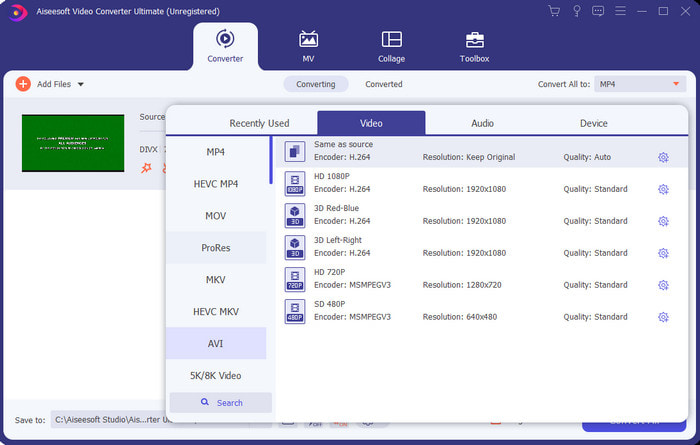
Pasul 3. Pentru a schimba DivX în AVI, apasă pe Convert All to și caută formatul AVI, apoi apasă pe acesta.
Pasul 4. Pentru a începe procesul de conversie, apasă pe Convert All și așteaptă finalizarea procesului.
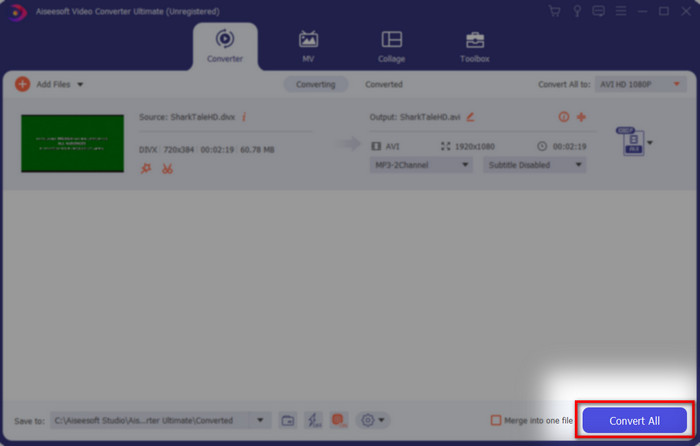
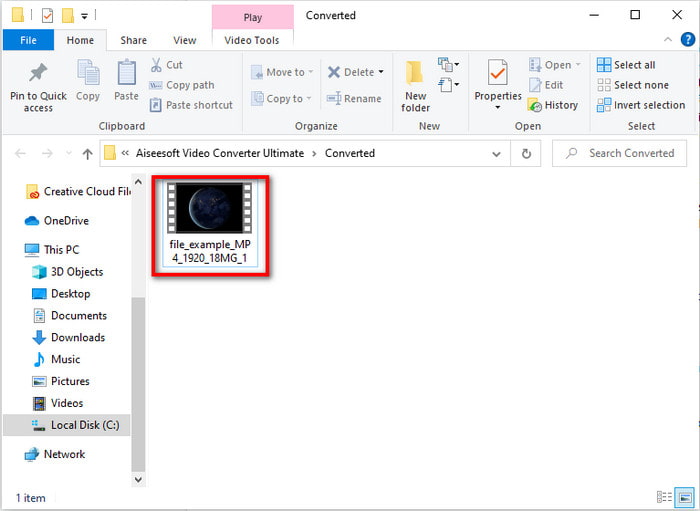
Pasul 5. Așteaptă finalizarea procesului de conversie; după ce s-a încheiat, pe ecran va apărea un folder cu fișierul convertit, dă clic pe el pentru a viziona și a te bucura de fișier.
Top 2. Freemake Video Converter
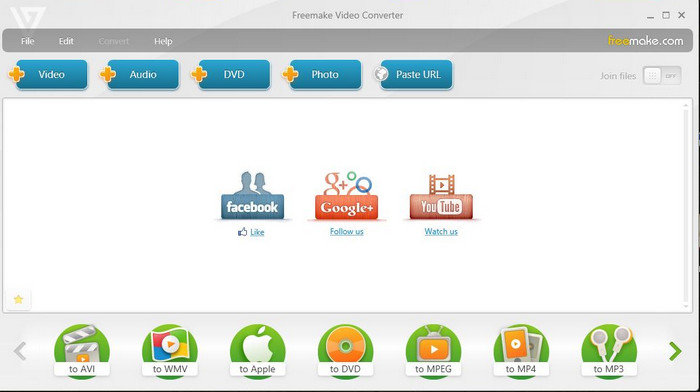
Un alt software descărcabil pe care îl poți folosi pentru a converti formatele este Freemake Video Converter. Acest instrument a ajutat deja mulți utilizatori să convertească orice fișier media într-un nou format. De asemenea, este considerat pe scară largă unul dintre cele mai bune programe pe care le poți descărca și pe care te poți baza. Deși instrumentul este bun, îi lipsesc în continuare unele formate suportate, iar procesul de conversie este foarte lent. Asta pentru că nu are accelerare hardware, așa cum are FVC Video Converter Ultimate. Așadar, dacă vrei să convertești DivX în AVI gratuit, acesta ar trebui să fie programul tău de referință.
Pro
- Gratuit pentru a descărca orice software.
- Aspectul înțelept este simplu.
Contra
- Nu are accelerare hardware.
- Unele formate nu sunt acceptate aici.
Top 3. FVC Free Video Converter
Ce faci dacă vrei să convertești un fișier media într-un nou format, dar nu vrei să descarci nimic? Atunci FVC Free Video Converter este aici să te ajute. Spre deosebire de celelalte două instrumente menționate mai sus, acest instrument poate fi accesat fără să fie nevoie să îl descarci. Deși software-ul este gratuit de accesat, unele formate nu sunt totuși acceptate. De asemenea, ai la dispoziție doar un număr limitat de formate în care poți converti. Totuși, procesul de conversie este mult mai rapid dacă îl comparăm cu Freemake Video Converter. Așadar, dacă vrei să știi cum să convertești DivX în AVI online, urmează pașii de mai jos.
Pasul 1. Mergi pe site-ul principal al FVC Free Video Converter făcând clic pe acest link.
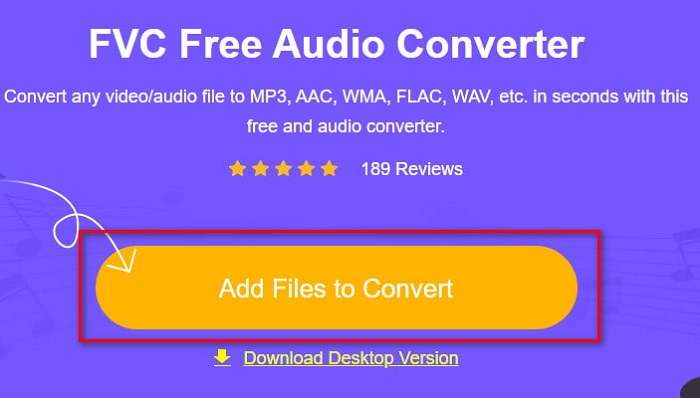
Pasul 2. Apasă pe Add Files to Convert pentru a descărca lansatorul dacă este prima dată când folosești serviciul. Iar dacă lansatorul este deja instalat, apasă din nou pe Add Files to Convert, localizează fișierul în folder, dă clic pe el și apasă pe Open.
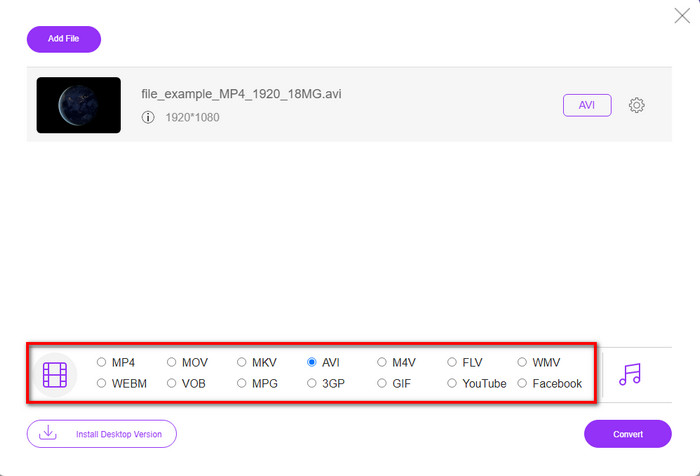
Pasul 3. Selectează formatul AVI din opțiunile enumerate mai jos sau orice alt format în care vrei să fie convertit fișierul.
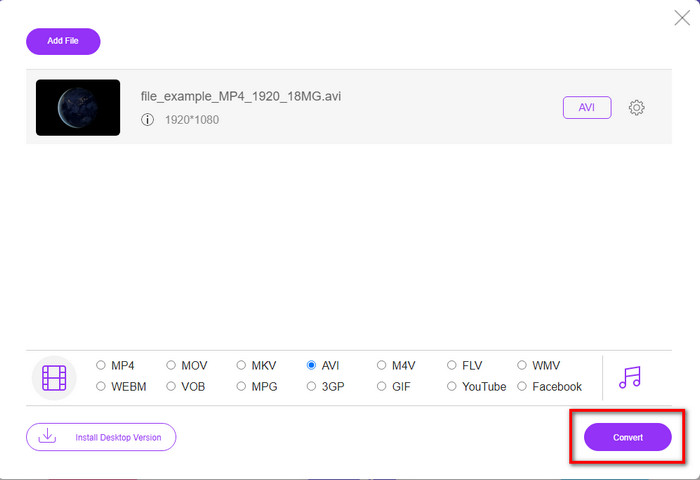
Pasul 4. Dacă ai terminat de selectat formatul, este momentul să îl salvezi pe unitatea ta dând clic pe Convert.
Pasul 5. După ce procesul a fost finalizat, așteaptă să apară pe ecran folderul fișierului. Deschide fișierul dând clic pe el și vizionează fișierul media convertit.
Top 4. Online-Convert.com
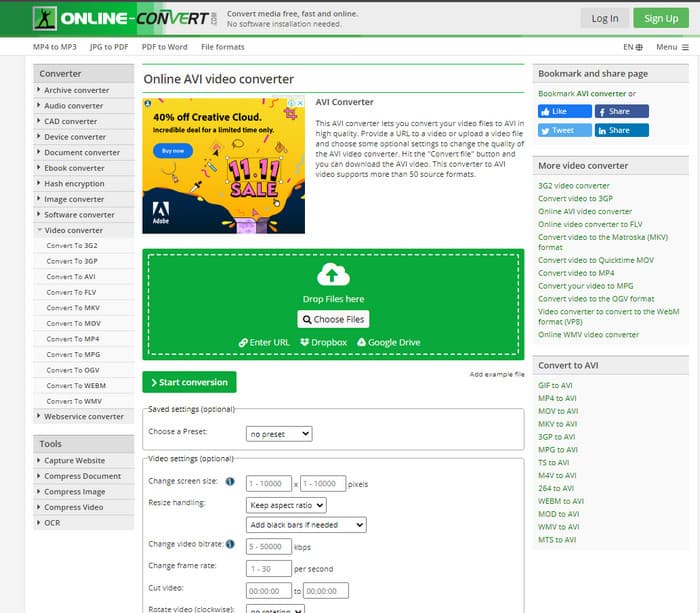
Un alt instrument online pe care îl poți folosi pentru a converti orice fișier media este Online-Convert.com. La fel ca unele dintre instrumentele online, acest convertor acceptă un număr redus de formate. Totuși, are o funcție integrată de ajustare video pe care o poți folosi, dar este dificil de gestionat, mai ales dacă nu ai cunoștințe în domeniu. În plus, încărcarea și descărcarea fișierelor aici este extrem de lentă în comparație cu FVC Free Video Converter.
Pro
- Acces gratuit pe web.
- Interfața instrumentului este grozavă și are puține sau deloc reclame.
- Procesul de conversie va depinde de conexiunea la internet.
Contra
- Nu poate fi accesat fără internet.
- Procesul de import și export va dura mult timp în comparație cu celelalte instrumente.
Partea 3. Care este cel mai bun pentru a converti DivX în AVI?
| Caracteristici | FVC Video Converter Ultimate | Convertor video Freemake | Convertor video gratuit FVC | Online-Convert.com |
| Convertiți video și audio |  | | | |
| Conversia lotului | |  | | |
| Accelerare hardware | | | | |
| Instrument bazat pe programe | Instrument bazat pe desktop | Instrument bazat pe desktop | Instrument bazat pe web | Instrument bazat pe web |
| Conectivitate la rețea | Nu este necesar | Nu este necesar | Necesar | Necesar |
Partea 4. Întrebări frecvente despre convertizoarele DivX în AVI
Care e mai bun? DivX și XviD?
DivX este un codec proprietar bine-cunoscut pentru fișierul container video și audio și, de asemenea, este specializat în extragerea fișierului de pe disc în timp ce îl comprimă fără a pierde calitatea. În timp ce XviD este versiunea knock-off a DivX și este oarecum mult mai bună decât DivX. De asemenea, este neproprietar, ceea ce înseamnă că oricine îl poate folosi oricând sau oricum doriți.
Ce sunt codec-urile?
Un codec este utilizat pentru a comprima un fișier și a distribui oricare dintre fișierele audio și video mult mai rapid într-o dimensiune mai mică a fișierului. De asemenea, este folosit pentru a decomprima un fișier care este legat cu codecul menționat pentru a deschide fișierul comprimat pe care l-ați creat fără a-i distruge credibilitatea.
Pentru a avea o dimensiune mai mică a fișierului, este ideal să comprimați sau să convertiți?
Dacă vrei să păstrezi calitatea unui videoclip și să îl faci mai mic, este ideal să îl comprimi cu ajutorul acestui link. Dar dacă vrei o metodă mult mai simplă, atunci ar trebui să iei în considerare convertirea videoclipurilor în MP4 citind acest articol pentru a avea o idee despre cum se face.
Concluzie
Pe măsură ce încheiem acest articol, ne este acum mai ușor să înțelegem ce este DivX și, de asemenea, ce este un fișier AVI. De asemenea, ți-am prezentat deja cele 4 instrumente utile pe care le poți folosi pentru a reda fișierul DivX convertindu-l în format AVI. Așadar, dacă vrei să te bucuri de un succes 100%, folosește FVC Video Converter Ultimate pentru a-ți garanta reușita.
Descărcare gratuită pentru Windows 7 sau o versiune ulterioară Descărcare securizată
Descărcare gratuită pentru MacOS 10.7 sau o versiune ulterioară Descărcare securizată
-
 [Gratuit și online] 7 moduri de a converti MTS în AVI pe computer Mac/Windows
 Cum se convertește MTS în AVI cu ușurință? În acest ghid, veți găsi 7 moduri gratuite și ușoare de a converti fișiere MTS în AVI pe Windows sau Mac fără pierderi de calitate.
-
 Tutorial pentru a converti fișiere MP4 în fișiere AVI cu 7 convertoare video gratuite
 Doriți să obțineți toate modalitățile gratuite de a converti videoclipuri AVI în MP4? Nu trebuie să ratați acest articol. Iată 7 moduri de a converti fișierele AVI în MP4 gratuit pe Windows, Mac, iPhone, Android și online.
-
 3 metode ușoare de a converti FLV în AVI pe desktop și online
 Iată trei metode pentru a vă ajuta să convertiți în mod eficient fișierele dvs. video FLV în format AVI pe Windows și Mac, astfel încât să le puteți viziona cu o calitate înaltă.
