


 Video Converter Ultimate
 Screen Recorder
 Reparație video
 Descărcare sigură
Cele mai ușoare metode despre cum să convertiți M2TS în format de fișier M4V
Multe formate, precum M2TS, primesc un suport tot mai redus pe măsură ce trece timpul. Containerul original Blu-ray Audio Video, care transportă date folosind un flux MPEG-2, este încă folosit în acest format. Unele dispozitive, inclusiv iPhone, iPod și Android, nu pot citi structura acestui format. Prin urmare, nu poți accesa acest format pe ele. Însă, dacă încă mai ai fișiere în acest format, convertește-le în alte tipuri de fișiere, precum M4V. Iar dacă dorești să îl convertești, citește acest articol. Îți vom oferi cele mai bune metode prin care poți învăța cum să convertești M2TS în M4V.

Partea 1: Mod gratuit de a converti M2TS în M4V
Nu mai trebuie să îți faci griji cu privire la cum să convertești fișierele M2TS dacă folosești FVC Free M2TS Converter. Cu acest instrument gratuit poți converti fișiere M2TS într-o varietate de formate video standard, inclusiv M4V, MP4 (HD H.264/MPEG-4 AVC video), MOV, AVI, TS, VOB, MKV, FLV, SWF, ASF, WMV, MP3, M4A, OGG, WAV, WMA, FLAC și altele. De asemenea, acest instrument oferă conversie în lot. Asta înseamnă că poți converti instantaneu mai multe fișiere deodată. În plus, are un proces de conversie ultra-rapid. Poate converti fișiere de până la 50 de ori mai repede decât alte convertoare obișnuite.
În plus, FVC Free M2TS Converter nu este de încredere numai în conversia mai multor fișiere. De asemenea, oferă un editor video încorporat. Facilitează încărcarea simultană a numeroase fișiere M2TS și îmbinarea lor într-unul singur. În plus, puteți alege o anumită temă pentru fiecare fișier video, cum ar fi ziua de naștere, familie, mâncare, decor, sport sau un festival precum Halloween. În acest fel, vă puteți asigura că veți obține un videoclip atractiv și fantastic. În cele din urmă, acest instrument este sigur de utilizat. Acesta va asigura evitarea pierderii audio și a imaginii în timpul procesului de conversie.
Funcții
◆ Convertiți diferite fișiere video, cum ar fi M2TS, M4V, MP4, MOV, AVI, FLV, WMV și multe altele.
◆ Oferă un proces de conversie de mare viteză de până la 50 de ori mai rapid decât viteza medie de conversie.
◆ Convertiți mai multe fișiere simultan.
◆ Oferă o funcție de îmbunătățire a videoclipurilor pentru a îmbunătăți videoclipurile.
◆ Îmbinați mai multe videoclipuri pentru a face o singură piesă.
Urmați procedura simplă de mai jos pentru a afla cum să transformați mai multe fișiere M2TS într-un singur M4V folosind FVC Free M2TS Converter.
Pasul 1: Descarcă FVC Free M2TS Converter pe computerul tău făcând clic pe butonul Download de mai jos. Apoi, continuă cu procesul de instalare și pornește aplicația.
Descărcare gratuităPentru Windows 7 sau versiuni mai recenteDescărcare sigură
Descărcare gratuităPentru MacOS 10.7 sau versiuni mai recenteDescărcare sigură
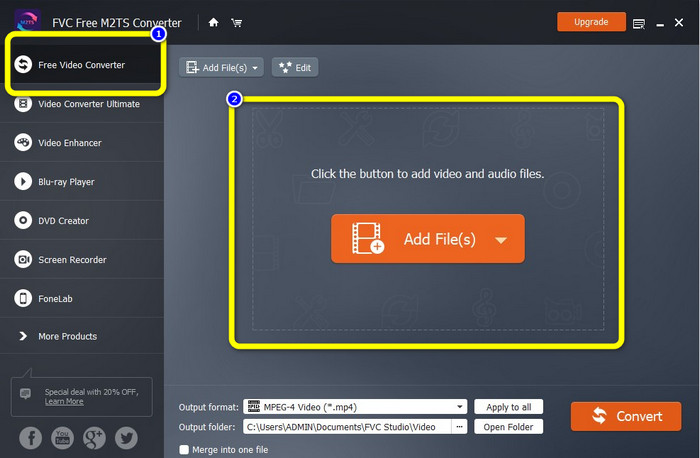
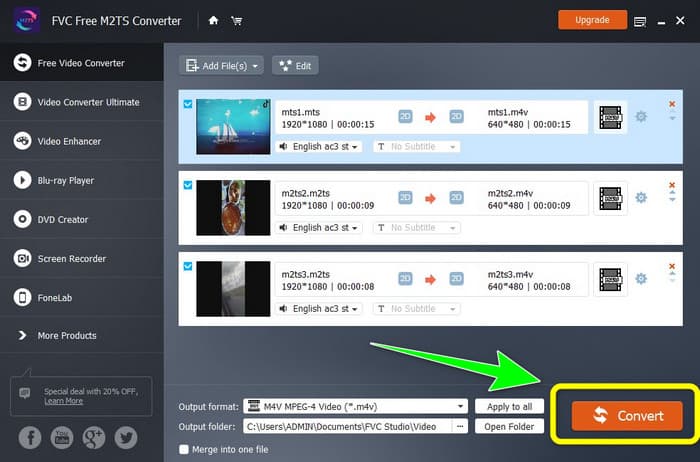
Pasul 2: Selectează opțiunea Free Video Converter din partea stângă a interfeței. Apoi, fă clic pe butonul Add File pentru a atașa fișierul video M2TS pe care vrei să îl convertești.
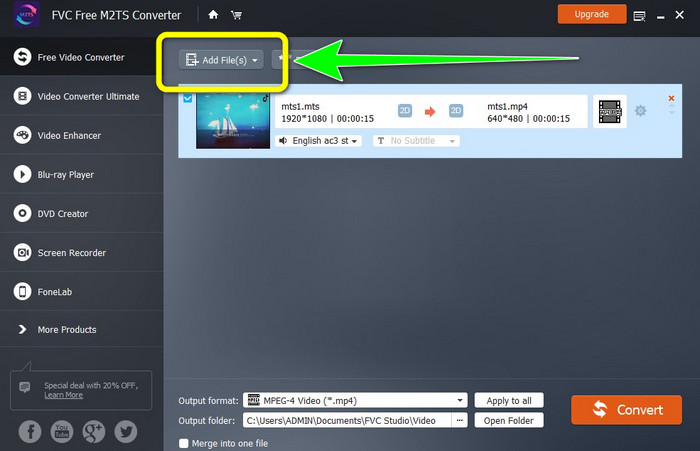
Pasul 3: Dacă vrei să inserezi mai multe fișiere video M2TS, fă clic pe butonul Add Files.
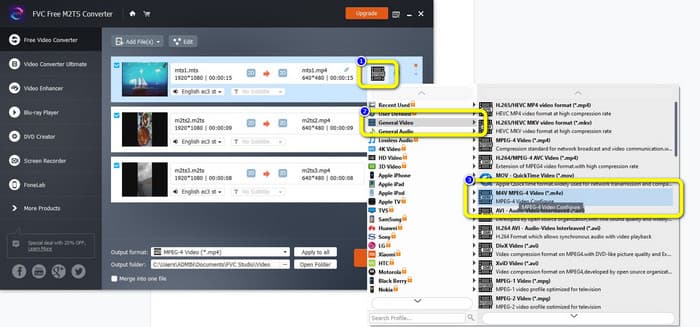
Pasul 3: Mergi la simbolul Video din partea dreaptă a interfeței. Selectează opțiunea General Video și alege formatul de fișier dorit, adică M4V.
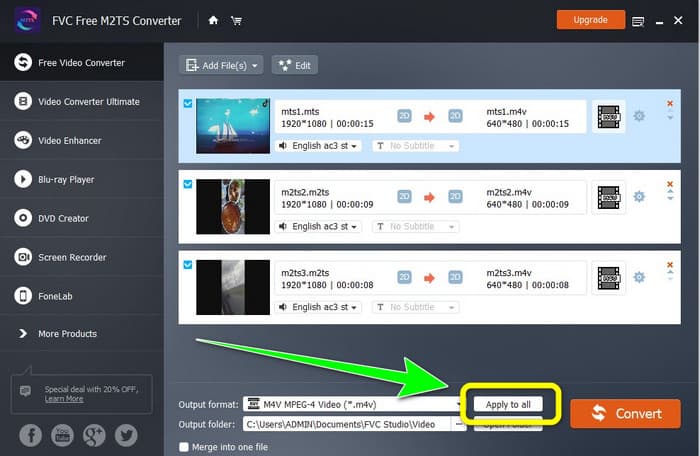
Pasul 4: Poți folosi aceeași procedură pentru a schimba formatul de ieșire al altor fișiere M2TS. Poți, de asemenea, să faci clic pe butonul Apply to all pentru a le schimba instantaneu tuturor formatul de ieșire în M4V.
Pasul 5: După ce ai schimbat toate fișierele M2TS în format de fișier M4V, fă clic pe butonul Convert. Așteaptă procesul de conversie și salvează videoclipurile în locația dorită.
Partea 2: Cea mai bună metodă de a converti M2TS în M4V fără pierderi
Dacă vrei o altă metodă excelentă pentru a transforma mai multe fișiere M2TS într-un singur M4V, poți încerca Video Converter Ultimate. Cu această aplicație descărcabilă, poți converti ușor M2TS în M4V fără pierderi de calitate, deoarece oferă conversie în lot. În plus, are o viteză de conversie de 30 de ori mai mare decât alte convertoare. În acest fel, poți converti mai multe fișiere fără să pierzi timp. Mai mult, Video Converter Ultimate are o interfață intuitivă și oferă pași simpli pentru conversia fișierelor, fiind potrivită pentru toți utilizatorii.
În plus, acest convertor oferă și mai multe funcții grozave. Dacă doriți să combinați mai multe videoclipuri M2TS și să le transformați într-o singură bucată, atunci puteți utiliza această aplicație deoarece are un instrument de fuziune video. În acest fel, puteți îmbina cu ușurință videoclipurile dvs. M2TS. De asemenea, acest instrument vă permite să creați un colaj, în care puteți combina imagini și videoclipuri. De asemenea, puteți utiliza numeroase șabloane și filtre gratuite. Așa că poți face un colaj frumos. Există mai multe funcții de care vă puteți bucura folosind Video Converter Ultimate.
Funcții
◆ Convertiți peste 100 de formate de fișiere video, inclusiv M4V, M2TS, MP4, AVI, FLV, MKV, WMV, VOB, MOV, SWF etc.
◆ Creați un colaj minunat cu filtre și șabloane gratuite.
◆ Oferă Music Video maker.
◆ Oferă Toolbox pentru editare video.
◆ Oferă un proces de conversie în lot cu o viteză de conversie de 30 ori mai mare.
Utilizați pașii detaliați de mai jos pentru a converti mai multe fișiere M2TS simultan folosind FVC Video Converter Ultimate.
Pasul 1: Descarcă Video Converter Ultimate pe computerul tău. Pentru a-l descărca, poți face clic pe butonul Download de mai jos. După aceea, deschide aplicația.
Descărcare gratuită pentru Windows 7 sau o versiune ulterioară Descărcare securizată
Descărcare gratuită pentru MacOS 10.7 sau o versiune ulterioară Descărcare securizată
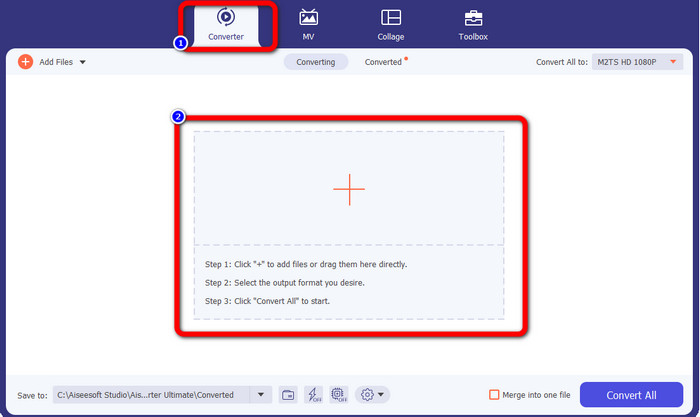
Pasul 2: Selectează panoul Converter și fă clic pe butonul cu semnul Plus pentru a adăuga fișierele tale M2TS.
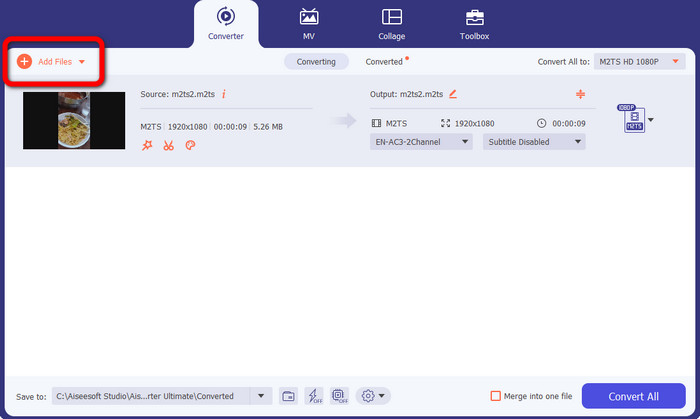
Pasul 3: Fă clic pe butonul Add File din partea stângă a interfeței pentru a insera mai multe fișiere M2TS.
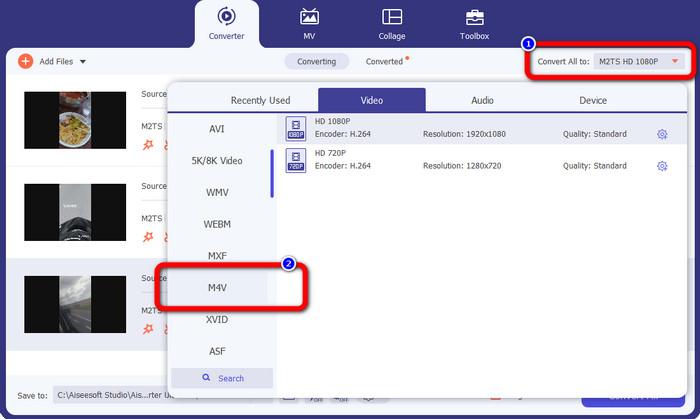
Pasul 4: Pentru a le converti într-un fișier M4V, fă clic pe butonul Convert All to pentru a vedea opțiunile de format. După aceea, selectează formatul de fișier M4V.
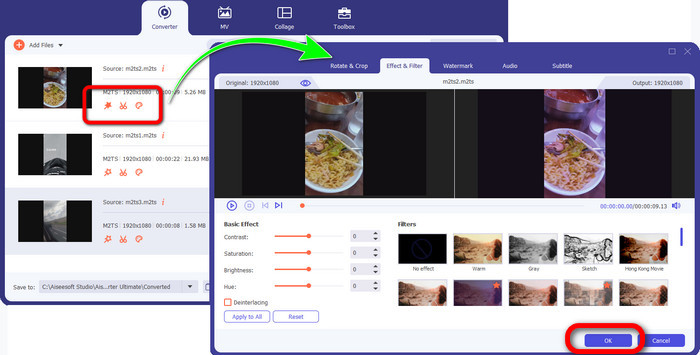
Pasul 4: Pentru a-ți edita videoclipurile, fă clic pe aceste instrumente de editare. Poți îmbunătăți, edita, adăuga filtre și efecte și decupa videoclipurile. După ce îți termini editarea, fă clic pe OK.
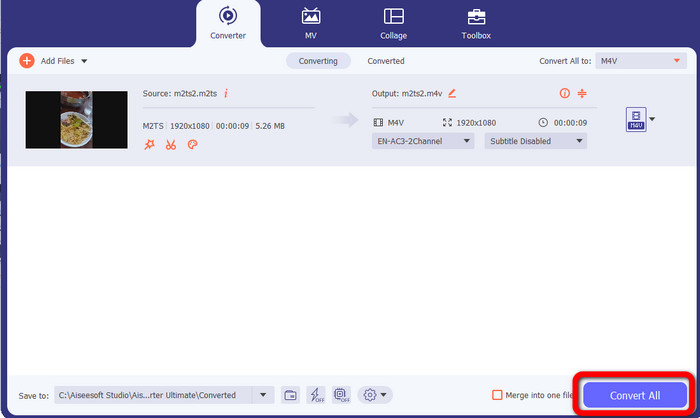
Pasul 5: După ce ți-ai editat videoclipul, îl poți converti făcând clic pe butonul Convert All. Salvează videoclipul după finalizarea procesului de conversie.
Partea 3: Ce este M2TS?
Extensie fișier: .m2ts
Formatul de fișier container Blu-ray Disc Audio-Video (BDAV) MPEG-2 Transport Stream (M2TS) utilizează extensia de nume de fișier M2TS. Este folosit pentru mai multe fluxuri audio, video și alte fluxuri. Containerul pentru fluxul de transport MPEG-2 servește drept fundație. Pe disc Blu-ray și AVCHD, acest tip de container este utilizat frecvent pentru videoclipuri de înaltă calitate. Blu-ray Disc Association a dezvoltat M2TS. Toate programele asociate sunt All Player, VLC Media Player, Pot Player și MPlayer.
Partea 4: Ce este M4V?
Extensie fișier: .m4v
Apple a creat formatul de fișier M4V, un format de container video similar standardului MP4. Diferența principală este că fișierele M4V pot avea protecție împotriva copierii. În iTunes Store, Apple codifică fișiere video folosind formatul M4V. Programele asociate pentru acest format sunt Apple QuickTime Player, Apple iTunes, Media Player Classic, KMPlayer, Real Player, Zoom Player și VLC Media Player.
Lecturi suplimentare:
Cum să convertești M2TS în AVI cu cele mai bune convertoare pentru Web și Desktop
Abordare excepțională pentru a converti M2TS în FLV online și offline
Partea 5: Întrebări frecvente despre conversia M2TS în M4V
Este M2TS mai bun decât MP4?
Deoarece M2TS economisește mai multă memorie și are rezoluție înaltă, necesită mai mult spațiu. MP4 este mai bun decât M2TS pentru economisirea spațiului de stocare.
Cum se utilizează frâna de mână pentru a converti M2TS în M4V?
Descărcați frâna de mână. Apoi accesați sursa deschisă și adăugați fișierul M2TS. Apoi, accesați opțiunea de format și selectați M4V. După aceea, faceți clic pe butonul Start Encode.
MTS este același cu M2TS?
În ceea ce privește funcționalitatea, fișierele MTS și M2TS sunt identice. Ambele fișiere HD sunt conectate la formatul video AVCHD. Este posibil să schimbați o extensie de fișier M2TS cu o extensie de fișier MTS și invers.
Concluzie
Discuția de mai sus te ajută să afli mai multe despre cum să convertești M2TS în M4V. Cele două aplicații descărcabile sunt cele mai bune convertoare pe care le poți folosi pentru a converti fișiere. Ele pot converti mai rapid și fără pierderi de calitate.
-
 Diverse metode despre cum să schimbați formatul fișierului MOV în M4V
 Doriți o metodă eficientă de a converti fișierul MOV în format M4V? Atunci, acest articol îți va îndeplini dorința. Iată cele mai bune convertoare pe care le puteți folosi.
-
 Tehnici excelente pentru a converti instantaneu GIF în M4V
 Acest ghid vă oferă cele mai eficiente strategii pentru a converti GIF în M4V. În plus, vă vom prezenta cele mai bune două convertoare pe care le puteți încerca.
-
 Proces simplu pentru a converti eficient SWF în M4V
 Nu ratați această oportunitate de a învăța metodele simple de conversie SWF în M4V online și de a folosi o aplicație descărcabilă. Citiți această postare pentru a afla!
