


 Video Converter Ultimate
 Screen Recorder
 Reparație video
 Descărcare sigură
Cele mai ușoare modalități de a converti MPG în DivX pe desktop
Vrei să îți convertești rapid fișierul MPG în DivX? În acest caz, există aplicații pe care le poți folosi pentru a converti diferite formate de fișiere. În prezent, după cum observăm, diversele clipuri video au formate de fișier variate. Totuși, există situații în care unele formate nu sunt compatibile cu anumite dispozitive. Prin urmare, ceea ce trebuie să faci este să cauți un convertor capabil să transforme un anumit fișier într‑un alt format. În felul acesta, te poți asigura că videoclipul tău poate fi redat pe dispozitivul tău, deoarece este deja compatibil și optim. Pentru a converti fișierul MPG într‑un fișier DivX, trebuie să citești în continuare acest articol pentru a‑ți face o idee despre ce aplicație sau convertor ai nevoie să folosești.

Partea 1: Convertiți MPG în DivX fără a pierde calitatea
Dacă ești în căutarea unei aplicații excelente și de încredere pentru a converti MPG în DivX, atunci Video Converter Ultimate este aplicația pe care o poți utiliza. Această aplicație îți permite să convertești fișierul MPG în formatul de fișier DivX. Dar stai, nu e tot. Nu se limitează doar la aceste două formate. Poate converti și diverse alte formate de fișiere, precum FLV, MP4, MKV, MOV, VOB, DIVX, OGV, XVID și multe altele. De asemenea, Video Converter Ultimate este disponibil atât pe Mac, cât și pe Windows. În plus, nu trebuie să îți faci griji în privința calității videoclipului, deoarece poți converti fișierele fără pierderi de calitate folosind această aplicație. Mai mult, este o aplicație simplă și ușor de utilizat, perfectă și potrivită pentru începătorii care vor să convertească fișiere. În ceea ce privește procesul de conversie, această aplicație îți poate converti fișierul foarte rapid, astfel încât nu trebuie să aștepți prea mult. Și poți folosi acest software pentru a converti în lot mai multe fișiere. În plus, nu este doar de încredere pentru conversia diferitelor fișiere. Această aplicație are și multe instrumente de editare, cum ar fi amplificator de volum, reversor video, decupare video, corecție de culoare, îmbinare video, eliminare filigran, creator de GIF și multe altele. Dacă vrei să convertești MPG în DivX pe Windows și Mac, urmează pașii simpli de mai jos.
Pasul 1: Accesează site‑ul Video Converter Ultimate și descarcă aplicația. Apoi continuă cu procesul de instalare și lansează aplicația.
Descărcare gratuită pentru Windows 7 sau o versiune ulterioară Descărcare securizată
Descărcare gratuită pentru MacOS 10.7 sau o versiune ulterioară Descărcare securizată
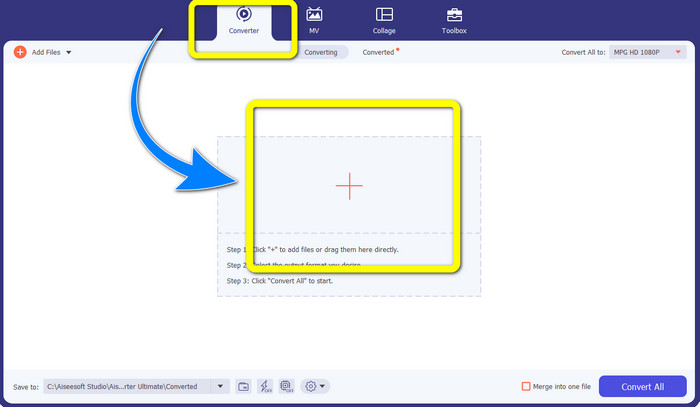
Pasul 2: După ce deschizi Video Converter Ultimate, mergi la secțiunea Converter. Apoi selectează butonul cu semnul Plus și atașează fișierul MPG pe care vrei să îl convertești într‑un fișier DivX.
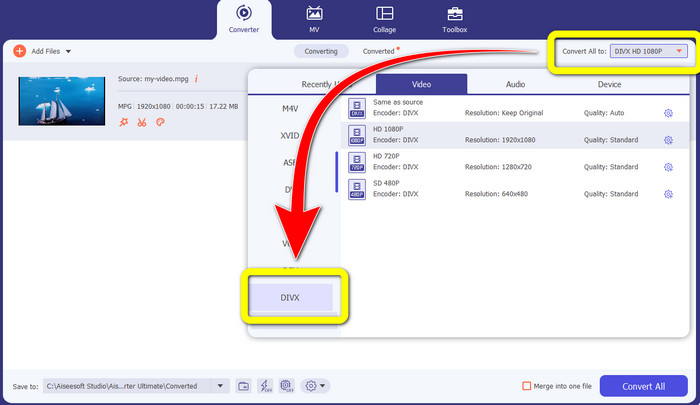
Pasul 3: După ce ai introdus fișierul MPG, mergi la butonul Convert All to și alege fișierul DIVX din opțiunile de format. Poți selecta și calitatea pe care o preferi.
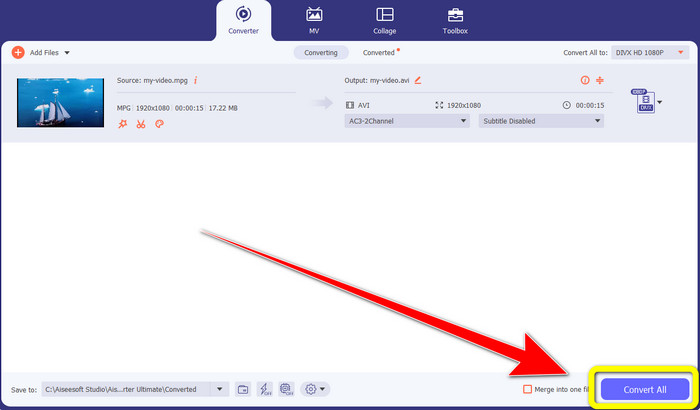
Pasul 4: După ce ai terminat de ales formatul de fișier DIVX, dă clic pe butonul Convert All și salvează videoclipul în format DIVX. Acesta este cel mai simplu mod de a converti fișierul MPG în fișier DIVX pe Mac și Windows.
Partea 2: Convertiți gratuit MPG în DivX online
Folosind Media.io
Dacă ești interesat să cauți convertoare MPG în DIVX gratuite, online, unul dintre instrumentele online pe care le poți folosi este Media.io. Acest software poate converti diverse tipuri de fișiere, precum videoclipuri, fișiere audio, imagini și altele. Suportă diferite formate de fișiere video, cum ar fi MP4, AVI, MKV, WMV, MPEG2, FLV, XVID, M4V etc. Așadar, îl poți folosi și ca convertor MPEG în DivX. În plus, Media.io nu este doar capabil să convertească diferite formate de fișiere. Are și multe instrumente pentru a‑ți edita videoclipurile, precum eliminare filigran, tăiere video, decupare, îmbinare video, schimbare viteză, creare slideshow și altele. Din păcate, această versiune gratuită are limitări. La conversia fișierelor, poți încărca doar până la dimensiunea maximă de 100 Mb, ceea ce nu este convenabil dacă vrei să convertești multe fișiere. Dacă vrei să convertești mai mult și să te bucuri de funcții mai avansate ale aplicației, trebuie să achiziționezi un abonament. De asemenea, are un proces de conversie lent și durează câteva minute pentru a‑ți converti fișierul, ceea ce nu este practic pentru persoanele care vor să convertească multe fișiere. Așadar, dacă vrei să convertești MPG în DIVX online gratuit, urmează pașii simpli de mai jos.
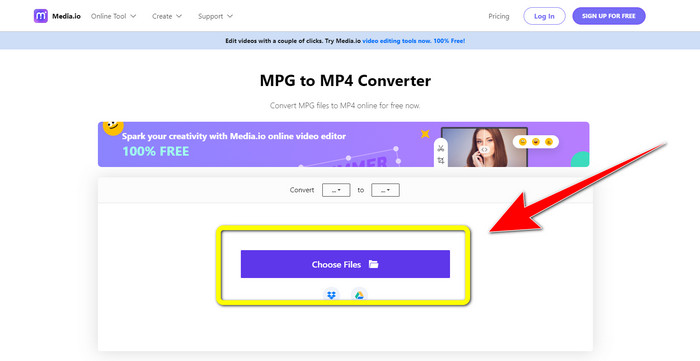
Pasul 1: Accesează site‑ul Media.io. Apoi dă clic pe butonul Choose Files pentru a insera videoclipul tău în format MPG.
Pasul 2: După ce atașezi fișierul MPG, mergi la Convert și caută fișierul DIVX în opțiunile de format și selectează‑l.
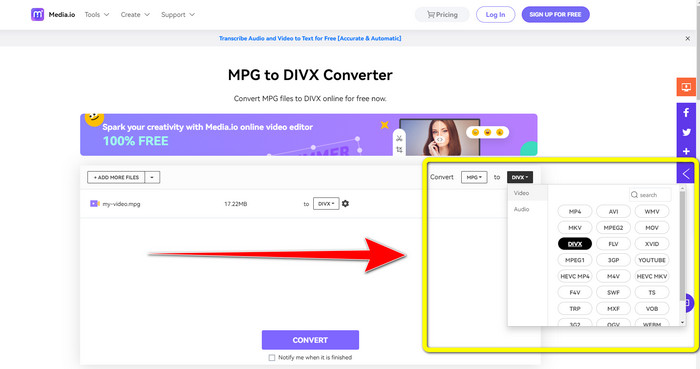
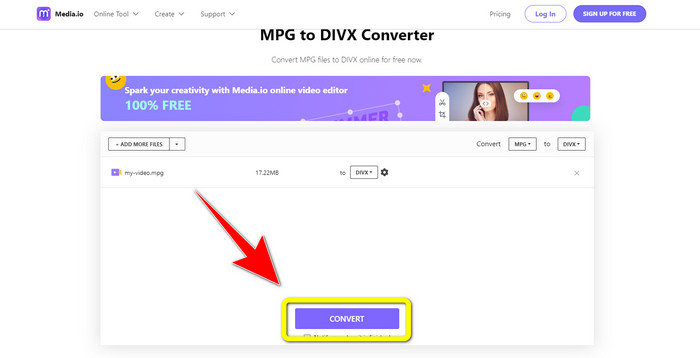
Pasul 3: După ce ai ales fișierul DIVX pentru videoclipul tău, dă clic pe butonul Convert și salvează rezultatul final.
Folosind FileProInfo
O altă aplicație pe care o poți folosi pentru a converti MPG în DIVX online este FileProInfo. Această aplicație online te poate ajuta să convertești videoclipul tău cu fișier MPG într‑un fișier DIVX. De asemenea, acceptă diverse formate de fișiere, cum ar fi 3GP, AAC, M4A, M4R, M4V, AVI, AMR, MP4, VOC, VOB și multe alte formate video. Astfel îl poți folosi pentru a converti 3GP în DivX. În plus, poți converti fișiere gratuit. Este simplu și ușor de utilizat pentru conversie. Mai mult, FileProInfo este un instrument pe care îl poți folosi online, dar poți descărca și aplicația pe computer. În plus, poți face mai multe lucruri în această aplicație, cum ar fi verificare de plagiat, vizualizor de fișiere, îmbinare, împărțire, editare și altele. FileProInfo este potrivit pentru începători, în special pentru conversia diferitelor formate de fișiere. Totuși, acest instrument online este prea complicat în ceea ce privește editarea video. Are unele funcții avansate și greu de urmărit, ceea ce nu este potrivit pentru începători. De asemenea, procesul de conversie a MPG în DivX este foarte consumator de timp. Dacă vrei să convertești online videoclipul tău cu fișier MPG într‑un fișier DIVX, urmează pașii simpli de mai jos.
Pasul 1: Accesează site‑ul FileProInfo. Apoi dă clic pe butonul Select MPG File pentru a atașa videoclipul tău cu fișier MPG.
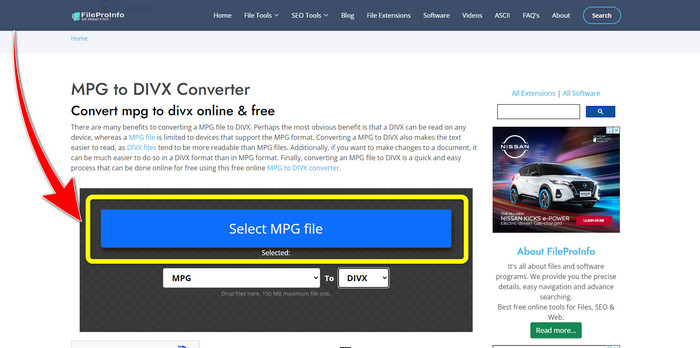
Pasul 2: După ce ai adăugat videoclipul MPG, caută opțiunile de format și dă clic pe fișierul DIVX.
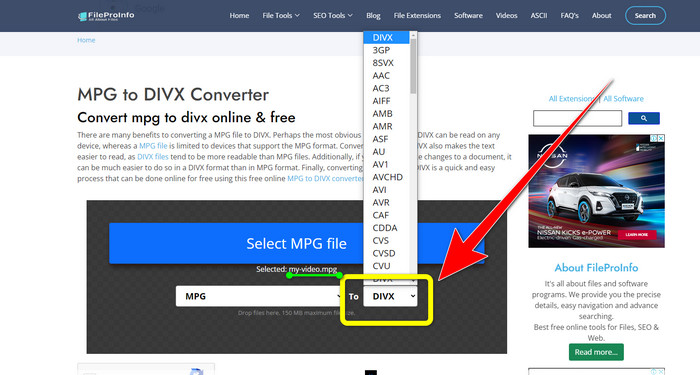
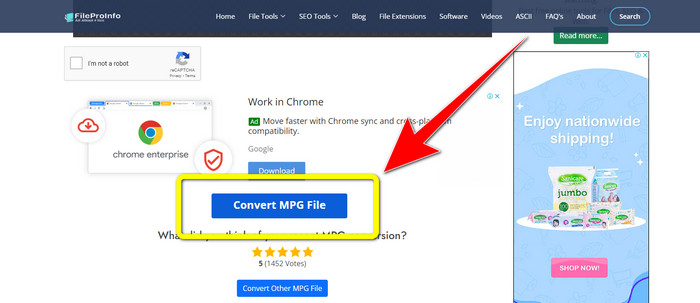
Pasul 3: Când ai dat deja clic pe fișierul DIVX, derulează puțin în jos și apasă butonul Convert MPG File.
Partea 3: Cunoștințe extinse despre MPG și DivX
Ce este MPG?
Fișierul MPG este un format care utilizează un format de fișier digital. De asemenea, a fost standardizat de Moving Pictures Expert Group. În cele din urmă, acest format de fișier a fost folosit în mod obișnuit în filme și distribuit pe internet.
Ce este DIVX?
DIVX este un codec video de înaltă calitate și de înaltă compresie pe care îl puteți utiliza pentru codecul digital. De asemenea, a fost clasificat ca fișier video. De asemenea, este nepotrivit pentru programele Windows. În plus, comprimă un videoclip la o fracțiune din dimensiunea sa originală, cu o mică pierdere de calitate.
Partea 4: Întrebări frecvente despre conversia MPG în DivX
Care este avantajul conversiei unui fișier MPG într-un fișier DIVX?
Unul dintre avantajele conversiei unui fișier MPG într-un fișier DIVX este că formatul DIVX este mai larg acceptat în programe decât fișierul MPG.
Ce browser pot folosi pentru a converti MPG în DIVX?
Nu trebuie să vă faceți probleme, deoarece acum puteți utiliza aproape toate browserele pentru a converti fișiere MPG în DIVX pe Google Chrome, Firefox, Safari, Opera și multe altele.
Există un convertor care are un proces de conversie a vitezei?
Da este! Dacă sunteți în căutarea unei aplicații sau a unui convertor cu un proces de conversie rapidă, puteți utiliza Video Converter Ultimate. Puteți converti fișiere în doar câteva secunde, spre deosebire de celelalte aplicații care necesită prea mult timp pentru a converti.
Concluzii
După cum s‑a arătat mai sus, poți converti cu ușurință MPG în DivX folosind aplicații descărcabile sau instrumente online. Conversia fișierelor în alte formate este necesară, mai ales dacă fișierul nu este potrivit pentru anumite programe sau dispozitive. Dacă vrei să convertești diferite tipuri de fișiere, poți folosi Video Converter Ultimate.
-
 Cum să convertiți GIF în DivX într-un mod simplu și mai ușor
 Doriți să vă convertiți GIF în formatul de fișier Divx? Vă vom arăta un convertor excelent pe care îl puteți utiliza pentru a converti GIF în DivX.
-
 Metode ușor de învățat despre cum să convertiți Xvid în DivX
 Căutați cea mai bună soluție pentru a converti gratuit Xvid în DivX? Acest articol vă va ajuta să vă rezolvați problema. Așa că, citește postarea continuu.
-
 Cum să convertiți M4V în DivX gratuit pe Mac [Best Tools&93;
 Căutați modalități de a converti M4V în DivX gratuit? Am enumerat cele mai bune convertoare pentru a vă converti fișierul M4V în DivX pe Mac.
