


 Video Converter Ultimate
 Screen Recorder
 Reparație video
 Descărcare sigură
Cele mai eficiente metode online și offline pentru a converti MTV în MKV
Există situații în care fișierul tău în format MTV este incompatibil cu dispozitivul sau programul pe care îl folosești. Cea mai bună soluție este să schimbi formatul fișierului video. Din fericire, îți punem la dispoziție cele mai bune metode. Acest articol îți va prezenta mai multe aplicații pe care le poți folosi pentru a converti MTV în MKV instantaneu. Nu sări peste lecturarea acestui articol pentru a descoperi cel mai bun convertor MTV în MKV.

Partea 1: Informații detaliate despre MTV și MKV
Ce este MTV?
MTV înseamnă Music Television. La 1 august 1981, MTV a fost lansat ca un canal american de televiziune prin cablu. Acest format de fișier a fost creat pentru a permite redarea video pe ieftinele playere MP4 portabile produse în China, fără a crește costul acestora prin licențe. Playerul MTV era fabricat în China și putea afișa fișiere video, fișiere text și imagini. În final, funcționează prin afișarea unei serii de cadre de imagine brute, necomprimate, în format rgb565/555, în timp ce redă audio MP3.
Ce este MKV?
MKV este prescurtarea de la Matroska Video. Este un container multimedia, similar formatelor MOV și AVI. Însă acceptă mai multe piste de subtitrare și audio în același fișier. Acest container multimedia Matroska este folosit pentru video. De asemenea, se bazează pe Extensible Binary Meta Language. Diferența dintre formatul MKV și alte formate video este că celelalte formate sunt codecuri, în timp ce MKV este un container.
Partea 2: Cum să convertiți MTV în MKV fără pierderi
Convertirea din MTV în MKV fără pierderi este ușor de realizat cu ajutorul Video Converter Ultimate. Această aplicație poate converti numeroase tipuri de fișiere, precum MOV, MTS, XVID, FLV, AVI, MP4 și multe altele. În ceea ce privește procesul, oferă o viteză de conversie de 30x mai mare, incomparabilă cu alți convertoare. De asemenea, poți converti mai multe fișiere simultan, deoarece oferă conversie în lot. În plus, dacă vrei să îmbunătățești videoclipul și să îl faci mai atrăgător, poți folosi acest instrument. Are multe funcții pe care le poți încerca pentru a edita și îmbunătăți videoclipul, cum ar fi un „video enhancer”, cu ajutorul căruia poți mări rezoluția videoclipului, îndepărta zgomotul, optimiza luminozitatea și contrastul și reduce tremurul imaginii. Cu ajutorul acestor funcții, poți fi sigur că videoclipul tău va fi mai satisfăcător. Mai mult, dacă vrei să adaugi un filigran videoclipului, poți folosi acest instrument, deoarece este capabil să insereze un watermark peste video. Acestea sunt câteva dintre funcțiile acestui program, însă dacă vrei să descoperi și mai multe funcții excelente, trebuie să încerci să folosești Video Converter Ultimate.
Funcții:
◆ Capabil să creeze un colaj.
◆ Oferiți instrumente de editare video, cum ar fi Enhancer, Watermark Remover, Compressor etc.
◆ Vă permite să creați videoclipuri muzicale.
◆ Convertiți numeroase formate de fișiere video.
Pro
- Are un proces de conversie de 30 de ori mai rapid.
- Perfect pentru utilizatorii neprofesioniști.
- Poate converti mai multe formate de fișiere, cum ar fi MP4, MOV, MTV, MKV etc.
- Nu s-a aplicat filigran.
- Accesibil pentru Windows și Mac.
Contra
- Trebuie să achiziționați aplicația pentru a experimenta mai multe funcții grozave.
Urmați aceste ghiduri detaliate pentru a converti instantaneu MTV în MKV.
Pasul 1: Descarcă Video Converter Ultimate pe computerul tău Windows sau Mac făcând clic pe butonul Download de mai jos. Apoi instalează programul pe dispozitiv și deschide aplicația.
Descărcare gratuită pentru Windows 7 sau o versiune ulterioară Descărcare securizată
Descărcare gratuită pentru MacOS 10.7 sau o versiune ulterioară Descărcare securizată
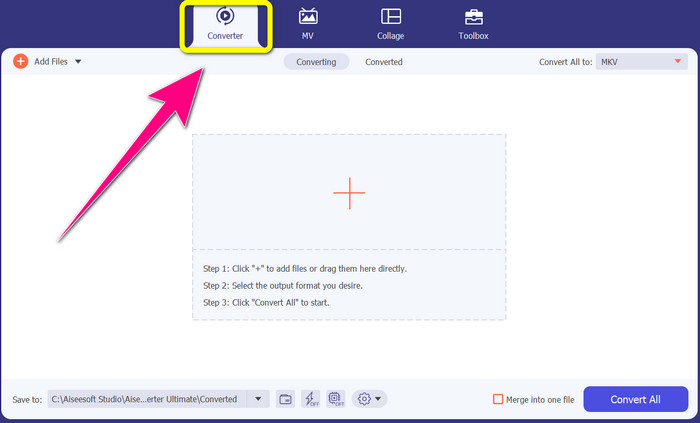
Pasul 2: Vei vedea patru opțiuni în partea de sus a interfeței: Converter, MV, Collage și Toolbox. Selectează panoul Converter.
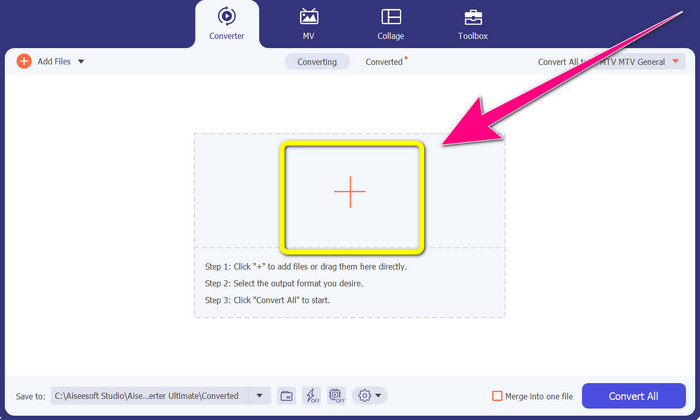
Pasul 3: Apoi, fă clic pe pictograma + pentru a adăuga fișierul video MTV pe care vrei să îl convertești.
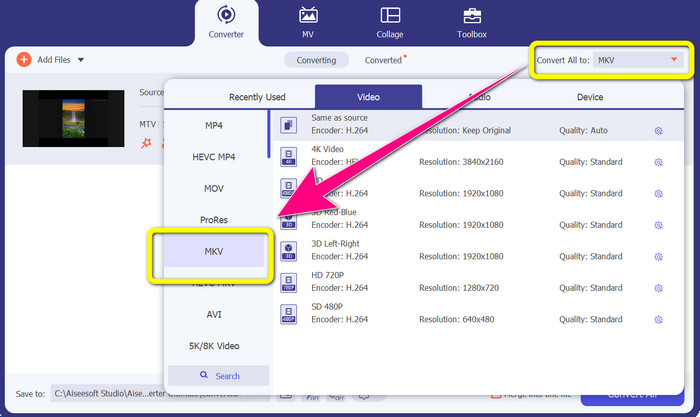
Pasul 4: După ce ai adăugat videoclipul, fă clic pe opțiunea Convert all to. Apoi caută formatul de fișier MKV în lista de formate și selectează-l.
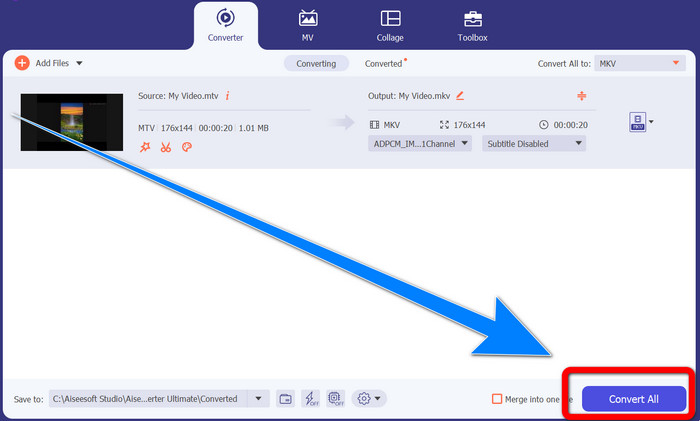
Pasul 5: După ce ai selectat formatul de fișier MKV, poți deja să apeși butonul Convert All pentru a converti și a salva videoclipul final.
Partea 3: Software online pentru a converti MTV în MKV
Folosind Converthelper
Ai învățat cum să convertești MTV în MKV pe Windows și Mac. Acum vei afla procedura de conversie a fișierelor online. Unul dintre convertoarele utile pe care le poți folosi este Converthelper. Acest instrument online este gratuit și îl poți utiliza pentru a converti diverse formate de fișiere, cum ar fi MTV, MKV, DDAT, AVE, PS GFP, WMF etc. În plus, necesită doar câțiva pași pentru conversie, ceea ce îl face potrivit pentru începători. De asemenea, poți converti multe fișiere fără limită folosind Converthelper. Totuși, acest convertor online gratuit este lent în procesul de conversie, fiind nevoie de ceva timp pentru a finaliza transformarea fișierelor. De asemenea, performanța acestui instrument depinde de conexiunea ta la internet. Așadar, pentru a converti fișiere cu Converthelper, trebuie să ai o conexiune bună la internet. Urmează pașii de mai jos pentru a converti MTV în MKV online.
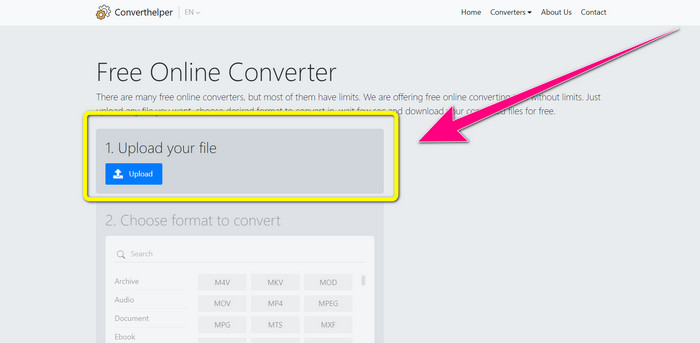
Pasul 1: Accesează site-ul Converthelper în browserul tău. Apoi, apasă butonul de încărcare și adaugă videoclipul în format MTV.
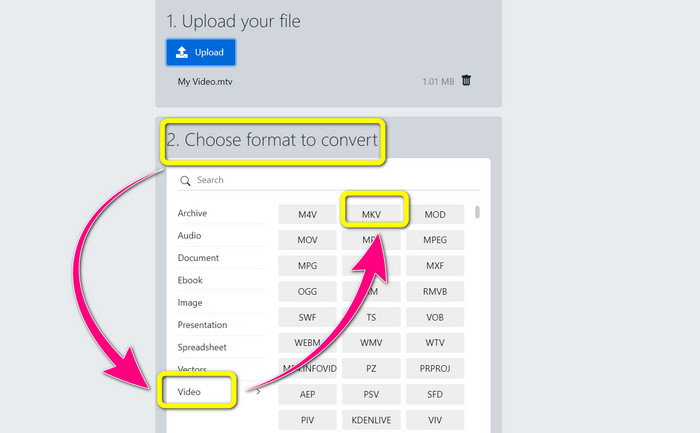
Pasul 2: După ce ai încărcat fișierul, mergi la pasul 2. Alege opțiunile de format. Fă clic pe butonul Video, caută fișierul MKV și selectează-l.
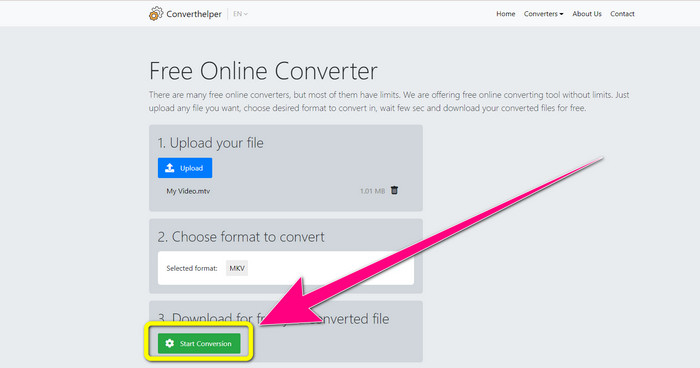
Pasul 3: Pentru ultimul pas, apasă butonul Start Conversion pentru a converti fișierul MTV în format MKV. Așteaptă finalizarea procesului de conversie, apoi descarcă videoclipul final în format MKV.
Utilizarea Online Convert
Un alt instrument online pe care îl puteți folosi pentru a converti MTV în MKV este Online Convert. În afară de formatele MTV și MKV, acceptă mai multe formate, cum ar fi MP4, AVI, GIF, FLAC, FLV, VOB, DIVX, MOV, WMV și multe altele. Nu este de încredere numai în conversia fișierelor video. De asemenea, puteți converti imagini, documente, audio și alte formate. Acest instrument online este bun și pentru utilizatorii noi, deoarece este ușor de utilizat și are doar câțiva pași pentru a converti fișiere diferite. Cu toate acestea, acest instrument online are o limită de dimensiune a fișierului, care este de maximum 3Mb. De asemenea, ca și celelalte instrumente bazate pe web, nu îl puteți utiliza dacă nu aveți o conexiune la internet. Există momente în care acest software nu funcționează bine. Pentru a converti fișierul dvs. MTV în format de fișier MKV, urmați acești pași de mai jos.
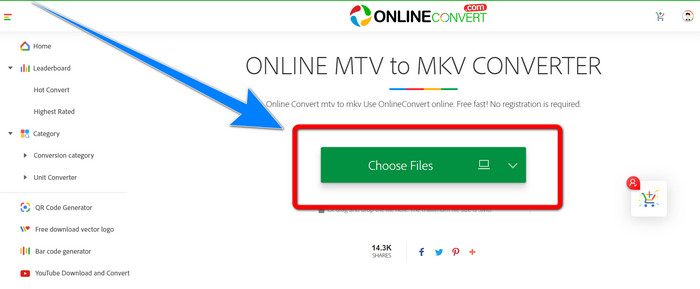
Pasul 1: Mergi pe site-ul Online Convert. Fă clic pe butonul Choose Files pentru a importa videoclipul tău în format MTV.
Pasul 2: După ce încarci videoclipul în format MTV, mergi la opțiunile de format și selectează formatul MKV .
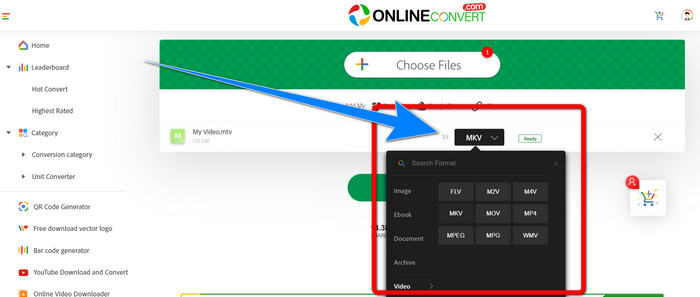
Pasul 3: Pentru ultimul pas, fă clic pe butonul Convert pentru a converti fișierul tău din format MTV. Apoi așteaptă procesul de conversie și salvează videoclipul convertit.
Lecturi suplimentare:
Cele mai bune proceduri despre cum să convertești AMV în MKV gratuit
[Online & Gratuit] Cum pot converti MKV în MP4 pe Windows/Mac
Partea 4: Întrebări frecvente despre conversia MTV în MKV
Formatul MKV este același cu MP4?
Nu, ei nu. MKF are mai multe funcții suplimentare, cum ar fi mai multe subtitrări și piese audio, astfel încât MKV are o dimensiune de fișier mai mare decât formatul MP4. De asemenea, MKV are o rezoluție mai mare decât MP4 deoarece are un codec avansat cu un raport de compresie mai mare.
Pot converti și MKV într-un alt format?
Desigur, da! Poți converti MKV în alte formate folosind programe care acceptă fișiere MKV, precum Video Converter Ultimate. Descarcă aplicația pe Windows sau Mac și bucură-te de conversia fișierelor tale.
Formatul MKV este grozav?
Da, este. Nu are cerințe de licență. Acceptă funcții excelente, cum ar fi mai multe piese și subtitrări și multe altele.
Concluzie
Acestea sunt cele mai bune metode de a converti MTV în MKV folosind convertoare excelente. Dacă vrei să convertești ușor și fără pierderi mai multe fișiere, folosește Video Converter Ultimate.
-
 Convertor gratuit MP4 în MKV - Cum să convertiți MP4 în MKV cu ușurință
 Când doriți să convertiți MP4 în MKV gratuit, puteți afla mai multe despre cele mai eficiente 4 metode pentru a transforma fișierele MP4 într-un videoclip MKV pentru diferite scenarii.
-
 Cum să convertiți MKV în DivX online și offline gratuit
 Căutați cele mai bune modalități de a converti gratuit MKV în format DivX. Continuați să citiți pentru a afla cele mai bune convertoare MKV în DivX online și offline
-
 4 dintre cele mai bune convertoare MKV la 3GP pentru Windows și Mac
 Dacă sunteți în căutarea convertoarelor MKV în 3GP care sunt ușor de utilizat, aveți noroc! Am găsit cele mai bune și gratuite convertoare MKV în 3GP pe care trebuie să le încercați
