


 Video Converter Ultimate
 Screen Recorder
 Reparație video
Aflați cele 3 moduri despre cum să convertiți VOB în AVI online și offline
Fișierele VOB sunt folosite pentru a stoca fluxuri private și utilizează compresie video cu pierderi, cum ar fi MPEG-2. De asemenea, au aproape aceeași structură dacă ar fi să le comparăm pe cele două. Cu toate acestea, fișierele .vob au o limitare și o specificație înainte de a le putea folosi. Și din această cauză nu puteți reda cu ușurință un fișier VOB pe playerul media local. Așa că acum, pentru a economisi timp în căutarea modului de deschidere, vă sugerăm că trebuie să îl convertiți alegând un convertor de mai jos. În acest caz, vă prezentăm cel mai bun convertor cu care putem găsi și să învățăm cum să convertiți VOB în AVI online sau offline cu instrumentele care se află pe listă.
Partea 1. Cum să convertiți online VOB în AVI
Dacă ai un buget redus, îți sugerăm să folosești un instrument gratuit. Căutând pe internet, am descoperit un instrument cunoscut drept cel mai bun convertor online, și anume FVC Free Video Converter. În plus, acest instrument oferă simplitate fiecărui utilizator care l‑a folosit deja, iar toți au fost impresionați de cât de bine funcționează. Așadar, dacă vrei și tu să fii impresionat de cât de bun este acest convertor, încearcă să transformi fișierul VOB în format AVI urmând pașii indicați mai jos.
Pasul 1. Pentru a ajunge imediat pe site‑ul convertorului, dă clic pe acest link.
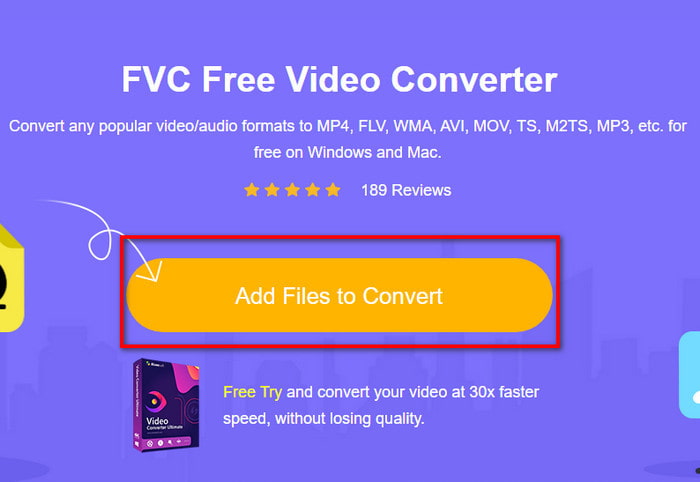
Pasul 2. Pe site, dă clic pe Add Files to Convert pentru a descărca programul de instalare. Nu trebuie să îți faci griji, are doar câțiva KB. Apoi dă din nou clic pe el pentru a lansa instrumentul și localizează fișierul în folder; după ce l‑ai găsit, dă clic pe Open.
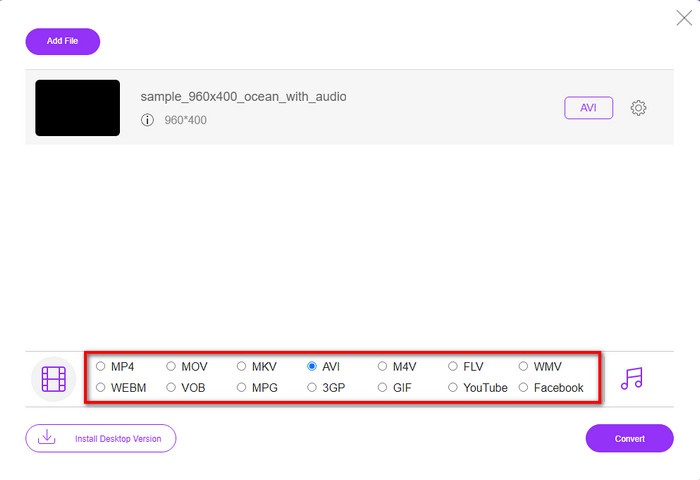
Pasul 3. O nouă interfață a FVC va apărea pe ecran. Din lista de mai jos, alege formatul AVI sau orice alt format în care dorești să fie convertit fișierul.
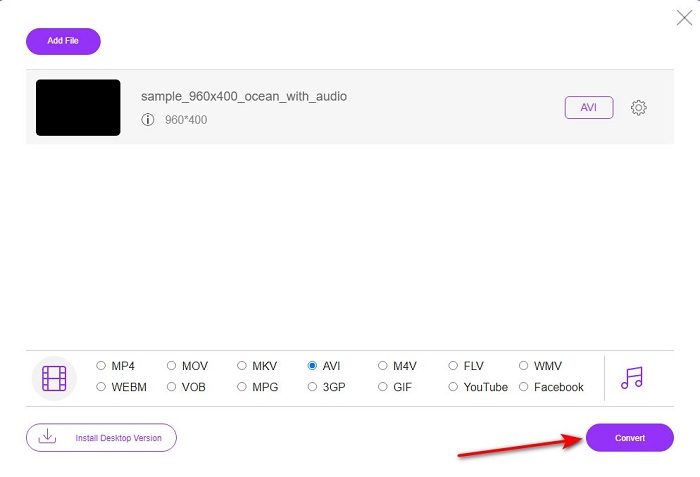
Pasul 4. După ce ai terminat de ales formatul, începe conversia fișierului dând clic pe Convert.
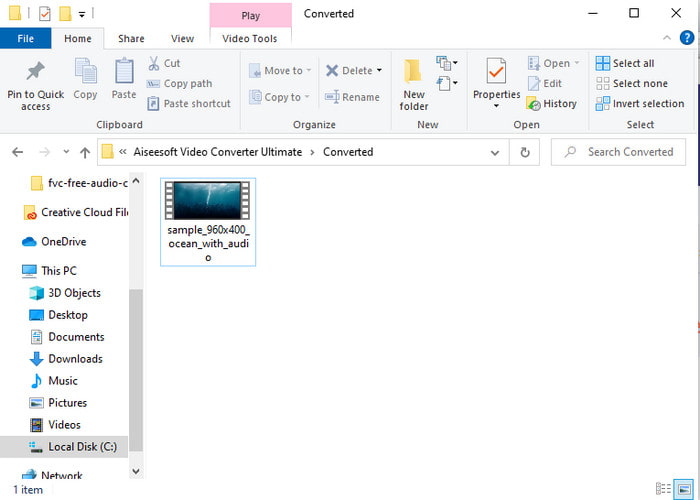
Pasul 5. Acest proces va dura aproximativ mai puțin de un minut; când conversia este finalizată, se va deschide un folder cu fișierul nou convertit.
Partea 2. Cum să convertiți VOB în AVI pe Windows și Mac
Utilizați Fenomenal Converter: FVC Video Converter Ultimate
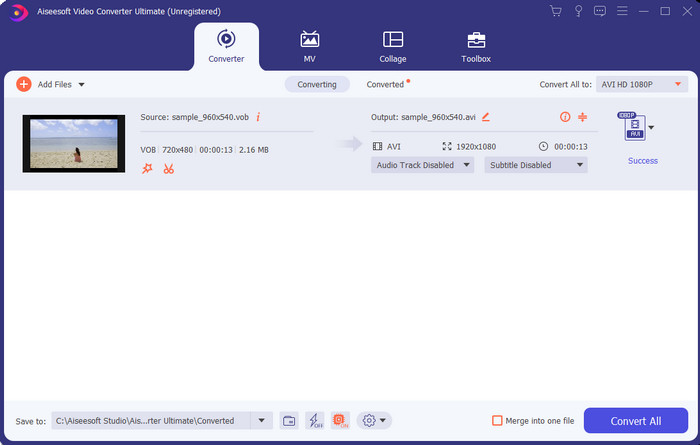
Dacă doriți să descărcați convertizorul VOB în AVI, atunci aceasta trebuie să fie cea mai bună alegere pe care v-ar plăcea să o faceți. FVC Video Converter Ultimate se ridică întotdeauna la înălțimea numelui său ca instrument suprem care rezolvă orice situație finală cu care puteți veni, în special în ceea ce privește conversia. Acest software este mult diferit de cele două instrumente menționate. Poate te gândești de ce și doar pentru că se potrivește perfect oricui, indiferent dacă ești profesionist sau începător. Performanța generală pe care o experimentăm atunci când încercăm acest instrument este deja uimitoare și suntem impresionați cât de rapid se poate face conversia. Și acum, dacă doriți să experimentați conversia fenomenală, despre care vorbim atunci urmați pașii indicați mai jos.
Pasul 1. Înainte de a‑l putea folosi, trebuie mai întâi să îl descarci. Apoi instalează‑l după ce descărcarea este completă, fă configurarea inițială și dă clic pe Start Now.
Descărcare gratuită pentru Windows 7 sau o versiune ulterioară Descărcare securizată
Descărcare gratuită pentru MacOS 10.7 sau o versiune ulterioară Descărcare securizată
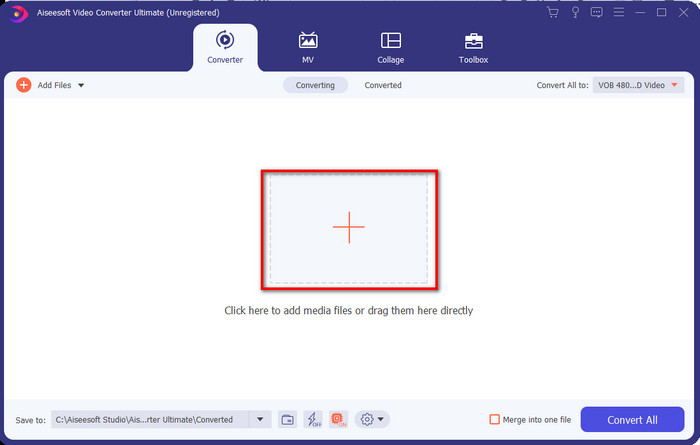
Pasul 2. După ce instalarea este terminată, deschide software‑ul. O interfață ca aceasta va apărea pe ecran. În partea de mijloc a interfeței dă clic pe butonul + și pe ecran va apărea un folder. Dă clic pe Open pentru a continua la pasul următor al procesului.
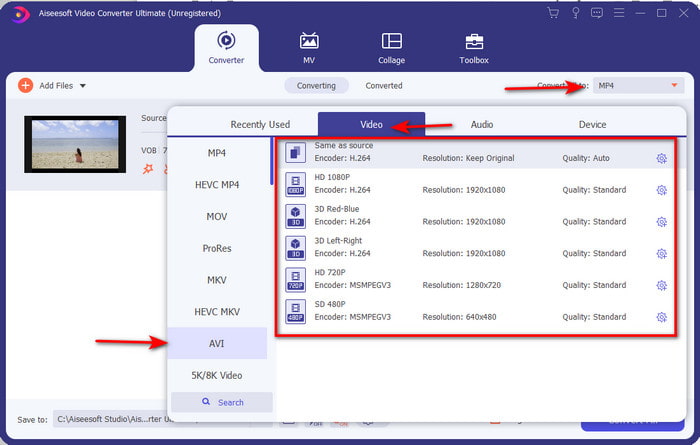
Pasul 3. Dă clic pe butonul Convert All din partea stângă sus a interfeței și alege formatul AVI din lista de formate video.
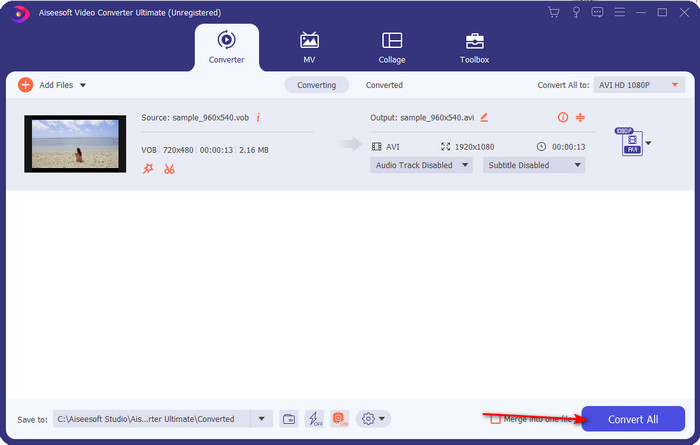
Pasul 4. După ce ai terminat de ales formatul, apasă Convert All pentru a începe conversia.
Pasul 5. Nu trebuie să îți faci griji că vei aștepta prea mult, deoarece conversia se poate finaliza în câteva secunde. Apoi, un folder se va deschide automat pe ecran cu fișierul media convertit pe care l‑ai creat acum puțin timp. Dă clic pe el ca să îl vizionezi și să te bucuri de noua versiune a fișierului tău .vob.
Utilizați instrumentul gratuit: frână de mână
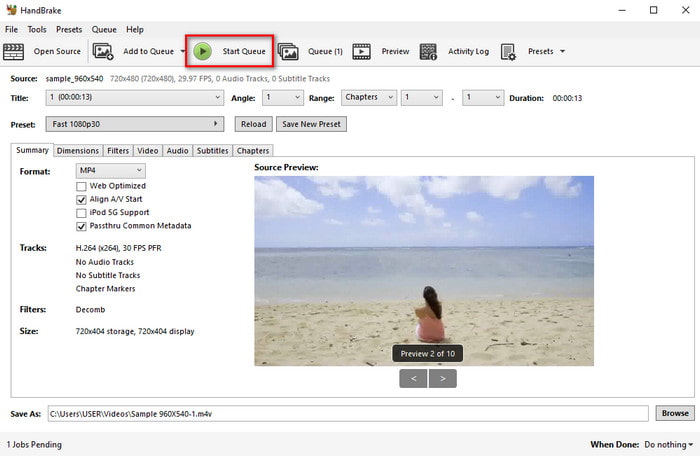
Dacă ești în căutarea unui instrument gratuit, atunci HandBrake îți va fi de ajutor și, la fel ca FVC Video Converter Ultimate, nu are nevoie de conexiune la internet pentru a funcționa. De asemenea, este gratuit de descărcat și de folosit de oricine are un computer acasă, la serviciu sau oriunde altundeva. Totuși, dacă descarci acest instrument, va trebui să descarci separat un fișier numit .NET 5.0 înainte de a‑l putea folosi. Unii utilizatori consideră acest lucru ușor enervant, deoarece după ce descarci programul trebuie să mai descarci încă un fișier. Însă, dacă vrei un proces de conversie eficient și gratuit, încearcă HandBrake pentru conversia VOB în AVI și urmează pașii de mai jos.
Pasul 1. Instalează mai întâi instrumentul pe unitatea computerului tău.
Pasul 2. Dă clic pe File și localizează fișierul .vob în folderul tău.
Pasul 3. Dă clic pe Format și alege din lista disponibilă, apoi dă clic pe Start Queue.
Partea 3. Care este cel mai bun convertizor pentru a fi folosit pentru a converti fișiere VOB în format AVI
| Caracteristici | Convertor video gratuit FVC | FVC Video Converter Ultimate | Frână de mână |
| Format de conversie |  | | |
| Hardware și accelerare a conversiei |  | | |
| Conectivitate la Internet | | | |
| Amplificator video sau editare | | | |
| Program suportat | Instrument bazat pe web | Instrument bazat pe desktop | Instrument bazat pe desktop |
Partea 4. Întrebări frecvente despre VOB și AVI
Care sunt celelalte fișiere pe care VOB le poate conține?
VOB este un format DVD multiplex și, din această cauză, poate conține nu numai videoclipuri și audio, ci și subtitrări, conținut de navigare și meniu.
De ce nu pot reda fișiere VOB pe playerul meu media?
Unul dintre motivele pentru care fișierele VOB nu pot fi redate în playerul tău media este că acest format are un nivel redus de suport în rândul playerelor media. Poți da clic aici pentru a obține playere VOB disponibile. Dacă încă ai această problemă, o soluție fezabilă este să convertești fișierul cu ajutorul convertoarelor prezentate mai sus.
De ce fișierele VOB sunt prea mari?
Singurul motiv pentru care acest format este atât de mare este că conține date diferite pe care ar trebui să le aibă un DVD. De asemenea, nu putem omite posibilitatea lungimii videoclipului. Sau faceți clic aici pentru a afla cum să comprimați fișierele VOB.
Concluzie
Deci, acum, dacă doriți să convertiți fișierul VOB, atunci se poate face cu ușurință cu ajutorul instrumentelor disponibile mai sus. În afară de asta, FVC Video Converter Ultimate este convertorul care se remarcă cu adevărat printre celelalte instrumente online și offline menționate. Pentru că puteți converti cu ușurință VOB în AVI în Windows și chiar și pe Mac. Dacă încă nu aveți idee ce să utilizați, vă sugerăm cu tărie să descărcați instrumentul fenomenal pentru a experimenta o ieșire explicită și a fi uimit.
-
 VOB în MP4 - 3 moduri de a converti fișiere VOB în MP4 gratuit în vrac
 Acest articol introduce 3 convertoare VOB în MP4 gratuite și tutorialele aferente. Puteți converti gratuit fișiere VOB în MP4 gratuit pe Windows / Mac / online cu ușurință.
-
 Cele mai bune modalități de a converti VOB în FLV [gratuit și online inclus]
 Doriți să convertiți un fișier VOB într-un fișier FLV? Puteți finaliza cu ușurință sarcina fie cu desktop, fie cu convertoare online. Citiți acest ghid și aflați cum să transformați VOB în FLV ușor și rapid.
-
 Ce este fișierul VOB și cum să transformați fișierul VOB în GIF gratuit
 Doriți să aflați mai multe despre fișierele VOB și despre cum să le partajați după ce au fost extrase? sau De ce trebuie să convertiți VOB în GIF? Atunci citește cu atenție acest articol.
