


 Video Converter Ultimate
 Screen Recorder
 Reparație video
 Descărcare sigură
4 metode simple de a converti WEBM în DIVX
Convertirea fișierelor video este cea mai bună procedură atunci când un anumit program nu suportă acel format video. În acest articol, vei învăța cele mai simple metode prin care îți poți transforma fișierul WEBM în format DIVX. Poți găsi numeroase convertoare WEBM în DIVX online și offline, însă unele dintre ele nu sunt eficiente și sunt complicate de folosit. Din acest motiv, am testat numeroase aplicații pentru a-ți prezenta cele mai utile și performante convertoare, cu metode ușor de înțeles, pe care le poți descărca pe Mac, Windows sau le poți folosi online. Ești curios să afli aceste metode deosebite? Atunci hai să trecem la treabă și să citești acest articol informativ.

Partea 1: Convertiți WEBM în DIVX offline cu cea mai bună calitate
Convertirea diferitelor fișiere este dificilă, mai ales când nu cunoști procedura și aplicația pe care trebuie să o folosești. Așadar, vrei să convertești fișierul WEBM în DIVX cu o calitate excelentă? Atunci descarcă Video Converter Ultimate pe Windows sau Mac. Această aplicație este ușor de utilizat pentru conversia diverselor fișiere, deoarece are metode de bază și o interfață prietenoasă, motiv pentru care nu îți va complica pașii de urmat. În plus, suportă peste 1000 de formate, inclusiv WEBM, DIVX, ASF, OGV, MTV, GIF, MPEG, DPG, MOV, M4V, MP4, FLV etc. Mai mult, Video Converter Ultimate îți poate îmbunătăți videoclipurile deoarece dispune de instrumente avansate de editare video. Putem face mai multe lucruri cu videoclipul tău WEBM. Pentru a-ți comprima videoclipul, mergi la secțiunea Toolbox și selectează Video Compressor. De asemenea, pentru a adăuga watermark-uri pe videoclipul WEBM, selectează instrumentul Video Watermark.
Funcții
◆ Convertiți multe videoclipuri în peste 1000 de formate de fișiere.
◆ Convertiți fișierele de 30 de ori mai rapid decât alte convertoare.
◆ Oferă creatori de colaje cu filtre și teme gratuite.
◆ Capabil să creeze un videoclip muzical.
◆ Oferă o Casetă de instrumente pentru îmbunătățirea unui videoclip, cum ar fi un compresor video, corecție de culoare, sincronizare audio, îmbunătățitor și multe altele.
Pro
- Are o interfață ușor de utilizat și este potrivit pentru începători.
- Este o aplicație de descărcare gratuită.
- Permite conversia loturilor.
- Capabil să convertească fișiere fără a pierde calitatea.
Contra
- Pentru a utiliza versiunea pro, cumpărați un abonament.
Convertiți WEBM în DIVX utilizând Video Converter Ultimate.
Pasul 1: Instalează Video Converter Ultimate pe computerul tău. Apoi, lansează aplicația.
Descărcare gratuită pentru Windows 7 sau o versiune ulterioară Descărcare securizată
Descărcare gratuită pentru MacOS 10.7 sau o versiune ulterioară Descărcare securizată
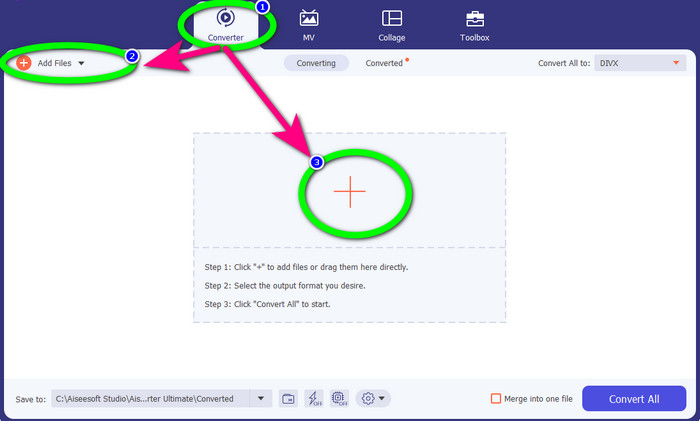
Pasul 2: Când apare interfața, selectează panoul Converter și fă clic pe butonul Add Files sau pe pictograma în formă de Plus pentru a adăuga fișierul WEBM.
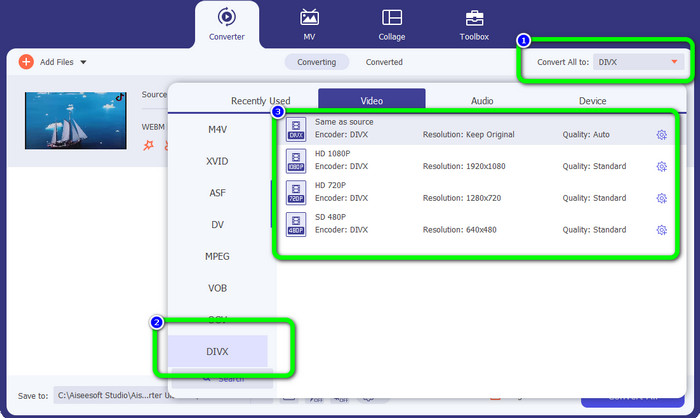
Pasul 3: După ce ai adăugat fișierul WEBM, dă clic pe butonul Convert All to. Selectează formatul dorit, adică formatul de fișier DIVX. Poți alege și calitatea videoclipului, de la 480p până la 1080p.
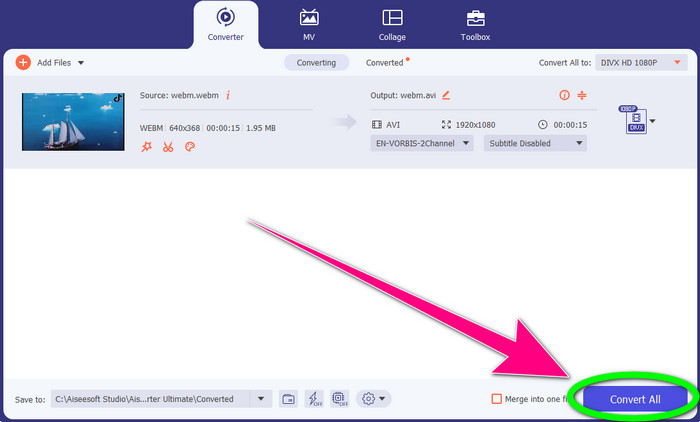
Pasul 4: În final, poți face clic pe butonul Convert All pentru a converti fișierul WEBM în format DIVX.
Partea 2: 3 moduri de a converti WEBM în DIVX online
Folosind WEBM.to
Cauți un convertor WEBM în DIVX online? WEBM.to este instrumentul pe care nu vrei să-l ratezi. Poate converti diferite fișiere direct din browser, precum Google Chrome, Mozilla Firefox, Microsoft Edge etc. Suportă formate de fișiere precum MOV, FLV, M4V, TS, MT2S și altele. La fel ca și convertorul menționat mai sus, WEBM.to este ușor de utilizat deoarece se concentrează doar pe conversia fișierelor. În plus, fișierul tău este în siguranță aici, deoarece va fi șters automat după 24 de ore. Totuși, procesul de conversie este lent. De asemenea, nu funcționează bine dacă nu ai o conexiune stabilă la internet. Hai să convertim fișierul tău WEBM în DIVX folosind acest instrument online.
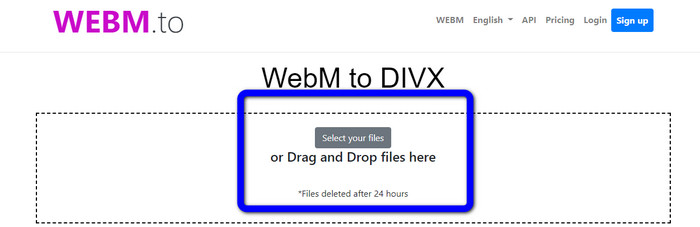
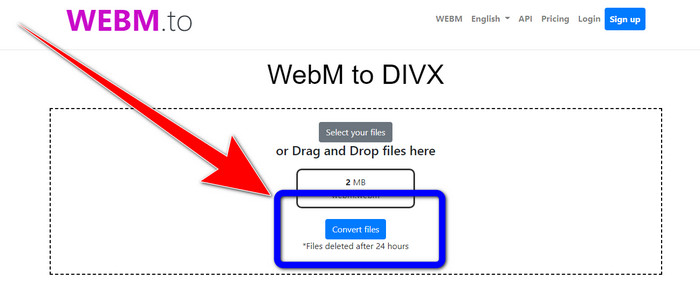
Pasul 1: Accesează site-ul WEBM.to. Fă clic pe butonul Select your files pentru a importa fișierul WEBM. Poți, de asemenea, să tragi fișierul în caseta indicată.
Pasul 2: Fă clic pe butonul Convert Files după ce ai adăugat fișierul WEBM. Așteaptă să se finalizeze procesul de conversie și salvează videoclipul final.
Folosind Evano
Poți folosi și Evano pentru a converti WEBM în DIVX. Acest instrument online este, de asemenea, de încredere. Poate converti diferite formate de fișiere, precum MP4, AVI, DIVX, XVID, 3GP, FLV, VOB, MOV etc. Așadar, poți converti și WEBM în FLV folosind acest instrument. În plus, EVANO nu este doar un convertor, ci și un editor și optimizator audio, astfel încât poți face mai multe lucruri cu acest tool. Totuși, această aplicație are o limită în versiunea gratuită. Poți converti doar fișiere cu dimensiunea maximă de 100 MB. Asta înseamnă că trebuie să achiziționezi un abonament pentru a avea dimensiuni de fișiere nelimitate. De asemenea, ai nevoie de o conexiune rapidă la internet. Fiind o aplicație web, conexiunea la internet este esențială. Urmează pașii de mai jos pentru a converti WEBM în DIVX folosind Evano.
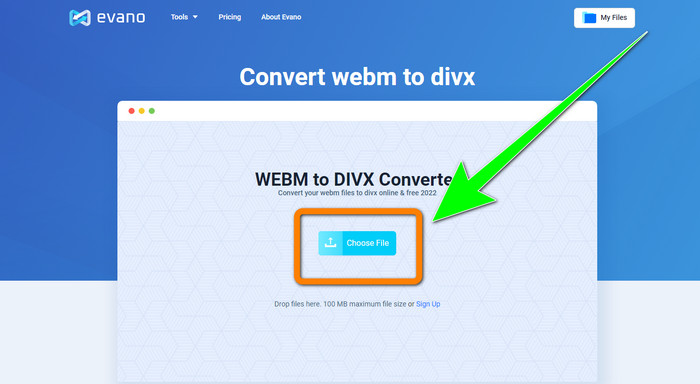
Pasul 1: Accesează site-ul Evano. Apasă butonul Choose File pentru a adăuga fișierul WEBM.
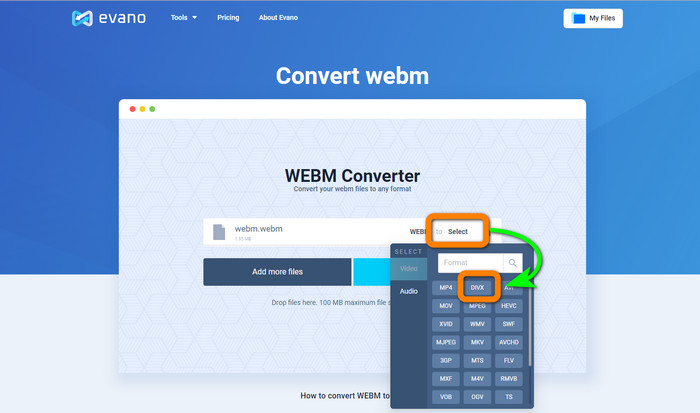
Pasul 2: Fă clic pe butonul Select pentru a trece la opțiunile de format. Apoi selectează formatul de fișier DIVX.
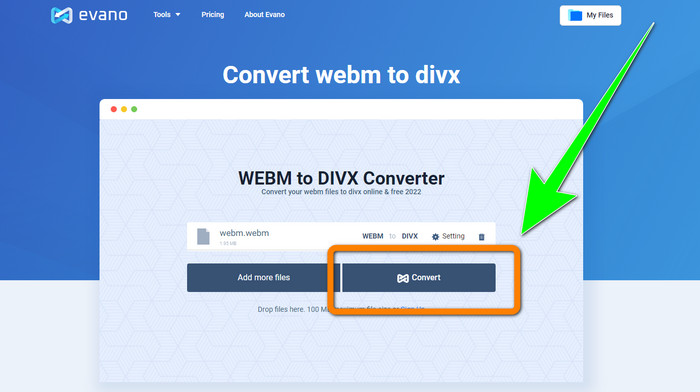
Pasul 3: Pentru pasul final, fă clic pe butonul Convert. Așteaptă cu răbdare procesul de conversie și salvează videoclipul în format DIVX.
Folosind FileProInfo
FileProInfo este unul dintre convertoarele online pe care le poți folosi cu ușurință pentru a converti WEBM în DIVX. Cu ajutorul acestui instrument online, nu trebuie să îți mai faci griji despre cum să îți convertești fișierul în alte formate. Poți folosi acest tool și pentru a converti WEBM în MKV. În plus, are metode simple pentru conversia fișierelor. De asemenea, pe lângă conversie, poți folosi acest instrument pentru verificarea plagiatului, analize complete de site, unelte de ping pentru site-uri și multe altele. Totuși, există momente când FileProInfo nu funcționează. De asemenea, în ceea ce privește procesul de conversie, acesta este destul de lent. La fel ca alte convertoare online, are o dimensiune maximă de fișier de 150 MB. Așadar, să trecem la convertirea fișierului WEBM în DIVX folosind acest instrument online.
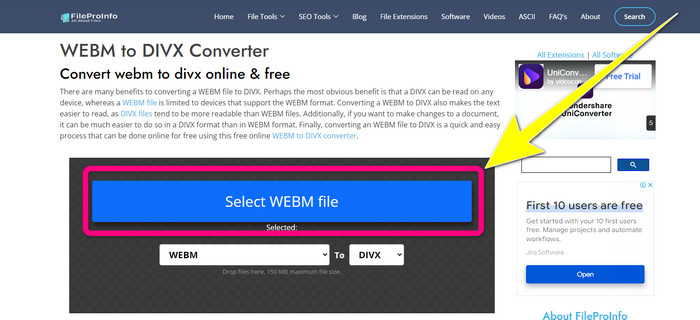
Pasul 1: Mergi pe site-ul FileProInfo. Fă clic pe caseta albastră pentru a introduce fișierul WEBM.
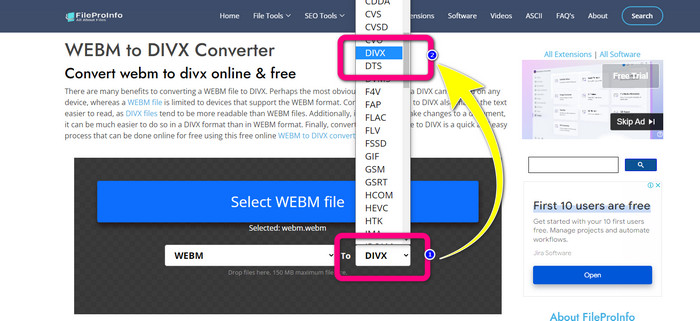
Pasul 2: După ce ai introdus fișierul WEBM, mergi la opțiunile de format și selectează formatul de fișier DIVX.
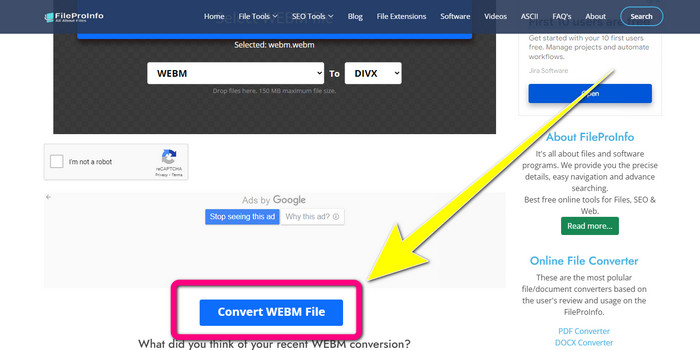
Pasul 3: Derulează în jos și fă clic pe butonul Convert WEBM file.
Partea 3: WEBM vs. DIVX
| WEBM | DIVX | |
| Extensie de fișier video | Un format multimedia open-source, fără drepturi de autor, numit WebM, este utilizat pentru streaming de conținut pe internet. Include fluxuri audio comprimate folosind codecurile Oupus sau Vorbis și fluxuri video comprimate folosind fie VP8, fie VP9. Datorită designului său ușor și capabilităților de distribuție în timp real, a devenit unul dintre cele mai populare formate de fișiere pentru streaming video online. | Un codec video de înaltă calitate, de înaltă compresie, care acceptă rezoluții de până la 1080 HD și comprimă videoclipurile la o fracțiune din dimensiunea lor standard, fără a sacrifica o mare parte din calitatea lor. |
| Dezvoltat de | Google Inc. | DIVX Network Inc. |
| Pro | Fără loialitate și sursă deschisă, acceptă majoritatea codecurilor. | Dimensiune mică, folosit gratuit |
| Contra | Lipsa elementelor interactive | |
| Programe asociate | VLC Media Player, Mozilla Firefox, Google Chrome, Windows Media Player | XBox 360, stereo auto, playere DVD, playere Blu-ray |
Partea 4: Întrebări frecvente despre conversia WEBM în DIVX
1. Care sunt avantajele conversiei WEBM în DIVX?
Formatul de fișier DIVX este mai ușor de citit și mai acceptat decât fișierul WEBM. De asemenea, conversia în fișiere DIVX poate ajuta la securitate.
2. Care este mai bine, WEBM sau MP4?
În ceea ce privește dimensiunea fișierului video, WEBM este mai mic decât MP4. Dar, în ceea ce privește calitatea și compatibilitatea, MP4 este mai bun.
3. Are WEBM un sunet?
Da, desigur. Proiectul WebM cu sursă deschisă promovează WebM, un format de fișier container multimedia digital care poate conține atât audio, cât și video. WEBM este doar un format de container. Un subset al formatului de container multimedia Matroska este conținut în acesta.
Concluzie
Acestea sunt cele mai bune aplicații pe care le poți folosi pentru a converti WEBM în DIVX prin metode eficiente. Așadar, ce mai aștepți? Descarcă și folosește Video Converter Ultimate chiar acum. Îți poate converti fișierele mai rapid și mai ușor.
-
 Metode ușor de învățat despre cum să convertiți Xvid în DivX
 Căutați cea mai bună soluție pentru a converti gratuit Xvid în DivX? Acest articol vă va ajuta să vă rezolvați problema. Așa că, citește postarea continuu.
-
 Cum să convertiți MPG în DivX fără a avea pierderi de calitate
 Căutați o aplicație fără probleme pe care să o puteți utiliza pentru a converti MPG în DivX? Acest articol vă va oferi diferite metode eficiente pe care trebuie să le încercați.
-
 Cum să convertiți DIVX în 3GP pe Windows, Mac și online
 Cum se convertesc DIVX în 3GP? Dacă cauți un răspuns, citește acest articol. Vă vom arăta proceduri grozave cu ajutorul diferitelor convertoare.
