


 Video Converter Ultimate
 Screen Recorder
 Reparație video
 Descărcare sigură
Modalități remarcabile de a tăia un videoclip pe Snapchat [inclusiv modul offline]
Aplicația Snapchat este o altă aplicație care a câștigat popularitate recent. Principalul scop al Snapchat era schimbul de fotografii private și personalizate. Însă acum o poți folosi pentru diverse sarcini, cum ar fi trimiterea de filmulețe și participarea la conferințe video live. Pe de altă parte, poți folosi această aplicație și pentru a-ți tăia videoclipurile. După cum știm cu toții, Snapchat acceptă videoclipuri de maximum 60 de secunde. Decuparea videoclipului este cea mai bună soluție dacă intenționezi să încarci sau să postezi un videoclip pe această aplicație mobilă. În acest caz, citește acest articol pentru a vedea metodele detaliate pe care le poți încerca despre cum să tai un videoclip pe Snapchat și să decupezi videoclipuri pentru Snapchat.

Partea 1. Cum să tăiați un videoclip pentru Snapchat folosind computerul
Snapchat are o limită atunci când postezi un videoclip. Una dintre cele mai bune soluții la acest tip de problemă este să scurtezi un videoclip. În acest fel, când tai sau decupezi un videoclip, îl poți deja adăuga pe Snapchat. Dacă vrei cel mai bun software de editare video pentru a tăia un videoclip lung pentru Snapchat, folosește Video Converter Ultimate. Acest program are o funcție excelentă de împărțire, pentru a-ți diviza videoclipul în mai multe părți. De asemenea, procedura de împărțire a videoclipurilor este perfectă pentru utilizatorii neprofesioniști. Poți împărți videoclipurile în doar câteva clicuri. Interfața este, de asemenea, prietenoasă, astfel încât poți înțelege ușor fiecare opțiune. Mai mult, are și alte funcții foarte bune, pe lângă împărțirea videoclipurilor. Video Converter Ultimate îți permite să decupezi, să rotești și să îmbunătățești videoclipurile în funcție de preferințe. De asemenea, acceptă diverse formate video, inclusiv MP4, MOV, MKV, AVI și altele. În plus, atât utilizatorii Windows, cât și cei Mac pot accesa programul, deoarece este disponibil atât pentru computerele Mac, cât și pentru Windows.
Pasul 1. Apasă butonul Download de mai jos pentru a descărca Video Converter Ultimate. Deoarece programul este disponibil pentru computere Mac și Windows, există două butoane mai jos. Apasă butonul corespunzător dispozitivului pe care îl folosești. După aceea, lansează programul.
Descărcare gratuită pentru Windows 7 sau o versiune ulterioară Descărcare securizată
Descărcare gratuită pentru MacOS 10.7 sau o versiune ulterioară Descărcare securizată
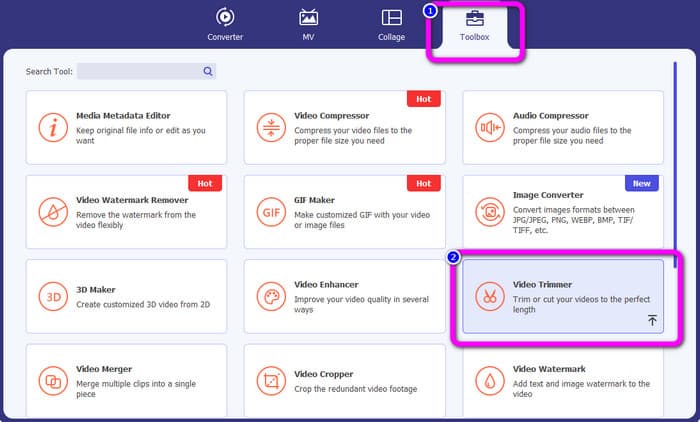
Pasul 2. Apasă pe panoul Toolbox din partea superioară a interfeței. Când apar instrumentele sub Toolbox, selectează instrumentul Video Trimmer.
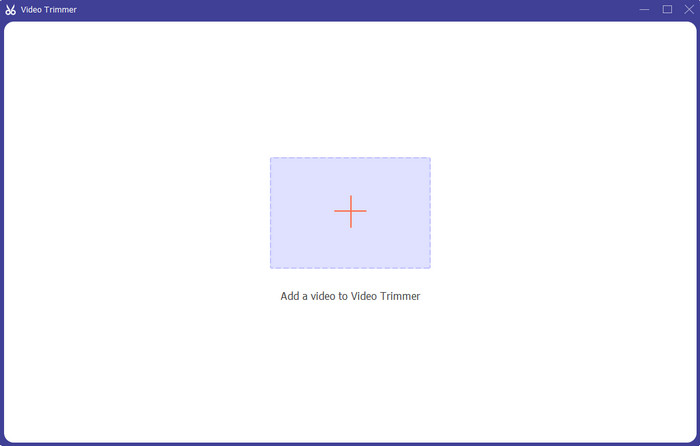
Pasul 3. Apasă simbolul Plus din partea centrală a interfeței. Apoi selectează din folderul de fișiere videoclipul pe care vrei să‑l tai.
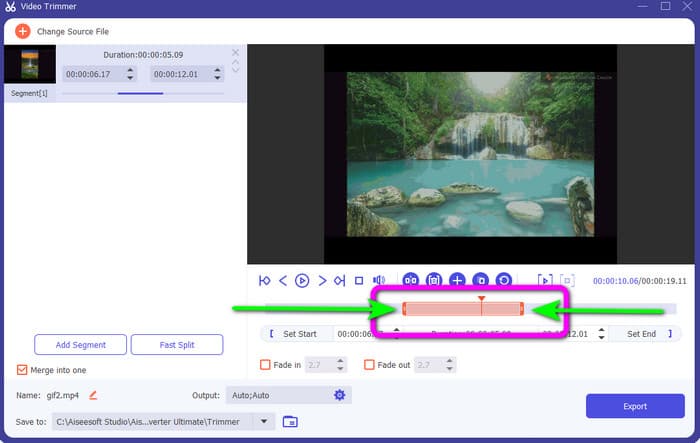
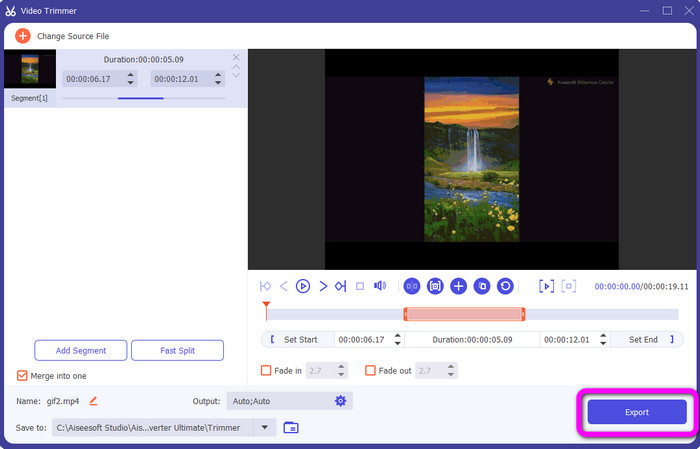
Pasul 4. Poți tăia videoclipul ajustând bara portocalie pe care o vezi în partea de jos a videoclipului. Această bară are câte un capăt în ambele părți. Ajustează capătul barei pentru a decupa porțiunea de videoclip pe care vrei să o editezi.
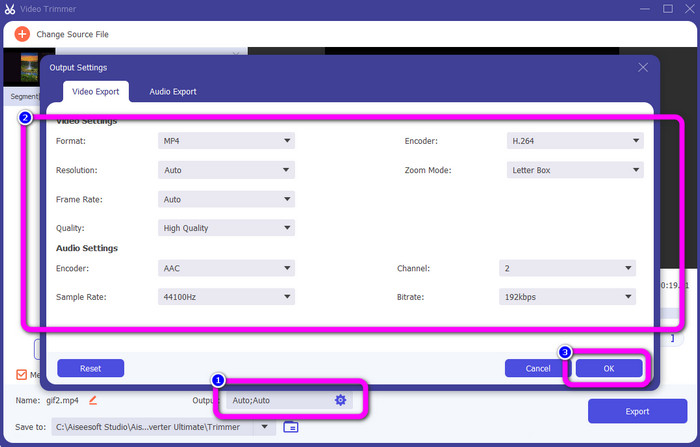
Pasul 5. Dând clic pe opțiunea Output Settings, poți modifica rata de cadre, calitatea, rezoluția și modul de zoom al videoclipului pentru ajustări suplimentare. De asemenea, poți schimba rata de eșantionare și bitrate‑ul audio. Apoi apasă pe OK.
Pasul 6. Pentru ultimul pas, apasă butonul Export. Așteaptă procesarea finală, iar după câteva secunde poți salva videoclipul final, editat, pe computer.
Partea 2. Cum să tăiați un videoclip pe Snapchat
În această parte, veți învăța cum să tăiați un videoclip pe Snapchat. Această aplicație mobilă este excelentă pentru a face fotografii și videoclipuri. Vă oferă multe efecte pentru a le îmbunătăți și a satisface utilizatorii. De asemenea, este considerată o platformă de comunicare pentru alte persoane. Mai mult, Snapchat nu este capabil doar de astfel de lucruri. Aplicația mobilă vă permite, de asemenea, să tăiați sau să decupați un videoclip cu ușurință. În afară de asta, Snapchat vă permite să vă editați videoclipul schimbând filtrele, adăugând efecte, decupând și multe altele. Cu toate acestea, ca și alte aplicații, Snapchat se concentrează pe captarea de fotografii și videoclipuri. Deci, nu puteți folosi instrumente avansate de editare din aplicație. De asemenea, acceptă doar videoclipuri scurte, ceea ce este nesatisfăcător pentru utilizatorii care doresc să încarce videoclipuri lungi. Consultați procedurile de mai jos despre cum să scurtați un videoclip pe Snapchat.
Tăiați un videoclip după înregistrare
Pasul 1. Descarcă Snapchat din App Store sau Google Play Store. După instalarea aplicației mobile, deschide‑o pe telefon.
Pasul 2. Apoi, înregistrează un videoclip folosind Snapchat. Când termini înregistrarea, va apărea un mini‑clip în partea de jos a ecranului. Apasă pe acesta pentru a începe procesul de decupare.
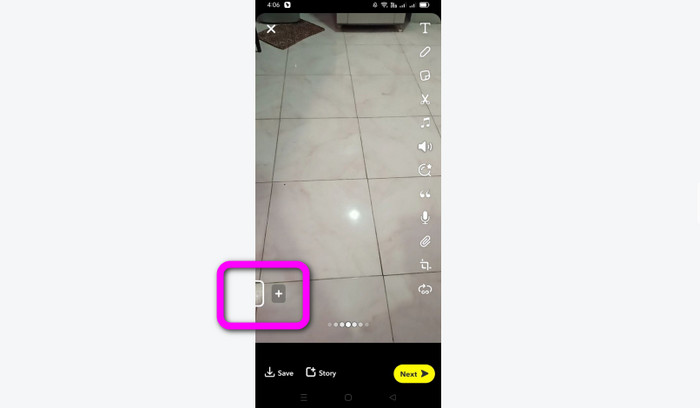
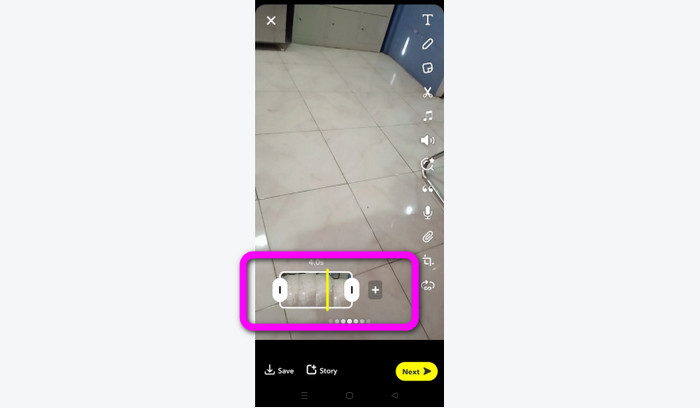
Pasul 3. Poți continua procesul când clipul apare pe ecran. Trage marginile clipului și decupează videoclipul în funcție de preferințele tale.
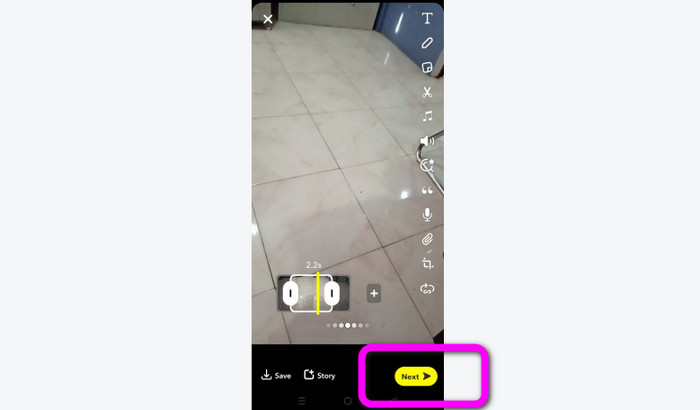
Pasul 4. Apoi, când ești mulțumit de rezultatul final, apasă butonul Next din colțul din stânga jos al interfeței. În acest fel, poți salva videoclipul tăiat.
Decupați un videoclip din amintiri
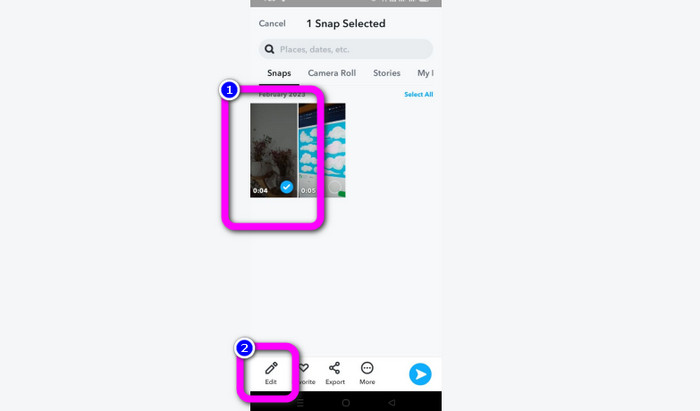
Pasul 1. Deschide aplicația Snapchat de pe telefon. Apoi mergi la secțiunea Memories. Acolo poți vedea videoclipurile tale. Ține apăsat pe videoclip câteva secunde și apasă pe opțiunea Edit.
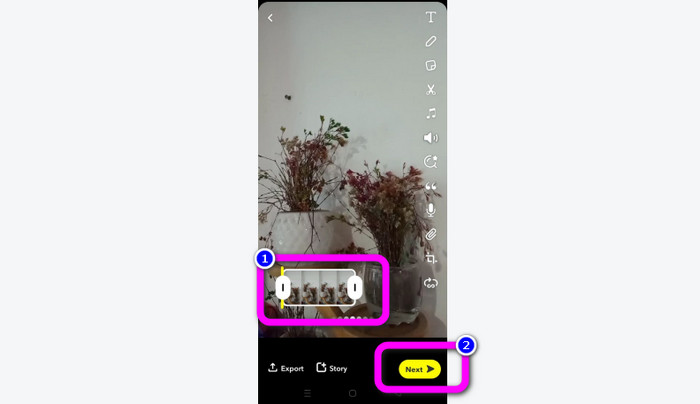
Pasul 2. Apoi vei vedea videoclipul în partea de jos a ecranului. Acest videoclip îți permite să ajustezi marginile pentru a începe decuparea. După ce ai terminat decuparea, apasă butonul Next pentru a salva videoclipul final.
11 trimmere video remarcabile de utilizat [gratuite și cu plată]
Moduri excelente de a tăia un videoclip online, în mod convenabil
Partea 3. Întrebări frecvente despre cum să tăiați un videoclip pe Snapchat
1. Ce înseamnă să tăiați un videoclip pe Snapchat?
A tăia un videoclip înseamnă a face o tăietură care stabilește o secțiune specificată ca început și o secțiune specifică ca sfârșit al videoclipului. Această opțiune vă permite să alegeți pozițiile de început și de sfârșit ale unui videoclip pe Snapchat. Această opțiune este ideală dacă doriți să încărcați porțiuni dintr-un videoclip care a durat inițial mai mult de 10 secunde.
2. Puteți folosi funcția de împărțire pe Snapchat?
Nu ați putea folosi această funcție dacă ați încărcat un videoclip din camera foto. Dacă ați folosit camera Snapchat pentru a captura, puteți. Puteți folosi instrumentul Split pentru a separa filmul în bucăți editabile și pentru a elimina orice porțiuni pe care nu doriți să le păstrați.
3. Care este dimensiunea maximă a videoclipului pentru un singur videoclip snapchat?
Dacă transmiteți fotografii sau videoclipuri de pe camera foto către Snapchat, puteți trimite doar un videoclip de până la 2,5 MB. Fișierele dumneavoastră sunt comprimate înainte de a fi livrate.
Concluzie
Dacă folosești Snapchat pentru a tăia un videoclip, acest articol este pentru tine. Acest articol ți‑a oferit cea mai bună metodă despre cum să tai un videoclip pe Snapchat. De asemenea, dacă preferi să‑ți decupezi videoclipul pentru Snapchat pe computer, există un program pe care îl poți folosi. Video Converter Ultimate este un program excelent pentru decuparea videoclipurilor pe computer. Are o interfață intuitivă și este absolut gratuit.
-
 6 Filtre Snapchat animate Snapchat alese preferate pe Snapchat
 Vrei să știi cele mai bune modalități de a adăuga filtre la videoclipurile Snapchat? Ei bine, poți să dai clic pe aceasta și să înveți diferitele filtre pe care le poți folosi pentru a aplica videoclipuri Snapchat.
-
 Cum să încetinești un videoclip pe Snapchat cu ușurință pe orice dispozitiv
 Cel mai bun mod de a încetini un videoclip pe Snapchat este deja aici. Pentru a ști care sunt aceste tehnici pentru a încetini un videoclip, urmați-l cu atenție.
-
 Cele mai ușoare modalități de a elimina textul Snapchat din captură de ecran
 Să eliminăm textul Snapchat din fotografii și videoclipuri folosind instrumente de încredere online și offline. Vă vom oferi modalități simple. Încearcă-l acum și hai să încercăm!
